
Vue / 系统课时
基础架构与公共能力
基础架构与公共能力
领域边界确定后,下一步不是马上堆页面,而是先把所有页面都会依赖的基础能力固定下来。本节用 Vue Router、Pinia、统一请求层、应用布局和反馈通道组成最小骨架,让后续业务模块只关注自己的领域逻辑。
学习目标
- 设计不会反向依赖业务模块的基础目录和依赖方向
- 完成路由、Pinia、请求层与应用布局的最小接入
- 建立统一的加载与错误反馈机制,并验证基础骨架是否生效
固定基础层的依赖方向
公共能力应该位于业务模块下方:页面依赖路由、Store、请求和反馈服务,而这些基础模块不能再导入某个具体业务页面。这样用户、角色或订单模块被替换时,应用骨架不需要跟着重写。
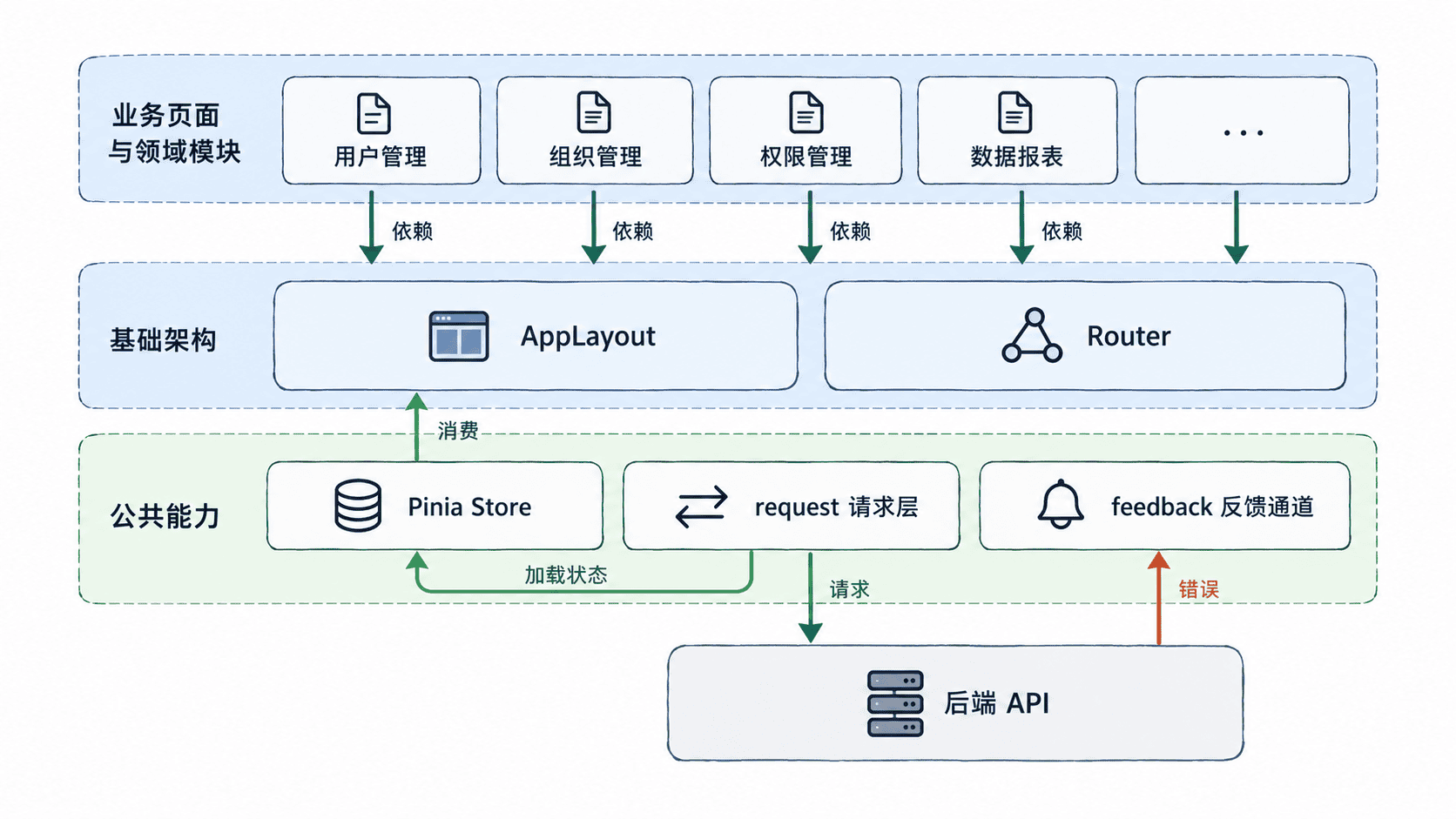
目录不需要一开始就分得很深,但职责必须稳定。推荐把 router、stores、layouts、shared 放在应用级,把 modules 留给用户、角色、菜单和具体业务领域。跨模块复用的内容进入 shared,只有某个领域使用的类型、Store、API 和页面则留在自己的模块。
接入路由与全局 Store
下面代码是片段示例,依赖已经创建好的 Vue 3 + TypeScript 项目,并安装 vue-router 与 pinia。按注释中的路径分别保存后,入口只负责注册基础设施,路由只负责页面装配,Store 只保存跨页面的应用状态。
// src/main.ts
import { createApp } from 'vue'
import { createPinia } from 'pinia'
import App from './App.vue'
import router from './router'

const app = createApp(App)
app.use(createPinia())
app.use(router)
app.mount('#app')

// src/stores/app.ts
import { defineStore } from 'pinia'

export const useAppStore = defineStore('app', {
  state: () => ({ pendingRequests: 0 }),
  getters: {
    isLoading: state => state.pendingRequests > 0,
  },
  actions: {
    beginRequest() {
      this.pendingRequests += 1
    },
    endRequest() {
      this.pendingRequests = Math.max(0, this.pendingRequests - 1)
    },
  },
})

// src/router/index.ts
import { createRouter, createWebHistory } from 'vue-router'
import AppLayout from '../layouts/AppLayout.vue'

export default createRouter({
  history: createWebHistory(),
  routes: [
    {
      path: '/',
      component: AppLayout,
      children: [
        {
          path: 'users',
          component: () => import('../modules/user/pages/UserListPage.vue'),
        },
      ],
    },
  ],
})
这组代码生效后,Pinia 负责共享应用状态,Router 只描述页面入口,AppLayout 承载导航、全局反馈与路由出口。业务页面不需要重复创建这些能力。
统一请求与反馈通道
请求层至少统一三件事:基础请求选项、加载计数、错误上报。下面继续补齐同一组片段示例。request 只负责通信和通用状态,不把某个业务接口的字段规则写进公共层。
// src/shared/http.ts
import { useAppStore } from '../stores/app'

type ApiEnvelope<T> = {
  data: T
}

export async function request<T>(
  input: RequestInfo | URL,
  init: RequestInit = {},
): Promise<T> {
  const appStore = useAppStore()
  appStore.beginRequest()

  try {
    const response = await fetch(input, {
      ...init,
      headers: {
        'Content-Type': 'application/json',
        ...init.headers,
      },
    })

    if (!response.ok) {
      throw new Error(`HTTP ${response.status}`)
    }

    const body = (await response.json()) as ApiEnvelope<T>
    return body.data
  } catch (error) {
    const message = error instanceof Error ? error.message : '请求失败'
    window.dispatchEvent(new CustomEvent('app:error', { detail: message }))
    throw error
  } finally {
    appStore.endRequest()
  }
}
这里用浏览器事件作为最小反馈通道。实际项目可以把事件适配为任意消息组件,但页面只调用统一请求层,不直接散落 alert 或重复的错误处理。鉴权头、超时和业务错误码也应继续收敛在这一层。
让布局消费公共能力
根组件只保留最外层路由出口,让 AppLayout 成为实际业务壳层。
<!-- src/App.vue -->
<script setup lang="ts">
import { RouterView } from 'vue-router'
</script>

<template>
  <RouterView />
</template>布局负责稳定壳层,不负责用户、角色等领域业务。下面的片段示例读取全局加载状态,并统一接收请求层发出的错误事件;RouterView 则保留给具体业务页面。
<!-- src/layouts/AppLayout.vue -->
<script setup lang="ts">
import { onBeforeUnmount, onMounted, ref } from 'vue'
import { storeToRefs } from 'pinia'
import { RouterView } from 'vue-router'
import { useAppStore } from '../stores/app'

const { isLoading } = storeToRefs(useAppStore())
const errorMessage = ref('')

function handleError(event: Event) {
  errorMessage.value = (event as CustomEvent<string>).detail
}

onMounted(() => window.addEventListener('app:error', handleError))
onBeforeUnmount(() => window.removeEventListener('app:error', handleError))
</script>

<template>
  <main>
    <header>企业管理后台</header>
    <p v-if="isLoading">加载中…</p>
    <p v-if="errorMessage" role="alert">{{ errorMessage }}</p>
    <RouterView />
  </main>
</template>
为了让 /users 在最小骨架中可以直接验收,再准备一个占位业务页。它只证明路由和布局已经接通,不承载真实用户逻辑。
<!-- src/modules/user/pages/UserListPage.vue -->
<template>
  <section>
    <h1>用户管理</h1>
    <p>基础路由已接通。</p>
  </section>
</template>
运行并验证基础骨架
在项目根目录执行开发服务器命令:
npm run dev预期输出:
VITE v<VALUE> ready in <TIME> ms
Local: http://localhost:<PORT>/<VALUE>、<TIME> 和 <PORT> 会随本机环境变化。打开本地地址并访问 /users,页面应显示应用布局与“用户管理”内容;控制台不应出现路由或 Pinia 激活实例错误。后续任意页面调用 request 时,加载计数应成对增减,请求失败则统一进入 app:error 通道,这说明基础能力已经收敛到应用层。