
Web 图形与 3D / 系统课时
依据设备能力选择分辨率档位
依据设备能力选择分辨率档位
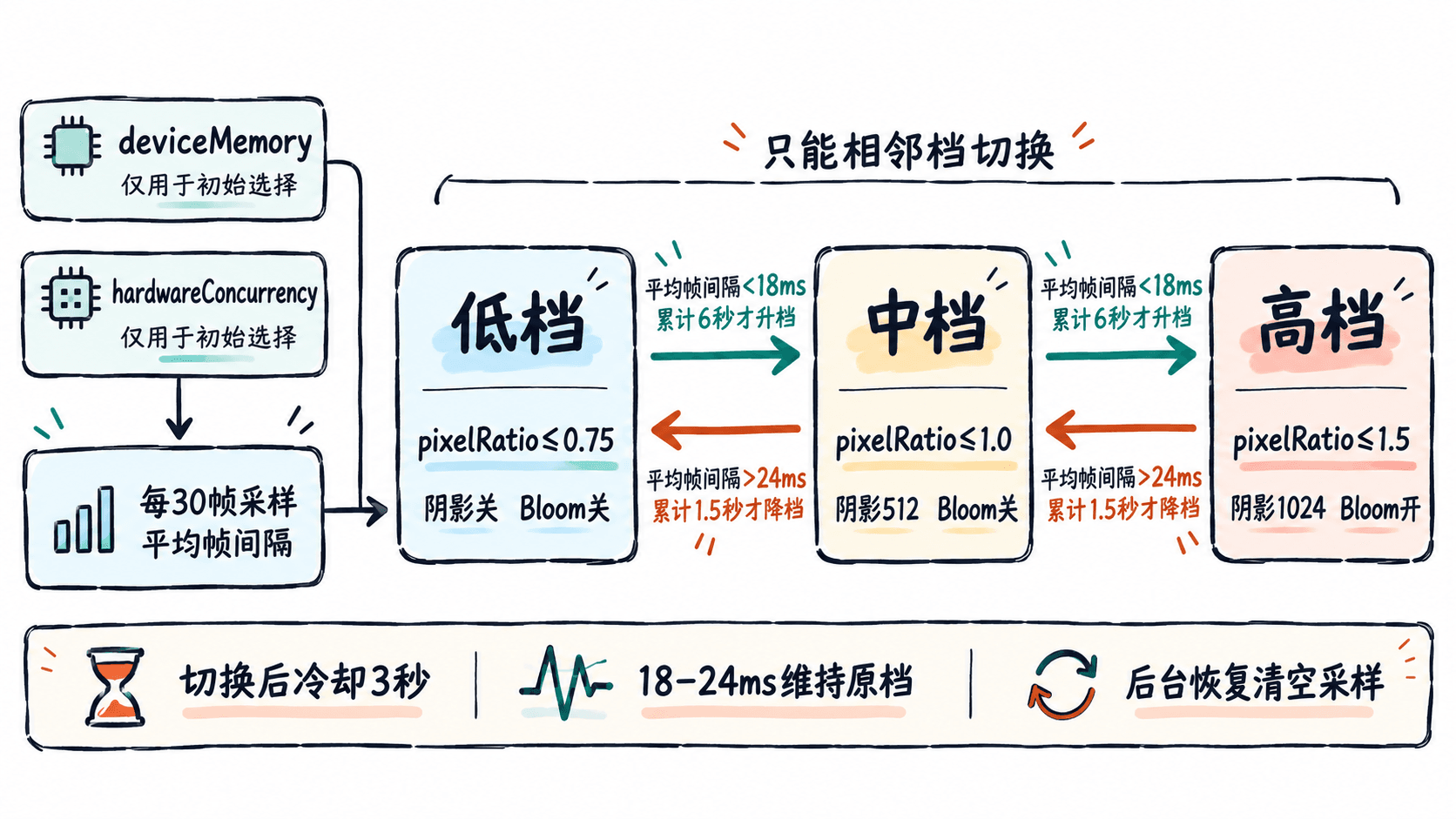
移动端的屏幕像素密度高,但持续渲染能力受 GPU、散热和功耗限制。这里把渲染分辨率、阴影贴图与 Bloom 后处理绑定成三档,用设备信息选择初始档位,再用实际帧间隔自动升降,并通过滞回避免反复切换。
学习目标
- 为 60 FPS 目标设置可执行的低、中、高三档画质参数。
- 使用连续帧耗时和滞回条件调节
pixelRatio、阴影与后处理。 - 在移动端验证档位变化,区分像素瓶颈与主线程瓶颈。
设定档位与像素预算
以 60 FPS 为目标,每帧预算约 16.7 ms。devicePixelRatio 是屏幕的物理像素与 CSS 像素之比,不应未经限制地直接用于 3D 画布。对 390×844 CSS 像素、DPR 为 3 的手机,原生分辨率约需绘制 296 万像素;将渲染 pixelRatio 限制为 1,则只需约 33 万像素。
| 档位 | pixelRatio 上限 |
阴影贴图 | Bloom |
|---|---|---|---|
| 低 | 0.75 | 关闭 | 关闭 |
| 中 | 1.0 | 512×512 | 关闭 |
| 高 | 1.5 | 1024×1024 | 开启 |
实际比例使用 Math.min(window.devicePixelRatio || 1, 档位上限)。这些数值是起始配置,不是手机型号白名单;阴影尺寸是单盏方向光的 shadow.mapSize,不是画布尺寸。若 0.75 档文字或细线明显模糊,应改为 1.0 并优先减少场景开销。
用滞回限制频繁切换
navigator.deviceMemory 和 navigator.hardwareConcurrency 只能辅助决定初始档位,部分浏览器不提供前者,CPU 核心数也不等于 GPU 性能。运行阶段每 30 帧计算一次 requestAnimationFrame 帧间隔均值,作为包含 CPU、GPU 和刷新调度的整体流畅度指标,而非纯 GPU 耗时。
下面采用两道不同阈值:均值 大于 24 ms 持续累计 1.5 秒才降一档;均值 小于 18 ms 持续累计 6 秒才升一档;每次切换后冷却 3 秒。18~24 ms 的区间维持原档位,页面恢复前台时清空采样,防止休眠间隔造成误降级。
实现可运行的自适应场景
以下完整示例固定使用 Three.js 0.180.0 的 WebGLRenderer 与 EffectComposer API。保存为 index.html,在所在目录运行 python3 -m http.server 8000,再访问 http://localhost:8000;首次加载需要网络访问 CDN。场景复用几何体和材质,避免额外资源干扰画质对比。
<!doctype html>
<html lang='zh-CN'>
<head>
  <meta charset='utf-8'>
  <meta name='viewport' content='width=device-width, initial-scale=1'>
  <style>
    body { margin: 0; overflow: hidden; background: #101722; }
    #hud { position: fixed; top: 12px; left: 12px; z-index: 1;
      padding: 8px 12px; color: white; background: #172432cc;
      font: 14px/1.6 system-ui; pointer-events: none; }
  </style>
  <script type='importmap'>
  {
    "imports": {
      "three": "https://cdn.jsdelivr.net/npm/three@0.180.0/build/three.module.js",
      "three/addons/": "https://cdn.jsdelivr.net/npm/three@0.180.0/examples/jsm/"
    }
  }
  </script>
</head>
<body>
<div id='hud'>正在初始化画质…</div>
<script type='module'>
import * as THREE from 'three';
import { EffectComposer } from 'three/addons/postprocessing/EffectComposer.js';
import { RenderPass } from 'three/addons/postprocessing/RenderPass.js';
import { UnrealBloomPass } from 'three/addons/postprocessing/UnrealBloomPass.js';
import { OutputPass } from 'three/addons/postprocessing/OutputPass.js';

const hud = document.querySelector('#hud');
const renderer = new THREE.WebGLRenderer({ antialias: true });
renderer.toneMapping = THREE.ACESFilmicToneMapping;
document.body.appendChild(renderer.domElement);
const scene = new THREE.Scene();
scene.background = new THREE.Color(0x182638);
const camera = new THREE.PerspectiveCamera(50, 1, 0.1, 100);
camera.position.set(5, 5, 8);
camera.lookAt(0, 0, 0);

scene.add(new THREE.HemisphereLight(0xffffff, 0x344458, 2));
const sun = new THREE.DirectionalLight(0xffffff, 3);
sun.position.set(3, 7, 4);
sun.castShadow = true;
Object.assign(sun.shadow.camera, { left: -6, right: 6, top: 6, bottom: -6 });
sun.shadow.camera.updateProjectionMatrix();
scene.add(sun);

const floorMat = new THREE.MeshStandardMaterial({ color: 0x2c4057 });
const floor = new THREE.Mesh(new THREE.PlaneGeometry(12, 12), floorMat);
floor.rotation.x = -Math.PI / 2;
floor.position.y = -0.3;
floor.receiveShadow = true;
scene.add(floor);

const cubes = new THREE.Group();
const cubeGeo = new THREE.BoxGeometry(0.5, 0.5, 0.5);
const cubeMat = new THREE.MeshStandardMaterial({ color: 0x25bdb4 });
for (let i = 0; i < 64; i++) {
  const mesh = new THREE.Mesh(cubeGeo, cubeMat);
  mesh.position.set((i % 8 - 3.5) * 0.72, 0, (Math.floor(i / 8) - 3.5) * 0.72);
  mesh.castShadow = true;
  cubes.add(mesh);
}
scene.add(cubes);
const glow = new THREE.Mesh(
  new THREE.SphereGeometry(0.35, 24, 16),
  new THREE.MeshBasicMaterial({ color: 0x88ffee, toneMapped: false })
);
glow.position.y = 1.2;
scene.add(glow);

const levels = [
  { name: '低', ratio: 0.75, shadow: 0, bloom: false },
  { name: '中', ratio: 1.0, shadow: 512, bloom: false },
  { name: '高', ratio: 1.5, shadow: 1024, bloom: true }
];
// 设备参数仅决定初始档位,后续以帧时间反馈为准。
const weak = (navigator.deviceMemory !== undefined && navigator.deviceMemory <= 4)
  || (navigator.hardwareConcurrency !== undefined && navigator.hardwareConcurrency <= 4);
let tier = weak ? 0 : 1;
let composer = null, bloomPass = null, outputPass = null;

function resize() {
  const w = window.innerWidth, h = window.innerHeight;
  camera.aspect = w / h;
  camera.updateProjectionMatrix();
  renderer.setSize(w, h);
  if (composer) composer.setSize(w, h);
}

function applyTier(next) {
  tier = next;
  const q = levels[tier];
  renderer.setPixelRatio(Math.min(window.devicePixelRatio || 1, q.ratio));
  renderer.shadowMap.enabled = q.shadow > 0;
  if (q.shadow) sun.shadow.mapSize.set(q.shadow, q.shadow);
  // 更换阴影尺寸时释放旧 RenderTarget,下一帧按新档位创建。
  if (sun.shadow.map) {
    sun.shadow.map.dispose();
    sun.shadow.map = null;
  }
  cubeMat.needsUpdate = true;
  floorMat.needsUpdate = true;

  // 高档才分配后处理缓冲;退出高档时释放对应 GPU 资源。
  if (q.bloom && !composer) {
    composer = new EffectComposer(renderer);
    composer.addPass(new RenderPass(scene, camera));
    bloomPass = new UnrealBloomPass(new THREE.Vector2(1, 1), 0.6, 0.2, 0.85);
    composer.addPass(bloomPass);
    outputPass = new OutputPass();
    composer.addPass(outputPass);
  } else if (!q.bloom && composer) {
    bloomPass.dispose();
    outputPass.dispose();
    composer.dispose();
    composer = bloomPass = outputPass = null;
  }
  if (composer) composer.setPixelRatio(renderer.getPixelRatio());
  resize();
  console.info('画质档位', q.name, 'pixelRatio', renderer.getPixelRatio());
}
window.addEventListener('resize', resize);
applyTier(tier);

let last = 0, sum = 0, samples = 0;
let slowFor = 0, fastFor = 0, cooldownUntil = 0;
document.addEventListener('visibilitychange', () => {
  last = sum = samples = slowFor = fastFor = 0;
  cooldownUntil = performance.now() + 3000;
});

renderer.setAnimationLoop((now) => {
  const dt = last ? now - last : 16.7;
  last = now;
  cubes.rotation.y += Math.min(dt, 50) * 0.00035;

  if (dt > 0 && dt < 120) {
    sum += dt;
    samples++;
    if (samples >= 30) {
      const average = sum / samples;
      if (now >= cooldownUntil) {
        slowFor = average > 24 ? slowFor + sum : 0;
        fastFor = average < 18 ? fastFor + sum : 0;
        // 不跨级切换;升档更慢,切换后暂停评估。
        if (slowFor >= 1500 && tier > 0) {
          applyTier(tier - 1);
          cooldownUntil = now + 3000;
          slowFor = fastFor = 0;
        } else if (fastFor >= 6000 && tier < 2) {
          applyTier(tier + 1);
          cooldownUntil = now + 3000;
          slowFor = fastFor = 0;
        }
      }
      const size = renderer.getDrawingBufferSize(new THREE.Vector2());
      hud.textContent = `${levels[tier].name}档 · ${average.toFixed(1)} ms/帧 · ${size.x}×${size.y} 像素`;
      sum = samples = 0;
    }
  } else {
    sum = samples = slowFor = fastFor = 0;
  }
  if (composer) composer.render();
  else renderer.render(scene, camera);
});
</script>
</body>
</html>
预期结果:页面显示旋转的方块阵列、地面和发光球;左上角持续更新档位、30 帧平均耗时及实际绘制缓冲区尺寸。高档可见 Bloom,低档没有实时阴影。控制台只在初始设置或档位改变时输出对应的 画质档位 信息,具体档位和耗时因设备而异。
验证切换与排除误判
- 在手机浏览器或桌面移动设备模拟环境打开页面,记录初始档位、画布尺寸和平均帧间隔。以 CSS 宽度 390、DPR 为 3 为例,中档缓冲区宽度应约为 390 像素,高档约为 585 像素。
- 使用 Chrome DevTools 的 Performance 录制交互、旋转和缩放视口过程;在持续超过 24 ms/帧的场景中,观察是否只降一档,且至少隔 3 秒才可能再切换。恢复流畅后,升档应明显慢于降档。
- 检查阴影与 Bloom 是否同步切换,改变窗口尺寸后画面应完整铺满且比例正确。重复后台与前台切换,不能因单次超长帧立即降档。
工程中还应在真实低端手机上连续测试至少 5 分钟,观察热降频后是否停在可接受的档位;记录 95 分位帧间隔与切换次数,而非只看启动时 FPS。具体 API 可对照 WebGLRenderer 与 EffectComposer 文档。