
Web 图形与 3D / 系统课时
按归属释放几何体和材质纹理
按归属释放几何体和材质纹理
把模型从 Scene 移走,不代表它的 GPU 缓冲、着色器和纹理已经释放。本课按资源归属划分卸载边界,用作用域登记与引用计数实现释放:局部对象退出时及时回收,仍被其他对象使用的共享贴图则继续保留。
学习目标
- 区分场景节点移除与
geometry、material、texture的实际释放。 - 为独占资源和跨对象共享资源制定不会误删的所有权规则。
- 编写可重复调用的卸载逻辑,并检查资源计数是否回落。
先划清资源的归属
scene.remove(mesh) 或 mesh.removeFromParent() 只断开场景树关系;BufferGeometry.dispose() 释放几何数据对应的 GPU 资源,Material.dispose() 释放材质持有的渲染资源引用,但不会自动释放材质引用的纹理。纹理需要单独调用 Texture.dispose()。
按卸载边界把资源分为三类,避免在遍历场景树时对所有引用无差别调用 dispose():
| 资源实例 | 归属方式 | 卸载局部对象时 |
|---|---|---|
| 仅供 A 使用的几何体、材质 | A 作用域独占 | A 卸载即释放 |
| A、B 共用的纹理 | 共享资源池持有,A/B 各登记一次 | A 退出时引用数 2→1;B 退出到 0 才释放 |
| 全局环境贴图或跨关卡图集 | 应用级缓存持有 | 局部卸载不释放,由缓存退出时统一处理 |
同一个 Texture 即便同时被 map 和 emissiveMap 引用,也只应按一个资源实例登记;反过来,两个不同纹理即使来自相同 URL,也不能凭 URL 当成同一实例处理。
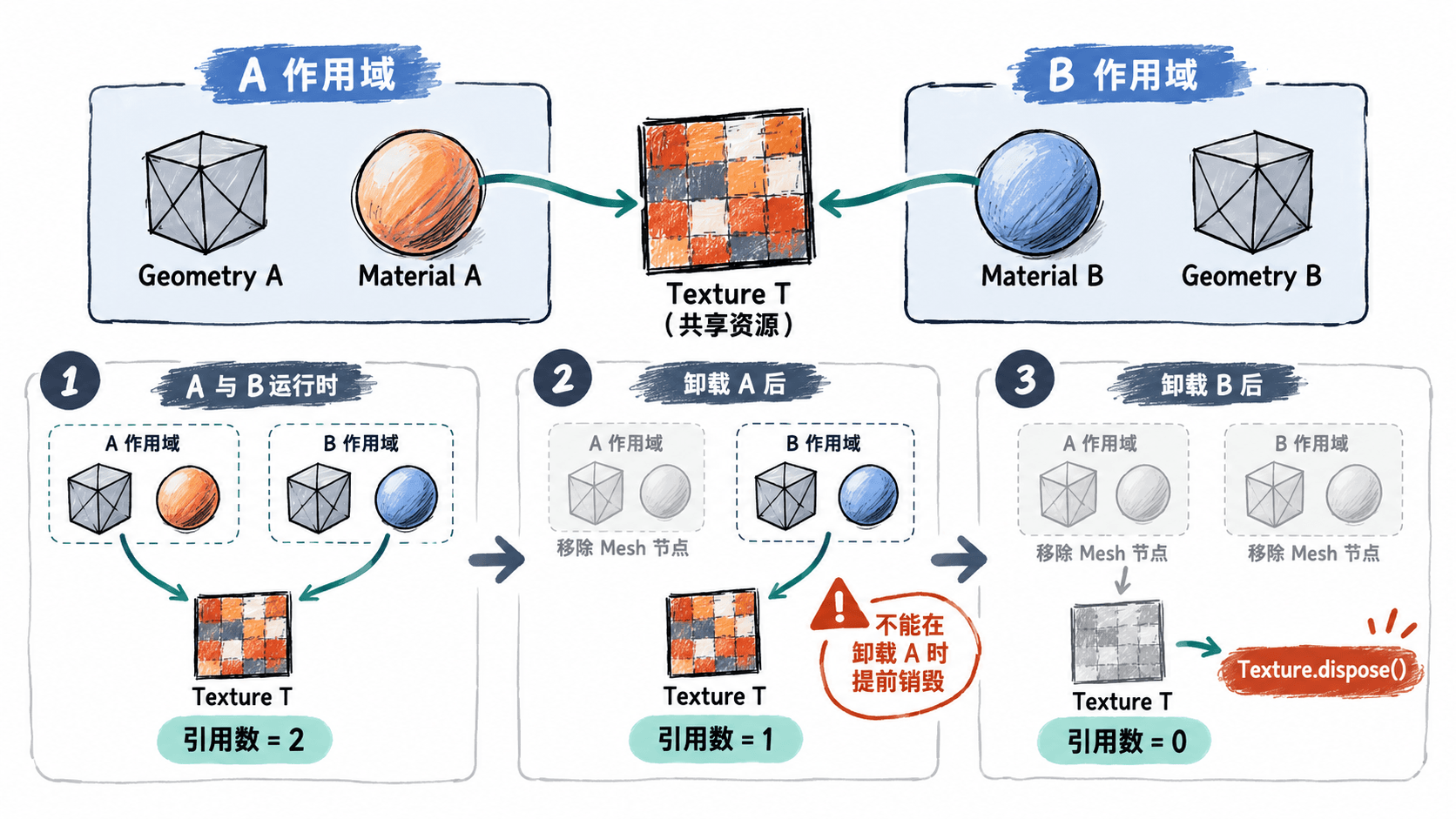
用作用域与引用计数释放
以下完整 ES Module 示例适用于已安装 three、支持浏览器 WebGL 的项目,例如 Vite 的 src/main.js。两个立方体各自持有几何体和材质,但共用同一张 DataTexture;资源池负责在最后一个使用者退出时才调用 dispose()。
import * as THREE from 'three';

class ResourcePool {
  constructor() { this.refs = new Map(); }

  acquire(resource) {
    this.refs.set(resource, (this.refs.get(resource) ?? 0) + 1);
    return resource;
  }

  release(resource) {
    const n = this.refs.get(resource);
    if (n === undefined) throw new Error('资源未登记或已释放');
    if (n === 1) {
      this.refs.delete(resource);
      resource.dispose(); // 最后一个使用者退出才释放
    } else {
      this.refs.set(resource, n - 1);
    }
  }

  count(resource) { return this.refs.get(resource) ?? 0; }
}

class SceneScope {
  constructor(scene, pool) {
    this.pool = pool;
    this.root = new THREE.Group();
    this.resources = new Set();
    this.closed = false;
    scene.add(this.root);
  }

  use(resource) {
    if (this.closed) throw new Error('作用域已卸载');
    // 同一作用域内多次引用只占一个所有权份额
    if (!this.resources.has(resource)) {
      this.resources.add(resource);
      this.pool.acquire(resource);
    }
    return resource;
  }

  unload() {
    if (this.closed) return; // 卸载可重复调用
    this.closed = true;
    this.root.removeFromParent();
    for (const resource of this.resources) this.pool.release(resource);
    this.resources.clear();
    this.root.clear();
  }
}

const pool = new ResourcePool();
const scene = new THREE.Scene();
const renderer = new THREE.WebGLRenderer();
renderer.setSize(480, 270);
document.body.appendChild(renderer.domElement);
const camera = new THREE.PerspectiveCamera(50, 480 / 270, 0.1, 100);
camera.position.z = 5;

const sharedTexture = new THREE.DataTexture(
  new Uint8Array([30, 180, 160, 255]), 1, 1
);
sharedTexture.needsUpdate = true;
let textureDisposals = 0;
sharedTexture.addEventListener('dispose', () => textureDisposals++);

function mountBox(x) {
  const scope = new SceneScope(scene, pool);
  const geometry = scope.use(new THREE.BoxGeometry(1, 1, 1));
  const texture = scope.use(sharedTexture);
  const material = scope.use(new THREE.MeshBasicMaterial({ map: texture }));
  const mesh = new THREE.Mesh(geometry, material);
  mesh.position.x = x;
  scope.root.add(mesh);
  return scope;
}

const a = mountBox(-1);
const b = mountBox(1);
renderer.render(scene, camera);
console.log('加载后', pool.count(sharedTexture), textureDisposals);

a.unload();
renderer.render(scene, camera);
console.log('卸载 A', pool.count(sharedTexture), textureDisposals);

b.unload();
renderer.render(scene, camera);
console.log('卸载 B', pool.count(sharedTexture), textureDisposals);
renderer.dispose();
renderer.domElement.remove();
预期输出(依次为共享纹理引用数、纹理 dispose 事件次数):
加载后 2 0
卸载 A 1 0
卸载 B 0 1
SceneScope.use() 的 Set 避免同一作用域因重复引用而多计数;作用域卸载先从场景中摘除节点,再逐项减少引用并清空节点。实际项目应在资源创建或加载完成时登记,而不是卸载时才猜测哪些资源属于当前关卡。
处理材质贴图与加载资源的边界
Mesh.material 可能是材质数组,且一个材质可能引用 map、normalMap、roughnessMap、emissiveMap 等多张纹理。加载 glTF 时,不同节点也可能复用同一份几何体或材质。需要在导入后建立资源登记集合:枚举网格的几何体与每个材质,收集已知纹理槽;自定义 ShaderMaterial.uniforms 中的纹理和场景的 background、environment 则按实际归属另外登记。
dispose() 释放的是 Three.js 管理的相关 GPU 资源,不等于移除所有 JavaScript 引用。卸载后还要解除应用缓存、事件回调、加载器结果数组对对象的持有。若纹理源使用 ImageBitmap,仅在确认源图像没有其他消费者时调用其 close();Texture.dispose() 不会自动代劳。WebGLRenderTarget、Skeleton 等资源也有各自的释放接口,不能只靠几何体和材质的卸载覆盖。
验证退出后资源是否回落
在实际渲染过场景后记录 renderer.info.memory.geometries 和 renderer.info.memory.textures;连续执行“加载关卡→渲染→卸载”约 10 次,比较每轮卸载后的数值是否回到相近基线。材质对应的着色器程序可能被复用,检查 renderer.info.programs 时也要结合是否还有存活材质判断。
不要强求计数绝对为 0:环境贴图处理或渲染器内部缓存可能保留正常资源。如果卸载后的基线逐轮上涨,检查资源池是否存在未配对的 acquire()、漏登记的贴图,以及没有解除引用的关卡缓存。再用浏览器 DevTools 的 Memory 堆快照确认旧 Mesh、纹理或图片对象是否仍被业务代码持有。接口与例外可对照 Three.js 官方对象释放指南。