
Node.js / 系统课时
提供静态资源
提供静态资源
这一节把一个只会返回字符串的 HTTP 服务改造成最小静态资源服务器:浏览器请求 HTML、CSS、JavaScript 或图片时,服务端会把 URL 映射到 public 目录中的文件,设置正确的 Content-Type,再以文件流返回,同时处理 404 与目录穿越风险。
学习目标
- 能把请求路径安全映射到静态目录,并拒绝越出
public的路径。 - 能按扩展名设置 HTML、CSS、JavaScript 与常见图片的 MIME 类型。
- 能用
fs.createReadStream()返回文件,并验证状态码与响应头。
从 URL 找到真实文件
静态服务的关键不是“读文件”,而是先限定可访问根目录。下面约定所有资源只能来自项目下的 public:请求 / 映射到 public/index.html,请求 /style.css 映射到 public/style.css。使用 path.relative() 检查计算后的路径,避免解析后的文件路径越过静态目录。
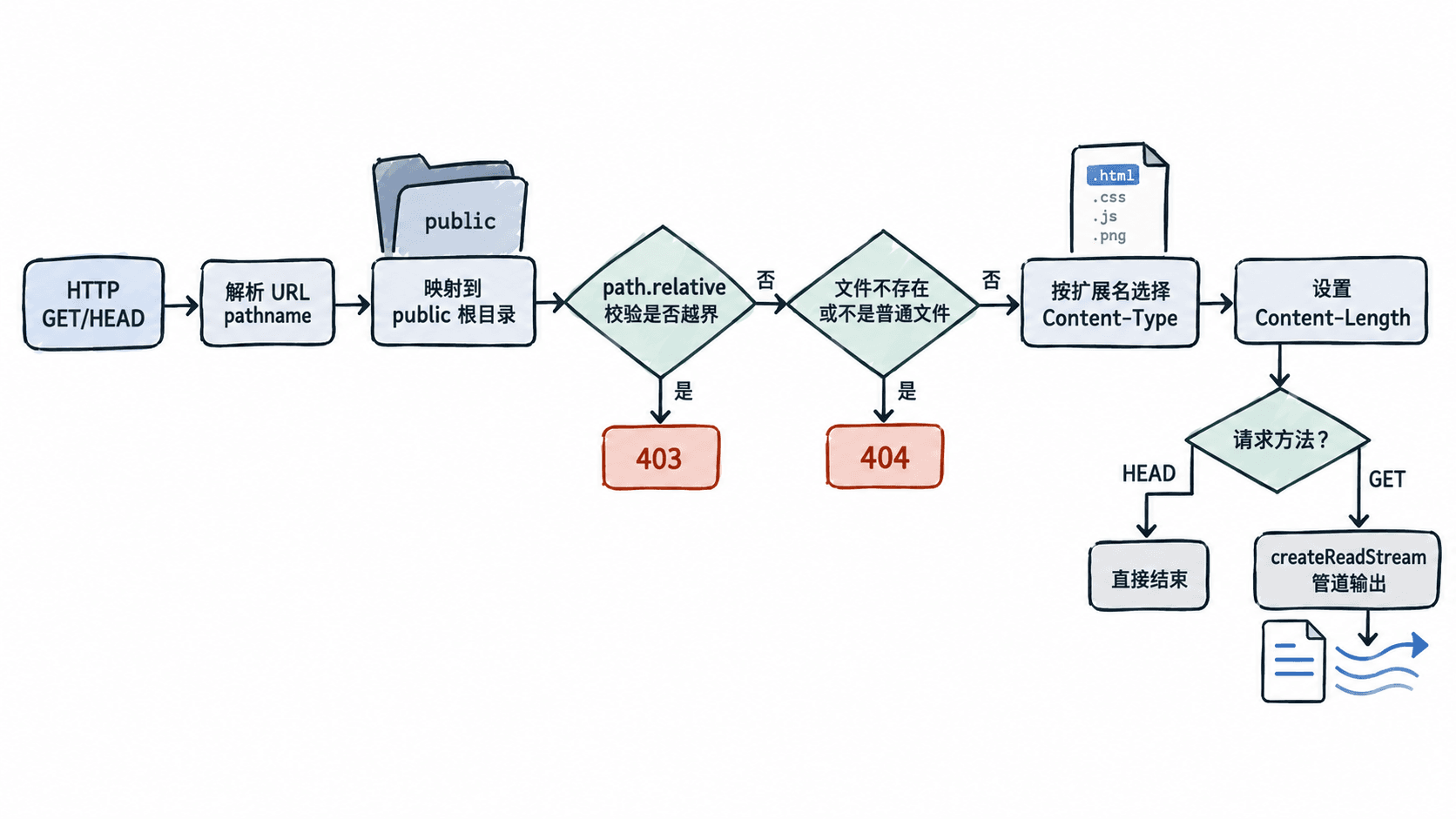
扩展名决定浏览器怎样解释响应体。HTML、CSS 和 JavaScript 应带 UTF-8 字符集;PNG、JPEG、WebP、SVG 等图片使用各自 MIME 类型。未知扩展名不要猜成文本,使用 application/octet-stream 更稳妥,浏览器会把它当通用二进制数据处理。
写一个可运行的静态服务器
下面示例使用 Node.js 内置模块,不依赖 Express。保存为 server.mjs 后直接运行;程序会自动创建 public 目录和四个演示文件。示例适用于 Node.js 22+,并同时支持 GET 与 HEAD。
import http from 'node:http';
import path from 'node:path';
import { createReadStream } from 'node:fs';
import { mkdir, stat, writeFile } from 'node:fs/promises';

const publicRoot = path.resolve('public');
const mimeTypes = {
  '.html': 'text/html; charset=utf-8',
  '.css': 'text/css; charset=utf-8',
  '.js': 'application/javascript; charset=utf-8',
  '.svg': 'image/svg+xml',
  '.png': 'image/png',
  '.jpg': 'image/jpeg',
  '.jpeg': 'image/jpeg',
  '.webp': 'image/webp'
};

await mkdir(publicRoot, { recursive: true });
await Promise.all([
  writeFile(path.join(publicRoot, 'index.html'), '<!doctype html><link rel="stylesheet" href="/style.css"><h1>Static OK</h1><img src="/logo.svg"><script src="/app.js"></script>'),
  writeFile(path.join(publicRoot, 'style.css'), 'body{font-family:sans-serif} h1{color:#345}'),
  writeFile(path.join(publicRoot, 'app.js'), 'console.log("static js loaded")'),
  writeFile(path.join(publicRoot, 'logo.svg'), '<svg xmlns="http://www.w3.org/2000/svg" width="120" height="40"><rect width="120" height="40" rx="8" fill="#789"/><text x="14" y="26" fill="white">Node Static</text></svg>')
]);

const server = http.createServer(async (req, res) => {
  if (req.method !== 'GET' && req.method !== 'HEAD') {
    res.writeHead(405, { Allow: 'GET, HEAD' });
    return res.end();
  }
  let pathname;
  try {
    pathname = decodeURIComponent(new URL(req.url, 'http://localhost').pathname);
  } catch {
    res.writeHead(400, { 'Content-Type': 'text/plain; charset=utf-8' });
    return res.end('Bad Request');
  }
  if (pathname === '/') pathname = '/index.html';
  const filePath = path.resolve(publicRoot, `.${pathname}`);
  const relative = path.relative(publicRoot, filePath);
  if (relative === '..' || relative.startsWith(`..${path.sep}`) || path.isAbsolute(relative)) {
    res.writeHead(403, { 'Content-Type': 'text/plain; charset=utf-8' });
    return res.end('Forbidden');
  }
  try {
    const info = await stat(filePath);
    if (!info.isFile()) throw new Error('not a file');
    const contentType = mimeTypes[path.extname(filePath).toLowerCase()] ?? 'application/octet-stream';
    res.writeHead(200, {
      'Content-Type': contentType,
      'Content-Length': info.size
    });
    if (req.method === 'HEAD') return res.end();
    const stream = createReadStream(filePath);
    stream.on('error', () => res.destroy());
    stream.pipe(res);
  } catch {
    res.writeHead(404, { 'Content-Type': 'text/plain; charset=utf-8' });
    res.end('Not Found');
  }
});

server.listen(3000, '127.0.0.1', () => {
  console.log('Static server: http://127.0.0.1:3000');
});
预期输出
Static server: http://127.0.0.1:3000浏览器访问 http://127.0.0.1:3000/ 后应看到 “Static OK”,并能加载样式、脚本和 SVG。服务器不是一次把整个文件读进内存,而是让 createReadStream() 按流输出;对较大的图片、脚本或下载文件,这比 readFile() 后一次性 res.end(buffer) 更节省峰值内存。
验证响应头和错误分支
另开终端检查 CSS 的状态码与 MIME 类型。Node.js 22+ 可直接运行下面的一行验证命令;它发送 HEAD 请求,因此只检查响应头,不下载 CSS 正文。
node -e "fetch('http://127.0.0.1:3000/style.css',{method:'HEAD'}).then(r=>console.log(r.status,r.headers.get('content-type')))"预期输出
200 text/css; charset=utf-8再访问一个不存在的路径,应得到 404;如果路径解析结果试图越出 public 根目录,校验分支会返回 403。实际项目还会加入缓存头、压缩、Range 请求和 CDN,但静态服务至少要先保证固定根目录、路径校验、正确 MIME 与流式发送。