
Node.js / 系统课时
处理 URL 与模块地址
处理 URL 与模块地址
Node.js 里的“地址”既可能是 https: URL,也可能是当前 ES 模块的 file: 地址。直接把 URL 当文件路径会遇到编码、盘符和分隔符问题。本课用标准 URL API、import.meta.url、fileURLToPath() 与 pathToFileURL() 建立可靠的转换链路。
学习目标
- 会用
URL与URLSearchParams解析路径、查询参数和来源信息。 - 会基于
import.meta.url定位相对当前模块的资源。 - 会在
file:URL 与本地文件系统路径之间做正确转换。
用 URL API 解析地址和查询参数
URL 会把协议、主机、路径、查询参数和片段分开处理,避免手写字符串切割。查询参数通过 url.searchParams 读取;同名参数可以用 getAll() 保留全部值,适合筛选器、标签或多选条件。
const page = new URL('https://example.com/search?q=node.js&page=2&q=runtime');

console.log(page.origin);
console.log(page.pathname);
console.log(page.searchParams.get('page'));
console.log(JSON.stringify(page.searchParams.getAll('q')));
预期输出:
https://example.com
/search
2
["node.js","runtime"]
修改参数时可以调用 searchParams.set('page', '3'),随后读取 page.href 就会得到更新后的完整 URL。不要用正则拆 ? 和 &,否则空值、重复键和百分号编码都需要自己重新实现。
用 import.meta.url 定位模块旁资源
在 ES 模块中,import.meta.url 是当前模块的绝对 URL 字符串,通常以 file: 开头。new URL('./config/app.json', import.meta.url) 会相对“模块文件所在位置”解析资源,因此不会受 process.cwd() 改变影响。
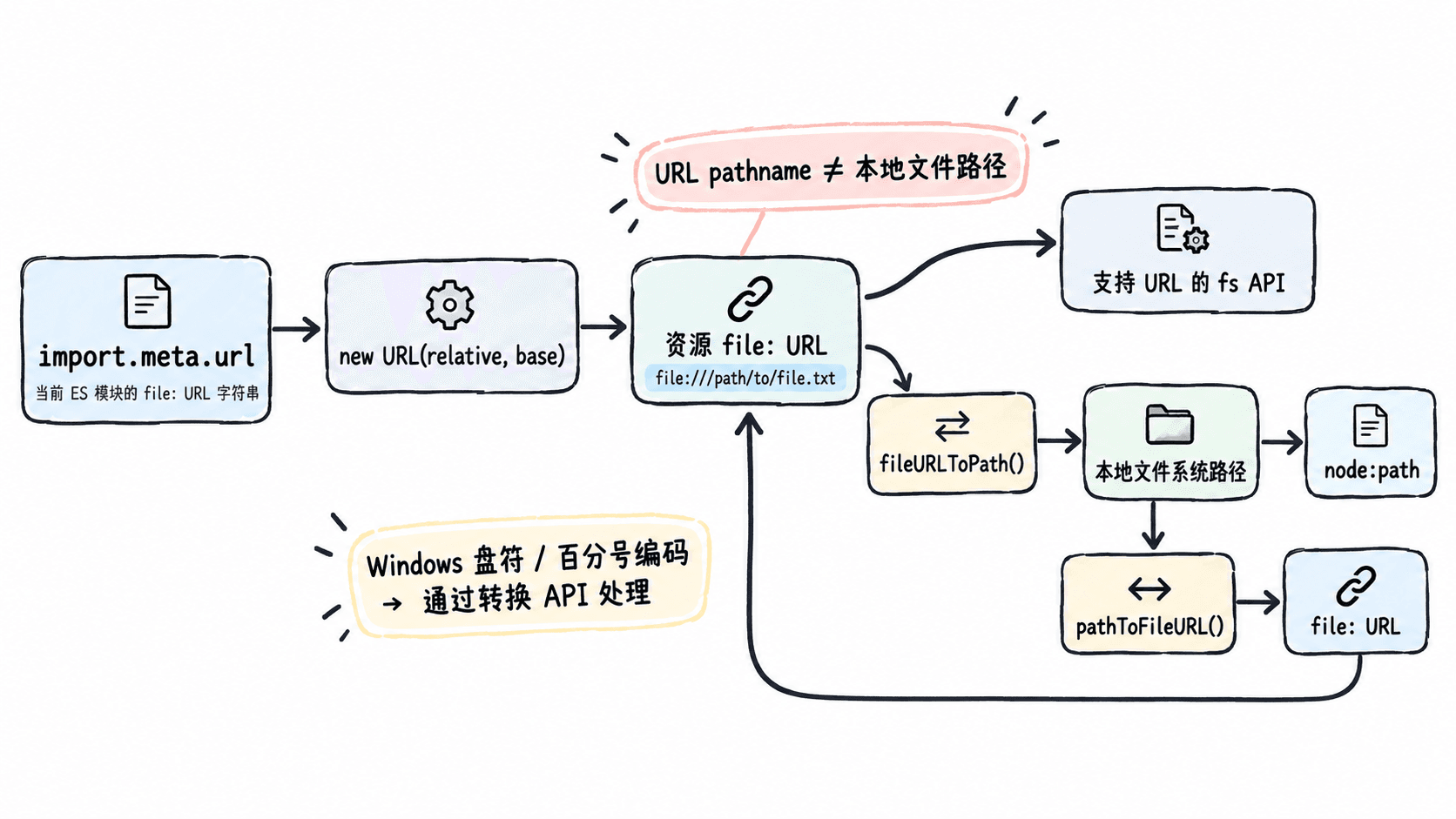
保存下面代码为 module-url.mjs,执行 node module-url.mjs:
import path from 'node:path';
import { fileURLToPath, pathToFileURL } from 'node:url';

const moduleDirUrl = new URL('.', import.meta.url);
const configUrl = new URL('./config/app.json', moduleDirUrl);
const configPath = fileURLToPath(configUrl);
const roundTripUrl = pathToFileURL(configPath);

console.log(moduleDirUrl.protocol);
console.log(path.basename(configPath));
console.log(roundTripUrl.href.endsWith('/config/app.json'));
预期输出:
file:
app.json
true
这种写法适合加载模板、SQL、证书、静态资源等“跟模块一起发布”的文件。相比 path.resolve('config/app.json'),它不会因为服务从不同工作目录启动而改变目标位置。
file URL 与本地路径不能直接混用
new URL(...).pathname 是 URL 路径部分,不是跨平台文件系统路径。文件名中有空格时 URL 可能出现 %20;Windows 还涉及盘符和 UNC 路径。需要本地路径时用 fileURLToPath(),反向转换用 pathToFileURL()。
import { fileURLToPath, pathToFileURL } from 'node:url';

const fileUrl = new URL('file:///tmp/report%20final.txt');
const filePath = fileURLToPath(fileUrl);

console.log(filePath.endsWith('report final.txt'));
console.log(pathToFileURL(filePath).href.endsWith('report%20final.txt'));
预期输出:
true
true
示例只检查稳定的结尾,因为完整路径在 Windows 与 POSIX 上表现不同。业务代码同样应避免自己做 %20 解码或手工拼 file:///,这些转换交给 Node.js 内置 API 更可靠。
区分 URL 基准和工作目录
当资源“属于某个模块”时,以 import.meta.url 为基准;当资源“属于程序启动位置”时,才使用 process.cwd()。两者混用最常见的故障是本机运行正常,换到测试、容器或进程管理器后就找不到文件。
| 需求 | 推荐基准 |
|---|---|
| 读取当前模块旁的模板 | new URL('./template.html', import.meta.url) |
| 读取用户在启动目录提供的配置 | path.resolve(process.cwd(), 'config.json') |
| 解析网络地址 | new URL('https://example.com/...') |
把 file: URL 交给 node:path |
先调用 fileURLToPath() |
判断时先问“这个资源跟模块一起移动,还是跟启动目录一起移动”。这个归属一旦确定,URL 与文件路径之间的转换就不会依赖偶然的运行环境。