
Web 图形与 3D / 系统课时
通过 uniform 传入动态参数
通过 uniform 传入动态参数
JavaScript 中不断变化的时间、颜色和强度,不能直接被 GLSL 读取。本课用 WebGL2 把这三个值写入 uniform,绘制一幅随时间明暗起伏的画面,并通过颜色选择器、强度滑块和帧计数验证参数在持续更新。
学习目标
- 将 GLSL 的
float、vec3uniform 与正确的 WebGL2 写入接口对应起来。 - 在
requestAnimationFrame回调中先更新 uniform,再绘制一帧。 - 通过可见效果和常见报错判断参数是否真正生效。
uniform 在哪里起作用
uniform 是当前着色器程序持有的输入值。JavaScript 通过 gl.getUniformLocation 找到变量位置,再调用对应的 gl.uniform* 方法写入;同一次绘制调用中,每个片元读到相同的 uniform 值。它适合表示时间、整体颜色和全局强度,不适合给每个像素单独传不同数值。
| GLSL 声明 | JavaScript 写入 | 本例含义 |
|---|---|---|
uniform float uTime; |
gl.uniform1f |
自动画开始经过的秒数 |
uniform vec3 uColor; |
gl.uniform3f |
RGB 三个分量,范围为 0~1 |
uniform float uIntensity; |
gl.uniform1f |
明暗倍率,滑块范围为 0~1 |
操作顺序不能颠倒:先链接程序并调用 gl.useProgram(program),再获取位置并写入;每帧的 gl.drawArrays 必须发生在更新之后。uniform 位置只需在链接后查询一次,重新链接程序才需要重新获取。
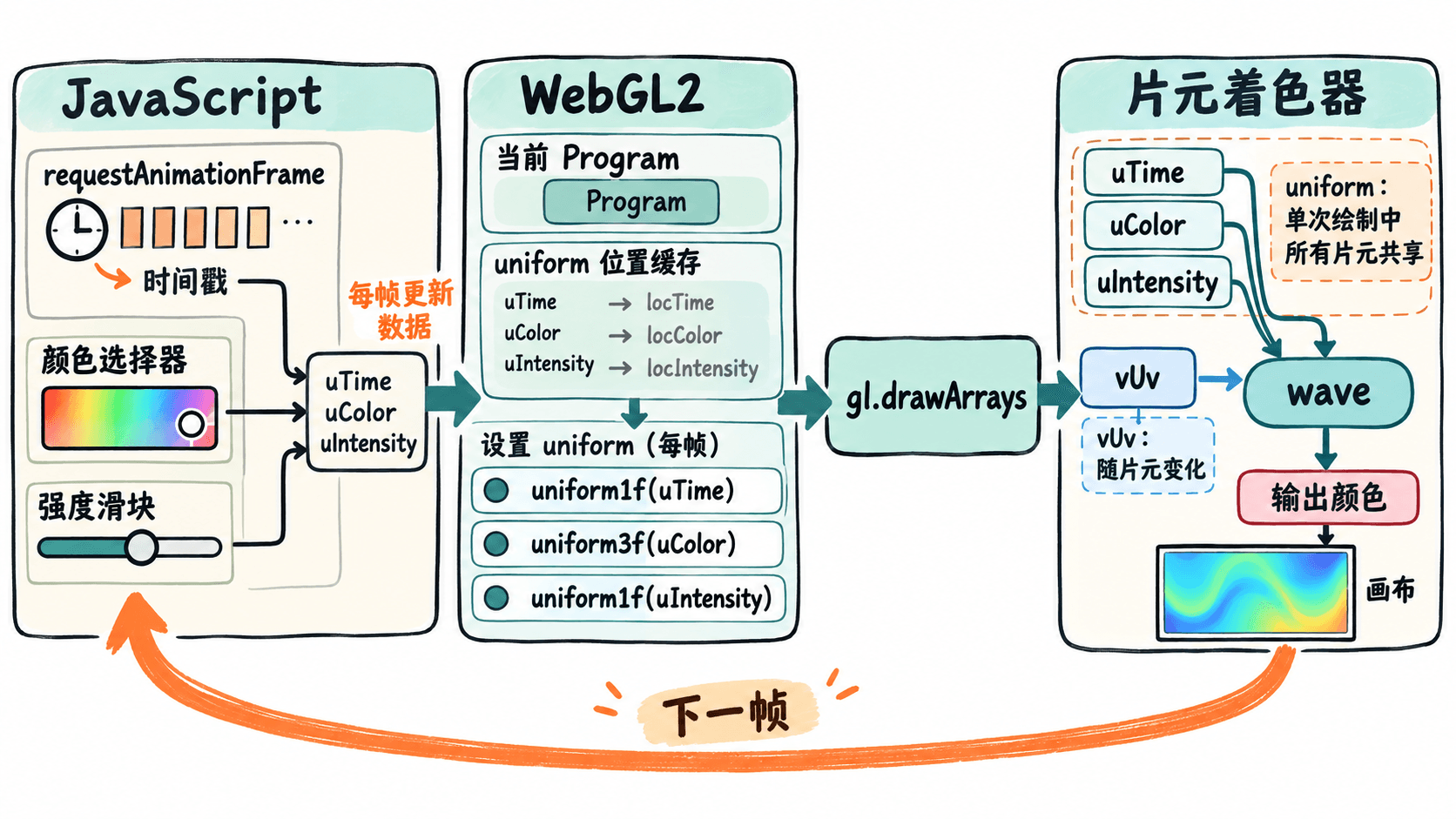
完整运行一个动态着色器
新建 index.html 并粘贴下列代码,直接在支持 WebGL2 的现代浏览器中打开。顶点着色器使用 gl_VertexID 生成覆盖画布的三角形,不必额外上传顶点缓冲区;片元着色器用 uTime 推动波纹,用 uColor 和 uIntensity 调节颜色。
<!doctype html>
<html lang='zh-CN'>
<meta charset='utf-8'>
<title>WebGL2 uniform 动画</title>
<canvas id='view' width='640' height='360'></canvas>
<p>
  颜色 <input id='color' type='color' value='#33ccff'>
  强度 <input id='strength' type='range' min='0' max='1' step='0.05' value='0.9'>
</p>
<p id='status'>等待绘制</p>
<script>
const gl = document.querySelector('#view').getContext('webgl2');
if (!gl) throw new Error('浏览器不支持 WebGL2');

const vertexSource = `#version 300 es
precision highp float;
out vec2 vUv;
void main() {
  // 超大三角形覆盖整个视口
  vec2 points[3] = vec2[3](
    vec2(-1.0, -1.0), vec2(3.0, -1.0), vec2(-1.0, 3.0)
  );
  vec2 p = points[gl_VertexID];
  vUv = (p + 1.0) * 0.5;
  gl_Position = vec4(p, 0.0, 1.0);
}`;

const fragmentSource = `#version 300 es
precision highp float;
in vec2 vUv;
uniform float uTime;
uniform vec3 uColor;
uniform float uIntensity;
out vec4 outColor;
void main() {
  float wave = 0.5 + 0.5 * sin(uTime * 2.0 + vUv.x * 8.0);
  float light = (0.3 + 0.7 * wave) * uIntensity;
  outColor = vec4(uColor * light, 1.0);
}`;

function compile(type, source) {
  const shader = gl.createShader(type);
  gl.shaderSource(shader, source);
  gl.compileShader(shader);
  if (!gl.getShaderParameter(shader, gl.COMPILE_STATUS)) {
    const error = gl.getShaderInfoLog(shader);
    gl.deleteShader(shader);
    throw new Error(error);
  }
  return shader;
}

const vs = compile(gl.VERTEX_SHADER, vertexSource);
const fs = compile(gl.FRAGMENT_SHADER, fragmentSource);
const program = gl.createProgram();
gl.attachShader(program, vs);
gl.attachShader(program, fs);
gl.linkProgram(program);
if (!gl.getProgramParameter(program, gl.LINK_STATUS)) {
  throw new Error(gl.getProgramInfoLog(program));
}
gl.deleteShader(vs);
gl.deleteShader(fs);
gl.useProgram(program);

// uniform 位置属于已链接的 program,缓存后重复使用
const timeLoc = gl.getUniformLocation(program, 'uTime');
const colorLoc = gl.getUniformLocation(program, 'uColor');
const strengthLoc = gl.getUniformLocation(program, 'uIntensity');
if ([timeLoc, colorLoc, strengthLoc].some(loc => loc === null)) {
  throw new Error('找不到正在使用的 uniform');
}

gl.bindVertexArray(gl.createVertexArray());
gl.viewport(0, 0, 640, 360);
const colorInput = document.querySelector('#color');
const strengthInput = document.querySelector('#strength');
const status = document.querySelector('#status');
let startMs = null;
let frames = 0;

function render(nowMs) {
  if (startMs === null) startMs = nowMs;
  const seconds = (nowMs - startMs) / 1000;
  const hex = colorInput.value;
  const r = parseInt(hex.slice(1, 3), 16) / 255;
  const g = parseInt(hex.slice(3, 5), 16) / 255;
  const b = parseInt(hex.slice(5, 7), 16) / 255;

  // 每帧先上传参数,再执行绘制
  gl.uniform1f(timeLoc, seconds);
  gl.uniform3f(colorLoc, r, g, b);
  gl.uniform1f(strengthLoc, Number(strengthInput.value));
  gl.drawArrays(gl.TRIANGLES, 0, 3);

  frames++;
  status.textContent = `已绘制 ${frames} 帧,uTime=${seconds.toFixed(2)} 秒`;
  requestAnimationFrame(render);
}
requestAnimationFrame(render);
</script>
</html>
**预期结果:**页面出现 640×360 的青色渐变波纹,亮带持续横向移动;画布下方的帧数和 uTime 不断增加。将颜色改为红色,画面随即转红;把强度调到 0,画布变黑。动画开始时 uTime 接近 0 秒,每过约一秒增加 1,实际帧数受设备刷新率和浏览器调度影响。
验证顺序与常见错误
- 将强度从
0.9调到0,确认画面变黑,再恢复0.9;这能验证uIntensity在影响最终颜色。 - 将颜色从
#33ccff改为#ff3300,确认波纹颜色改变;这能验证uColor的三个通道写入顺序正确。 - 保持浏览器标签页可见,观察
uTime和帧计数增长,同时波纹移动;这能验证requestAnimationFrame正在反复执行“写入后绘制”。
如果画布始终不变,先检查开发者工具 Console:#version 300 es 必须是各着色器源码首行,且需要 webgl2 上下文。getUniformLocation 返回 null 可能表示名称拼错,或变量未参与最终输出而被编译器优化掉。只调用 gl.uniform1f 而没有后续绘制,也不会让屏幕自动刷新。