
Web 图形与 3D / 系统课时
用统一参数表管理动态 uniform
用统一参数表管理动态 uniform
当多个页面都要控制 Shader 的速度与强度时,各自写入 material.uniforms 容易产生不同的默认值、边界和更新时间。本课用一个参数表统一管理输入和逐帧更新,再让两种材质共用参数,验证修改能同步生效。
学习目标
- 为动态 uniform 定义唯一的名称映射、默认值和合法范围。
- 将界面事件与逐帧时间更新集中到同一个参数管理对象。
- 让两份
ShaderMaterial复用参数,并识别不应共享的状态。
规定参数来源与更新时机
以条纹和圆环两种动画为例,两个效果都需要时间、速度和强度。规则表的键给页面使用,uniform 名称与 GLSL 声明严格对应。
| 参数键 | GLSL uniform | 初值 | 允许值 | 唯一写入来源 |
|---|---|---|---|---|
speed |
uSpeed |
1.00 | 0~3 | 滑块 input 事件 |
amplitude |
uAmplitude |
0.28 | 0~0.40 | 滑块 input 事件 |
| 内部时间 | uTime |
0 | 秒数,非负 | 每帧一次 tick() |
speed=0 应停止相位变化,amplitude=0 应消除可见条纹。页面不自行决定取值范围;参数入口先将输入转为有限数字,再限制到表内区间。逐帧只更新会变化的 uTime,不要每帧重新创建 uniform 对象。
集中写入并分发到材质
界面滑块调用 store.set();统一渲染循环调用 store.tick();两个材质只读取 store.uniforms。这让参数规则只有一份,避免页面 A 调整速度后还要手工同步页面 B。
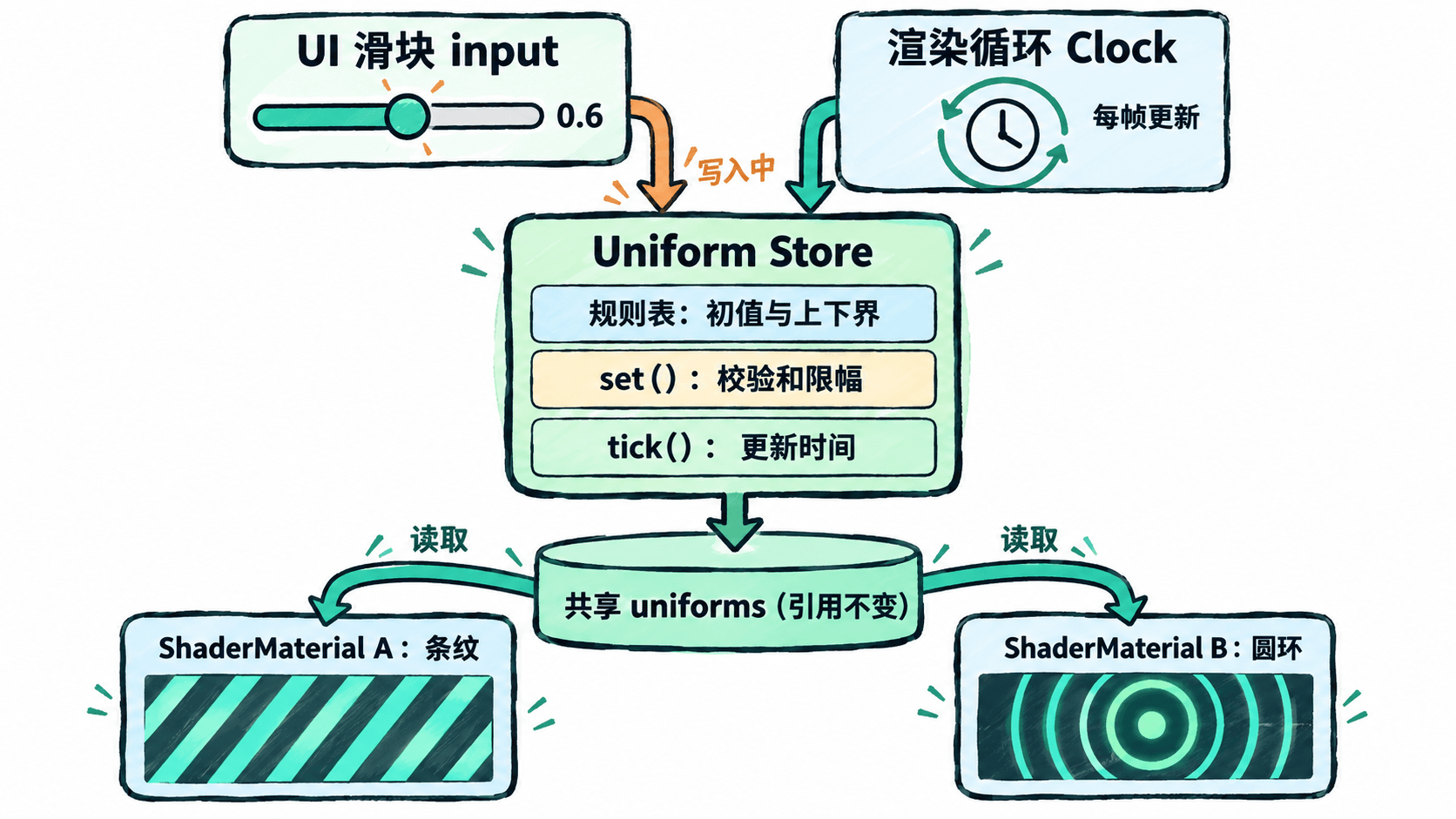
运行双材质同步示例
以下适用于 Three.js 0.180.0、支持 WebGL2 的现代浏览器。将完整代码保存为 index.html,在所在目录运行 python -m http.server 8000(需 Python 3),再打开 http://localhost:8000。示例通过固定版本 CDN 加载 Three.js,需要网络连接。
<!doctype html>
<html lang="zh-CN">
<head>
  <meta charset="utf-8">
  <meta name="viewport" content="width=device-width, initial-scale=1">
  <title>共享 uniform</title>
  <style>
    body { margin: 24px; font: 16px system-ui; }
    label { display: inline-block; margin: 0 18px 16px 0; }
    canvas { display: block; width: 100%; max-width: 900px; height: auto; }
  </style>
  <script type="importmap">
    {"imports":{"three":"https://cdn.jsdelivr.net/npm/three@0.180.0/build/three.module.js"}}
  </script>
</head>
<body>
  <label>速度 <input id="speed" type="range"> <output id="speedValue"></output></label>
  <label>强度 <input id="amplitude" type="range"> <output id="amplitudeValue"></output></label>
  <canvas id="view"></canvas>
  <script type="module">
    import * as THREE from 'three';

    // 初值、uniform 名称和限幅规则只有一份
    const schema = Object.freeze({
      speed: { uniform: 'uSpeed', initial: 1, min: 0, max: 3 },
      amplitude: { uniform: 'uAmplitude', initial: 0.28, min: 0, max: 0.4 }
    });
    const store = {
      uniforms: {
        uTime: { value: 0 },
        ...Object.fromEntries(Object.values(schema).map(
          rule => [rule.uniform, { value: rule.initial }]
        ))
      },
      set(name, raw) {
        const rule = schema[name];
        if (!rule) throw new Error(`未知参数: ${name}`);
        const n = Number(raw);
        if (!Number.isFinite(n)) return;
        // 只修改 value,始终保留 uniforms 引用
        this.uniforms[rule.uniform].value =
          Math.max(rule.min, Math.min(rule.max, n));
      },
      tick(seconds) { this.uniforms.uTime.value = seconds; }
    };

    for (const [name, rule] of Object.entries(schema)) {
      const input = document.getElementById(name);
      const output = document.getElementById(`${name}Value`);
      Object.assign(input, {
        min: rule.min, max: rule.max, step: 0.01, value: rule.initial
      });
      const update = () => {
        store.set(name, input.value);
        output.value = Number(input.value).toFixed(2);
      };
      input.addEventListener('input', update);
      update();
    }

    const vertexShader = `
      out vec2 vUv;
      void main() {
        vUv = uv;
        gl_Position = projectionMatrix * modelViewMatrix * vec4(position, 1.0);
      }
    `;
    const fragmentShader = `
      precision highp float;
      in vec2 vUv;
      uniform float uTime;
      uniform float uSpeed;
      uniform float uAmplitude;
      out vec4 outColor;
      void main() {
        #ifdef RINGS
          float phase = length(vUv - vec2(0.5)) * 28.0;
        #else
          float phase = vUv.x * 28.0;
        #endif
        float wave = 0.5 + 0.5 * sin(phase - uTime * uSpeed * 3.0);
        vec3 base = vec3(0.06, 0.12, 0.20);
        vec3 cyan = vec3(0.10, 0.80, 0.70);
        outColor = vec4(mix(base, cyan, wave * uAmplitude * 2.5), 1.0);
      }
    `;
    const scene = new THREE.Scene();
    const camera = new THREE.OrthographicCamera(-1.65, 1.65, 0.95, -0.95, 0.1, 10);
    camera.position.z = 2;
    const geometry = new THREE.PlaneGeometry(1.25, 1.25);

    // 两个不同图案的材质明确接收相同 uniforms 对象
    const meshes = [{}, { RINGS: 1 }].map((defines, i) => {
      const material = new THREE.ShaderMaterial({
        uniforms: store.uniforms,
        glslVersion: THREE.GLSL3,
        defines, vertexShader, fragmentShader
      });
      const mesh = new THREE.Mesh(geometry, material);
      mesh.position.x = i === 0 ? -0.76 : 0.76;
      scene.add(mesh);
      return mesh;
    });
    console.log('共用参数对象:',
      meshes[0].material.uniforms === meshes[1].material.uniforms);

    const renderer = new THREE.WebGLRenderer({
      canvas: document.getElementById('view'), antialias: true
    });
    renderer.setPixelRatio(Math.min(window.devicePixelRatio, 2));
    renderer.setSize(900, 520, false);
    const clock = new THREE.Clock();
    // 每帧只在一处推进共享时间
    renderer.setAnimationLoop(() => {
      store.tick(clock.getElapsedTime());
      renderer.render(scene, camera);
    });
  </script>
</body>
</html>
预期结果:左侧出现水平移动的竖条纹,右侧出现向外扩散的同心圆。拖动速度或强度滑块,两张图同步改变;速度为 0 时一起静止,强度为 0 时都变为深蓝底色。开发者工具控制台输出:
共用参数对象: true验证共享范围并处理例外
在控制台确认 true 后,再把速度设为 3、强度设为 0.40,应看到两种图案同时加快并增强;改回 0 则同时静止。若只有一张图更新,先检查两个材质是否分别创建了 uniform 表,或是否调用了 material.clone():克隆材质会复制 uniform 值,不能据此保证共享引用。
实际单页应用中可将 schema 与 store 单独导出为一个 ES 模块,让不同路由组件导入同一实例,并在唯一渲染入口调用 tick()。这只在同一个 JavaScript 运行上下文中共享状态,并不能自动同步不同浏览器标签页。
对 uTime 这类高频值,统一在动画循环写一次;对滑块这类低频值,只在事件发生时写入。这样参数的取值、写入责任与消费位置都有明确归属。