
编码与格式 / 系统课时
创建输出容器
创建输出容器
本课完成一个可运行的 FFmpeg 转封装程序:读取输入文件,创建输出格式上下文和媒体流,打开输出 IO,写入容器头,再复制数据包生成 Matroska 文件。重点是掌握输出容器创建阶段的对象关系与调用顺序。
学习目标
- 使用
avformat_alloc_output_context2创建输出格式上下文 - 创建输出流并正确设置编码参数与时间基
- 写入容器头、媒体包和尾部,并使用
ffprobe验证结果
创建阶段的调用顺序
输出文件不能直接从 avformat_write_header 开始。复用原编码数据时,需要先确定封装格式,再为每条保留的输入流创建对应输出流,复制 AVCodecParameters,打开输出 IO,最后让复用器校验并写入文件头。
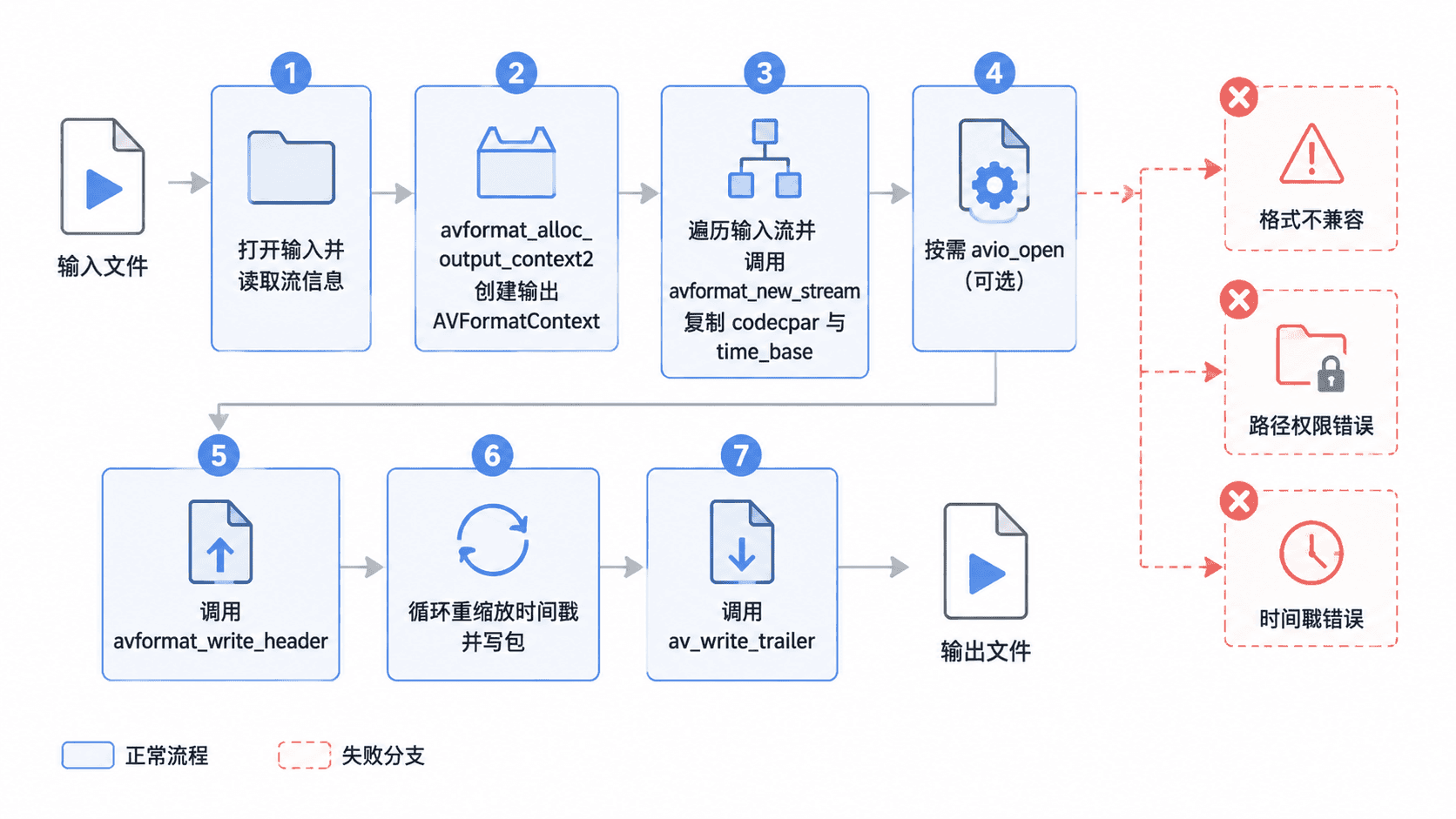
avformat_alloc_output_context2 通常根据输出文件扩展名推断复用器,例如 .mkv 对应 Matroska。avformat_new_stream 只创建流对象,不会自动复制编码参数;转封装时应调用 avcodec_parameters_copy,转码时则应从编码器上下文写回参数。
完整示例:转封装到 Matroska
下面程序保留输入中的音频、视频和字幕流,不进行解码或编码。它同时覆盖输出容器创建、写头、时间戳换算、写包和写尾,因此生成的文件可以直接验证。
#include <stdio.h>
#include <stdlib.h>
#include <libavformat/avformat.h>
#include <libavutil/error.h>
#include <libavutil/mem.h>

static void print_error(const char *stage, int errnum) {
    char message[AV_ERROR_MAX_STRING_SIZE] = {0};
    av_strerror(errnum, message, sizeof(message));
    fprintf(stderr, "%s: %s\n", stage, message);
}

int main(int argc, char **argv) {
    AVFormatContext *input_ctx = NULL;
    AVFormatContext *output_ctx = NULL;
    AVPacket *packet = NULL;
    int *stream_map = NULL;
    int output_stream_count = 0;
    int ret = 0;

    if (argc != 3) {
        fprintf(stderr, "Usage: %s <input> <output.mkv>\n", argv[0]);
        return 2;
    }

    if ((ret = avformat_open_input(&input_ctx, argv[1], NULL, NULL)) < 0) {
        print_error("open input", ret);
        return 1;
    }

    if ((ret = avformat_find_stream_info(input_ctx, NULL)) < 0) {
        print_error("read stream info", ret);
        goto cleanup;
    }

    /* 根据输出文件名选择复用器并创建输出上下文。 */
    ret = avformat_alloc_output_context2(&output_ctx, NULL, NULL, argv[2]);
    if (ret < 0 || output_ctx == NULL) {
        ret = ret < 0 ? ret : AVERROR_UNKNOWN;
        print_error("create output context", ret);
        goto cleanup;
    }

    stream_map = av_calloc(input_ctx->nb_streams, sizeof(*stream_map));
    if (stream_map == NULL) {
        ret = AVERROR(ENOMEM);
        goto cleanup;
    }

    /* 只保留常见媒体流,并建立输入流到输出流的索引映射。 */
    for (unsigned int i = 0; i < input_ctx->nb_streams; i++) {
        AVStream *input_stream = input_ctx->streams[i];
        enum AVMediaType type = input_stream->codecpar->codec_type;

        if (type != AVMEDIA_TYPE_VIDEO &&
            type != AVMEDIA_TYPE_AUDIO &&
            type != AVMEDIA_TYPE_SUBTITLE) {
            stream_map[i] = -1;
            continue;
        }

        AVStream *output_stream = avformat_new_stream(output_ctx, NULL);
        if (output_stream == NULL) {
            ret = AVERROR(ENOMEM);
            goto cleanup;
        }

        stream_map[i] = output_stream_count++;
        if ((ret = avcodec_parameters_copy(
                 output_stream->codecpar, input_stream->codecpar)) < 0) {
            print_error("copy codec parameters", ret);
            goto cleanup;
        }

        output_stream->codecpar->codec_tag = 0;
        output_stream->time_base = input_stream->time_base;
    }

    if (output_stream_count == 0) {
        ret = AVERROR_STREAM_NOT_FOUND;
        print_error("no supported stream", ret);
        goto cleanup;
    }

    /* 某些复用器自行管理 IO;普通文件复用器需要显式打开输出。 */
    if (!(output_ctx->oformat->flags & AVFMT_NOFILE)) {
        if ((ret = avio_open(&output_ctx->pb, argv[2], AVIO_FLAG_WRITE)) < 0) {
            print_error("open output", ret);
            goto cleanup;
        }
    }

    if ((ret = avformat_write_header(output_ctx, NULL)) < 0) {
        print_error("write header", ret);
        goto cleanup;
    }

    packet = av_packet_alloc();
    if (packet == NULL) {
        ret = AVERROR(ENOMEM);
        goto cleanup;
    }

    /* 写包前必须把时间戳换算到对应输出流的时间基。 */
    while ((ret = av_read_frame(input_ctx, packet)) >= 0) {
        int input_index = packet->stream_index;
        int output_index = stream_map[input_index];

        if (output_index < 0) {
            av_packet_unref(packet);
            continue;
        }

        AVStream *input_stream = input_ctx->streams[input_index];
        AVStream *output_stream = output_ctx->streams[output_index];

        av_packet_rescale_ts(
            packet, input_stream->time_base, output_stream->time_base);
        packet->stream_index = output_index;
        packet->pos = -1;

        ret = av_interleaved_write_frame(output_ctx, packet);
        av_packet_unref(packet);
        if (ret < 0) {
            print_error("write packet", ret);
            goto cleanup;
        }
    }

    if (ret != AVERROR_EOF) {
        print_error("read packet", ret);
        goto cleanup;
    }

    if ((ret = av_write_trailer(output_ctx)) < 0) {
        print_error("write trailer", ret);
        goto cleanup;
    }

    printf("Created output container: %s\n", argv[2]);
    ret = 0;

cleanup:
    av_packet_free(&packet);
    av_free(stream_map);
    if (output_ctx != NULL &&
        !(output_ctx->oformat->flags & AVFMT_NOFILE)) {
        avio_closep(&output_ctx->pb);
    }
    avformat_free_context(output_ctx);
    avformat_close_input(&input_ctx);
    return ret < 0 ? 1 : 0;
}
将代码保存为 remux.c。下面命令适用于已安装 FFmpeg 开发库和 pkg-config 的 Linux 或 macOS 环境;实际输入路径可以替换为 <PATH>。
cc remux.c -o remux $(pkg-config --cflags --libs libavformat libavcodec libavutil)
./remux input.mp4 output.mkv
ffprobe -v error -show_entries format=format_name -of default=noprint_wrappers=1:nokey=1 output.mkv
ffprobe -v error -show_entries format=nb_streams -of default=noprint_wrappers=1:nokey=1 output.mkv
预期输出
Created output container: output.mkv
matroska,webm
<STREAM_COUNT>
<STREAM_COUNT> 取决于输入文件中被保留的音频、视频和字幕流数量,实际值可能不同。编译器无警告时通常不会额外输出内容。
关键接口与边界
avformat_write_header 会检查输出流参数与复用器是否兼容。转封装可以复制输入流的 codecpar;转码时必须先配置并打开编码器,再使用 avcodec_parameters_from_context 把编码器参数写入输出流。
avio_open 只负责建立字节输出通道,不会创建媒体流。对于带 AVFMT_NOFILE 标志的复用器,例如某些网络或自管理协议,不应手动打开普通文件 IO。
写包前必须调用 av_packet_rescale_ts。输入流和输出流的时间基可能不同,直接沿用原时间戳容易触发 “non monotonically increasing DTS” 或产生播放速度异常。
常见失败与定位
write header: Invalid argument:优先检查输出后缀、编码与容器兼容性、流参数和时间基open output: Permission denied:检查目录是否存在、当前用户是否有写权限,以及目标文件是否被占用- 写包阶段出现 DTS 错误:确认每个包都按对应输入流和输出流的时间基换算,并保持正确的流索引映射
验收标准
生成的 output.mkv 应能被 ffprobe 识别为 Matroska,并保留输入中的主要音视频轨道。播放时长应与输入接近,拖动进度条后画面和声音仍能正常衔接。
本示例不重新编码,因此速度通常接近磁盘读写速度,画质和音质不会因转封装而发生有损变化。