
编码与格式 / 系统课时
发送与接收解码数据
发送与接收解码数据
本课实现 FFmpeg 解码器的标准收发循环:把压缩 AVPacket 送入解码器,反复接收已解码的 AVFrame,正确处理 EAGAIN,并在输入结束后通过空数据包排空缓存帧。
学习目标
- 掌握
avcodec_send_packet与avcodec_receive_frame的配合方式 - 理解一个数据包可能产生零帧、一帧或多帧
- 在文件结束时正确刷新解码器缓存
解码器为什么采用收发模型
现代 FFmpeg 解码 API 将“提交压缩数据”和“取出解码结果”分成两个动作。调用 avcodec_send_packet 后,必须持续调用 avcodec_receive_frame,直到返回 AVERROR(EAGAIN) 或 AVERROR_EOF。
这种设计能表达 B 帧重排序、帧线程和内部缓存:某个数据包可能暂时没有输出,也可能一次释放多个帧。因此不能假设一次发送必然对应一次接收。
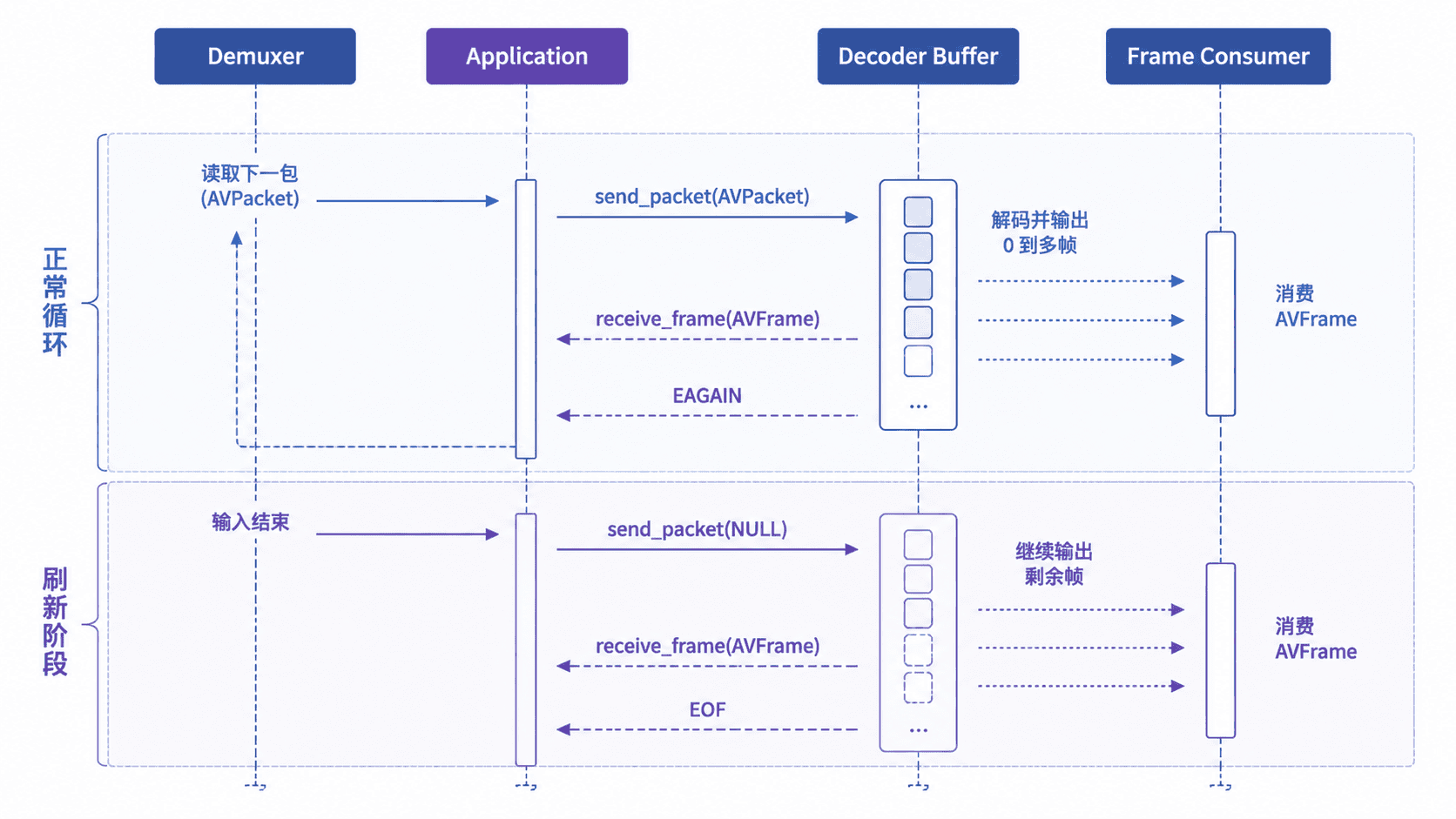
返回值与控制含义
EAGAIN 不是解码失败。发送接口返回 EAGAIN,表示还有输出帧尚未取完;接收接口返回 EAGAIN,表示当前没有更多帧,需要继续提交数据包。
| 调用结果 | 含义 | 下一步 |
|---|---|---|
0 |
本次操作成功 | 继续当前流程 |
AVERROR(EAGAIN) |
当前方向暂时无法推进 | 在发送与接收之间切换 |
AVERROR_EOF |
刷新完成,不会再有帧 | 结束解码 |
| 其他负数 | 真正的解码错误 | 记录错误并停止 |
完整视频解码示例
下面程序选择最佳视频流,创建解码器上下文,读取对应数据包并打印每个解码帧的信息。保存为 video_decoder.c,可使用 cc video_decoder.c -o video_decoder $(pkg-config --cflags --libs libavformat libavcodec libavutil) 编译。
#include <inttypes.h>
#include <stdio.h>

#include <libavcodec/avcodec.h>
#include <libavformat/avformat.h>
#include <libavutil/error.h>

static void print_error(const char *operation, int error_code) {
    char buffer[AV_ERROR_MAX_STRING_SIZE] = {0};
    av_strerror(error_code, buffer, sizeof(buffer));
    fprintf(stderr, "%s failed: %s\n", operation, buffer);
}

static int receive_frames(AVCodecContext *decoder_context,
                          AVFrame *frame,
                          int64_t *frame_count) {
    while (1) {
        int result = avcodec_receive_frame(decoder_context, frame);
        if (result == AVERROR(EAGAIN) || result == AVERROR_EOF) {
            return result;
        }
        if (result < 0) {
            return result;
        }

        (*frame_count)++;
        printf("frame=%" PRId64 " pts=%" PRId64
               " size=%dx%d format=%d\n",
               *frame_count,
               frame->pts,
               frame->width,
               frame->height,
               frame->format);

        // 释放当前帧引用,保留 AVFrame 对象供下一次接收复用。
        av_frame_unref(frame);
    }
}

int main(int argc, char **argv) {
    if (argc != 2) {
        fprintf(stderr, "Usage: %s <media-file>\n", argv[0]);
        return 1;
    }

    AVFormatContext *format_context = NULL;
    AVCodecContext *decoder_context = NULL;
    AVPacket *packet = NULL;
    AVFrame *frame = NULL;
    const AVCodec *decoder = NULL;

    int64_t frame_count = 0;
    int result = avformat_open_input(&format_context, argv[1], NULL, NULL);
    if (result < 0) {
        print_error("avformat_open_input", result);
        return 1;
    }

    result = avformat_find_stream_info(format_context, NULL);
    if (result < 0) {
        print_error("avformat_find_stream_info", result);
        goto cleanup;
    }

    int video_stream_index = av_find_best_stream(
        format_context, AVMEDIA_TYPE_VIDEO, -1, -1, &decoder, 0);
    if (video_stream_index < 0) {
        print_error("av_find_best_stream", video_stream_index);
        result = video_stream_index;
        goto cleanup;
    }

    decoder_context = avcodec_alloc_context3(decoder);
    if (decoder_context == NULL) {
        result = AVERROR(ENOMEM);
        goto cleanup;
    }

    result = avcodec_parameters_to_context(
        decoder_context,
        format_context->streams[video_stream_index]->codecpar);
    if (result < 0) {
        print_error("avcodec_parameters_to_context", result);
        goto cleanup;
    }

    result = avcodec_open2(decoder_context, decoder, NULL);
    if (result < 0) {
        print_error("avcodec_open2", result);
        goto cleanup;
    }

    packet = av_packet_alloc();
    frame = av_frame_alloc();
    if (packet == NULL || frame == NULL) {
        result = AVERROR(ENOMEM);
        goto cleanup;
    }

    while ((result = av_read_frame(format_context, packet)) >= 0) {
        if (packet->stream_index == video_stream_index) {
            result = avcodec_send_packet(decoder_context, packet);
            if (result < 0) {
                print_error("avcodec_send_packet", result);
                av_packet_unref(packet);
                goto cleanup;
            }

            result = receive_frames(decoder_context, frame, &frame_count);
            if (result < 0 && result != AVERROR(EAGAIN)) {
                print_error("avcodec_receive_frame", result);
                av_packet_unref(packet);
                goto cleanup;
            }
        }

        av_packet_unref(packet);
    }

    if (result != AVERROR_EOF) {
        print_error("av_read_frame", result);
        goto cleanup;
    }

    // 发送 NULL 数据包,通知解码器输入结束并排出缓存帧。
    result = avcodec_send_packet(decoder_context, NULL);
    if (result < 0 && result != AVERROR_EOF) {
        print_error("flush avcodec_send_packet", result);
        goto cleanup;
    }

    result = receive_frames(decoder_context, frame, &frame_count);
    if (result < 0 && result != AVERROR_EOF) {
        print_error("flush avcodec_receive_frame", result);
        goto cleanup;
    }

    result = 0;

cleanup:
    av_frame_free(&frame);
    av_packet_free(&packet);
    avcodec_free_context(&decoder_context);
    avformat_close_input(&format_context);
    return result < 0 ? 1 : 0;
}
预期输出
frame=<ID> pts=<PTS> size=<WIDTH>x<HEIGHT> format=<PIXEL_FORMAT_ID>
frame=<ID> pts=<PTS> size=<WIDTH>x<HEIGHT> format=<PIXEL_FORMAT_ID>
frame=<ID> pts=<PTS> size=<WIDTH>x<HEIGHT> format=<PIXEL_FORMAT_ID><ID>、<PTS>、分辨率和像素格式编号取决于输入文件。若视频包含重排序帧,最先发送的数据包可能不会立即产生输出,但文件末尾刷新后应补齐剩余帧。
正常循环与刷新阶段
正常阶段的固定顺序是“发送一个目标流数据包,接收直到 EAGAIN,再读取下一包”。每次成功接收一帧后,应立即处理或复制其数据,然后调用 av_frame_unref 复用帧对象。
当 av_read_frame 返回 AVERROR_EOF 时,仍可能有帧留在解码器中。此时只发送一次 NULL 数据包,再持续接收,直到 avcodec_receive_frame 返回 AVERROR_EOF。省略刷新会导致视频尾部帧数不足。
音频解码使用同一套收发流程,只是输出帧关注 sample_rate、ch_layout、nb_samples 和采样格式,而不是宽高与像素格式。
常见错误与修复
不要在每次 receive_frame 返回 EAGAIN 时重复发送同一个数据包,否则可能造成重复提交。正确做法是确认当前数据包已成功发送,然后读取下一包。
不要把 EAGAIN 当成致命错误,也不要只接收一次帧。循环接收是处理多帧输出和内部缓存的关键。若发送接口意外返回 EAGAIN,说明上一次输出没有排空,应先继续接收。