
流媒体与实时通信 / 系统课时
建立最小双端语音通话
建立最小双端语音通话
这一节直接跑通双端语音:两个页面分别采集麦克风,通过极简 WebSocket 信令交换 Offer、Answer 与 ICE candidate,并在远端 track 事件中播放音频,形成可验证的端到端闭环。
学习目标
- 串起采集、SDP Offer/Answer、ICE candidate 交换和远端播放的完整顺序。
- 用最小信令服务转发协商消息,而不把信令协议和媒体传输混为一谈。
- 根据
connectionState与远端track事件判断链路卡在哪一层。
最小通话需要哪些角色
双端通话至少同时存在四类对象:浏览器 A、浏览器 B、信令通道和两端各自的 RTCPeerConnection。信令服务只负责把 SDP 与 ICE 消息转发给对端,真正的音频数据建立连接后由 WebRTC 媒体链路传输。
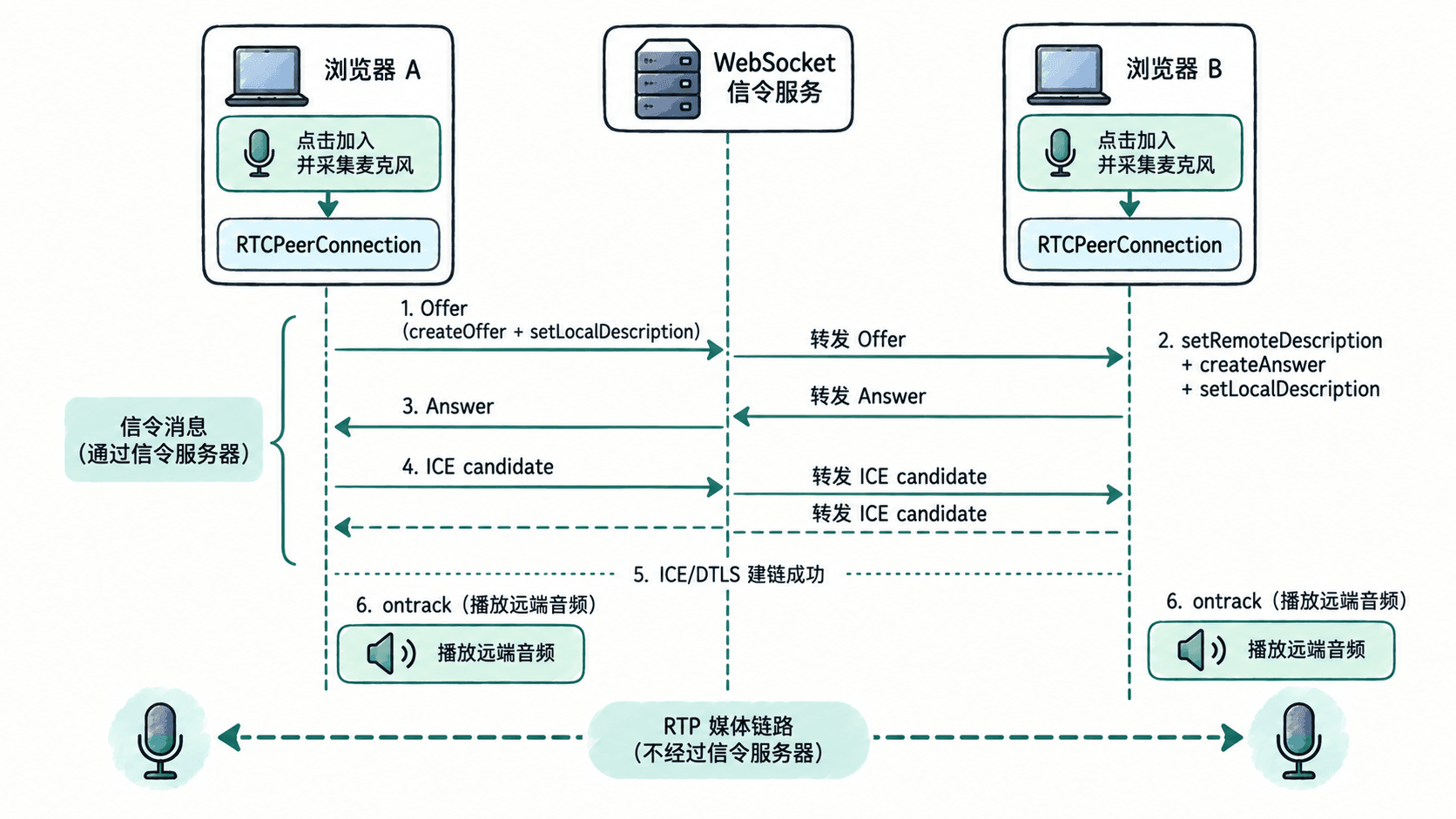
Offer/Answer 解决“双方准备发送和接收什么媒体”,ICE candidate 解决“网络上从哪里互相到达”。这两条线缺一不可:SDP 成功不代表网络已通,ICE 有候选地址也不代表双方已经接受彼此的媒体描述。
搭一个只负责转发的信令服务
下面服务最多接入两个客户端。第一个客户端作为 caller;第二个加入后,服务通知 caller 开始创建 Offer。其他消息全部原样转发给另一端。项目目录同时放置 server.js 与后面的 index.html,并安装 ws 依赖。
const http = require("http");
const fs = require("fs");
const path = require("path");
const { WebSocketServer, WebSocket } = require("ws");

const htmlPath = path.join(__dirname, "index.html");

const server = http.createServer((req, res) => {
  if (req.url !== "/") {
    res.writeHead(404);
    res.end("Not Found");
    return;
  }

  res.writeHead(200, { "Content-Type": "text/html; charset=utf-8" });
  fs.createReadStream(htmlPath).pipe(res);
});

const wss = new WebSocketServer({ server });
const peers = [];

wss.on("connection", (ws) => {
  if (peers.length >= 2) {
    ws.close(1013, "room full");
    return;
  }

  peers.push(ws);
  const role = peers.length === 1 ? "caller" : "callee";
  ws.send(JSON.stringify({ type: "role", role }));

  // 第二个客户端就绪后,才让 caller 创建 Offer。
  if (peers.length === 2) {
    peers[0].send(JSON.stringify({ type: "ready" }));
  }

  ws.on("message", (data) => {
    for (const peer of peers) {
      if (peer !== ws && peer.readyState === WebSocket.OPEN) {
        peer.send(data.toString());
      }
    }
  });

  ws.on("close", () => {
    const index = peers.indexOf(ws);
    if (index >= 0) {
      peers.splice(index, 1);
    }
  });
});

server.listen(8080, () => {
  console.log("open http://localhost:8080 in two tabs");
});
预期输出
open http://localhost:8080 in two tabs这里没有房间管理、鉴权、重连或消息持久化,因为这些都不是“跑通第一条语音链路”的必要条件。任一标签页关闭后,为避免角色错位,测试时直接刷新两个标签页重新开始。
在浏览器完成协商与远端播放
保存下面页面为 index.html。点击按钮时先采集麦克风并把音轨加入 RTCPeerConnection,再连接信令服务。收到 Offer 时先设置远端描述再创建 Answer;ICE candidate 如果早于远端描述到达,就先排队,避免 addIceCandidate() 时序错误。
<!doctype html>
<html lang="zh-CN">
<meta charset="utf-8">
<title>Minimal WebRTC Audio Call</title>
<button id="join">加入通话</button>
<p id="status">idle</p>
<audio id="remote" autoplay controls playsinline></audio>
<script>
const joinButton = document.querySelector("#join");
const statusEl = document.querySelector("#status");
const remoteAudio = document.querySelector("#remote");

let pc;
let socket;
const pendingCandidates = [];

joinButton.addEventListener("click", async () => {
  joinButton.disabled = true;

  const stream = await navigator.mediaDevices.getUserMedia({ audio: true });
  pc = new RTCPeerConnection();

  // 两端都发送自己的麦克风轨道,因此这是一条双向语音链路。
  stream.getTracks().forEach((track) => pc.addTrack(track, stream));

  pc.ontrack = (event) => {
    remoteAudio.srcObject = event.streams[0];
    remoteAudio.play().catch(() => {
      statusEl.textContent = "connected;请手动播放远端音频";
    });
  };

  pc.onicecandidate = ({ candidate }) => {
    if (candidate && socket?.readyState === WebSocket.OPEN) {
      socket.send(JSON.stringify({ type: "candidate", candidate }));
    }
  };

  pc.onconnectionstatechange = () => {
    statusEl.textContent = pc.connectionState;
  };

  socket = new WebSocket(`ws://${location.host}`);

  socket.onmessage = async ({ data }) => {
    const message = JSON.parse(data);

    if (message.type === "role") {
      statusEl.textContent = `joined as ${message.role}`;
      return;
    }

    if (message.type === "ready") {
      const offer = await pc.createOffer();
      await pc.setLocalDescription(offer);
      socket.send(JSON.stringify({
        type: "description",
        description: pc.localDescription
      }));
      return;
    }

    if (message.type === "description") {
      await pc.setRemoteDescription(message.description);

      while (pendingCandidates.length > 0) {
        await pc.addIceCandidate(pendingCandidates.shift());
      }

      if (message.description.type === "offer") {
        const answer = await pc.createAnswer();
        await pc.setLocalDescription(answer);
        socket.send(JSON.stringify({
          type: "description",
          description: pc.localDescription
        }));
      }
      return;
    }

    if (message.type === "candidate") {
      if (pc.remoteDescription) {
        await pc.addIceCandidate(message.candidate);
      } else {
        pendingCandidates.push(message.candidate);
      }
    }
  };
});
</script>
</html>
预期结果
两个标签页都允许麦克风权限并点击“加入通话”后,状态最终进入 connected。
每个标签页的远端 audio 元素收到对方音轨并可播放声音。
若浏览器阻止自动播放,可手动点击 audio 控件播放。
用耳机测试,避免同一台机器的扬声器声音再次被麦克风采集形成回声。该示例使用 localhost,不依赖公网 STUN/TURN;它的目的只是验证协商、ICE 和媒体事件能闭环,不代表跨 NAT 的生产网络一定可连通。
按层定位通话为什么不出声
先看 connectionState。如果长时间停在 connecting 或进入 failed,优先检查 ICE candidate 是否双向到达;如果状态已经是 connected,再看 ontrack 是否触发和 event.streams[0] 是否被绑定到 <audio>。
如果 Offer 已发送但对端从未产生 Answer,问题在信令或远端 setRemoteDescription() 之前;如果双方 SDP 都设置成功却没有 candidate,问题在 ICE 收集或转发;如果 ontrack 已触发但听不到声音,则继续检查浏览器自动播放策略、轨道是否 enabled、系统输入设备和音量。