
流媒体与实时通信 / 系统课时
getStats 里先看哪些音频指标
getStats 里先看哪些音频指标
排查 WebRTC 音频时,先别把 getStats() 的所有字段都打印出来。更有效的做法是沿着音频 RTP、编解码器和已选 ICE 链路逐层查看,先确认“收发是否正常、使用什么 codec、当前走哪条网络路径”,再进入细节指标。
学习目标
- 能从
RTCStatsReport中定位音频inbound-rtp、outbound-rtp、codec与当前candidate-pair - 能区分收包、发包、编解码和网络路径指标各自回答的问题
- 能写出一段可复用的统计采样代码,而不是依赖浏览器调试页人工查找
先沿对象关系找对统计
getStats() 返回的是一组彼此通过 ID 关联的统计对象。对音频排障最常用的关系是:RTP 统计通过 codecId 指向 codec,通过 transportId 指向 transport,再由 transport.selectedCandidatePairId 找到当前实际使用的 candidate-pair。
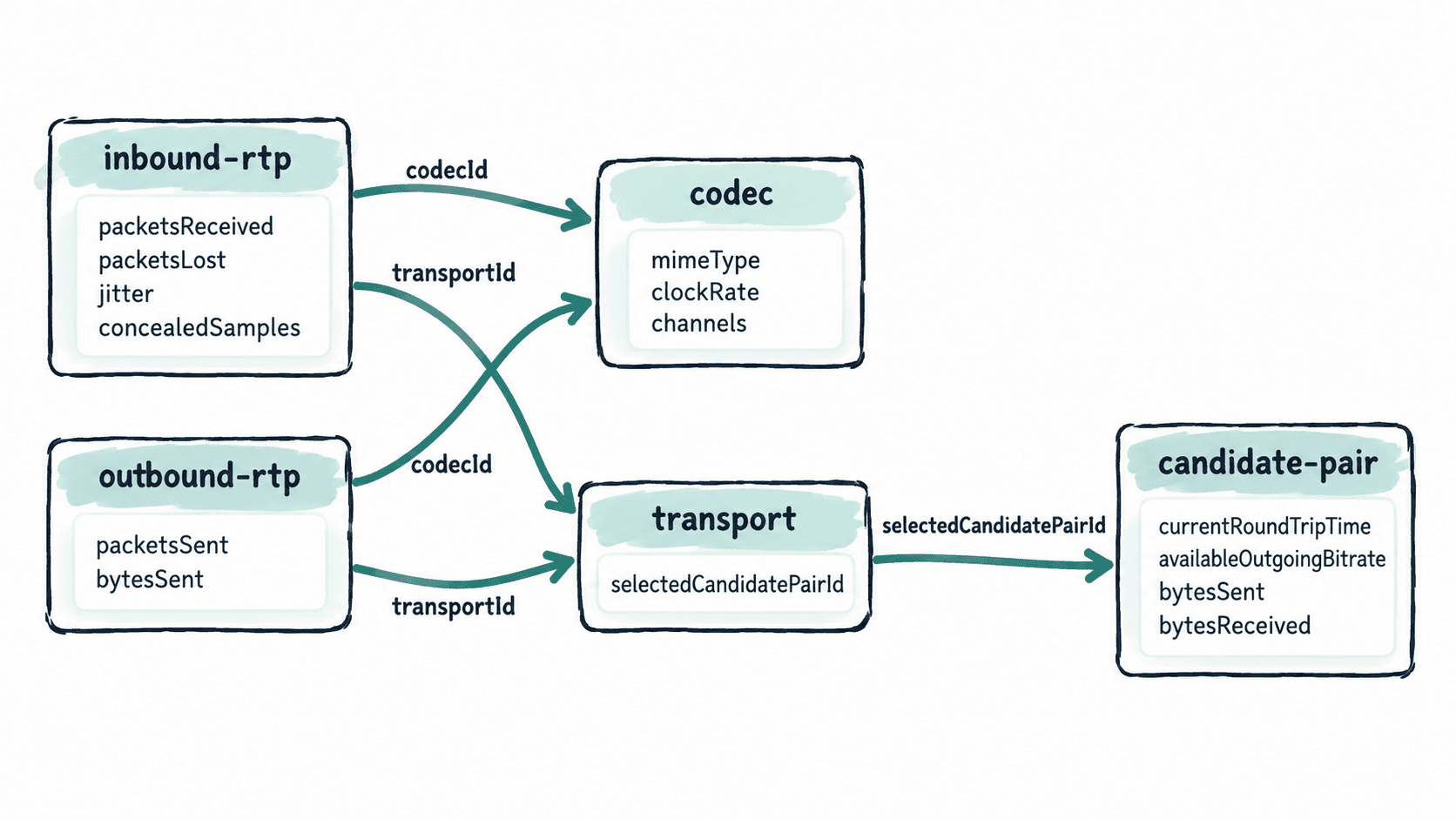
先用 kind === "audio" 过滤 RTP 对象,否则同一个 PeerConnection 里的视频流也会混进来。随后再沿 ID 找关联对象,比按 type 全局抓“第一个对象”更稳妥,因为一个连接可能存在多路媒体或多个 transport。
第一轮优先看四组指标
| 统计类型 | 优先字段 | 先回答的问题 |
|---|---|---|
inbound-rtp |
packetsReceived、packetsLost、jitter、concealedSamples、totalSamplesReceived |
远端音频是否持续到达,是否丢包、抖动或触发丢失隐藏 |
outbound-rtp |
packetsSent、bytesSent、codecId |
本端是否持续发送音频,发送计数是否增长 |
codec |
mimeType、clockRate、channels |
实际协商并使用了什么音频编码参数 |
candidate-pair |
currentRoundTripTime、availableOutgoingBitrate、bytesSent、bytesReceived |
当前实际网络路径的 RTT、可用发送带宽和数据流量是否正常 |
jitter 和 currentRoundTripTime 的单位都是秒,展示给人看时通常乘以 1000 转成毫秒。jitterBufferDelay / jitterBufferEmittedCount 可以估算已输出样本经历的平均抖动缓冲等待时间,但这些字段在不同浏览器或会话状态下可能缺失,代码应先判断是否存在。
在现有 PeerConnection 中打印关键指标
片段示例:下面代码依赖业务页面中已经建立的 RTCPeerConnection 实例 pc。它先锁定音频 RTP,再沿 codecId、transportId 和 selectedCandidatePairId 输出关联统计。
async function inspectAudioStats(pc) {
  const report = await pc.getStats();
  const inbound = [];
  const outbound = [];
  const selectedPairIds = new Set();

  for (const stat of report.values()) {
    const isAudioRtp =
      (stat.type === "inbound-rtp" || stat.type === "outbound-rtp") &&
      stat.kind === "audio";

    if (!isAudioRtp) continue;

    const codec = stat.codecId ? report.get(stat.codecId) : null;
    const transport = stat.transportId ? report.get(stat.transportId) : null;

    if (transport?.selectedCandidatePairId) {
      selectedPairIds.add(transport.selectedCandidatePairId);
    }

    if (stat.type === "inbound-rtp") {
      const emitted = stat.jitterBufferEmittedCount ?? 0;
      inbound.push({
        id: stat.id,
        packetsReceived: stat.packetsReceived,
        packetsLost: stat.packetsLost,
        jitterMs: stat.jitter == null ? null : stat.jitter * 1000,
        concealedSamples: stat.concealedSamples ?? null,
        avgJitterBufferMs:
          emitted > 0 && stat.jitterBufferDelay != null
            ? (stat.jitterBufferDelay / emitted) * 1000
            : null,
        codec: codec
          ? {
              mimeType: codec.mimeType,
              clockRate: codec.clockRate,
              channels: codec.channels ?? null
            }
          : null
      });
    } else {
      outbound.push({
        id: stat.id,
        packetsSent: stat.packetsSent,
        bytesSent: stat.bytesSent,
        codec: codec
          ? {
              mimeType: codec.mimeType,
              clockRate: codec.clockRate,
              channels: codec.channels ?? null
            }
          : null
      });
    }
  }

  const selectedCandidatePairs = [...selectedPairIds]
    .map((id) => report.get(id))
    .filter(Boolean)
    .map((pair) => ({
      id: pair.id,
      state: pair.state,
      currentRoundTripTimeMs:
        pair.currentRoundTripTime == null
          ? null
          : pair.currentRoundTripTime * 1000,
      availableOutgoingBitrate: pair.availableOutgoingBitrate ?? null,
      bytesSent: pair.bytesSent,
      bytesReceived: pair.bytesReceived
    }));

  const result = { inbound, outbound, selectedCandidatePairs };
  console.log(JSON.stringify(result, null, 2));
  return result;
}

inspectAudioStats(pc).catch(console.error);
预期输出(示意,实际 ID、计数、RTT 和带宽会随通话变化):
{
  "inbound": [
    {
      "id": "<ID>",
      "packetsReceived": "<COUNT>",
      "packetsLost": "<COUNT>",
      "jitterMs": "<MS>",
      "concealedSamples": "<COUNT>",
      "avgJitterBufferMs": "<MS>",
      "codec": {
        "mimeType": "audio/opus",
        "clockRate": 48000,
        "channels": 2
      }
    }
  ],
  "outbound": [
    {
      "id": "<ID>",
      "packetsSent": "<COUNT>",
      "bytesSent": "<BYTES>",
      "codec": {
        "mimeType": "audio/opus",
        "clockRate": 48000,
        "channels": 2
      }
    }
  ],
  "selectedCandidatePairs": [
    {
      "id": "<ID>",
      "state": "succeeded",
      "currentRoundTripTimeMs": "<MS>",
      "availableOutgoingBitrate": "<BPS>",
      "bytesSent": "<BYTES>",
      "bytesReceived": "<BYTES>"
    }
  ]
}
如果 outbound-rtp.packetsSent 持续增长而远端仍听不到声音,问题不一定在“没发包”,下一步应看远端接收统计、codec 是否一致以及音频播放链路。若 inbound-rtp 的丢包、抖动或隐藏样本同时恶化,再把排查重点转向网络质量和抖动缓冲,而不是继续盯单个累计字段。