
容器与云原生 / 系统课时
理解跨 Namespace 路由
理解跨 Namespace 路由
Gateway API 可以让 Gateway、HTTPRoute 与后端 Service 分属不同 Namespace,但跨边界不是一次授权就能完成。本课沿用一条主示例,分别配置 Route 挂载授权与后端引用授权,并用状态条件确认问题出在哪一道边界。
学习目标
- 区分
allowedRoutes与ReferenceGrant分别控制的跨 Namespace 边界 - 配置其他 Namespace 的 HTTPRoute 挂载到 Gateway
- 授权 HTTPRoute 引用另一 Namespace 的 Service,并根据状态定位失败点
两种跨 Namespace 行为
跨 Namespace 路由包含两种独立关系。HTTPRoute 能否挂载到某个 Gateway,由 Gateway Listener 的 allowedRoutes 控制;HTTPRoute 能否把 backendRefs 指向其他 Namespace 的 Service,则由目标 Namespace 中的 ReferenceGrant 授权。
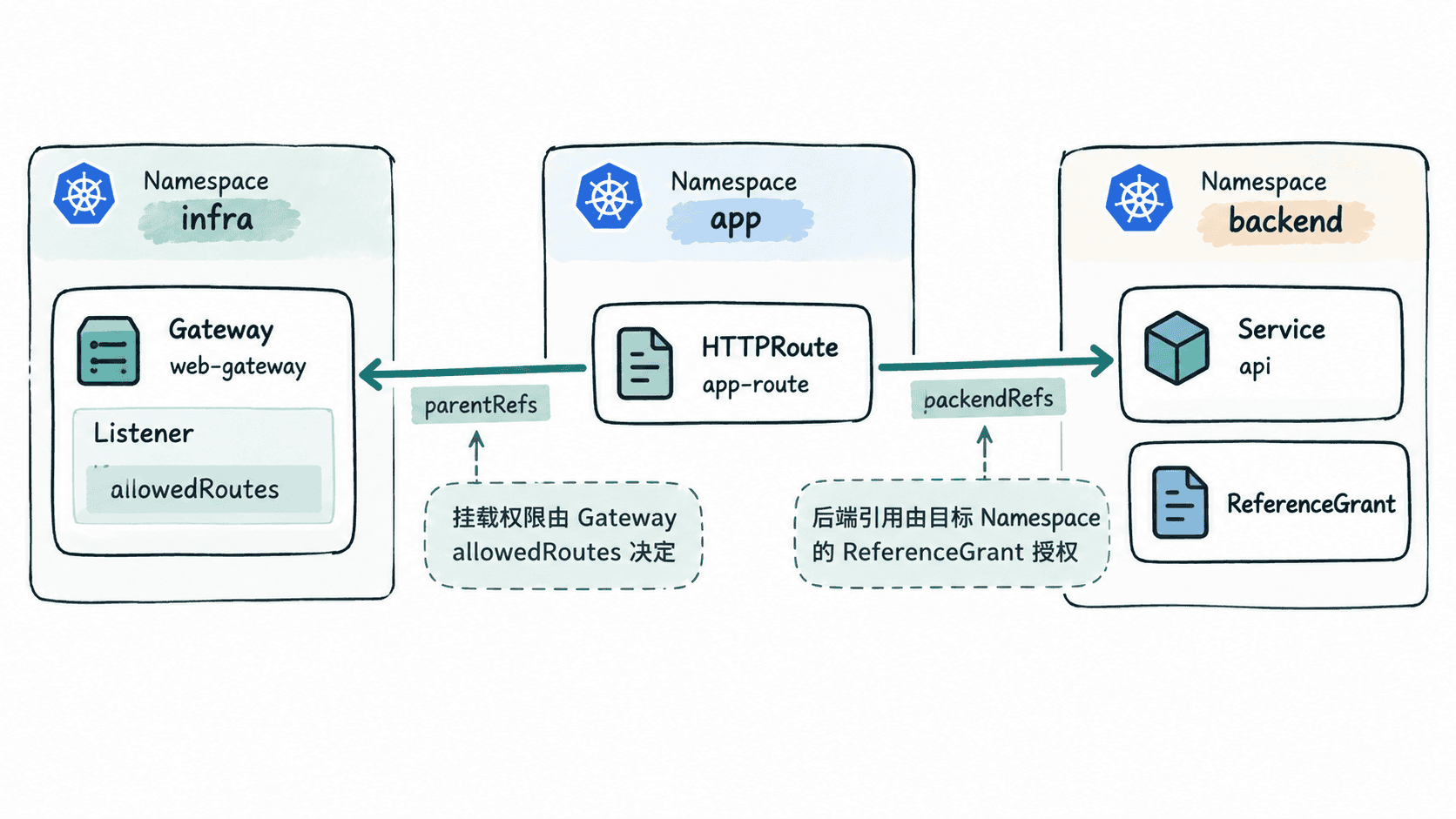
这两个机制不能互相替代。即使 infra/web-gateway 已允许 app Namespace 的 Route 挂载,如果 app/app-route 引用了 backend/api 而 backend 没有授予该引用,后端引用仍会失败;反过来,存在 ReferenceGrant 也不会绕过 Listener 的挂载限制。
确认 ReferenceGrant 资源版本
从 Gateway API v1.5 起,ReferenceGrant 已提供 gateway.networking.k8s.io/v1,当前 Standard Channel 的新配置应优先使用 v1。部分旧版 CRD 仍可能只提供 v1beta1,因此复制配置前先确认集群实际 serve 的版本:
kubectl get crd referencegrants.gateway.networking.k8s.io \
  -o jsonpath='{.spec.versions[?(@.name=="v1")].served}{"\n"}'
预期输出(CRD 提供 v1 时):
true如果没有输出 true,先核对已安装 Gateway API CRD 的版本,以及 Gateway 控制器声明支持的 Gateway API 版本或兼容矩阵。不要只把主示例中的 v1 临时改成 v1beta1 后继续,因为 API Server 能接受某个版本,并不等于当前控制器与整套 CRD 组合已经按该版本验证。
配置跨 Namespace 挂载与后端授权
假设 infra、app、backend 三个 Namespace 已存在,backend/api Service 已暴露 8080 端口。先给 app Namespace 添加 Listener 选择器要求的标签,并立即读回验证:
kubectl label namespace app gateway-access=shared --overwrite >/dev/null
kubectl get namespace app -o jsonpath='{.metadata.labels.gateway-access}{"\n"}'
预期输出:
shared下面是一组完整的跨 Namespace 路由配置。Gateway 的 allowedRoutes 只允许带指定 Namespace 标签的 Route 挂载;HTTPRoute 通过 parentRefs.namespace 指向 infra/web-gateway,通过 backendRefs.namespace 指向 backend/api;ReferenceGrant 必须创建在被引用资源所在的 backend Namespace。
apiVersion: gateway.networking.k8s.io/v1
kind: Gateway
metadata:
  name: web-gateway
  namespace: infra
spec:
  gatewayClassName: <GATEWAY_CLASS>
  listeners:
    - name: http
      protocol: HTTP
      port: 80
      allowedRoutes:
        namespaces:
          from: Selector
          selector:
            matchLabels:
              gateway-access: shared
---
apiVersion: gateway.networking.k8s.io/v1
kind: HTTPRoute
metadata:
  name: app-route
  namespace: app
spec:
  parentRefs:
    - name: web-gateway
      namespace: infra
  rules:
    - backendRefs:
        - name: api
          namespace: backend
          port: 8080
---
apiVersion: gateway.networking.k8s.io/v1
kind: ReferenceGrant
metadata:
  name: allow-app-route-to-api
  namespace: backend
spec:
  from:
    - group: gateway.networking.k8s.io
      kind: HTTPRoute
      namespace: app
  to:
    - group: ""
      kind: Service
      name: api
将配置保存为 cross-namespace-route.yaml,把 <GATEWAY_CLASS> 替换为集群中实际存在的 GatewayClass 后应用:
kubectl apply -f cross-namespace-route.yaml首次创建时预期输出:
gateway.gateway.networking.k8s.io/web-gateway created
httproute.gateway.networking.k8s.io/app-route created
referencegrant.gateway.networking.k8s.io/allow-app-route-to-api created
这里的 ReferenceGrant 允许 app Namespace 中的 HTTPRoute 引用 backend Namespace 里的 api Service。from 不能继续按 Route 名称收窄,但 to.name 可以把目标限制为单个 Service,因此比授权该 Namespace 中的全部 Service 更符合最小权限原则。
验证状态并定位失败边界
应用资源后分别读取 Accepted 与 ResolvedRefs。前者主要反映 Route 是否成功挂载到目标 Gateway,后者反映后端等对象引用是否成功解析:
kubectl get httproute app-route -n app \
  -o jsonpath='{range .status.parents[*].conditions[?(@.type=="Accepted")]}Accepted={.status}{"\n"}{end}{range .status.parents[*].conditions[?(@.type=="ResolvedRefs")]}ResolvedRefs={.status}{"\n"}{end}'
当挂载授权、Service、端口和 ReferenceGrant 都有效时,预期输出:
Accepted=True
ResolvedRefs=True
如果 Accepted=False,优先检查 parentRefs、Listener 的 allowedRoutes 以及 app Namespace 标签;如果 Accepted=True 但 ResolvedRefs=False,重点检查 backendRefs 的 Namespace、Service 名称与端口,以及 backend Namespace 中的 ReferenceGrant。按这两个状态分层判断,就能直接区分“Route 无权挂载”和“Route 无权或无法解析跨 Namespace 后端”两类问题。