
音频开发 / 系统课时
用压缩器控制动态范围
用压缩器控制动态范围
这一节用 DynamicsCompressorNode 把忽大忽小的输入压到更稳定的范围,并把阈值、比率、Attack 与 Release 放进同一条可运行链路里观察。完成后你能判断压缩器该放在播放链的什么位置,以及参数变化会带来怎样的动态表现。
学习目标
- 理解阈值、比率、Attack 与 Release 分别控制什么。
- 配置
DynamicsCompressorNode并验证它已经进入播放链。 - 判断压缩器适合解决的电平问题,以及它不能替代什么。
压缩器实际在控制什么
压缩器只在信号超过阈值后明显工作。threshold 决定从多大电平开始压缩,ratio 决定超过阈值后的增长速度;attack 决定压缩介入有多快,release 决定信号回落后多久逐步松开。
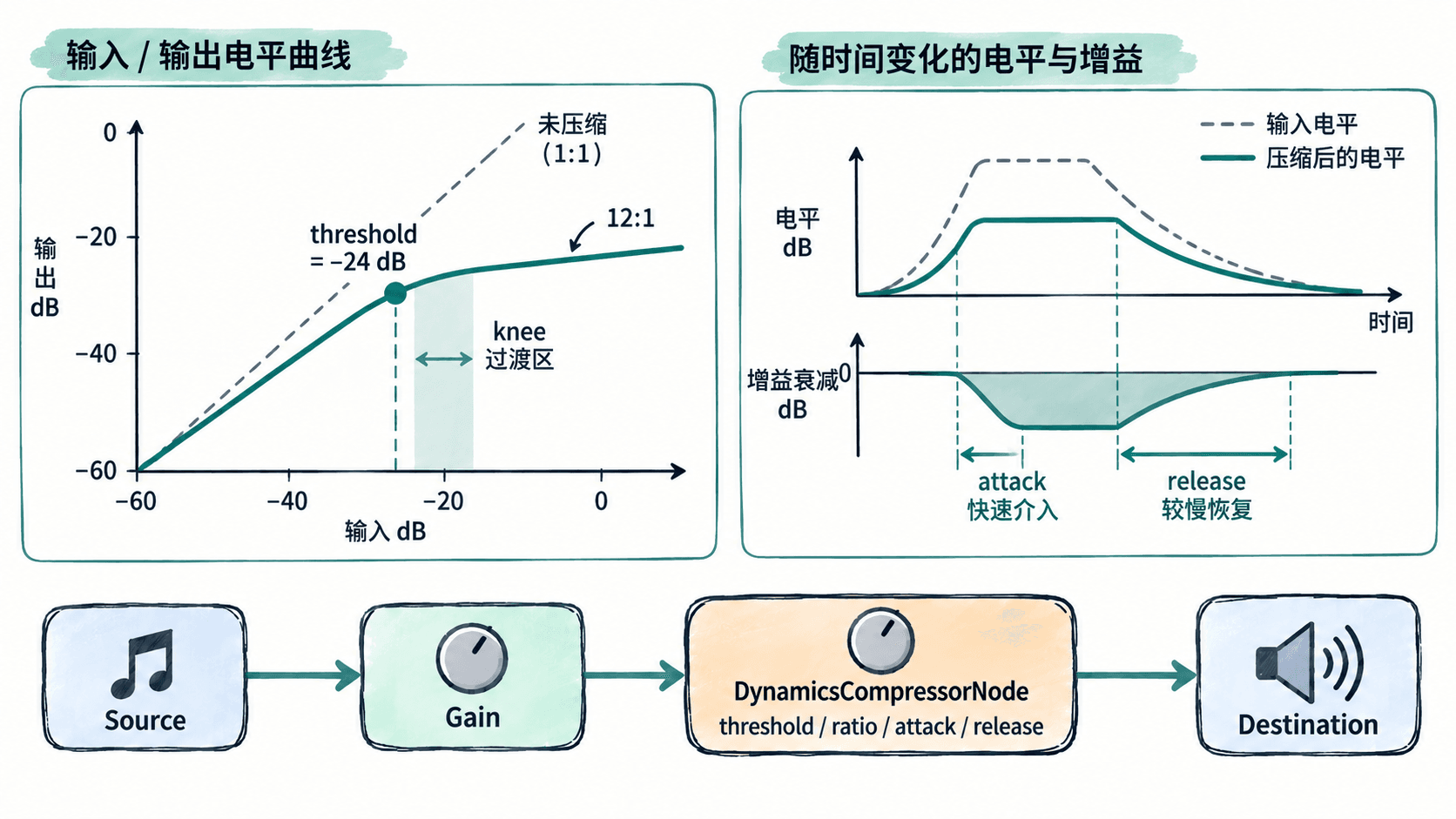
阈值和比率决定“压多少”,Attack 与 Release 决定“多快压、多久放开”。参数不是越激进越好:过短 Attack 会削弱瞬态,过长 Release 可能让后续声音一直处于被压状态。
配置一条可听见的压缩链
下面示例让输入增益在较小和较大两个电平之间交替,再经过压缩器输出。保存为 compressor-demo.html 后在浏览器打开。
<!doctype html>
<html lang="zh-CN">
<meta charset="utf-8">
<title>DynamicsCompressorNode Demo</title>
<button id="start">开始</button>
<button id="stop">停止</button>
<script>
let ctx = null;
let osc = null;
let timer = null;

document.querySelector("#start").addEventListener("click", async () => {
  if (ctx) return;

  ctx = new AudioContext();
  await ctx.resume();

  osc = new OscillatorNode(ctx, { type: "sine", frequency: 220 });
  const inputGain = new GainNode(ctx, { gain: 0.08 });
  const compressor = new DynamicsCompressorNode(ctx);
  const master = new GainNode(ctx, { gain: 0.08 });

  compressor.threshold.value = -24;
  compressor.knee.value = 30;
  compressor.ratio.value = 12;
  compressor.attack.value = 0.003;
  compressor.release.value = 0.25;

  osc.connect(inputGain);
  inputGain.connect(compressor);
  compressor.connect(master);
  master.connect(ctx.destination);

  // 交替制造较小与较大的输入电平,便于听出动态被压平。
  let high = false;
  timer = setInterval(() => {
    high = !high;
    inputGain.gain.setTargetAtTime(
      high ? 0.9 : 0.08,
      ctx.currentTime,
      0.01
    );
  }, 1000);

  osc.start();
  console.log("Compressor demo started: threshold=-24dB ratio=12:1");
});

document.querySelector("#stop").addEventListener("click", async () => {
  if (!ctx) return;
  clearInterval(timer);
  osc.stop();
  await ctx.close();
  ctx = null;
  osc = null;
  timer = null;
});
</script>
</html>
预期输出
Compressor demo started: threshold=-24dB ratio=12:1启动后,输入每秒在两个电平之间切换。较大的那一档会更明显地触发压缩,因此输出的响度差距会小于未压缩时;具体听感会随设备音量和浏览器实现略有差异。
四个关键参数怎么配合
threshold 越低,越多信号进入压缩区;ratio 越大,超过阈值后的电平增长越慢。两者共同决定压缩量,所以调整比率时应同时观察阈值是否让压缩器长期处于工作状态。
attack 很短时,峰值会更快被抓住,适合控制突发尖峰,但可能削弱打击感;较长 Attack 会保留更多瞬态。release 太短可能产生明显的“呼吸感”,太长则会让压缩持续覆盖后续声音。
压缩器放在播放链的什么位置
若目标是控制最终播放电平,常见位置是各类音源和效果汇合之后、总输出增益之前,例如“音源与效果 → 压缩器 → Master Gain → destination”。这样压缩器看到的是组合后的峰值,更容易统一控制整体动态。
如果只想压某一路人声或某个乐器,就把压缩器放在该分支内部,不要让其他声源一起经过。压缩器也不是硬限制器:它能缩小动态范围,却不能保证任何输入都绝不会超过某个峰值,因此最终输出仍需要合理的增益结构和足够余量。