
Web 图形与 3D / 系统课时
为角色实例分配独立 Mixer
为角色实例分配独立 Mixer
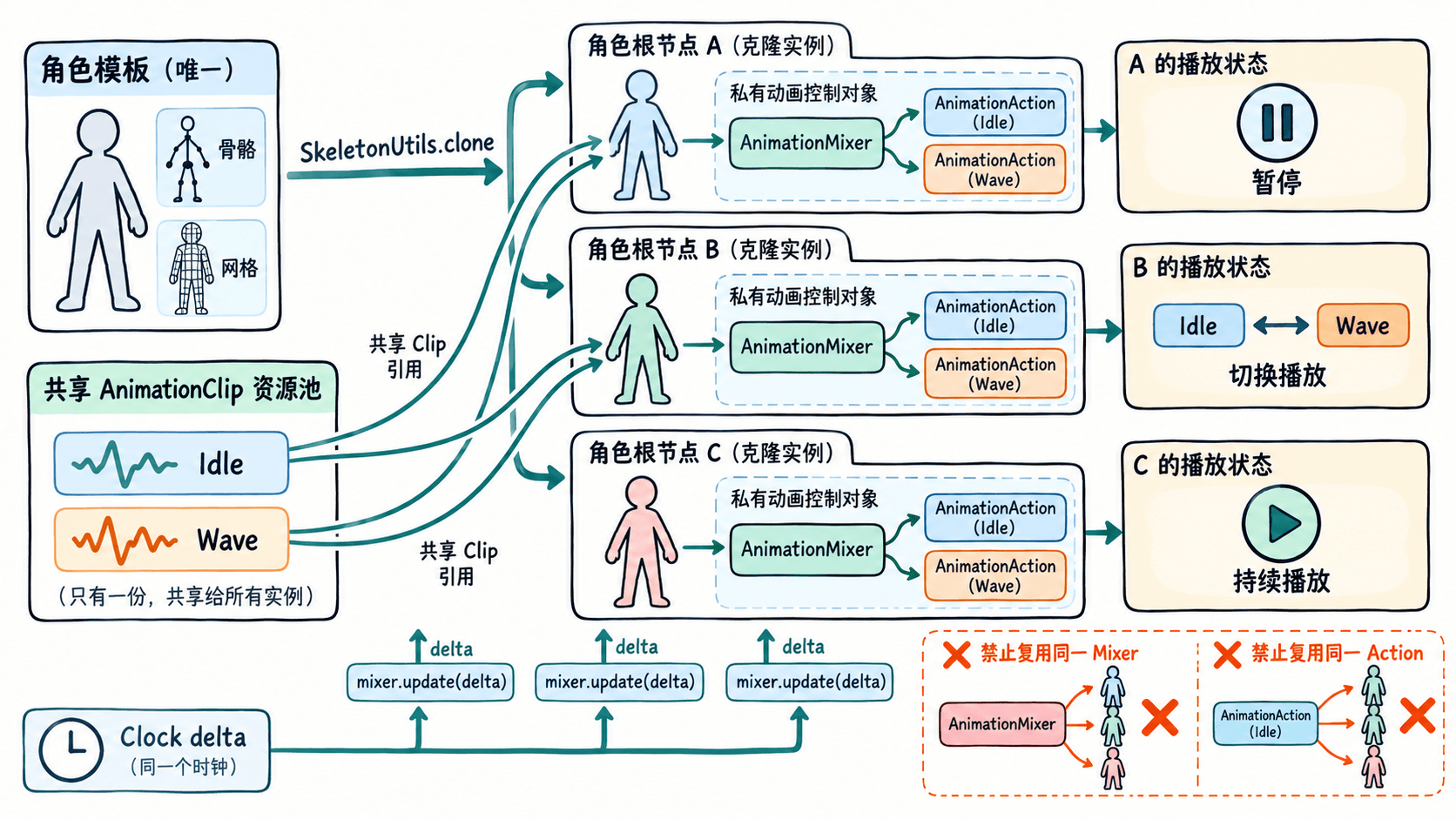
多个克隆角色可以复用同一份动画关键帧,却需要各自管理播放时间、暂停状态和动作切换。本课用三个无需外部模型的角色验证:共享 AnimationClip 不会导致 AnimationMixer 与 AnimationAction 串扰。
学习目标
- 区分可共享的 AnimationClip 与必须按实例创建的 Mixer、Action。
- 用统一帧间隔更新多个 Mixer,并独立暂停、切换动作。
- 验证实例隔离并在移除角色时清理动画绑定。
划清资源与播放状态的边界
AnimationClip 保存轨道和关键帧,可让所有同骨架、同节点命名的角色复用;但播放时间、权重与暂停状态分别属于 AnimationAction,其调度由 AnimationMixer 管理。每个角色使用 new THREE.AnimationMixer(克隆根节点),再在自己的 Mixer 上调用 clipAction(共享Clip)。
含 SkinnedMesh 的 GLB 角色应从包含网格与全部关联骨骼的共同根节点执行 SkeletonUtils.clone(gltf.scene)。它会重建骨骼引用,但默认仍共享几何体、材质和纹理;某角色需要单独改材质颜色时,应先复制该角色的材质。不要为了单独暂停角色而修改共享 Clip 的轨道数据。
用三个角色复现独立播放
准备已安装 Node.js 的环境,依次运行 npm create vite@latest mixer-lab -- --template vanilla、cd mixer-lab、npm install 和 npm install three。将 src/main.js 全部替换为下列代码,再运行 npm run dev,打开终端给出的本地地址。示例适用于支持 three/addons/ 导入路径的现代 Three.js 版本,不依赖 GLB 文件。
import * as THREE from 'three';
import { clone } from 'three/addons/utils/SkeletonUtils.js';

const scene = new THREE.Scene();
scene.background = new THREE.Color(0x142b3b);
const camera = new THREE.PerspectiveCamera(45, innerWidth / innerHeight, 0.1, 100);
camera.position.set(0, 3, 9);
camera.lookAt(0, 1.1, 0);
const renderer = new THREE.WebGLRenderer({ antialias: true });
renderer.setSize(innerWidth, innerHeight);
document.body.style.margin = '0';
document.body.append(renderer.domElement);
scene.add(new THREE.HemisphereLight(0xffffff, 0x7a8294, 3));
scene.add(new THREE.GridHelper(10, 10));

// 用程序生成角色,避免示例依赖外部 GLB 资源。
const template = new THREE.Group();
const material = new THREE.MeshStandardMaterial({ color: 0x2dd4bf });
function addBox(parent, size, position) {
  const mesh = new THREE.Mesh(new THREE.BoxGeometry(...size), material);
  mesh.position.set(...position);
  parent.add(mesh);
}
addBox(template, [0.8, 1, 0.4], [0, 1.25, 0]);
addBox(template, [0.5, 0.5, 0.5], [0, 2.05, 0]);
addBox(template, [0.2, 0.85, 0.3], [-0.5, 1.25, 0]);
for (const x of [-0.22, 0.22]) addBox(template, [0.25, 0.75, 0.3], [x, 0.38, 0]);
const arm = new THREE.Group();
arm.name = 'Arm';
arm.position.set(0.52, 1.68, 0);
addBox(arm, [0.2, 0.85, 0.3], [0, -0.43, 0]);
template.add(arm);

// Clip 与轨道只创建一次;旋转使用四元数关键帧。
const axis = new THREE.Vector3(0, 0, 1);
function makeClip(name, angles) {
  const times = angles.map((_, i) => i / (angles.length - 1));
  const values = angles.flatMap(a =>
    new THREE.Quaternion().setFromAxisAngle(axis, a).toArray()
  );
  return new THREE.AnimationClip(name, 1, [
    new THREE.QuaternionKeyframeTrack('Arm.quaternion', times, values)
  ]);
}
const clips = [
  makeClip('Idle', [0, 0.06, 0]),
  makeClip('Wave', [0, 2.0, 2.5, 2.0, 0])
];

// 每个克隆体都有独立 Mixer,以及从共享 Clip 建立的独立 Action。
const actors = [-2.4, 0, 2.4].map((x, i) => {
  const root = clone(template);
  root.position.x = x;
  scene.add(root);
  const mixer = new THREE.AnimationMixer(root);
  const actions = Object.fromEntries(
    clips.map(clip => [clip.name, mixer.clipAction(clip)])
  );
  const current = i === 1 ? 'Idle' : 'Wave';
  actions[current].play();
  return { root, mixer, actions, current };
});
actors[2].actions.Wave.time = 0.45;

console.log('Clip 共享:', actors[0].actions.Wave.getClip() === actors[2].actions.Wave.getClip());
console.log('Mixer 独立:', actors[0].mixer !== actors[2].mixer);
console.log('Action 独立:', actors[0].actions.Wave !== actors[2].actions.Wave);

const hint = document.createElement('div');
hint.textContent = '1 左暂停/恢复 · 2 中切换 · 3 右暂停/恢复 · 4 移除右角色';
Object.assign(hint.style, {
  position: 'fixed', top: '12px', left: '12px',
  color: '#fff', fontFamily: 'sans-serif'
});
document.body.append(hint);

function togglePause(actor) {
  if (actor) actor.mixer.timeScale = actor.mixer.timeScale === 0 ? 1 : 0;
}
window.addEventListener('keydown', ({ key }) => {
  if (key === '1') togglePause(actors[0]);
  if (key === '3') togglePause(actors[2]);
  if (key === '2') {
    const actor = actors[1];
    const next = actor.current === 'Idle' ? 'Wave' : 'Idle';
    const to = actor.actions[next];
    to.reset().setEffectiveWeight(1).setEffectiveTimeScale(1).play();
    actor.actions[actor.current].crossFadeTo(to, 0.3, false);
    actor.current = next;
  }
  if (key === '4' && actors[2]) {
    const actor = actors.pop();
    actor.mixer.stopAllAction();
    actor.mixer.uncacheRoot(actor.root);
    scene.remove(actor.root);
  }
});

const clock = new THREE.Clock();
renderer.setAnimationLoop(() => {
  const delta = Math.min(clock.getDelta(), 0.05);
  for (const actor of actors) actor.mixer.update(delta);
  renderer.render(scene, camera);
});
window.addEventListener('resize', () => {
  camera.aspect = innerWidth / innerHeight;
  camera.updateProjectionMatrix();
  renderer.setSize(innerWidth, innerHeight);
});
预期输出(浏览器开发者工具 Console):
Clip 共享: true
Mixer 独立: true
Action 独立: true
页面中出现三个角色:左、右播放 Wave 且初始相位不同,中间播放 Idle。Clock.getDelta() 返回秒,所有 Mixer 每帧分别执行一次 update(delta);上限 0.05 秒用于减少页面切回时的突兀跳帧。
验证暂停与动作切换不串扰
- 按
1:左侧角色冻结;中间和右侧继续运动。再按1,左侧从暂停时间继续播放。 - 按
2:只有中间角色在 Idle 与 Wave 之间切换,crossFadeTo以0.3秒完成过渡;其余角色不变。两次按键最好间隔超过0.3秒,以观察完整淡化。 - 按
3:只暂停或恢复右侧角色。对照 Console 的三个true,确认复用的是 Clip 引用,不是 Action 对象。 - 按
4:右侧角色被移除,另外两个角色仍能正常播放。代码同时从更新数组删除实例,并调用stopAllAction()与uncacheRoot()清理该 Mixer 的动作绑定。
如果所有角色一起暂停,优先检查是否把一个 Mixer 存在全局后重复赋给多个角色;如果某个实例动作不生效,检查该 Mixer 的根节点及动画轨道中的节点名 Arm 是否匹配。实际 GLB 应使用模型原有的 gltf.animations,而不是将示例里的 Arm 轨道直接套给不同命名的骨架。
清理实例时避免误释放共享资源
移除单个角色的正确顺序是停止该实例动作、uncacheRoot(root)、从场景和逐帧更新集合中移除根节点。示例按 4 已完整执行此顺序;单独调用 scene.remove(root) 并不会自动清除 Mixer 的缓存引用。
SkeletonUtils.clone 默认共享几何体和材质,因此删除一个角色时不要立即对共享的 geometry、material 或 texture 调用 dispose(),否则仍在使用这些资源的角色可能显示异常。只有确认全部引用者已退出,才统一释放共享 GPU 资源。