
Web 图形与 3D / 系统课时
调整动画速度暂停与时间定位
调整动画速度暂停与时间定位
动作能正常播放后,还需要支持慢放、暂停和拖动进度条。这里用一个持续 2 秒的机械臂抬起动作,搭建可直接运行的时间控制界面,并验证时间定位是否真正更新了三维姿态。
学习目标
- 区分
AnimationAction局部时间与AnimationMixer全局时间。 - 使用
timeScale、paused和time控制速度、暂停与定位。 - 实现进度条预览,并正确使用
mixer.setTime()。
分清两级时间控制
AnimationMixer 负责驱动一组动作,AnimationAction 对应一个具体的 AnimationClip。每帧调用 mixer.update(delta) 时,传入的 delta 单位为秒;动作实际推进量还会受到 Mixer 与 Action 两级 timeScale 影响。
| 操作 | 作用范围 | 典型用途 |
|---|---|---|
action.timeScale = 0.5 |
单个动作 | 当前动作半速 |
action.paused = true |
单个动作 | 保留当前位置并暂停 |
action.time = 1 |
单个动作 | 修改局部时间,随后重新采样 |
mixer.timeScale = 0.5 |
整个 Mixer | 所有动作一起半速 |
mixer.setTime(1) |
整个 Mixer | 重置相关动作时间并更新到指定全局时刻 |
action.time 是动作在片段中的秒数;写入后调用 mixer.update(0),即可在不推进时间的情况下重新计算姿态。mixer.setTime(t) 则会把 Mixer 和关联动作的时间归零后再更新,不能当作“只跳转当前动作”的方法;其参数也受两级倍速及动作暂停状态影响。
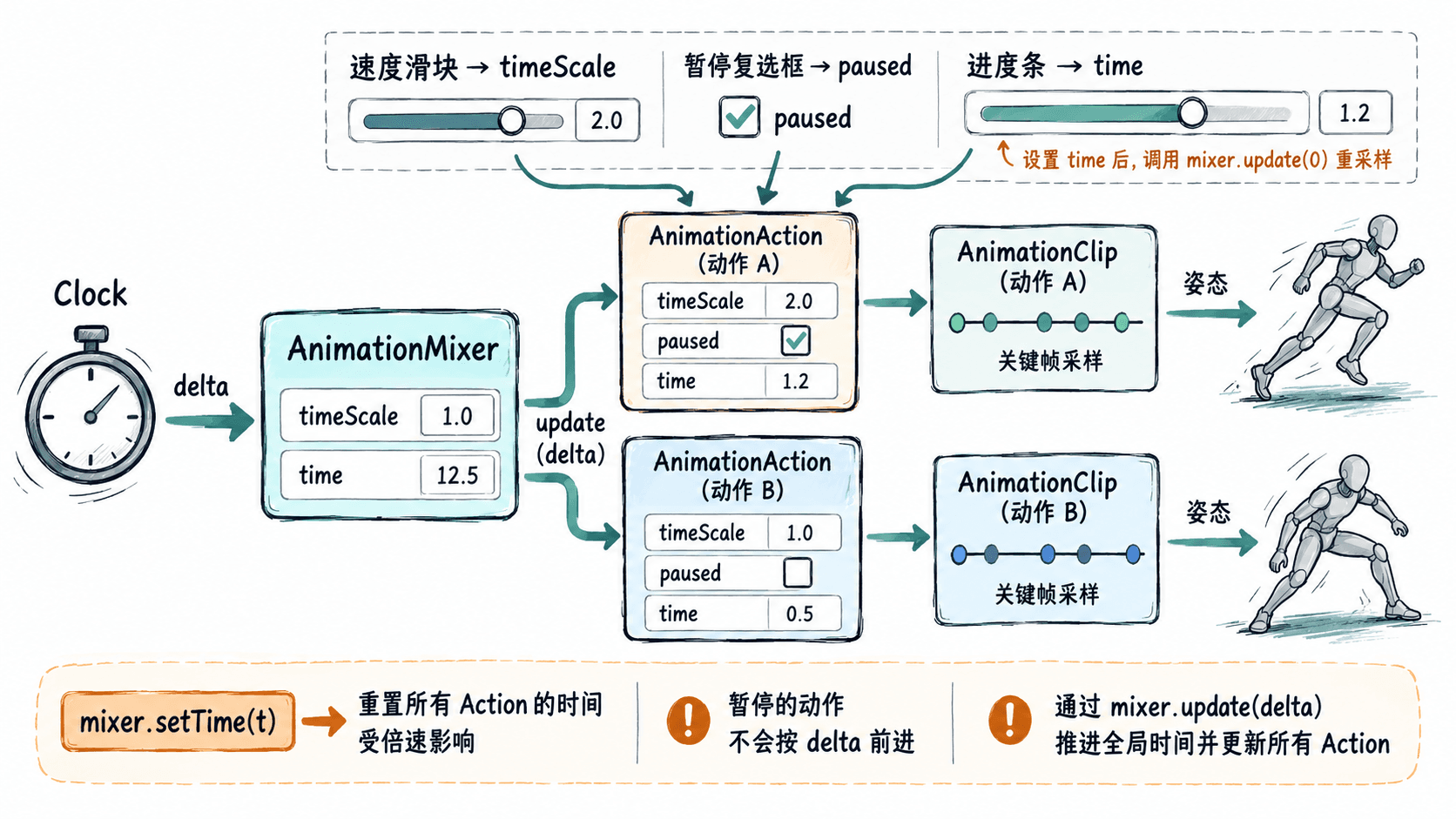
创建两秒动作测试场景
使用支持 ES Modules 的 Vite 项目;当前 Vite 要求 Node.js 20.19+ 或 22.12+(模板可能有更高要求)。固定 three@0.186.1 便于复现。以下命令新建原生 JavaScript 项目:
# 创建基础页面
npm create vite@latest animation-time-demo -- --template vanilla
cd animation-time-demo
npm install
npm install three@0.186.1
npm run dev
预期输出(节选,版本、启动耗时和端口以本机为准):
VITE v<VERSION> ready in <TIME>
Local: http://localhost:<PORT>/
保留 Vite 生成的 index.html,将 src/main.js 完整替换为以下代码。示例用 NumberKeyframeTrack 驱动名为 Arm 的旋转枢轴,不需要准备外部 GLB;真实角色可改用 gltf.scene 和 gltf.animations。
import * as THREE from 'three';

document.body.style.margin = '12px';
const app = document.querySelector('#app');
app.innerHTML = `
  <div style='display:flex;gap:16px;flex-wrap:wrap;margin-bottom:12px'>
    <label>速度 <input id='speed' type='range' min='0.25' max='2' step='0.25' value='1'>
      <output id='speedText'>1.00×</output></label>
    <label><input id='pause' type='checkbox'> 暂停</label>
    <label>时间 <input id='seek' type='range' min='0' max='2' step='0.01' value='0'>
      <output id='timeText'>0.00 / 2.00 秒</output></label>
    <button id='jump'>Mixer 定位 1 秒</button>
  </div>
`;

const scene = new THREE.Scene();
scene.background = new THREE.Color(0xf4f7fa);
const camera = new THREE.PerspectiveCamera(45, 1, 0.1, 100);
camera.position.set(0, 0, 4.5);

const renderer = new THREE.WebGLRenderer({ antialias: true });
app.appendChild(renderer.domElement);
function resize() {
  const width = Math.max(240, window.innerWidth - 24);
  renderer.setSize(width, 400);
  camera.aspect = width / 400;
  camera.updateProjectionMatrix();
}
window.addEventListener('resize', resize);
resize();

const rig = new THREE.Group();
const material = new THREE.MeshNormalMaterial();
rig.add(new THREE.Mesh(new THREE.BoxGeometry(0.8, 1.3, 0.35), material));
const armPivot = new THREE.Group();
armPivot.name = 'Arm';
armPivot.position.set(0.53, 0.55, 0);
const arm = new THREE.Mesh(new THREE.BoxGeometry(0.22, 1, 0.3), material);
arm.position.y = -0.5; // 将旋转轴放在肩膀,而非手臂中心
armPivot.add(arm);
rig.add(armPivot);
scene.add(rig);

// 0 秒下垂、1 秒抬起 1.2 弧度、2 秒回到起点
const clip = new THREE.AnimationClip('RaiseArm', 2, [
  new THREE.NumberKeyframeTrack('Arm.rotation[z]', [0, 1, 2], [0, 1.2, 0])
]);
const mixer = new THREE.AnimationMixer(rig);
const action = mixer.clipAction(clip);
action.setLoop(THREE.LoopRepeat, Infinity).play();

const speed = document.querySelector('#speed');
const pause = document.querySelector('#pause');
const seek = document.querySelector('#seek');
const speedText = document.querySelector('#speedText');
const timeText = document.querySelector('#timeText');

function syncTime() {
  seek.value = String(action.time);
  timeText.textContent = `${action.time.toFixed(2)} / ${clip.duration.toFixed(2)} 秒`;
}
speed.oninput = () => {
  action.timeScale = Number(speed.value);
  speedText.textContent = `${action.timeScale.toFixed(2)}×`;
};
pause.onchange = () => { action.paused = pause.checked; };
seek.oninput = () => {
  action.paused = true; // 拖动时冻结播放,避免进度条被逐帧覆盖
  pause.checked = true;
  action.time = Math.min(clip.duration, Math.max(0, Number(seek.value)));
  mixer.update(0); // 时间不前进,但立即重新采样关键帧
  syncTime();
};
document.querySelector('#jump').onclick = () => {
  // 演示全局定位:先消除倍速与暂停对 setTime 的影响
  mixer.timeScale = 1;
  action.timeScale = 1;
  action.paused = false;
  mixer.setTime(1);
  action.paused = true;
  pause.checked = true;
  speed.value = '1';
  speedText.textContent = '1.00×';
  syncTime();
};

const clock = new THREE.Clock();
renderer.setAnimationLoop(() => {
  mixer.update(Math.min(clock.getDelta(), 0.05));
  syncTime();
  renderer.render(scene, camera);
});
预期结果:页面出现彩色机械臂和四项控件。动画默认循环播放;将时间滑块拖到 1.00 秒时,手臂从下垂姿态抬起约 69°,并自动勾选“暂停”。取消暂停后从所选位置继续播放。
验证定位结果与处理边界
按以下顺序检查,先把时间滑块拖回 0.00 秒,再解除暂停进行速度测试:
- 速度设为
0.50×:播放约 2 秒,动作局部时间前进约 1 秒;设为2.00×则约 1 秒完成一轮 2 秒片段。 - 勾选暂停:
action.time停止变化,但画布仍正常渲染;取消勾选后从原位置继续。 - 拖动进度到
1.00秒:即使处于暂停状态,mixer.update(0)也应立即更新到抬臂姿态。 - 点击“Mixer 定位 1 秒”:速度复位为
1.00×,时间到1.00秒且保持暂停;本例只有一个 Action,多动作项目中的所有关联 Action 都会受setTime影响。
LoopRepeat 的局部时间会在播放越过 2 秒后回绕;不要用它表示累计播放总时长。需要对 GLB 的某条动画定位时,先通过 mixer.clipAction(gltf.animations[index]) 取得 Action,再把进度条的最大值设置为 action.getClip().duration。多动作混合期间,最终姿态还取决于其他 Action 的权重;检查单条动作时,先停止或降低其他冲突动作的影响。