
Web 图形与 3D / 系统课时
交叉渐变切换 Idle 与 Walk
交叉渐变切换 Idle 与 Walk
角色从待机变成行走时,直接停止旧动作并播放新动作,常会让四肢瞬间跳到另一套姿态。这里用 Three.js 的 AnimationMixer 和两个循环 AnimationClip 实现交叉渐变,再为连续点击加入最后请求排队机制,让动作切换既平滑又可验证。
学习目标
- 理解 Idle 与 Walk 在渐变期间如何按权重混合。
- 使用
crossFadeTo()完成可运行的双动作切换。 - 比较三种过渡时长,并避免重复点击引起动作重置。
理解两段动作的权重
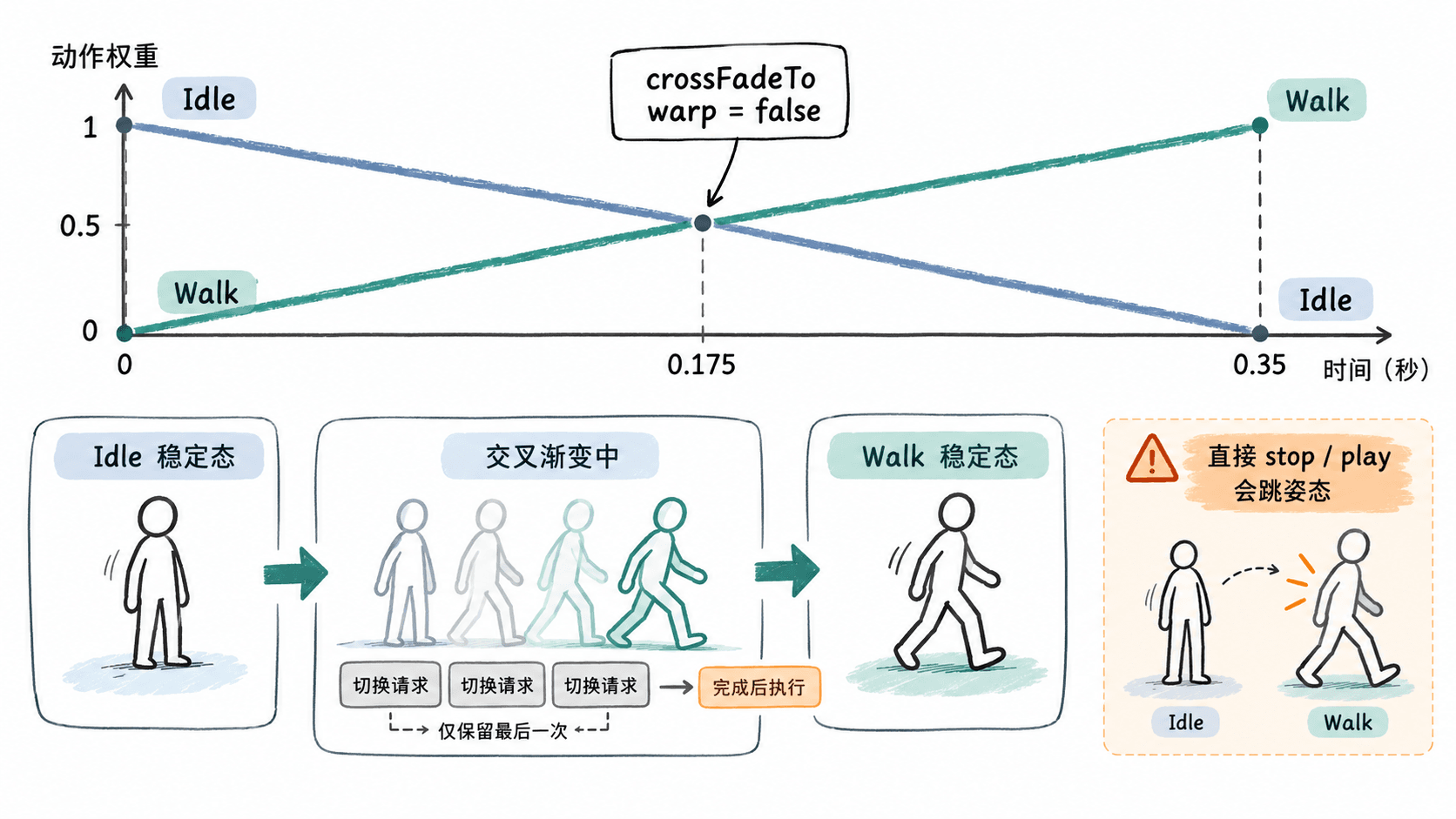
AnimationMixer 驱动动作播放,AnimationClip 保存关键帧,AnimationAction 控制循环、时间和权重。调用 idleAction.crossFadeTo(walkAction, 0.35, false),表示在 0.35 秒内逐渐降低 Idle 的权重,同时提高 Walk 的权重;第三个参数 false 表示不对播放速度做同步变速。
例如在理想的线性渐变中,开始时 Idle/Walk 权重为 1/0,约 0.175 秒时为 0.5/0.5,结束时为 0/1。两段动画最好驱动同一套骨骼或属性,否则未被目标片段覆盖的属性可能回到基础姿态。过渡只负责混合姿态,不会自动解决脚底打滑。
搭建可运行的双动作演示
使用已安装 Node.js 和 npm 的环境,新建 Vite 原生 JavaScript 项目。示例用几何体和关键帧现场构造一个双腿角色,不需要另找 GLB 素材;因此可以先验证渐变逻辑,再接入真实角色资产。
npm create vite@latest idle-walk-demo -- --template vanilla
cd idle-walk-demo
npm install
npm install three
预期结果:项目中存在 index.html、src/main.js,并成功安装 three 依赖。安装日志和版本号随本机环境变化。
用以下完整内容替换 src/main.js。Idle 每 2 秒轻微起伏一次,Walk 每 0.8 秒交替摆腿;两个片段都绑定角色整体高度与左右腿旋转三个属性,以便观察混合效果。
import * as THREE from 'three';

const app = document.querySelector('#app');
app.innerHTML = `
  <button id='idle'>Idle</button>
  <button id='walk'>Walk</button>
  <label>渐变秒数
    <select id='duration'>
      <option value='0.15'>0.15</option>
      <option value='0.35' selected>0.35</option>
      <option value='0.8'>0.8</option>
    </select>
  </label>
  <p id='state'></p>
`;
document.body.style.fontFamily = 'sans-serif';
app.style.padding = '16px';

const scene = new THREE.Scene();
scene.background = new THREE.Color(0xf1f5f9);
scene.add(new THREE.HemisphereLight(0xffffff, 0x64748b, 3));

const camera = new THREE.PerspectiveCamera(45, 720 / 420, 0.1, 100);
camera.position.set(3, 2.8, 6);
camera.lookAt(0, 1.2, 0);

const renderer = new THREE.WebGLRenderer({ antialias: true });
renderer.setSize(720, 420);
app.appendChild(renderer.domElement);

const actor = new THREE.Group();
scene.add(actor);
const material = new THREE.MeshStandardMaterial({ color: 0x219e92 });

const torso = new THREE.Mesh(new THREE.BoxGeometry(0.7, 1.1, 0.35), material);
torso.position.y = 1.45;
actor.add(torso);

const head = new THREE.Mesh(new THREE.SphereGeometry(0.26, 16, 12), material);
head.position.y = 2.25;
actor.add(head);

function addLeg(name, x) {
  const pivot = new THREE.Group();
  pivot.name = name; // 关键帧轨道通过节点名查找旋转目标
  pivot.position.set(x, 0.9, 0);
  const mesh = new THREE.Mesh(new THREE.BoxGeometry(0.22, 0.9, 0.24), material);
  mesh.position.y = -0.45;
  pivot.add(mesh);
  actor.add(pivot);
}
addLeg('LeftLeg', -0.22);
addLeg('RightLeg', 0.22);

const idleClip = new THREE.AnimationClip('Idle', 2, [
  new THREE.NumberKeyframeTrack('.position[y]', [0, 1, 2], [0, 0.03, 0]),
  new THREE.NumberKeyframeTrack('LeftLeg.rotation[z]', [0, 1, 2], [0, 0.02, 0]),
  new THREE.NumberKeyframeTrack('RightLeg.rotation[z]', [0, 1, 2], [0, -0.02, 0])
]);
const times = [0, 0.2, 0.4, 0.6, 0.8];
const walkClip = new THREE.AnimationClip('Walk', 0.8, [
  new THREE.NumberKeyframeTrack('.position[y]', times, [0, 0.08, 0, 0.08, 0]),
  new THREE.NumberKeyframeTrack('LeftLeg.rotation[z]', times, [0, 0.55, 0, -0.55, 0]),
  new THREE.NumberKeyframeTrack('RightLeg.rotation[z]', times, [0, -0.55, 0, 0.55, 0])
]);

const mixer = new THREE.AnimationMixer(actor);
const actions = {
  Idle: mixer.clipAction(idleClip),
  Walk: mixer.clipAction(walkClip)
};
actions.Idle.play();

let active = 'Idle';
let remaining = 0;
let outgoing = null;
let pending = null;

function changeState(target) {
  // 渐变未完成时只保存最后一次请求,不重启正在播放的动作
  if (remaining > 0) {
    pending = target;
    return;
  }
  if (target === active) return;

  const incoming = actions[target];
  incoming.reset().setEffectiveTimeScale(1).setEffectiveWeight(1).play();
  outgoing = actions[active];
  const seconds = Number(document.querySelector('#duration').value);
  outgoing.crossFadeTo(incoming, seconds, false);

  active = target;
  remaining = seconds;
}

document.querySelector('#idle').addEventListener('click', () => changeState('Idle'));
document.querySelector('#walk').addEventListener('click', () => changeState('Walk'));

const clock = new THREE.Clock();
renderer.setAnimationLoop(() => {
  const dt = Math.min(clock.getDelta(), 0.05);
  mixer.update(dt); // mixer 的时间单位是秒,必须每帧推进

  if (remaining > 0) {
    remaining = Math.max(0, remaining - dt);
    if (remaining === 0) {
      outgoing.stop();
      outgoing = null;
      const next = pending;
      pending = null;
      if (next !== null) changeState(next);
    }
  }

  const weight = action =>
    action.isScheduled() ? action.getEffectiveWeight().toFixed(2) : '0.00';
  document.querySelector('#state').textContent =
    `目标:${active} | Idle ${weight(actions.Idle)} / Walk ${weight(actions.Walk)}`;
  renderer.render(scene, camera);
});
预期结果:页面出现几何角色与 Idle、Walk 按钮。默认轻微起伏,点击 Walk 后双腿交替摆动;状态行可看到两段动作权重逐步此消彼长,切回 Idle 时反向渐变。
启动本地开发服务器:
npm run dev预期结果:终端显示 Local: http://localhost:<PORT>/ 一类地址;实际端口可能不同。打开终端给出的地址即可操作。
连续请求为什么要排队
若在 0.35 秒渐变尚未结束时,再次对目标动作调用 reset() 或启动新的 crossFadeTo(),动作时间和权重可能被重新设置,造成突然抽动。本例用 remaining 标记过渡窗口,窗口内只覆盖 pending,完成后停止已淡出的动作,并执行最后一次请求。
按下 Walk 后快速连续点 Idle、Walk、Idle,最终应稳定停在 Idle;连续点击相同状态不会重播该片段。这种“最后请求生效”适用于菜单驱动的角色展示,但代价是输入响应最多延迟一个渐变周期。如果游戏需要即时响应,应从当前实际权重重新规划淡入淡出,而不是直接套用这里的排队策略。
比较时长与实际资产边界
依次选择 0.15、0.35、0.8 秒,点击 Walk 与 Idle 做往返测试。0.15 秒切换较利落,但姿态差异大时仍会显得突兀;0.35 秒适合一般待机与步行转换;0.8 秒动作更柔和,却容易出现已经移动但仍保留较多待机姿态的拖沓感。记录按钮响应、腿部摆动和权重到达 0/1 的时刻,而不只凭主观感觉选时长。
替换为 GLB 角色时,让 GLTFLoader 返回的 gltf.scene 充当混合器根节点,从 gltf.animations 按名称寻找 Idle 与 Walk,并确认两个片段对应同一角色骨架。找不到动作应直接报错,而不是默默用第一个片段代替。若动画包含根节点位移,还要另外处理角色世界位移和步速匹配;交叉渐变只能让姿态连续,不能代替移动逻辑。API 细节可查阅 Three.js AnimationAction 文档。