
Web 图形与 3D / 系统课时
设置循环模式与结束事件
设置循环模式与结束事件
角色待机需要持续循环,开门动作要播放一次并保持开启姿态,提示动画可能只重复两轮。这些行为都由 AnimationAction 控制。本篇用一个 1 秒的动画片段验证循环次数、末帧保持和 AnimationMixer 的事件,并区分自然完成与主动停止。
学习目标
- 使用
LoopRepeat、LoopOnce和repetitions设置动作次数。 - 用
clampWhenFinished控制自然结束后的姿态。 - 正确处理
loop、finished和主动stop(),避免状态误切换。
配置循环次数与末帧保持
AnimationClip 保存关键帧,mixer.clipAction(clip) 返回控制播放的 AnimationAction。通过 action.setLoop(mode, repetitions) 设置循环策略,repetitions 表示总播放轮数,不是首次播放之外额外重复的次数。
| 使用场景 | 配置 | 行为 |
|---|---|---|
| 待机动画 | setLoop(LoopRepeat, Infinity) |
无限循环,不会自然结束 |
| 提示闪烁两轮 | setLoop(LoopRepeat, 2) |
共播放两轮后结束 |
| 开门动作 | setLoop(LoopOnce, 1) |
播放一轮后结束 |
LoopOnce 忽略 repetitions 的数值。默认模式是 LoopRepeat,默认次数是 Infinity。两者都不等于自动保持末帧:clampWhenFinished 默认为 false,自然完成后 enabled 会变为 false,动画不再影响模型;设为 true 时,动作会在结束帧暂停(paused = true),继续影响所绑定的属性。
例如门打开后必须维持开启姿态,应在 play() 前设置 action.setLoop(LoopOnce, 1) 和 action.clampWhenFinished = true。如果其他动作同时修改门的同一属性,混合结果仍可能覆盖这一姿态。
区分循环事件、自然完成和取消
事件监听器注册在 AnimationMixer,而不是 AnimationAction。loop 表示重复模式跨过一次或多次仍需继续播放的周期边界;有限次数的最后一轮结束时触发 finished,不会再为这个最终边界额外派发 loop。LoopOnce 自然结束只触发 finished。
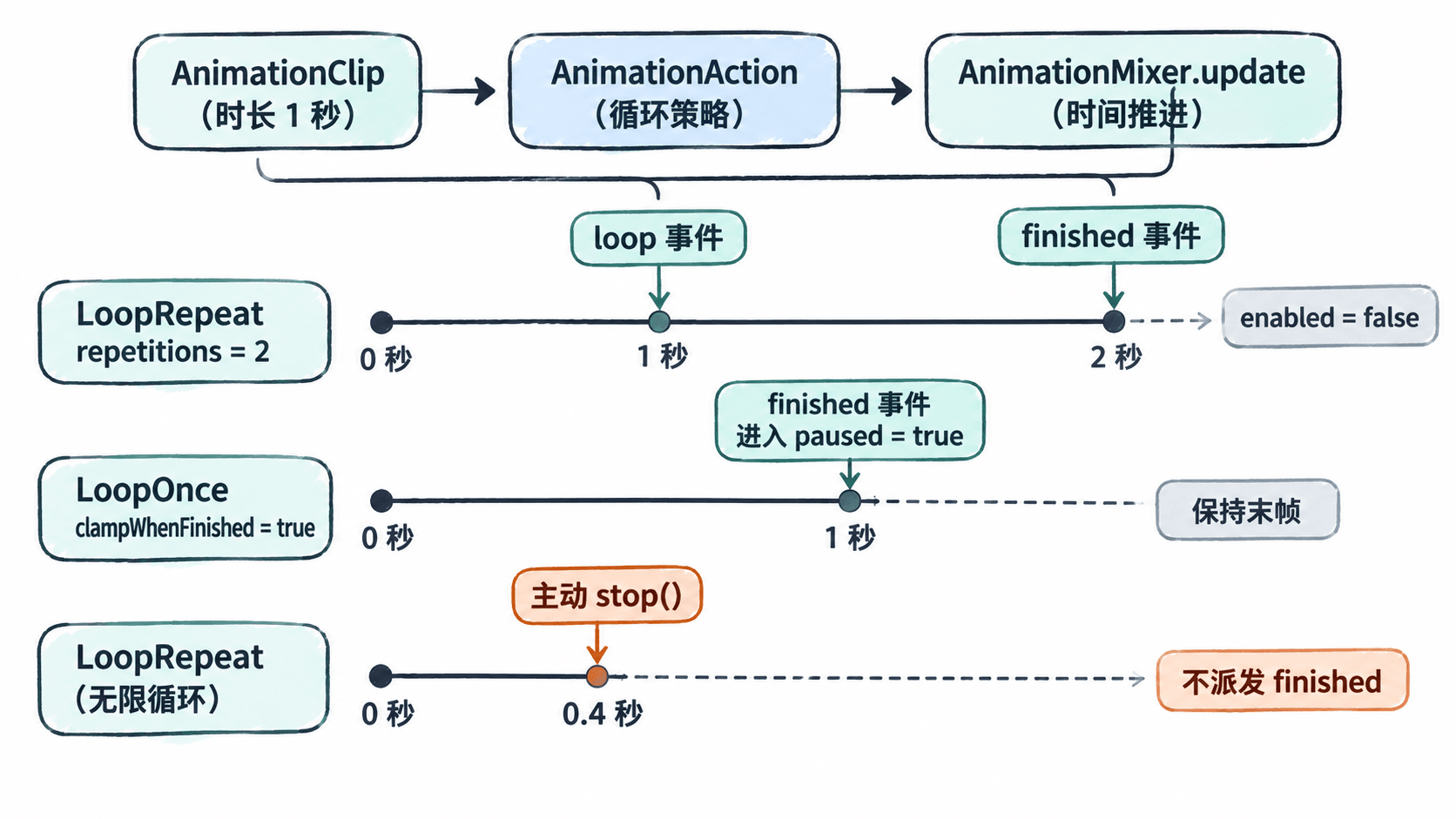
事件对象的 event.action 用来定位具体动作,loop 事件还提供 event.loopDelta(本次跨越的循环边界数,反向播放可为负值),finished 事件提供 event.direction(正向为 1,反向为 -1)。一次较大的时间步进可能跨越多个周期,不能假设每次 loop 回调都只代表一轮。
调用 action.stop() 或 mixer.stopAllAction() 是主动中断,不会发出 finished;clampWhenFinished 也不会在主动中断时生效。需要统计“用户取消”时,应在执行 stop() 的业务代码中单独记录取消,而不是等待完成事件。
运行示例并核对事件顺序
在 Node.js 20+ 的空目录执行 npm install three,新建 demo.mjs,粘贴以下代码后运行 node demo.mjs。示例自行创建关键帧,不需要 GLB 文件或 WebGL;通过手动调用 mixer.update() 精确触发事件,真实页面则应在每帧传入实际经过的秒数。
import {
  AnimationClip, AnimationMixer, LoopOnce, LoopRepeat,
  NumberKeyframeTrack, Object3D
} from 'three';

const model = new Object3D();
const track = new NumberKeyframeTrack('.position[x]', [0, 1], [0, 1]);
const clip = new AnimationClip('Move', 1, [track]);
const mixer = new AnimationMixer(model);
const action = mixer.clipAction(clip);
let finishedCount = 0;

// 同一个 mixer 可能管理多个动作,用 action 身份过滤事件。
mixer.addEventListener('loop', (event) => {
  if (event.action === action) console.log('loopDelta:', event.loopDelta);
});
mixer.addEventListener('finished', (event) => {
  if (event.action !== action) return;
  finishedCount++;
  console.log('finished:', event.action.getClip().name);
});

// 共两轮:首轮结束触发 loop,末轮结束触发 finished。
action.setLoop(LoopRepeat, 2);
action.clampWhenFinished = false;
action.play();
mixer.update(1.1);
mixer.update(1.1);
console.log('repeat enabled:', action.enabled);

// 单次播放并停在末帧。
action.reset().setLoop(LoopOnce, 1);
action.clampWhenFinished = true;
action.play();
mixer.update(1.1);
console.log('once paused:', action.paused);
console.log('end x:', model.position.x);

// 主动停止不会增加 finished 次数。
action.reset().setLoop(LoopRepeat, Infinity).play();
mixer.update(0.25);
const countBeforeStop = finishedCount;
action.stop();
mixer.update(1.1);
console.log('stop emitted finished:', finishedCount > countBeforeStop);
预期输出:
loopDelta: 1
finished: Move
repeat enabled: false
finished: Move
once paused: true
end x: 1
stop emitted finished: false
两次 finished 分别来自有限循环的终点和单次播放的终点。end x: 1 验证了末帧仍在生效,最后的 false 验证主动停止不等于自然完成。
接入交互时的边界处理
在动作状态切换中,按 event.action === openDoorAction 过滤 finished,再切换按钮状态或播放下一动作;不要把同一个 mixer 的所有完成事件都当成开门完成。页面或组件销毁时,以相同函数引用调用 mixer.removeEventListener('finished', handler),避免重复监听。
单次动作播放结束后再次点击,使用 action.reset().play()。只调用 play() 不保证清除此前的 paused 或恢复起始时间。若想取消开门并返回待机,应主动调用 action.stop()、启动待机动作并更新业务状态;若要保留末帧,则不要立即 stop(),因为它会取消已保持的动作影响。
排查“没有结束回调”时依次确认:动作是否仍是无限循环、是否持续调用 mixer.update(deltaSeconds)、是否在到达终点前被 stop()、事件是否注册在正确的 mixer 上。