
Web 图形与 3D / 系统课时
读取 glTF 节点和资源结构
读取 glTF 节点和资源结构
拿到 .gltf 资产后,应先核对场景入口、节点层级与顶点数据的引用链,而不只看预览画面。本篇用两个节点共用一组三角形顶点的最小文件,演示怎样从场景索引追到二进制字节,并据此验收资源。
学习目标
- 通过
scene、scenes、nodes找到场景根节点并辨认层级。 - 追踪
meshes、accessors、bufferViews、buffers的索引关系。 - 运行一个完整样例,核对顶点格式、字节长度与资源复用。
从场景入口找到节点
glTF 2.0 的 .gltf 主文件是 JSON。scene: 0 表示默认场景为 scenes[0];场景里的 nodes: [0, 1] 是根节点索引,分别引用 nodes[0] 和 nodes[1]。nodes[i].children 才描述父子层级。一个文件可以存放多个场景,不能把整个 nodes 数组都当作当前场景的根节点。
节点存放 translation、rotation、scale 或 matrix 等局部变换,并可用 mesh 指向网格。比如两个节点分别位于 X=-1 和 X=1,却都写 mesh: 0:这是两个场景实例共用一份几何资源,不是两个网格数据副本。没有 mesh 的节点也可能是分组节点。
从网格追到二进制
一个 mesh 包含一个或多个 primitives。其中 attributes.POSITION: 0 指向 accessors[0],不是第 0 个顶点;若存在 indices,它也指向另一个 accessor。accessor 用 count、type、componentType 说明数据有多少项、每项几个分量、分量是什么类型。
本例的 count=3、type=VEC3、componentType=5126(32 位浮点数),所以位置数据是 3 × 3 × 4 = 36 字节。accessor.bufferView: 0 指向 bufferViews[0],后者以 buffer: 0、byteOffset: 0、byteLength: 36 定位 buffers[0] 的字节范围。buffer.uri 可以是外部 .bin 文件或内嵌的 data URI。
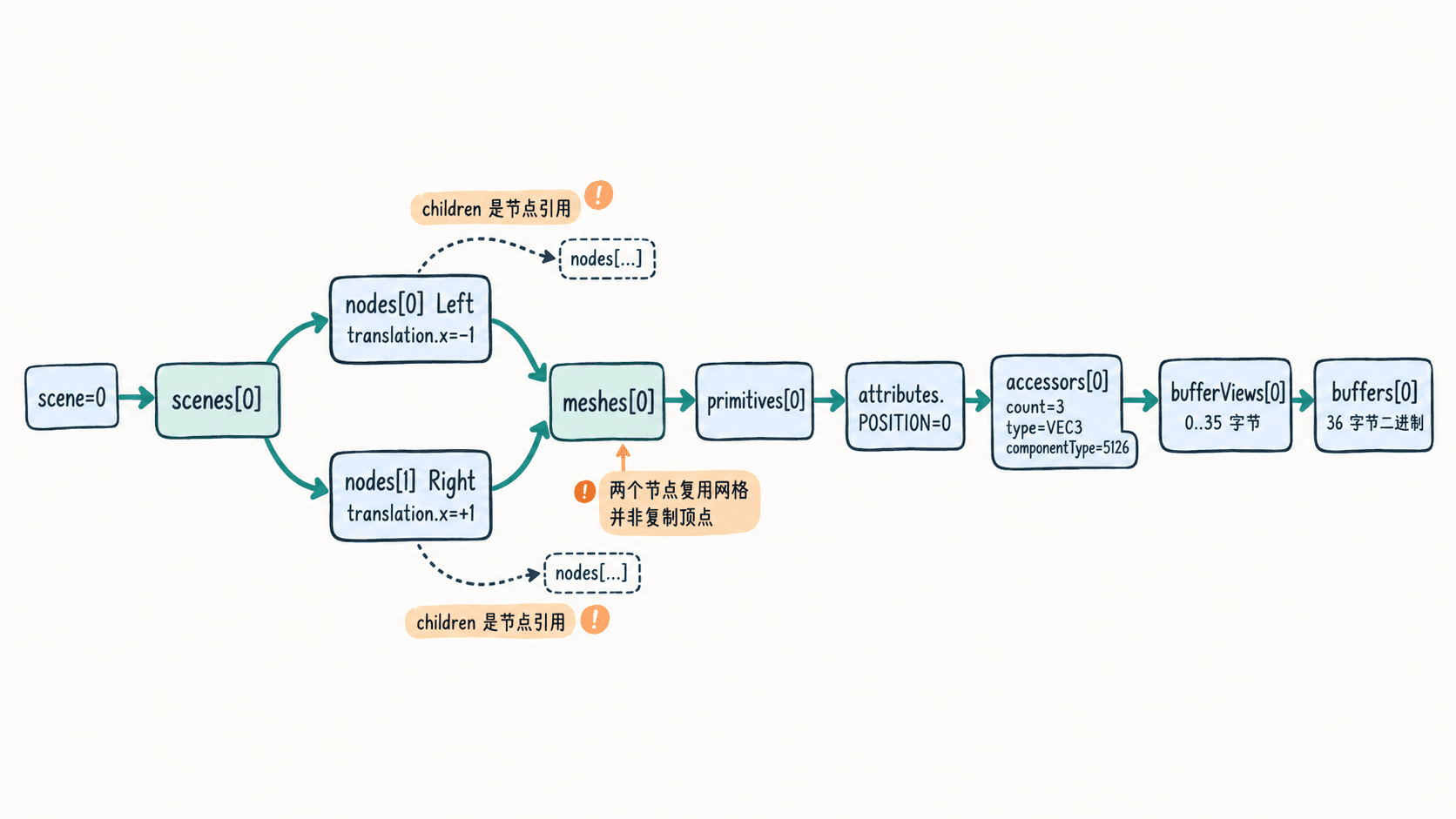
读取字节时,起始位置是 bufferView.byteOffset 与 accessor.byteOffset 之和;若 bufferView.byteStride 存在,相邻元素不能直接按紧密排列计算。两级 offset 相加和处理交错步长是自制读取器最常漏掉的地方。
生成并检查最小资产
以下示例适用于 Node.js 18 及以上版本,无第三方依赖。将代码保存为 inspect.mjs;它先生成带内嵌 buffer 的 sample.gltf,再按场景、节点、网格、accessor 的顺序读取引用,并解码第一个顶点。两个节点都指向 mesh[0],便于观察实例复用。
import { readFileSync, writeFileSync } from 'node:fs';

const vertices = Buffer.alloc(36);
[0, 0, 0, 1, 0, 0, 0, 1, 0].forEach((v, i) => {
  vertices.writeFloatLE(v, i * 4);
});

// 两个节点共用 mesh[0],各自保留独立的平移。
const sample = {
  asset: { version: '2.0' },
  scene: 0,
  scenes: [{ nodes: [0, 1] }],
  nodes: [
    { name: 'Left', mesh: 0, translation: [-1, 0, 0] },
    { name: 'Right', mesh: 0, translation: [1, 0, 0] }
  ],
  meshes: [{ primitives: [{ attributes: { POSITION: 0 }, mode: 4 }] }],
  accessors: [{
    bufferView: 0, componentType: 5126, count: 3,
    type: 'VEC3', min: [0, 0, 0], max: [1, 1, 0]
  }],
  bufferViews: [{ buffer: 0, byteOffset: 0, byteLength: 36 }],
  buffers: [{
    uri: `data:application/octet-stream;base64,${vertices.toString('base64')}`,
    byteLength: 36
  }]
};
writeFileSync('sample.gltf', JSON.stringify(sample, null, 2));
const g = JSON.parse(readFileSync('sample.gltf', 'utf8'));
const sceneIndex = g.scene ?? 0;
console.log(`scene[${sceneIndex}]: ${g.scenes[sceneIndex].nodes.length} roots`);

// 引用号是对应数组的下标,不是节点的显示名称。
function visit(id) {
  const n = g.nodes[id];
  console.log(`node[${id}] ${n.name}: mesh[${n.mesh}], x=${n.translation[0]}`);
  if (n.mesh !== undefined) {
    for (const p of g.meshes[n.mesh].primitives) {
      const ai = p.attributes.POSITION;
      const a = g.accessors[ai];
      const v = g.bufferViews[a.bufferView];
      const b = g.buffers[v.buffer];
      console.log(`POSITION -> accessor[${ai}] ${a.count}x${a.type}, bufferView[${a.bufferView}] ${v.byteLength}B, buffer[${v.buffer}] ${b.byteLength}B`);
      // 将首个顶点按 FLOAT / VEC3 解析,而非直接打印原始字节。
      const bin = Buffer.from(b.uri.split(',')[1], 'base64');
      const offset = (v.byteOffset ?? 0) + (a.byteOffset ?? 0);
      const xyz = [0, 4, 8].map(d => bin.readFloatLE(offset + d));
      console.log(`first vertex=(${xyz.join(', ')})`);
    }
  }
  for (const child of n.children ?? []) visit(child);
}
for (const id of g.scenes[sceneIndex].nodes ?? []) visit(id);
在相同目录执行 node inspect.mjs。预期输出:
scene[0]: 2 roots
node[0] Left: mesh[0], x=-1
POSITION -> accessor[0] 3xVEC3, bufferView[0] 36B, buffer[0] 36B
first vertex=(0, 0, 0)
node[1] Right: mesh[0], x=1
POSITION -> accessor[0] 3xVEC3, bufferView[0] 36B, buffer[0] 36B
first vertex=(0, 0, 0)
两次读取都得到局部顶点 (0, 0, 0),但节点 X 位置不同,说明场景变换并未写回共享的 buffer。程序同时在当前目录生成 sample.gltf,用文本编辑器打开即可查到 scene 和各数组索引。
按引用链验收真实资源
- 先核对
asset.version为2.0;若缺少默认scene,应明确选择scenes中哪个场景,而非假定全部节点都参与渲染。 - 检查每个
nodes[].children、nodes[].mesh和primitives[].attributes的索引是否落在对应数组范围内;同一个 mesh 被多个节点引用可能是正常复用。 - 对普通紧密排列的 FLOAT/VEC3 accessor,按每项 12 字节核算范围:本例
0 + (3 - 1) × 12 + 12 = 36,恰好不超过bufferView.byteLength。若存在byteStride,应以该值计算相邻元素;还要检查bufferView没有越过buffer.byteLength。 - 检查
buffers[].uri引用的外部文件或 data URI 是否可读取。.glb是包含 JSON 与 BIN 块的二进制容器,不能直接调用JSON.parse读取整个文件;稀疏 accessor(sparse)还需应用稀疏覆盖数据。
实际验收也要沿 primitives[].material 查看材质引用,并检查相关纹理与图片资源是否齐全。结构字段的含义与取值可对照 Khronos glTF 2.0 规范。