
Linux 与服务器运维 / 系统课时
用 ExecStart 指定启动命令
用 ExecStart 指定启动命令
ExecStart= 是 Service 文件真正把 systemd 与应用进程连接起来的位置。本篇通过一个可运行服务说明如何使用绝对路径启动程序,并重点处理最容易误判的一点:systemd 默认不会把这一行交给交互式 Shell 解释。
学习目标
- 使用
ExecStart=指定明确的可执行文件和参数 - 理解 systemd 直接启动进程与 Shell 执行命令的区别
- 判断重定向、管道和
&&等 Shell 语法何时需要显式 Shell
ExecStart 描述的是进程命令行
最常见的写法是在 [Service] 中直接给出可执行文件及其参数。为了让配置不依赖登录用户的 PATH,自定义单元通常使用可执行文件的绝对路径。
下面创建一个简单服务,让 /usr/bin/sleep 运行 600 秒。
sudo tee /etc/systemd/system/execstart-demo.service >/dev/null <<'EOF'
[Unit]
Description=ExecStart direct execution demo

[Service]
Type=simple
ExecStart=/usr/bin/sleep 600
EOF

sudo systemctl daemon-reload
sudo systemctl start execstart-demo.service
systemctl is-active execstart-demo.service
预期输出:
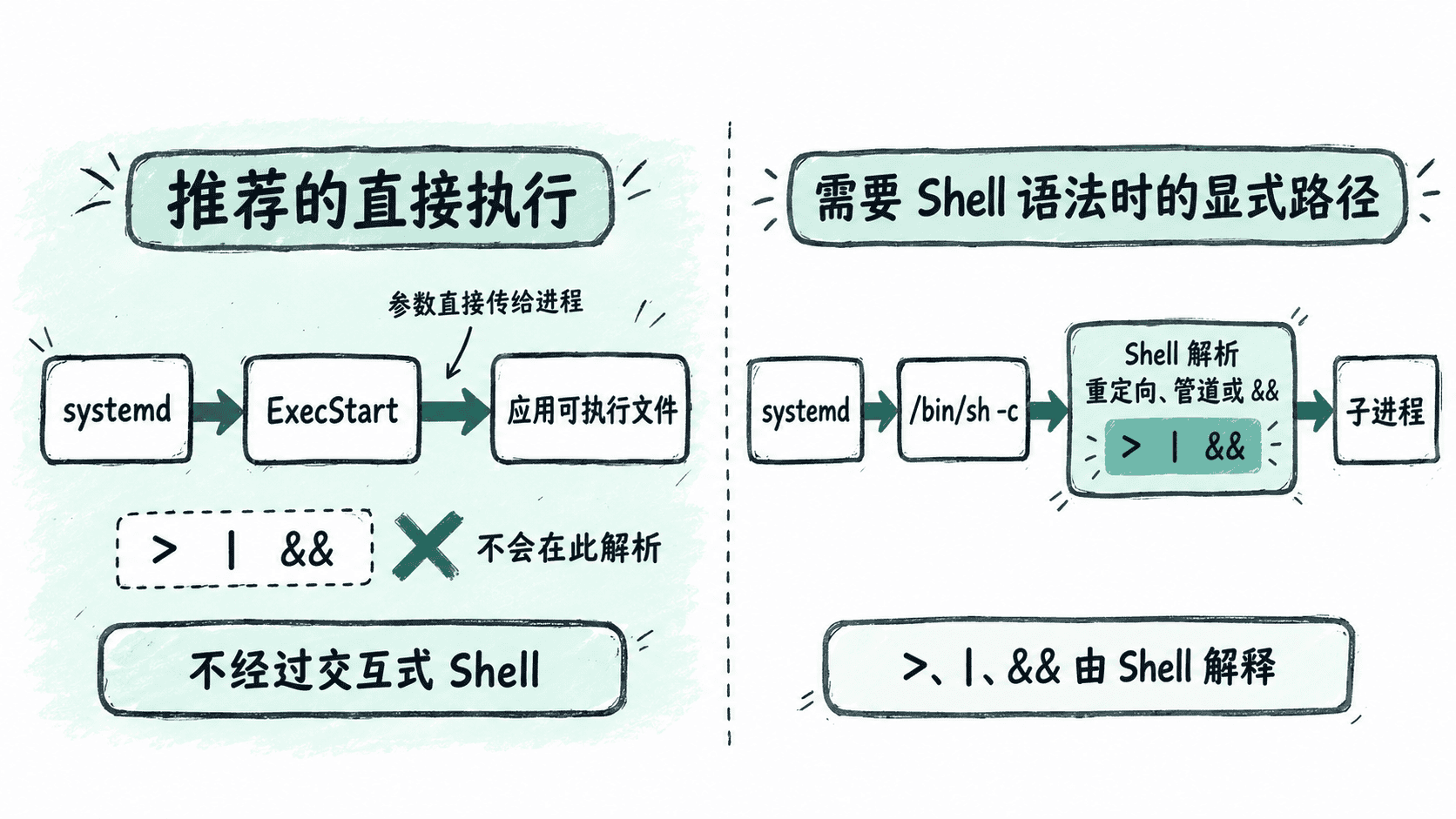
active这里的 ExecStart=/usr/bin/sleep 600 可以理解为 systemd 直接创建 /usr/bin/sleep 进程,并把 600 作为参数传给它。不存在“先打开一个终端,再把整行命令输入终端”这一层。
默认没有 Shell 解释这一层
在交互式 Shell 中,>、|、&&、通配符等字符具有特殊含义。但直接写进 ExecStart= 时,不应把它们当成 Bash 命令行来理解。
例如下面这个写法不能用来实现 Shell 重定向:
[Service]
ExecStart=/usr/bin/echo hello > /tmp/hello.txt
这是片段示例,依赖完整 .service 文件上下文。systemd 不会默认把整行交给 Bash 解释,因此 > 不会像交互式 Shell 中那样自动把标准输出重定向到文件。
确实需要 Shell 时显式调用
如果启动逻辑真的依赖管道、重定向或条件组合,可以明确启动 /bin/sh,并把命令字符串交给 -c。下面用 Shell 把一行文本写入文件,然后让进程保持运行。
sudo tee /etc/systemd/system/shell-demo.service >/dev/null <<'EOF'
[Unit]
Description=Explicit shell execution demo

[Service]
Type=simple
ExecStart=/bin/sh -c 'printf "%s\n" "started by systemd" > /tmp/shell-demo.txt; exec /usr/bin/sleep 600'
EOF

sudo systemctl daemon-reload
sudo systemctl start shell-demo.service
cat /tmp/shell-demo.txt
systemctl is-active shell-demo.service
预期输出:
started by systemd
active
这里 Shell 的使用是显式的:systemd 启动 /bin/sh,Shell 再解释 > 和分号。最后使用 exec /usr/bin/sleep 600,让 Shell 被真正的长期运行进程替换,避免无必要地多保留一层 Shell 进程。
修改 ExecStart 后验证实际状态
改动 ExecStart= 后,必须先让 systemd 重新加载单元文件,再重启服务。只编辑文件而不执行 daemon-reload,管理器仍可能继续使用之前加载的配置。
sudo systemctl daemon-reload
sudo systemctl restart execstart-demo.service
systemctl is-active execstart-demo.service
systemctl show execstart-demo.service --property=MainPID --value
预期结果:第一行输出为 active,第二行输出当前主进程的数字 PID,例如:
active
<ID>
<ID> 每次启动都可能不同。编写 ExecStart= 时,优先让 systemd 直接执行目标程序;只有确实需要 Shell 的语法能力时才显式加入 /bin/sh -c。这样启动链路更简单,也更容易判断 systemd 实际管理的是哪个进程。