
服务注册与分布式协调 / 系统课时
监听变更并刷新应用参数
监听变更并刷新应用参数
本课解决“配置已经发布,但应用仍在使用旧值”的问题:用 Nacos 监听配置变更,把新参数送入 Spring 运行态,并用可观测接口验证刷新结果,同时明确哪些 Bean 适合动态刷新、哪些更适合显式重建或重启。
学习目标
- 使用
spring.config.import为指定 Data ID 开启动态刷新。 - 用
@ConfigurationProperties绑定运行参数,并验证发布后无需重启即可读取新值。 - 区分配置对象、
@RefreshScopeBean 与资源型 Bean 的刷新风险。
开启监听与自动刷新
以下以 Spring Cloud Alibaba 2025.x 的配置导入方式为例。应用必须已经引入 Nacos Config Starter,并能访问 Nacos Server;配置中心中的 Data ID、Group 和 Namespace 必须与应用侧完全一致。refreshEnabled=true 表示该导入项在服务端变更后继续监听并触发刷新。([Spring Cloud Alibaba][1])
application.yml 可以这样配置:
server:
  port: 8080
spring:
  cloud:
    nacos:
      config:
        server-addr: 127.0.0.1:8848
  config:
    import:
      - nacos:order-runtime.properties?group=DEFAULT_GROUP&refreshEnabled=true
这段配置会在启动阶段加载 DEFAULT_GROUP 下的 order-runtime.properties,并保持变更监听。如果 Nacos 开启了鉴权,应通过项目既有的安全方式补充访问凭据,不要把生产密码直接写进仓库。
在 Nacos 中先发布一份基线配置:
order.timeout-ms=1500
order.checkout-enabled=true
生效行为是这两个属性进入 Spring Environment;后续发布同一 Data ID 时,监听器会感知变更并触发运行态刷新。
把参数绑定到可刷新 Bean
对一组相关参数,优先使用 @ConfigurationProperties,比在多个 Bean 中散落 @Value 更容易统一校验和观察。Spring Cloud Alibaba 的 Nacos Config 在监听到变更后会触发 Spring Cloud 刷新流程,@ConfigurationProperties 是官方推荐的动态绑定方式之一。([GitHub][2])
下面的类是完整示例;项目需已有 spring-boot-starter-web 与 Nacos Config Starter:
package com.example.demo;

import org.springframework.boot.SpringApplication;
import org.springframework.boot.autoconfigure.SpringBootApplication;
import org.springframework.boot.context.properties.ConfigurationProperties;
import org.springframework.boot.context.properties.EnableConfigurationProperties;
import org.springframework.web.bind.annotation.GetMapping;
import org.springframework.web.bind.annotation.RestController;

@SpringBootApplication
@EnableConfigurationProperties(NacosRefreshApplication.RuntimeProperties.class)
public class NacosRefreshApplication {

    public static void main(String[] args) {
        SpringApplication.run(NacosRefreshApplication.class, args);
    }

    @ConfigurationProperties(prefix = "order")
    public static class RuntimeProperties {
        private int timeoutMs;
        private boolean checkoutEnabled;

        public int getTimeoutMs() {
            return timeoutMs;
        }

        public void setTimeoutMs(int timeoutMs) {
            this.timeoutMs = timeoutMs;
        }

        public boolean isCheckoutEnabled() {
            return checkoutEnabled;
        }

        public void setCheckoutEnabled(boolean checkoutEnabled) {
            this.checkoutEnabled = checkoutEnabled;
        }
    }

    @RestController
    static class RuntimeConfigController {
        private final RuntimeProperties properties;

        RuntimeConfigController(RuntimeProperties properties) {
            this.properties = properties;
        }

        @GetMapping("/runtime-config")
        String runtimeConfig() {
            return "timeoutMs=" + properties.getTimeoutMs()
                    + ", checkoutEnabled=" + properties.isCheckoutEnabled();
        }
    }
}
预期结果:
应用启动成功后,GET /runtime-config 会读取当前 RuntimeProperties 中的值。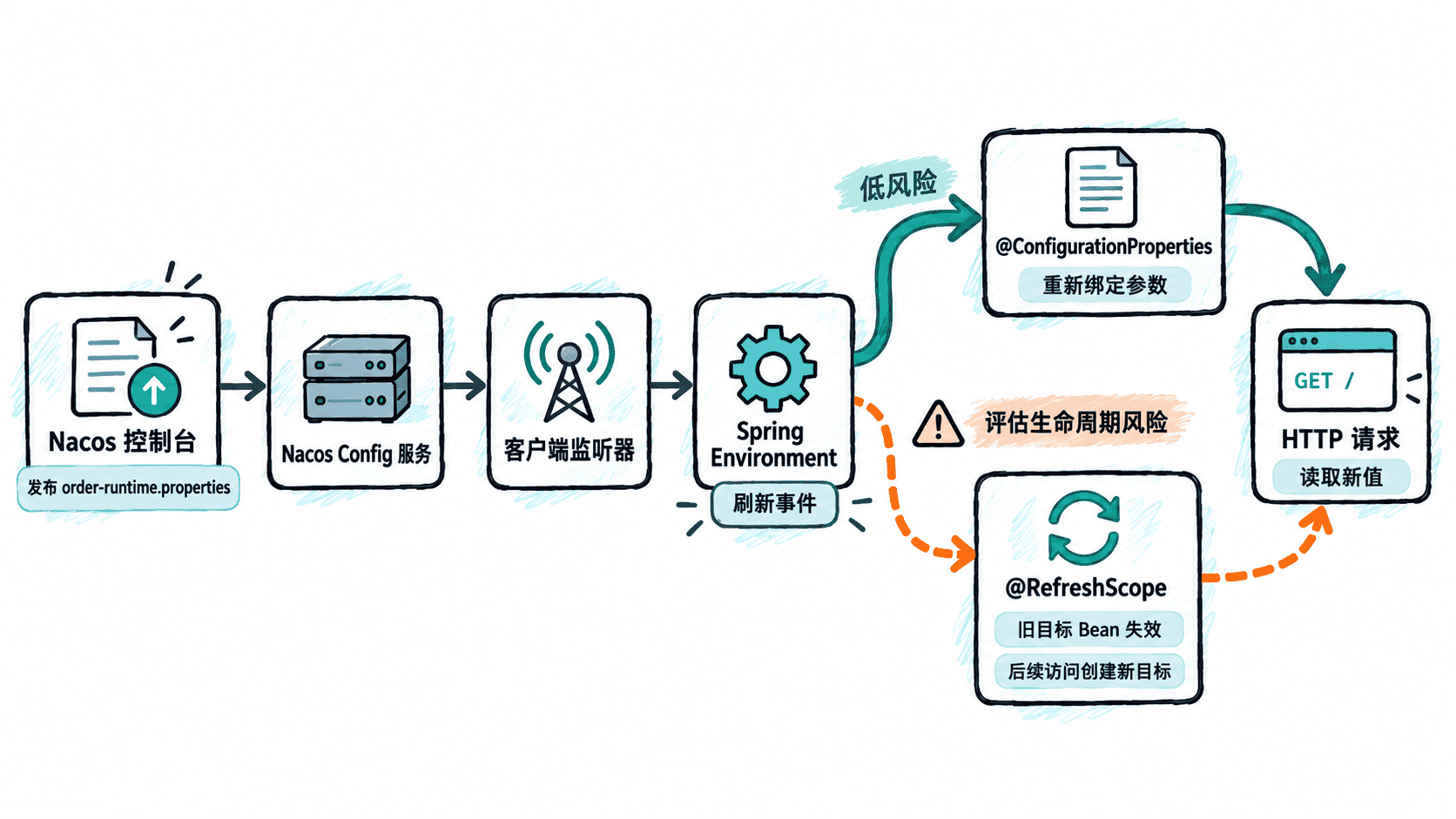
发布变更并验证运行态
启动应用后先读取基线值:
curl -fsS http://127.0.0.1:8080/runtime-config预期输出:
timeoutMs=1500, checkoutEnabled=true然后把同一个 Data ID 更新为:
order.timeout-ms=2500
order.checkout-enabled=false
发布后等待客户端收到变更,再次执行:
curl -fsS http://127.0.0.1:8080/runtime-config预期输出:
timeoutMs=2500, checkoutEnabled=false如果 Nacos 页面已经是新值,而接口仍返回旧值,优先核对 Namespace、Group、Data ID 是否一致,再检查导入项是否开启 refreshEnabled、应用到 Nacos 的网络是否可达,以及监听关系是否真实建立。不要先靠重启“修好”,否则会掩盖动态刷新链路本身的问题。
判断哪些 Bean 可以安全刷新
| Bean 类型 | 建议 | 原因 |
|---|---|---|
纯参数 @ConfigurationProperties Bean |
优先动态刷新 | 主要职责是承载配置,重新绑定副作用小 |
@RefreshScope 的无状态业务 Bean |
谨慎使用 | 刷新会让旧目标失效并创建新目标,需要确认初始化和销毁逻辑 |
| 线程池、连接池、长连接客户端、自建缓存 | 不要盲目刷新 | 重建可能影响在途请求、连接和后台线程,通常应显式热更新或滚动重启 |
普通单例中的 @Value 字段 |
不要默认会变 | 未处于合适刷新机制中的字段可能继续持有旧值 |
真正的验收标准不是“控制台发布成功”,而是应用在不重启的前提下读到正确的新值,并且刷新动作没有破坏 Bean 的生命周期与正在处理的请求。