
原生移动开发 / 系统课时
通知与通知渠道
通知与通知渠道
本节完成一条可验证的通知链路:为 Android 8.0 及以上创建通知渠道,在 Android 13 及以上请求通知权限,发布通知,并通过 PendingIntent 处理点击返回应用。最终你会得到一个能真实弹出并可点击的最小实现。
学习目标
- 能创建稳定的 Notification Channel,并理解渠道与单条通知的职责边界。
- 能处理 Android 13 及以上的
POST_NOTIFICATIONS运行时权限。 - 能用
NotificationCompat构建通知,并通过PendingIntent处理点击行为。
先分清渠道和通知
通知渠道从 Android 8.0(API 26)开始生效,它描述一类通知的长期行为与用户可控设置,例如渠道名称和重要程度;单条通知则承载某一次具体消息的标题、正文、图标和点击动作。应用把通知发布到某个渠道,系统再根据用户对该渠道的设置决定最终呈现方式。
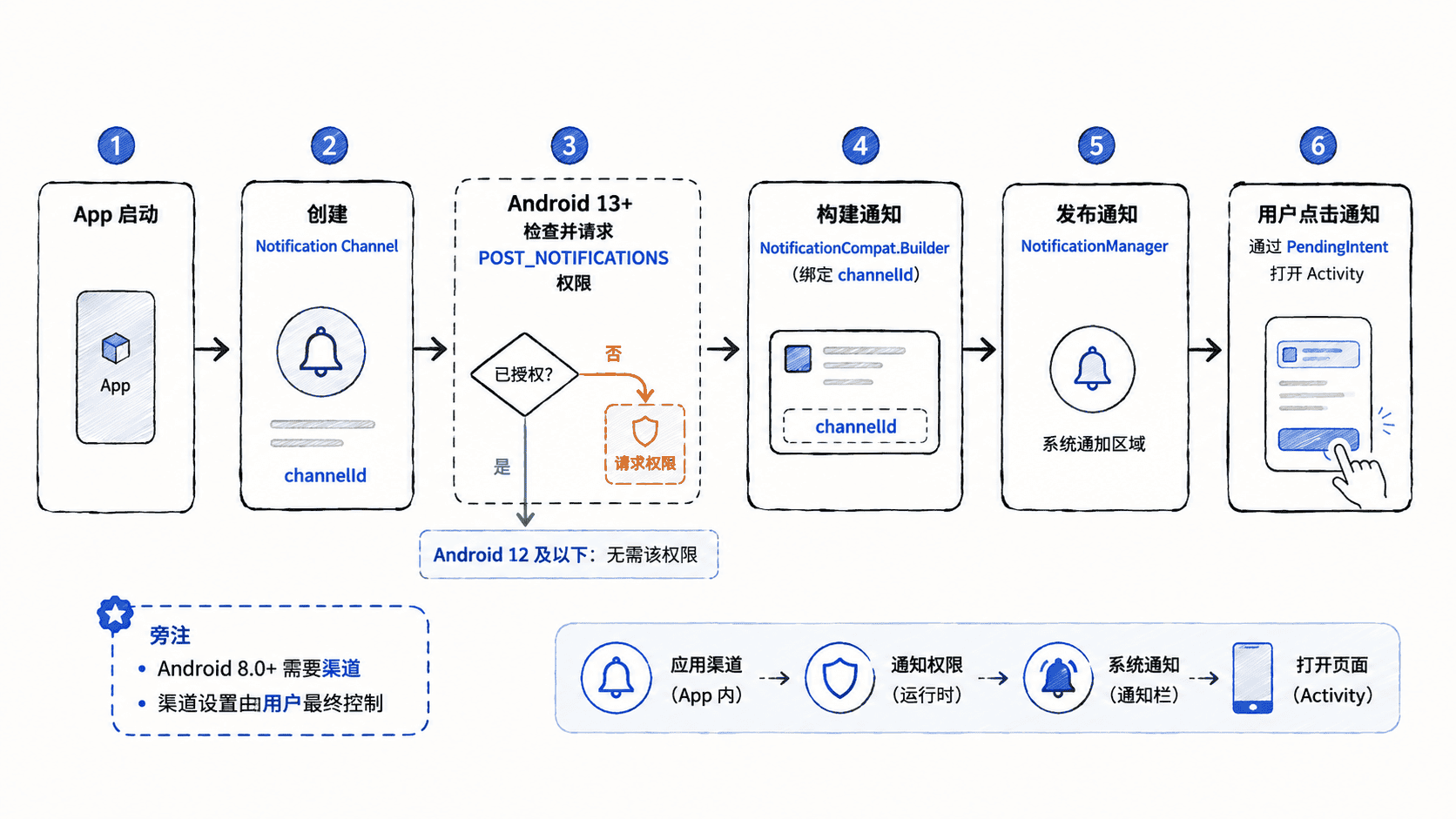
渠道应在应用启动阶段尽早创建,而且 channelId 一旦用于生产环境就应保持稳定。重复调用创建同 ID 渠道是安全的,但已经创建后,应用不能随意把重要程度提升到更高等级覆盖用户选择。
声明通知权限
Android 13(API 33)及以上对大多数普通通知引入了 POST_NOTIFICATIONS 运行时权限。先在清单中声明权限;低版本会忽略这条声明。
<manifest xmlns:android="http://schemas.android.com/apk/res/android">
    <uses-permission android:name="android.permission.POST_NOTIFICATIONS" />

    <application
        android:label="NotificationDemo"
        android:theme="@android:style/Theme.Material.Light.NoActionBar">
        <activity
            android:name=".MainActivity"
            android:exported="true">
            <intent-filter>
                <action android:name="android.intent.action.MAIN" />
                <category android:name="android.intent.category.LAUNCHER" />
            </intent-filter>
        </activity>
    </application>
</manifest>
生效行为:Android 13 及以上允许应用在合适时机发起通知权限请求;Android 12L 及以下不需要该运行时权限。验证时应在 Android 13 及以上的新安装环境中测试“允许”和“拒绝”两条路径。
创建渠道并发布可点击通知
下面示例使用 NotificationCompat,点击按钮时检查权限;允许后发布通知。通知点击通过不可变 PendingIntent 回到当前 Activity,并用额外参数识别“从通知进入”。
package com.example.notificationdemo

import android.Manifest
import android.app.NotificationChannel
import android.app.NotificationManager
import android.app.PendingIntent
import android.content.Intent
import android.content.pm.PackageManager
import android.os.Build
import android.os.Bundle
import android.widget.Button
import android.widget.Toast
import androidx.activity.ComponentActivity
import androidx.activity.result.contract.ActivityResultContracts
import androidx.core.app.NotificationCompat
import androidx.core.app.NotificationManagerCompat
import androidx.core.content.ContextCompat

class MainActivity : ComponentActivity() {

    companion object {
        private const val CHANNEL_ID = "course_updates"
        private const val NOTIFICATION_ID = 1001
        private const val EXTRA_FROM_NOTIFICATION = "from_notification"
    }

    private val notificationPermission =
        registerForActivityResult(ActivityResultContracts.RequestPermission()) { granted ->
            if (granted) {
                postNotification()
            } else {
                Toast.makeText(this, "通知权限未授予", Toast.LENGTH_SHORT).show()
            }
        }

    override fun onCreate(savedInstanceState: Bundle?) {
        super.onCreate(savedInstanceState)
        createNotificationChannel()
        handleEntry(intent)

        setContentView(
            Button(this).apply {
                text = "发送课程通知"
                setOnClickListener { requestPermissionAndNotify() }
            }
        )
    }

    override fun onNewIntent(intent: Intent) {
        super.onNewIntent(intent)
        setIntent(intent)
        handleEntry(intent)
    }

    private fun requestPermissionAndNotify() {
        if (
            Build.VERSION.SDK_INT >= Build.VERSION_CODES.TIRAMISU &&
            ContextCompat.checkSelfPermission(
                this,
                Manifest.permission.POST_NOTIFICATIONS
            ) != PackageManager.PERMISSION_GRANTED
        ) {
            notificationPermission.launch(Manifest.permission.POST_NOTIFICATIONS)
        } else {
            postNotification()
        }
    }

    private fun createNotificationChannel() {
        if (Build.VERSION.SDK_INT >= Build.VERSION_CODES.O) {
            val channel = NotificationChannel(
                CHANNEL_ID,
                "课程更新",
                NotificationManager.IMPORTANCE_DEFAULT
            ).apply {
                description = "用于展示课程进度与更新提醒"
            }

            getSystemService(NotificationManager::class.java)
                .createNotificationChannel(channel)
        }
    }

    private fun postNotification() {
        val targetIntent = Intent(this, MainActivity::class.java).apply {
            putExtra(EXTRA_FROM_NOTIFICATION, true)
            flags = Intent.FLAG_ACTIVITY_CLEAR_TOP or Intent.FLAG_ACTIVITY_SINGLE_TOP
        }

        val pendingIntent = PendingIntent.getActivity(
            this,
            0,
            targetIntent,
            PendingIntent.FLAG_UPDATE_CURRENT or PendingIntent.FLAG_IMMUTABLE
        )

        val notification = NotificationCompat.Builder(this, CHANNEL_ID)
            .setSmallIcon(android.R.drawable.ic_dialog_info)
            .setContentTitle("课程有新内容")
            .setContentText("点击继续学习 Android 通知。")
            .setPriority(NotificationCompat.PRIORITY_DEFAULT)
            .setContentIntent(pendingIntent)
            .setAutoCancel(true)
            .build()

        if (
            Build.VERSION.SDK_INT >= Build.VERSION_CODES.TIRAMISU &&
            ContextCompat.checkSelfPermission(
                this,
                Manifest.permission.POST_NOTIFICATIONS
            ) != PackageManager.PERMISSION_GRANTED
        ) {
            Toast.makeText(this, "通知权限未授予", Toast.LENGTH_SHORT).show()
            return
        }

        val manager = NotificationManagerCompat.from(this)
        if (manager.areNotificationsEnabled()) {
            manager.notify(NOTIFICATION_ID, notification)
        } else {
            Toast.makeText(this, "系统已关闭此应用的通知", Toast.LENGTH_SHORT).show()
        }
    }

    private fun handleEntry(intent: Intent) {
        if (intent.getBooleanExtra(EXTRA_FROM_NOTIFICATION, false)) {
            Toast.makeText(this, "从通知进入页面", Toast.LENGTH_SHORT).show()
        }
    }
}
预期结果
Android 13+ 首次点击按钮 -> 系统显示通知权限请求。
允许权限 -> 通知区域出现“课程有新内容”。
点击通知 -> 返回 MainActivity,并显示“从通知进入页面”,该通知自动消失。
拒绝权限 -> 显示“通知权限未授予”,不会发布普通通知。
若用户在系统设置中关闭应用通知 -> 显示“系统已关闭此应用的通知”。
通知是否横幅弹出、是否有声音,以及锁屏上显示多少内容,最终还会受到渠道重要程度和用户系统设置影响。
点击行为为什么用 PendingIntent
通知由系统界面持有并在未来某个时刻触发,因此不能直接保存当前 Activity 的普通回调。PendingIntent 把“以后以本应用身份执行这个 Intent”的能力交给系统。示例使用显式 Intent 指向 MainActivity,并使用 FLAG_IMMUTABLE 防止其中关键字段被外部修改。
FLAG_UPDATE_CURRENT 允许相同请求码的 PendingIntent 更新附加数据。如果不同通知需要打开不同详情页,应让请求码或 Intent 数据能区分目标,否则多个通知可能复用同一个 PendingIntent。
验证失败时按权限、渠道、通知逐层检查
先确认 Android 13 及以上是否已经授权通知权限,再检查应用级通知开关与目标渠道是否被用户关闭,最后检查构建通知时使用的 CHANNEL_ID 是否与已创建渠道一致。Android 8.0 及以上如果把通知投递到不存在的渠道,通知不会正常显示。
只要把这三层分开排查,通知问题通常不会变成“代码看起来都对但就是不弹”的黑盒:权限决定应用能否发,渠道决定这一类通知怎样发,单条通知决定这次具体展示什么以及点击后去哪里。