
原生移动开发 / 系统课时
协程网络请求
协程网络请求
这一节把一次 Retrofit 请求接入常见的 Android 分层:Repository 负责获取并转换数据,ViewModel 在 viewModelScope 中启动协程并维护 StateFlow,Compose 只观察 UI 状态并渲染结果。
学习目标
- 能在 Repository 中封装
suspend网络调用并隔离 DTO - 能在 ViewModel 中正确处理加载、成功、失败与协程取消
- 能让 Compose 按生命周期收集
StateFlow,形成单向 UI 状态流
把网络细节收进 Repository
Repository 是 UI 与具体数据源之间的边界。它可以调用 Retrofit 接口,再把 ArticleDto 转成页面真正需要的领域对象;这样 ViewModel 不需要知道 JSON 字段名或 Retrofit 注解。
import kotlinx.serialization.Serializable
import retrofit2.http.GET
import retrofit2.http.Path

@Serializable
data class ArticleDto(
    val id: Long,
    val title: String,
    val body: String
)

data class Article(
    val id: Long,
    val title: String,
    val body: String
)

interface ArticleApi {
    @GET("articles/{id}")
    suspend fun getArticle(@Path("id") id: Long): ArticleDto
}

class ArticleRepository(
    private val api: ArticleApi
) {
    suspend fun getArticle(id: Long): Article {
        val dto = api.getArticle(id)
        return Article(
            id = dto.id,
            title = dto.title,
            body = dto.body
        )
    }
}
这是 Android 项目中的片段示例,依赖已配置好的 Retrofit 与 JSON 转换器。对于 Retrofit 的 suspend 接口,一般不需要再用 withContext(Dispatchers.IO) 包一层;只有 Repository 额外执行阻塞文件或数据库操作时,才应为那部分选择合适的调度器。
用 ViewModel 管理请求状态
UI 不应只保存一个可空数据对象,因为“尚未请求”“正在加载”和“请求失败”会被混在一起。用密封状态类型可以让每一种界面状态都有明确含义。
import androidx.lifecycle.ViewModel
import androidx.lifecycle.viewModelScope
import java.io.IOException
import kotlinx.coroutines.CancellationException
import kotlinx.coroutines.flow.MutableStateFlow
import kotlinx.coroutines.flow.StateFlow
import kotlinx.coroutines.flow.asStateFlow
import kotlinx.coroutines.launch
import kotlinx.serialization.SerializationException
import retrofit2.HttpException

sealed interface ArticleUiState {
    data object Idle : ArticleUiState
    data object Loading : ArticleUiState
    data class Success(val article: Article) : ArticleUiState
    data class Error(val message: String) : ArticleUiState
}

class ArticleViewModel(
    private val repository: ArticleRepository
) : ViewModel() {
    private val _uiState =
        MutableStateFlow<ArticleUiState>(ArticleUiState.Idle)

    val uiState: StateFlow<ArticleUiState> =
        _uiState.asStateFlow()

    fun load(id: Long) {
        viewModelScope.launch {
            _uiState.value = ArticleUiState.Loading

            try {
                val article = repository.getArticle(id)
                _uiState.value = ArticleUiState.Success(article)
            } catch (e: CancellationException) {
                // 取消是协程控制流程,必须继续向上抛出。
                throw e
            } catch (e: IOException) {
                _uiState.value =
                    ArticleUiState.Error("网络连接失败")
            } catch (e: HttpException) {
                _uiState.value =
                    ArticleUiState.Error("请求失败:HTTP ${e.code()}")
            } catch (e: SerializationException) {
                _uiState.value =
                    ArticleUiState.Error("响应数据格式错误")
            }
        }
    }
}
viewModelScope 会随 ViewModel 清理而取消其中协程。这里单独重新抛出 CancellationException,避免把正常取消误判成“请求失败”;网络不可达、非 2xx HTTP 响应与 JSON 解析失败则分别映射为用户可理解的错误状态。
让状态单向流动
请求链路中同时有 API、Repository、ViewModel 和 UI 四个角色,最容易混淆的是“谁发起动作、谁保存状态”。正确方向是 UI 触发事件,ViewModel 调用 Repository,Repository 访问 API;结果再沿相反方向回到 ViewModel,并由 StateFlow 驱动 UI。
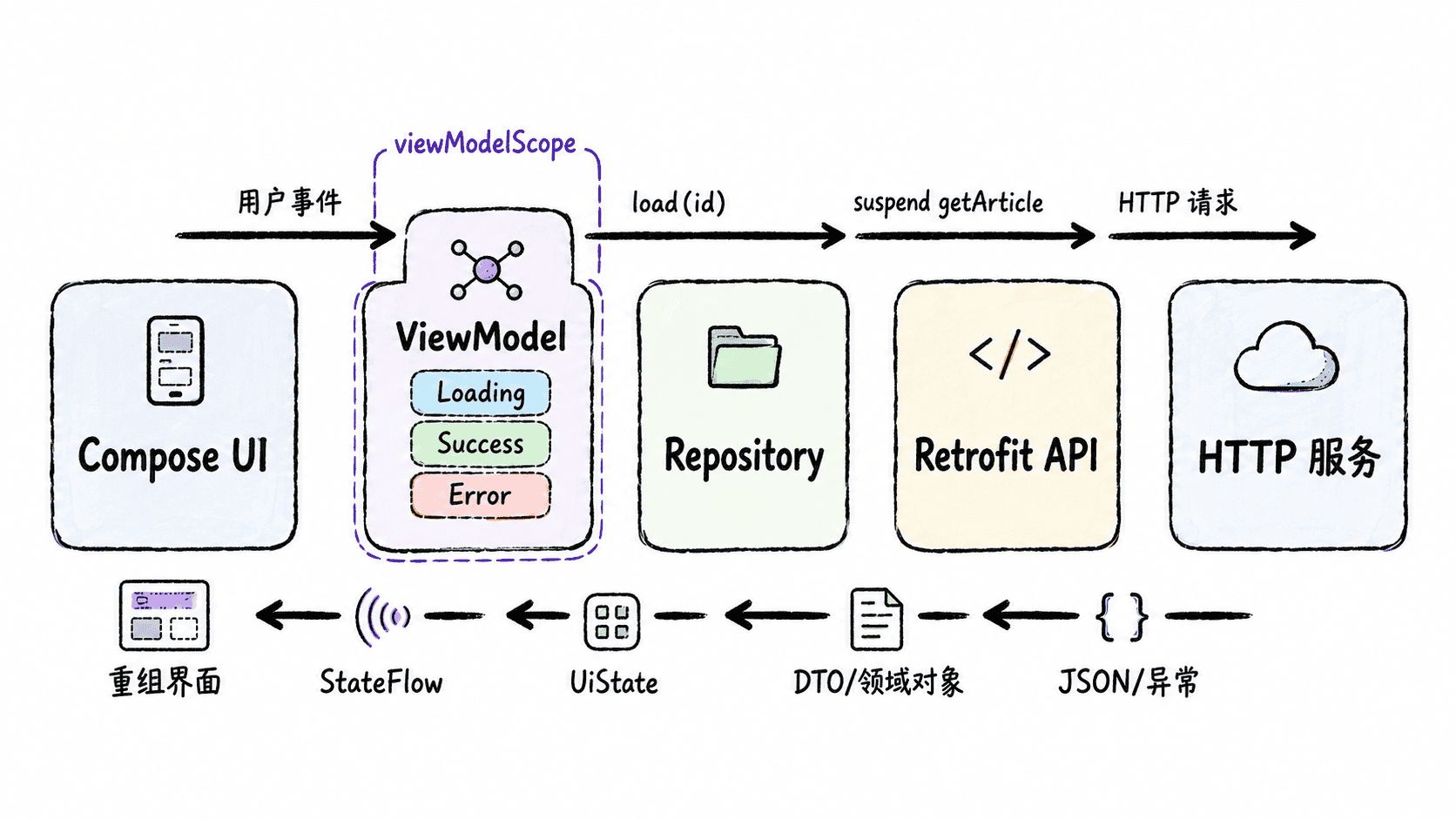
这条单向链路能把职责分开:Repository 不直接改界面,Compose 不直接访问 Retrofit,ViewModel 也不持有 Activity 或 View 引用。后续加入缓存、重试或分页时,改动会集中在相应层而不是扩散到整个页面。
在 Compose 中观察 StateFlow
Compose 页面通过 collectAsStateWithLifecycle() 按生命周期收集状态。LaunchedEffect(articleId) 在文章 ID 变化时触发一次加载,when 则保证每种状态都有明确 UI。
import androidx.compose.material3.CircularProgressIndicator
import androidx.compose.material3.Text
import androidx.compose.runtime.Composable
import androidx.compose.runtime.LaunchedEffect
import androidx.compose.runtime.getValue
import androidx.lifecycle.compose.collectAsStateWithLifecycle

@Composable
fun ArticleScreen(
    articleId: Long,
    viewModel: ArticleViewModel
) {
    val state by viewModel.uiState.collectAsStateWithLifecycle()

    LaunchedEffect(articleId) {
        viewModel.load(articleId)
    }

    when (val current = state) {
        ArticleUiState.Idle -> Unit
        ArticleUiState.Loading -> CircularProgressIndicator()
        is ArticleUiState.Success -> {
            Text("${current.article.title}\n${current.article.body}")
        }
        is ArticleUiState.Error -> Text(current.message)
    }
}
预期结果:
请求开始:显示加载指示器
请求成功:显示 <TITLE> 与 <BODY>
网络不可达:显示“网络连接失败”
HTTP 非 2xx:显示“请求失败:HTTP <VALUE>”
响应格式错误:显示“响应数据格式错误”
实际标题、正文和状态码取决于接口响应。若连续快速切换 articleId 可能产生并发请求,还应在 ViewModel 中保存并取消上一项 Job,或把 ID 建模为 Flow 后使用 flatMapLatest;基础页面先做到“请求逻辑在数据层、状态在 ViewModel、渲染在 UI”即可。