
原生移动开发 / 系统课时
图片选择与文件访问
图片选择与文件访问
Android 文件能力的关键是先选对访问通道:选照片优先 Photo Picker,选任意文档使用 Storage Access Framework,对外分享应用自己的文件则用 FileProvider。本节把三种 URI 流程放到一个可运行示例里,避免把文件路径和访问权限混为一谈。
学习目标
- 根据场景选择 Photo Picker、系统文件选择器或 FileProvider
- 使用
Uri与ContentResolver读取用户选择的内容 - 通过 FileProvider 安全分享应用私有文件并授予临时权限
先选通道,不要先申请存储权限
用户只想挑一张图片时,Photo Picker 只授予所选媒体的访问能力;选择普通文档时,Storage Access Framework 让用户明确挑选文件,并返回可通过 ContentResolver 访问的 URI;这两类系统选择器都能避免为了单个文件去请求广泛存储权限。:contentReference[oaicite:3]{index=3}
| 需求 | 推荐入口 | 应用拿到的能力 |
|---|---|---|
| 选择图片或视频 | Photo Picker | 用户选中媒体的 URI |
| 打开 PDF、文本等文档 | OpenDocument |
用户选中文档的 URI,可按需持久化授权 |
| 把应用私有文件交给其他 App | FileProvider | content:// URI 与临时读写授权 |
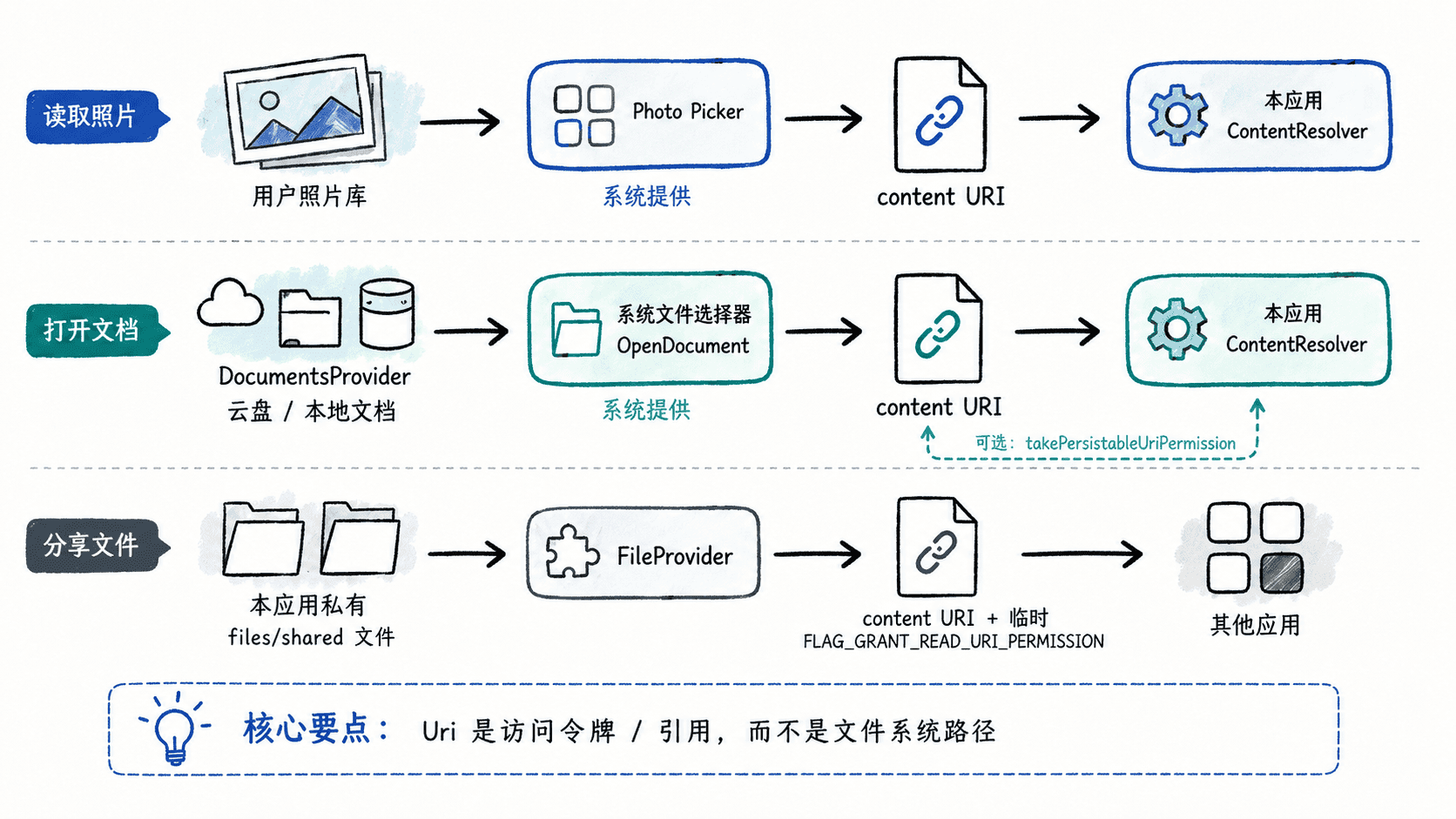
Uri 不是“真实文件路径”的同义词。不要把 uri.path 当成可直接交给 File 的路径;对于选择器返回的内容,优先通过 ContentResolver.openInputStream()、openFileDescriptor() 或对应 provider API 访问。
配置 FileProvider 的可分享目录
FileProvider 用 content:// URI 代替不安全的 file:// URI,并允许应用只给接收方临时访问权。它只能暴露预先声明的目录,因此先在 Manifest 中注册 provider。下面是片段示例,应放在 AndroidManifest.xml 的 application 元素内。:contentReference[oaicite:4]{index=4}
<provider
    android:name=".AppFileProvider"
    android:authorities="${applicationId}.fileprovider"
    android:exported="false"
    android:grantUriPermissions="true">
    <meta-data
        android:name="android.support.FILE_PROVIDER_PATHS"
        android:resource="@xml/file_paths" />
</provider>
再创建 res/xml/file_paths.xml:
<?xml version="1.0" encoding="utf-8"?>
<paths xmlns:android="http://schemas.android.com/apk/res/android">
    <files-path
        name="shared"
        path="shared/" />
</paths>
这表示只有应用内部 files/shared/ 下的文件可以通过这个 provider 生成 URI。验证时不要把 path="." 当作省事配置;范围越大,可被分享出去的私有文件越多。
把三种访问方式放进一个 Activity
下面的 Activity 提供三个按钮:选择图片、选择 PDF、分享应用生成的文本文件。OpenDocument 返回的 URI 可以显式持久化读取授权,以便设备重启后仍能继续访问;若文档被移动或删除,应用仍需重新让用户选择。:contentReference[oaicite:5]{index=5}
package com.example.filedemo

import android.content.ClipData
import android.content.Intent
import android.os.Bundle
import android.widget.Button
import android.widget.LinearLayout
import android.widget.TextView
import androidx.activity.ComponentActivity
import androidx.activity.result.PickVisualMediaRequest
import androidx.activity.result.contract.ActivityResultContracts
import androidx.core.content.FileProvider
import java.io.File

class AppFileProvider : FileProvider()

class MainActivity : ComponentActivity() {

    private lateinit var statusView: TextView

    private val pickPhoto =
        registerForActivityResult(ActivityResultContracts.PickVisualMedia()) { uri ->
            statusView.text = if (uri == null) {
                "没有选择图片"
            } else {
                val firstByte = contentResolver.openInputStream(uri)?.use { it.read() }
                "图片 URI:$uri,首字节:$firstByte"
            }
        }

    private val openPdf =
        registerForActivityResult(ActivityResultContracts.OpenDocument()) { uri ->
            if (uri == null) {
                statusView.text = "没有选择 PDF"
                return@registerForActivityResult
            }

            contentResolver.takePersistableUriPermission(
                uri,
                Intent.FLAG_GRANT_READ_URI_PERMISSION
            )
            statusView.text = "已保留 PDF 读取权限:$uri"
        }

    override fun onCreate(savedInstanceState: Bundle?) {
        super.onCreate(savedInstanceState)

        statusView = TextView(this).apply { text = "请选择一个操作" }

        val pickPhotoButton = Button(this).apply {
            text = "选择图片"
            setOnClickListener {
                pickPhoto.launch(
                    PickVisualMediaRequest(
                        ActivityResultContracts.PickVisualMedia.ImageOnly
                    )
                )
            }
        }

        val openPdfButton = Button(this).apply {
            text = "选择 PDF"
            setOnClickListener { openPdf.launch(arrayOf("application/pdf")) }
        }

        val shareButton = Button(this).apply {
            text = "分享应用文件"
            setOnClickListener { shareAppFile() }
        }

        setContentView(
            LinearLayout(this).apply {
                orientation = LinearLayout.VERTICAL
                addView(pickPhotoButton)
                addView(openPdfButton)
                addView(shareButton)
                addView(statusView)
            }
        )
    }

    private fun shareAppFile() {
        val directory = File(filesDir, "shared").apply { mkdirs() }
        val file = File(directory, "note.txt").apply {
            writeText("Hello from FileProvider")
        }
        val uri = FileProvider.getUriForFile(
            this,
            "$packageName.fileprovider",
            file
        )

        val shareIntent = Intent(Intent.ACTION_SEND).apply {
            type = "text/plain"
            putExtra(Intent.EXTRA_STREAM, uri)
            clipData = ClipData.newRawUri("shared-file", uri)
            addFlags(Intent.FLAG_GRANT_READ_URI_PERMISSION)
        }
        startActivity(Intent.createChooser(shareIntent, "分享文件"))
    }
}
预期结果:
点击“选择图片”:出现系统媒体选择界面;选中后页面显示 content://.../<ID> 形式的 URI。
点击“选择 PDF”:出现系统文件选择器;选中后页面显示已保留读取权限的 URI。
点击“分享应用文件”:出现系统分享选择器,接收应用可临时读取 note.txt。
取消任一选择器:应用返回当前页面,不会获得对应文件访问能力。
Photo Picker 的 Activity Result contract 会优先使用系统 Photo Picker,并在不可用设备上提供兼容回退;返回值是 Uri 或 null,不应假定它是可写文件。:contentReference[oaicite:6]{index=6}
URI 权限要跟生命周期匹配
临时查看一次内容时,保留选择器授予的短期权限即可;确实需要在重启后继续处理某个文档时,再调用 takePersistableUriPermission()。对外分享应用文件则使用 FLAG_GRANT_READ_URI_PERMISSION 或确有必要时的写权限,让授权随接收组件生命周期结束,而不是扩大文件系统权限。
这三条路径的共同原则是“由用户选择具体内容,再授予最小访问范围”。只要始终把 Uri 当作受权限控制的内容引用,而不是本地绝对路径,绝大多数图片选择、文档访问和跨应用文件分享都不需要回到旧式的全盘存储访问方式。