
Web 图形与 3D / 系统课时
使用索引缓冲减少重复顶点
使用索引缓冲减少重复顶点
一个矩形由两个三角形组成,若按三角形顺序上传顶点,共享的角点就会重复。本课使用索引缓冲保存“引用哪个顶点”的编号,让矩形只存 4 个顶点、立方体只存 8 个角点,并用 drawElements 画出两种网格、核算节省的字节数。
学习目标
- 用索引序列描述矩形的 2 个三角形和立方体的 12 个三角形。
- 正确绑定
ELEMENT_ARRAY_BUFFER,在 VAO 中调用drawElements。 - 根据最大顶点索引选择
Uint16Array或Uint32Array,判断索引绘制何时省空间。
索引如何复用同一个顶点
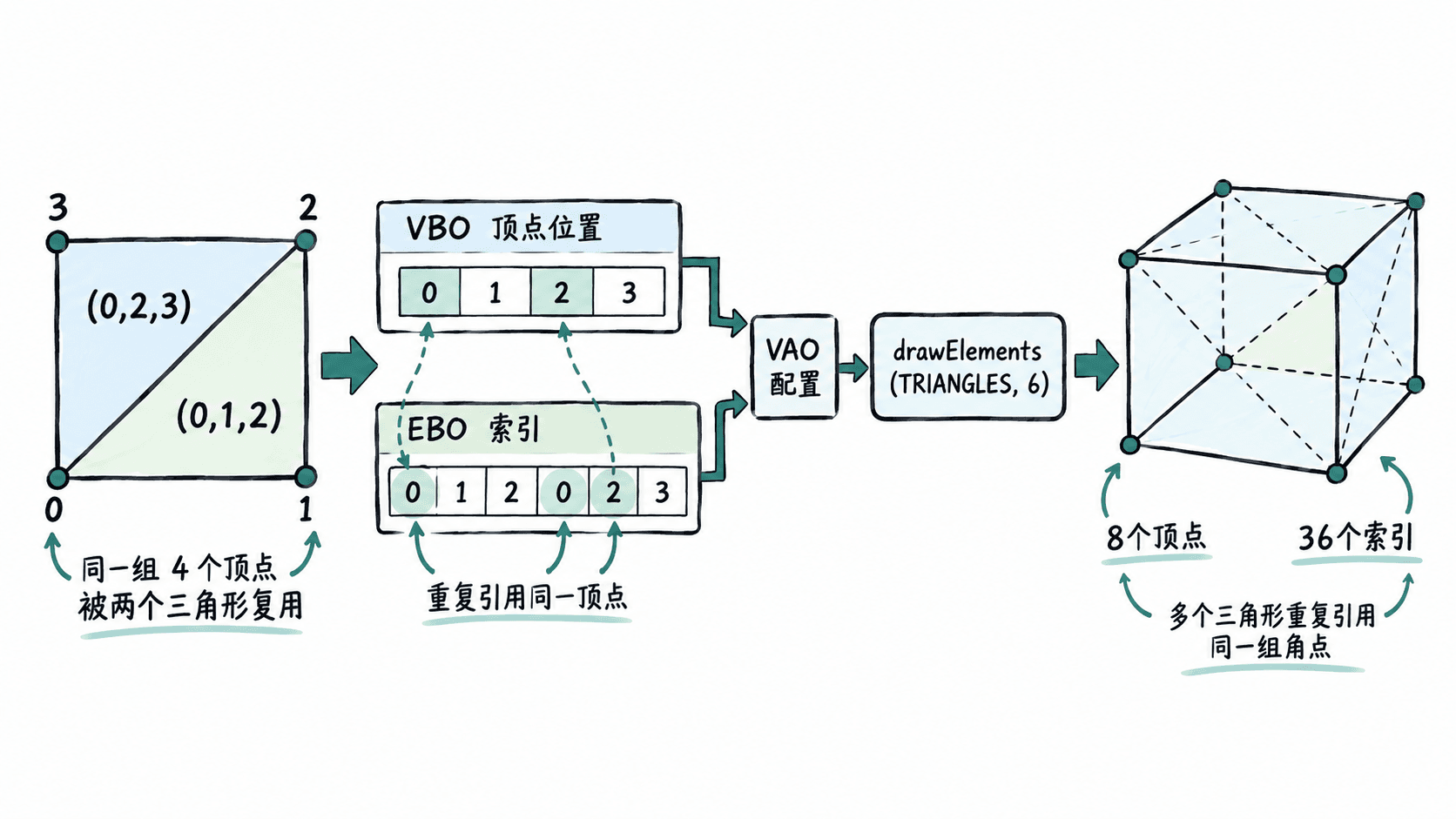
ARRAY_BUFFER 存储顶点属性;ELEMENT_ARRAY_BUFFER 存储顶点编号。以逆时针排列的矩形四角为例:0=左下、1=右下、2=右上、3=左上。索引 [0, 1, 2, 0, 2, 3] 每 3 个编号构成一个独立三角形,0 和 2 被两个三角形共同引用,而不是再复制一次位置数据。
立方体同理:8 个几何角点构成 6 个面,每面拆为 2 个三角形,因此需要 36 个索引。索引数量不是唯一顶点数量;索引里重复的是编号,不是整份顶点属性。
创建缓冲并绘制矩形和立方体
将下列完整示例保存为 index.html,用支持 WebGL 2 的浏览器打开。页面左右各占 400×400 像素:左侧为矩形,右侧为固定角度的立方体。着色器只为显示效果添加颜色与简化的立方体透视,不涉及纹理和相机系统。
<!doctype html>
<html lang="zh-CN">
<head>
  <meta charset="utf-8">
  <title>WebGL 2 索引绘制</title>
</head>
<body>
  <p>左:4 顶点 / 6 索引  右:8 顶点 / 36 索引</p>
  <canvas id="scene" width="800" height="400"></canvas>
  <script>
    const gl = document.querySelector("#scene").getContext("webgl2");
    if (!gl) throw new Error("当前浏览器不支持 WebGL 2");

    const vertexSource = `#version 300 es
layout(location = 0) in vec3 aPosition;
uniform bool uCube;
out vec3 vColor;
void main() {
  vec3 p = aPosition;
  if (uCube) {
    float cy = cos(0.6), sy = sin(0.6);
    p = vec3(cy * p.x + sy * p.z, p.y, -sy * p.x + cy * p.z);
    float cx = cos(-0.45), sx = sin(-0.45);
    p = vec3(p.x, cx * p.y - sx * p.z, sx * p.y + cx * p.z);
    // 仅用于展示的固定视角与透视除法
    gl_Position = vec4(p.xy * 2.0, 1.0 - p.z, 3.0 - p.z);
  } else {
    gl_Position = vec4(p, 1.0);
  }
  vColor = aPosition * 0.5 + vec3(0.5);
}`;

    const fragmentSource = `#version 300 es
precision highp float;
in vec3 vColor;
out vec4 outColor;
void main() {
  outColor = vec4(vColor, 1.0);
}`;

    function compile(type, source) {
      const shader = gl.createShader(type);
      gl.shaderSource(shader, source);
      gl.compileShader(shader);
      if (!gl.getShaderParameter(shader, gl.COMPILE_STATUS)) {
        throw new Error(gl.getShaderInfoLog(shader));
      }
      return shader;
    }

    const program = gl.createProgram();
    gl.attachShader(program, compile(gl.VERTEX_SHADER, vertexSource));
    gl.attachShader(program, compile(gl.FRAGMENT_SHADER, fragmentSource));
    gl.linkProgram(program);
    if (!gl.getProgramParameter(program, gl.LINK_STATUS)) {
      throw new Error(gl.getProgramInfoLog(program));
    }

    function makeMesh(positions, indices) {
      const vertexCount = positions.length / 3;
      if (indices.some(i => !Number.isInteger(i) || i < 0 || i >= vertexCount)) {
        throw new RangeError("索引超出顶点范围");
      }
      // 编号超过65535才需要32位索引;类型必须与drawElements匹配
      const use32 = indices.some(i => i > 65535);
      const indexData = use32 ? new Uint32Array(indices) : new Uint16Array(indices);
      const vao = gl.createVertexArray();
      gl.bindVertexArray(vao);

      const vbo = gl.createBuffer();
      gl.bindBuffer(gl.ARRAY_BUFFER, vbo);
      gl.bufferData(gl.ARRAY_BUFFER, new Float32Array(positions), gl.STATIC_DRAW);
      gl.enableVertexAttribArray(0);
      gl.vertexAttribPointer(0, 3, gl.FLOAT, false, 0, 0);

      // EBO绑定记录在当前VAO中,切换网格时随VAO恢复
      const ebo = gl.createBuffer();
      gl.bindBuffer(gl.ELEMENT_ARRAY_BUFFER, ebo);
      gl.bufferData(gl.ELEMENT_ARRAY_BUFFER, indexData, gl.STATIC_DRAW);
      gl.bindVertexArray(null);
      return {
        vao, vertexCount, indexCount: indexData.length,
        indexType: use32 ? gl.UNSIGNED_INT : gl.UNSIGNED_SHORT
      };
    }

    const quad = makeMesh(
      [-0.8,-0.8,0, 0.8,-0.8,0, 0.8,0.8,0, -0.8,0.8,0],
      [0,1,2, 0,2,3]
    );

    const cube = makeMesh(
      [
        -0.65,-0.65,-0.65,  0.65,-0.65,-0.65,
         0.65, 0.65,-0.65, -0.65, 0.65,-0.65,
        -0.65,-0.65, 0.65,  0.65,-0.65, 0.65,
         0.65, 0.65, 0.65, -0.65, 0.65, 0.65
      ],
      [
        4,5,6, 4,6,7, 0,3,2, 0,2,1,
        0,4,7, 0,7,3, 1,2,6, 1,6,5,
        3,7,6, 3,6,2, 0,1,5, 0,5,4
      ]
    );

    gl.useProgram(program);
    gl.enable(gl.DEPTH_TEST);
    gl.enable(gl.CULL_FACE);
    gl.clearColor(0.96, 0.98, 1.0, 1.0);
    gl.clear(gl.COLOR_BUFFER_BIT | gl.DEPTH_BUFFER_BIT);
    const cubeLocation = gl.getUniformLocation(program, "uCube");

    function draw(mesh, isCube, x) {
      gl.viewport(x, 0, 400, 400);
      gl.uniform1i(cubeLocation, isCube ? 1 : 0);
      gl.bindVertexArray(mesh.vao);
      gl.drawElements(gl.TRIANGLES, mesh.indexCount, mesh.indexType, 0);
    }

    draw(quad, false, 0);
    draw(cube, true, 400);
    gl.bindVertexArray(null);
    console.log(`矩形:${quad.vertexCount}顶点 / ${quad.indexCount}索引`);
    console.log(`立方体:${cube.vertexCount}顶点 / ${cube.indexCount}索引`);
    console.log("WebGL错误码:", gl.getError());
  </script>
</body>
</html>
预期结果:Canvas 左半显示彩色矩形,右半显示有透视效果的彩色立方体;浏览器开发者工具的 Console 显示:
矩形:4顶点 / 6索引
立方体:8顶点 / 36索引
WebGL错误码: 0
makeMesh 先绑定 VAO,再创建位置 VBO 与索引 EBO;vertexAttribPointer 的顶点数据来源和 ELEMENT_ARRAY_BUFFER 绑定均随当前 VAO 保存。绘制时只需切换 VAO,便能让两个网格使用各自的索引。
正确选择索引类型和绘制参数
gl.drawElements(mode, count, type, offset) 中,count 是索引个数,不是三角形数;offset 是 EBO 内的字节偏移,不是第几个索引。当前示例全部从索引 0 开始,因此偏移为 0。
| 索引数据 | 对应 type |
单索引字节数 | 最大顶点编号 |
|---|---|---|---|
Uint16Array |
gl.UNSIGNED_SHORT |
2 | 65535 |
Uint32Array |
gl.UNSIGNED_INT |
4 | 4294967295 |
WebGL 2 原生支持 gl.UNSIGNED_INT,无需 WebGL 1 的 OES_element_index_uint 扩展。只要网格的最大实际索引达到 65536,就需要改用 32 位;并非索引数组长度超过 65535 就必须升级。偏移值还必须分别按 2 或 4 字节对齐。上面的 makeMesh 已根据索引值自动选择配对类型。
数据量对比与顶点拆分边界
只计算每个顶点的 3 个 Float32 位置分量(12 字节)及索引本体,不包含 GPU 对齐、驱动管理开销与其他属性:
| 网格 | 非索引 drawArrays |
索引 drawElements |
节省 |
|---|---|---|---|
| 矩形:2 个三角形 | 6×12=72 B | 4×12+6×2=60 B | 12 B(16.7%) |
| 立方体:12 个三角形 | 36×12=432 B | 8×12+36×2=168 B | 264 B(61.1%) |
但“同一空间位置”不保证可以复用同一个完整顶点:硬边立方体若需要每个面的独立法线、不同贴图 UV,通常要为 6 个面分别提供 4 个顶点,共 24 个属性顶点,再用 36 个索引绘制。否则共用角点会使法线或 UV 在面与面之间错误共享。省下多少字节,应按真实的位置、法线、UV、颜色等全部属性重新计算。
若出现缺面,先检查三角形的索引绕序和 gl.CULL_FACE;若出现扭曲或空白,核对索引是否小于顶点数、VAO 中的 EBO 是否仍绑定,以及 type 是否与 TypedArray 一致。将示例中的立方体索引首项改为 8,会触发 RangeError,这是越界检查在上传前拦截错误的预期行为。