
Web 图形与 3D / 系统课时
组装可交互的三维模型查看器
组装可交互的三维模型查看器
把模型加载、材质光照、透视相机、轨道操作、点击拾取与画布自适应接成一个可运行的浏览器页面。完成后可以连续切换不同的 glTF 2.0 二进制模型(.glb),检查纹理、遮挡、交互与错误提示,而不是只看到一张静态渲染图。
学习目标
- 说清模型资源、场景、相机、交互和绘制循环的责任边界。
- 运行一个能加载 .glb、旋转缩放、拾取网格并随窗口调整的查看器。
- 使用明确的验收动作定位资源、相机、材质与画布问题。
确定模块边界与数据流
本次把输入限制为单文件 .glb:它是 glTF 2.0 的二进制容器,能够将网格、材质和纹理放在一个文件中,避免本地 .gltf 引用外部 .bin 或图片时的路径问题。为让工程在一页内完整运行,示例使用 Three.js 0.164.0 的 WebGL 2 渲染器、GLTFLoader 和 OrbitControls;它们分别封装前面手写的 GPU 绘制、资源解析与轨道相机逻辑。
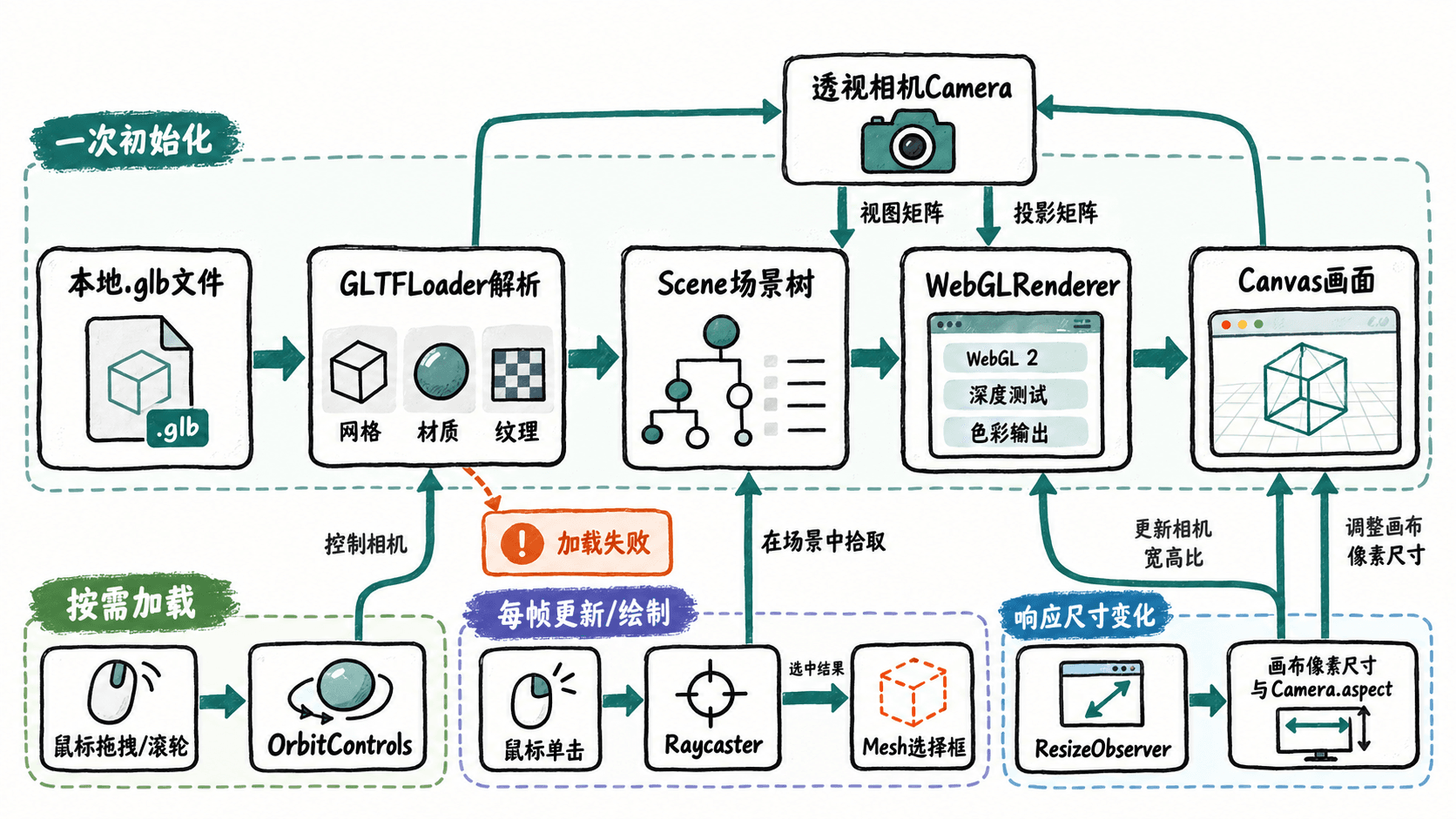
数据流中有三条不能混淆:加载成功才替换旧场景对象;每帧只更新相机控制并绘制;窗口尺寸变化时同时修改绘图缓冲区和投影宽高比。拾取必须使用当前相机,将点击位置换算成标准化设备坐标,而不是把 CSS 像素直接当作世界坐标。
建立单文件查看器
创建 index.html,粘贴以下完整代码。页面只依赖能访问 CDN 的网络以及支持 WebGL 2 的现代浏览器;无需安装打包器。点击选择本地 .glb 后,GLTFLoader.parseAsync 解析文件,保留 glTF 的网格层级、纹理与 PBR 材质。为避免视野尺寸依赖模型作者,加载完成后根据包围球重设观察目标和相机距离。
<!doctype html>
<html lang="zh-CN">
<head>
<meta charset="utf-8">
<meta name="viewport" content="width=device-width, initial-scale=1">
<title>WebGL 2 模型查看器</title>
<style>
  body { margin: 0; font: 14px system-ui; color: #26364b; background: #f5f7fa; }
  main { max-width: 960px; margin: 20px auto; padding: 0 12px; }
  label { display: block; margin-bottom: 12px; }
  #stage { height: min(70vh, 680px); min-height: 260px; }
  canvas { display: block; width: 100%; height: 100%; touch-action: none; }
  #status { min-height: 1.5em; }
</style>
<script type="importmap">
{
  "imports": {
    "three": "https://cdn.jsdelivr.net/npm/three@0.164.0/build/three.module.js",
    "three/addons/": "https://cdn.jsdelivr.net/npm/three@0.164.0/examples/jsm/"
  }
}
</script>
</head>
<body>
<main>
  <label>选择 .glb:<input id="file" type="file" accept=".glb"></label>
  <div id="stage"><canvas id="view"></canvas></div>
  <p id="status" role="status">请选择自包含的 .glb 模型。</p>
</main>
<script type="module">
import * as THREE from 'three';
import { GLTFLoader } from 'three/addons/loaders/GLTFLoader.js';
import { OrbitControls } from 'three/addons/controls/OrbitControls.js';

const canvas = document.querySelector('#view');
const stage = document.querySelector('#stage');
const status = document.querySelector('#status');
const input = document.querySelector('#file');

// 明确检查 WebGL 2,避免把浏览器环境问题误判为模型错误。
const gl = canvas.getContext('webgl2', { antialias: true });
if (!gl) {
  status.textContent = '初始化失败:浏览器不支持 WebGL 2。';
  throw new Error('WebGL 2 unavailable');
}
const renderer = new THREE.WebGLRenderer({ canvas, context: gl });
renderer.outputColorSpace = THREE.SRGBColorSpace;
renderer.toneMapping = THREE.ACESFilmicToneMapping;

const scene = new THREE.Scene();
scene.background = new THREE.Color(0x192434);
scene.add(new THREE.HemisphereLight(0xffffff, 0x506070, 2));
const keyLight = new THREE.DirectionalLight(0xffffff, 3);
keyLight.position.set(3, 5, 4);
scene.add(keyLight);

const camera = new THREE.PerspectiveCamera(45, 1, 0.01, 100);
camera.position.set(0, 1, 5);
const controls = new OrbitControls(camera, canvas);
controls.enableDamping = true;
controls.dampingFactor = 0.08;
const loader = new GLTFLoader();
const raycaster = new THREE.Raycaster();
const pointer = new THREE.Vector2();
let model = null;
let selection = null;
let requestId = 0;

// 切换文件前释放不再使用的网格、材质和纹理。
function disposeModel(root) {
  const geometries = new Set(), materials = new Set(), textures = new Set();
  root.traverse(object => {
    if (!object.isMesh) return;
    if (object.geometry) geometries.add(object.geometry);
    for (const material of Array.isArray(object.material)
      ? object.material : [object.material]) {
      if (!material) continue;
      materials.add(material);
      for (const value of Object.values(material)) {
        if (value?.isTexture) textures.add(value);
      }
    }
  });
  geometries.forEach(value => value.dispose());
  materials.forEach(value => value.dispose());
  textures.forEach(value => value.dispose());
}
function clearSelection() {
  if (!selection) return;
  scene.remove(selection);
  selection.geometry.dispose();
  selection.material.dispose();
  selection = null;
}
function resize() {
  const width = Math.max(1, stage.clientWidth);
  const height = Math.max(1, stage.clientHeight);
  renderer.setPixelRatio(Math.min(window.devicePixelRatio || 1, 2));
  renderer.setSize(width, height, false);
  camera.aspect = width / height;
  camera.updateProjectionMatrix();
}
new ResizeObserver(resize).observe(stage);
resize();

input.addEventListener('change', async () => {
  const file = input.files?.[0];
  if (!file) return;
  input.value = '';
  const id = ++requestId;
  status.textContent = `正在加载:${file.name}`;
  try {
    if (!file.name.toLowerCase().endsWith('.glb')) {
      throw new Error('此示例仅接受 .glb 文件');
    }
    const gltf = await loader.parseAsync(await file.arrayBuffer(), '');
    const next = gltf.scene;
    if (id !== requestId) {
      disposeModel(next);
      return;
    }
    let meshCount = 0;
    next.traverse(object => { if (object.isMesh) meshCount++; });
    const bounds = new THREE.Box3().setFromObject(next);
    const sphere = bounds.getBoundingSphere(new THREE.Sphere());
    if (!meshCount || bounds.isEmpty() || !Number.isFinite(sphere.radius)
        || sphere.radius <= 0) {
      disposeModel(next);
      throw new Error('没有有效的网格边界');
    }

    clearSelection();
    if (model) {
      scene.remove(model);
      disposeModel(model);
    }
    model = next;
    scene.add(model);

    // 包围球适配相机:兼顾窄窗口与宽窗口。
    const vertical = THREE.MathUtils.degToRad(camera.fov);
    const horizontal = 2 * Math.atan(Math.tan(vertical / 2) * camera.aspect);
    const distance = sphere.radius / Math.sin(Math.min(vertical, horizontal) / 2) * 1.25;
    camera.near = Math.max(0.001, sphere.radius / 100);
    camera.far = Math.max(100, sphere.radius * 100);
    camera.updateProjectionMatrix();
    controls.target.copy(sphere.center);
    camera.position.copy(sphere.center).add(new THREE.Vector3(
      distance * 0.2, distance * 0.12, distance
    ));
    controls.minDistance = sphere.radius * 0.2;
    controls.maxDistance = sphere.radius * 20;
    controls.update();
    status.textContent = `已加载 ${file.name},网格 ${meshCount} 个;拖拽旋转,滚轮缩放,单击拾取。`;
  } catch (error) {
    if (id === requestId) status.textContent = `加载失败:${error.message}`;
    console.error(error);
  }
});

let down = null;
canvas.addEventListener('pointerdown', event => {
  if (event.button === 0) down = [event.clientX, event.clientY];
});
canvas.addEventListener('pointerup', event => {
  if (!down || !model || event.button !== 0) return;
  const moved = Math.hypot(event.clientX - down[0], event.clientY - down[1]);
  down = null;
  if (moved > 4) return; // 排除拖拽结束时的误选。
  const rect = canvas.getBoundingClientRect();
  pointer.set(
    2 * (event.clientX - rect.left) / rect.width - 1,
    1 - 2 * (event.clientY - rect.top) / rect.height
  );
  raycaster.setFromCamera(pointer, camera);
  const hit = raycaster.intersectObject(model, true)[0];
  clearSelection();
  if (!hit) {
    status.textContent = '未命中模型。';
    return;
  }
  selection = new THREE.BoxHelper(hit.object, 0xffbd59);
  scene.add(selection);
  status.textContent = `已选中:${hit.object.name || '未命名网格'};距离 ${hit.distance.toFixed(2)}(模型单位)`;
});

canvas.addEventListener('webglcontextlost', event => {
  event.preventDefault();
  status.textContent = 'WebGL 上下文丢失,等待恢复。';
});
canvas.addEventListener('webglcontextrestored', () => {
  status.textContent = '上下文已恢复,请检查画面和纹理。';
});

// 只启动一次渲染循环,文件切换和窗口变化不另开循环。
renderer.setAnimationLoop(() => {
  controls.update();
  renderer.render(scene, camera);
});
</script>
</body>
</html>
运行并逐项验收
在 index.html 所在目录执行以下命令。8000 是示例固定端口,若被占用可改成其他可用端口;控制台的绑定信息因 Python 版本和环境而异。
python -m http.server 8000 --bind 127.0.0.1预期输出示例:
Serving HTTP on 127.0.0.1 port 8000 (http://127.0.0.1:8000/) ...访问 http://127.0.0.1:8000/,从 Khronos glTF Sample Assets 获取 Box 和 Box Textured 的 Binary glTF(.glb)文件,分别选择加载。模型素材遵守其页面标注的许可;当前代码只读取本地文件,不向服务器上传模型。
| 检查动作 | 可观察的合格结果 |
|---|---|
| 加载 Box 与 Box Textured | 两者均居中且完整可见;带纹理版本表面显示图案 |
| 拖拽、滚轮、点击网格 | 视角旋转或缩放;单击出现黄色包围框与网格名称 |
| 将浏览器窗口由宽改窄再改宽 | 模型不被拉伸;画布比例变化时投影同步更新 |
选择一个重命名为 .glb 的非模型文件 |
页面出现“加载失败”,控制台提供错误详情 |
| 加载第二个正常模型 | 新模型替换旧模型,仍能拾取,不出现叠影 |
失败时先检查哪一层
- 界面空白且没有控件:检查是否使用本地 HTTP 服务打开、浏览器能否访问 CDN,并查看开发者工具 Console 的模块导入报错。
- 提示 WebGL 2 不可用:检查浏览器硬件加速与 WebGL 2 支持情况;模型文件不会导致这条初始化错误。
- 提示加载失败:确认是真正的二进制 glTF,而不是把
.gltf或其他格式改名为.glb。本例不处理外部分离资源,也未配置 Draco、Meshopt、KTX2 等压缩扩展解码器。 - 模型可见但金属发暗:材质已加载并不等于光照环境齐全。高金属度 PBR 材质通常还需要环境贴图与预过滤反射;先检查光源和
scene.environment,不要把这一现象直接归咎于 UV。 - 拖动后误选或改窗后拾取偏移:确认点击位移阈值为 4 CSS 像素,射线坐标以
getBoundingClientRect()归一化,且camera.aspect在ResizeObserver内更新。 - 高分辨率屏幕掉帧:CSS 画布为 800×450、像素比为 2 时,实际绘图像素达 1600×900,是原来的 4 倍。先把
setPixelRatio的上限从 2 改为 1,再比较开发者工具 Performance 的帧耗时。
本例用于验证单场景静态 .glb 的核心链路;骨骼动画需要额外接入 AnimationMixer,高级材质扩展与压缩纹理需要单独适配。真正的工程应将加载、场景、输入和渲染拆为模块,但仍沿用“加载成功后替换资源、单一循环绘制、变化时同步投影”的执行边界。