
原生移动开发 / 系统课时
启动一个合规前台服务
启动一个合规前台服务
本篇用一个可运行的 Kotlin 示例把前台服务的关键链路串起来:在可见界面启动服务、创建通知渠道、声明前台服务类型,并在服务创建后及时进入前台。重点不是“让 Service 一直跑”,而是让系统知道这项持续任务对用户可见且用途明确。([Android Developers][1])
学习目标
- 能正确声明前台服务权限、服务类型和 Manifest 配置
- 能从前台界面启动 Service,并及时调用
startForeground() - 能用日志和系统界面验证服务确实处于前台运行状态
先确定前台服务的职责
前台服务适合处理用户能够明显感知、且应用离开当前页面后仍需要继续执行的任务,例如主动进行的数据同步。它必须伴随持续通知;若任务本身不需要用户感知,优先考虑其他后台工作方案。([Android Developers][1])
本例选择 dataSync 作为演示类型,因为它适合数据上传、下载、备份和文件处理等场景,而且不要求额外的运行时数据访问权限。Android 14(API 34)及以上要求前台服务声明合适的类型,并同时满足该类型对应的前台服务权限。([Android Developers][2])
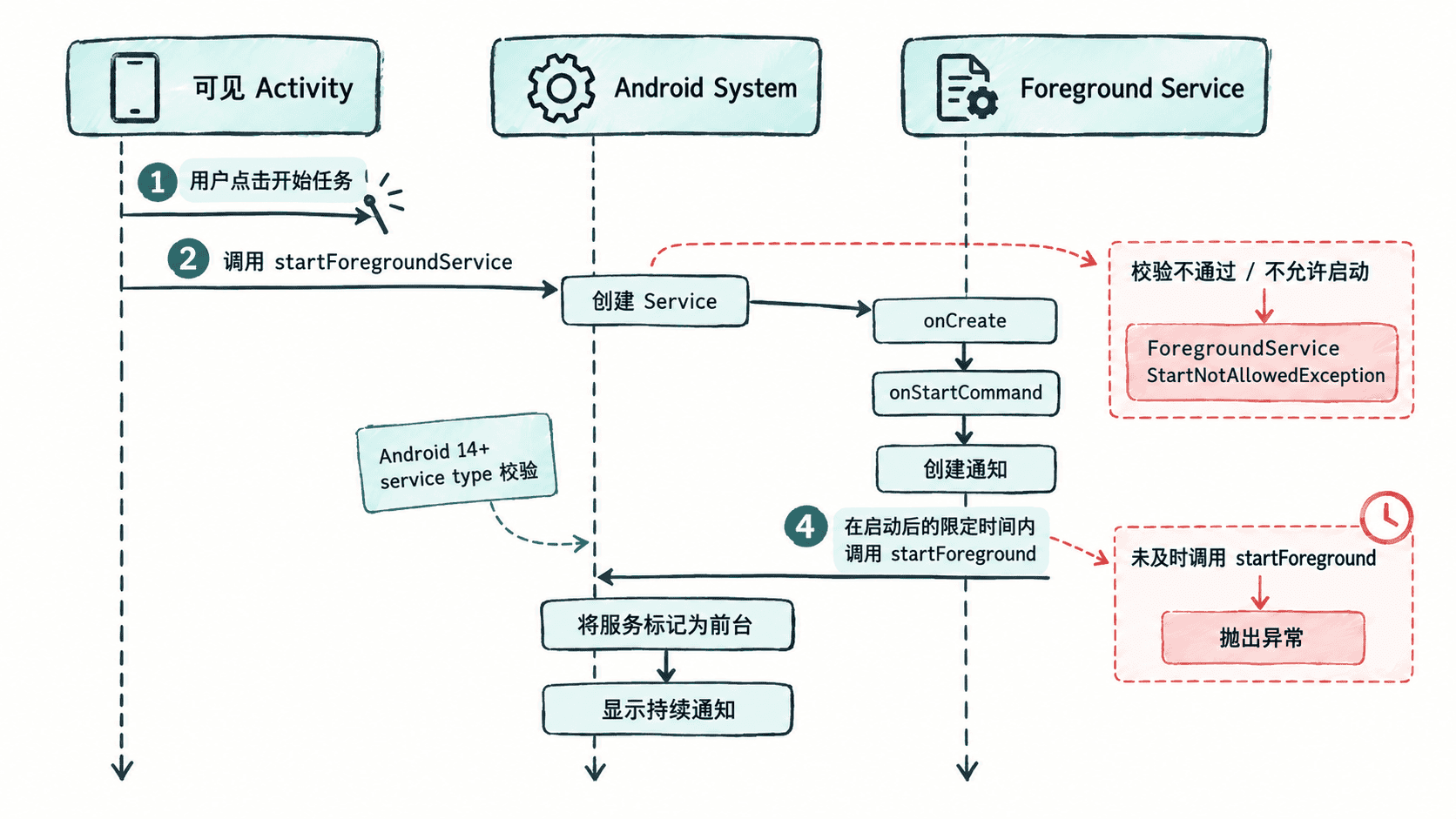
Manifest 先把能力声明完整
下面的配置把基础 FOREGROUND_SERVICE 权限、dataSync 专用权限和服务类型一次声明齐全。服务类名按你的实际包名修改;这里用 DataSyncForegroundService 作为示例名称。
<manifest xmlns:android="http://schemas.android.com/apk/res/android">
    <uses-permission android:name="android.permission.FOREGROUND_SERVICE" />
    <uses-permission android:name="android.permission.FOREGROUND_SERVICE_DATA_SYNC" />

    <application
        android:allowBackup="true"
        android:label="ForegroundDemo">
        <activity
            android:name=".MainActivity"
            android:exported="true" />

        <service
            android:name=".DataSyncForegroundService"
            android:exported="false"
            android:foregroundServiceType="dataSync" />
    </application>
</manifest>
预期结果:构建时 Manifest 中存在 dataSync 类型和对应前台服务权限;Android 14+ 启动该类型服务时不会因为缺少类型声明而直接失败。([Android Developers][2])
在服务里尽快进入前台
关键时序是:先让系统创建服务,再在服务内部快速完成通知初始化并调用 startForeground()。Android 对 startForegroundService() 启动的服务有严格的时间窗口;官方文档明确要求服务在 5 秒内调用 startForeground()。([Android Developers][3])
package com.example.foregrounddemo

import android.app.Notification
import android.app.NotificationChannel
import android.app.NotificationManager
import android.app.Service
import android.content.Intent
import android.content.pm.ServiceInfo
import android.os.Build
import android.os.IBinder

class DataSyncForegroundService : Service() {
    private val channelId = "sync"
    private val notificationId = 1001

    override fun onCreate() {
        super.onCreate()
        createNotificationChannel()

        val notification = buildNotification()
        // 先完成前台化,再开始耗时业务,避免错过系统时限。
        if (Build.VERSION.SDK_INT >= Build.VERSION_CODES.Q) {
            startForeground(
                notificationId,
                notification,
                ServiceInfo.FOREGROUND_SERVICE_TYPE_DATA_SYNC
            )
        } else {
            startForeground(notificationId, notification)
        }
    }

    override fun onStartCommand(intent: Intent?, flags: Int, startId: Int): Int {
        println("DataSyncForegroundService started")
        return START_NOT_STICKY
    }

    private fun createNotificationChannel() {
        if (Build.VERSION.SDK_INT >= Build.VERSION_CODES.O) {
            val channel = NotificationChannel(
                channelId,
                "Data sync",
                NotificationManager.IMPORTANCE_LOW
            )
            getSystemService(NotificationManager::class.java)
                .createNotificationChannel(channel)
        }
    }

    private fun buildNotification(): Notification {
        return Notification.Builder(this, channelId)
            .setContentTitle("Data sync")
            .setContentText("Synchronizing data")
            .setSmallIcon(android.R.drawable.stat_sys_upload)
            .setOngoing(true)
            .build()
    }

    override fun onBind(intent: Intent?): IBinder? = null
}
预期输出:
DataSyncForegroundService started这里的 println 只用于验证 onStartCommand() 是否执行;真正的前台状态应同时通过通知和系统运行状态确认。startForeground() 第三个参数必须与 Manifest 声明的类型相匹配,否则可能触发参数或权限相关异常。([Android Developers][4])
从可见界面启动
启动方应使用显式 Intent 指向自己的 Service。Android 8(API 26)及以上,如果需要创建前台服务,应使用 startForegroundService();服务创建后再由自身调用 startForeground()。([Android Developers][3])
package com.example.foregrounddemo

import android.content.Intent
import android.os.Bundle
import androidx.appcompat.app.AppCompatActivity
import androidx.core.content.ContextCompat

class MainActivity : AppCompatActivity() {
    override fun onCreate(savedInstanceState: Bundle?) {
        super.onCreate(savedInstanceState)

        val intent = Intent(this, DataSyncForegroundService::class.java)
        ContextCompat.startForegroundService(this, intent)
    }
}
预期结果:
DataSyncForegroundService started这个启动点位于 Activity 可见期间,因此同时满足“从用户可见状态发起”的典型合规路径。对于后台状态下自行启动前台服务的场景,还要额外满足 Android 12 及以上的后台启动限制,本篇不把两种问题混在一起处理。([Android Developers][5])
通知不是装饰,而是前台服务的一部分
Android 13(API 33)引入了 POST_NOTIFICATIONS 运行时权限。用户拒绝后,应用仍可以启动前台服务,但前台服务通知不会进入普通通知抽屉;系统仍可在 Active apps/Task Manager 中向用户展示正在运行的前台服务。([Android Developers][6])
因此,业务上仍应提供清晰的持续通知文案,并根据应用实际功能决定是否在合适时机请求通知权限。不要把“通知权限被拒绝”误判成“前台服务一定无法启动”。
验证与停止服务
完成启动后,应同时观察 Logcat、通知和系统的 Active apps 状态。结束任务时,让服务主动停止,而不是依赖进程被系统回收。
stopForeground(STOP_FOREGROUND_REMOVE)
stopSelf()
预期结果:
服务停止
前台服务通知被移除
验证的核心不是“进程还活着”,而是确认服务已经按声明的类型进入前台、用户能看到它正在执行的任务,并且任务完成后可以主动退出。若目标是长期运行的数据同步,还要继续评估 dataSync 类型本身的时限与适用范围,而不能把前台服务当作无限时长后台线程。([Android Developers][2])