
游戏叙事与剧情 / 系统课时
让镜头和音效响应对白
让镜头和音效响应对白
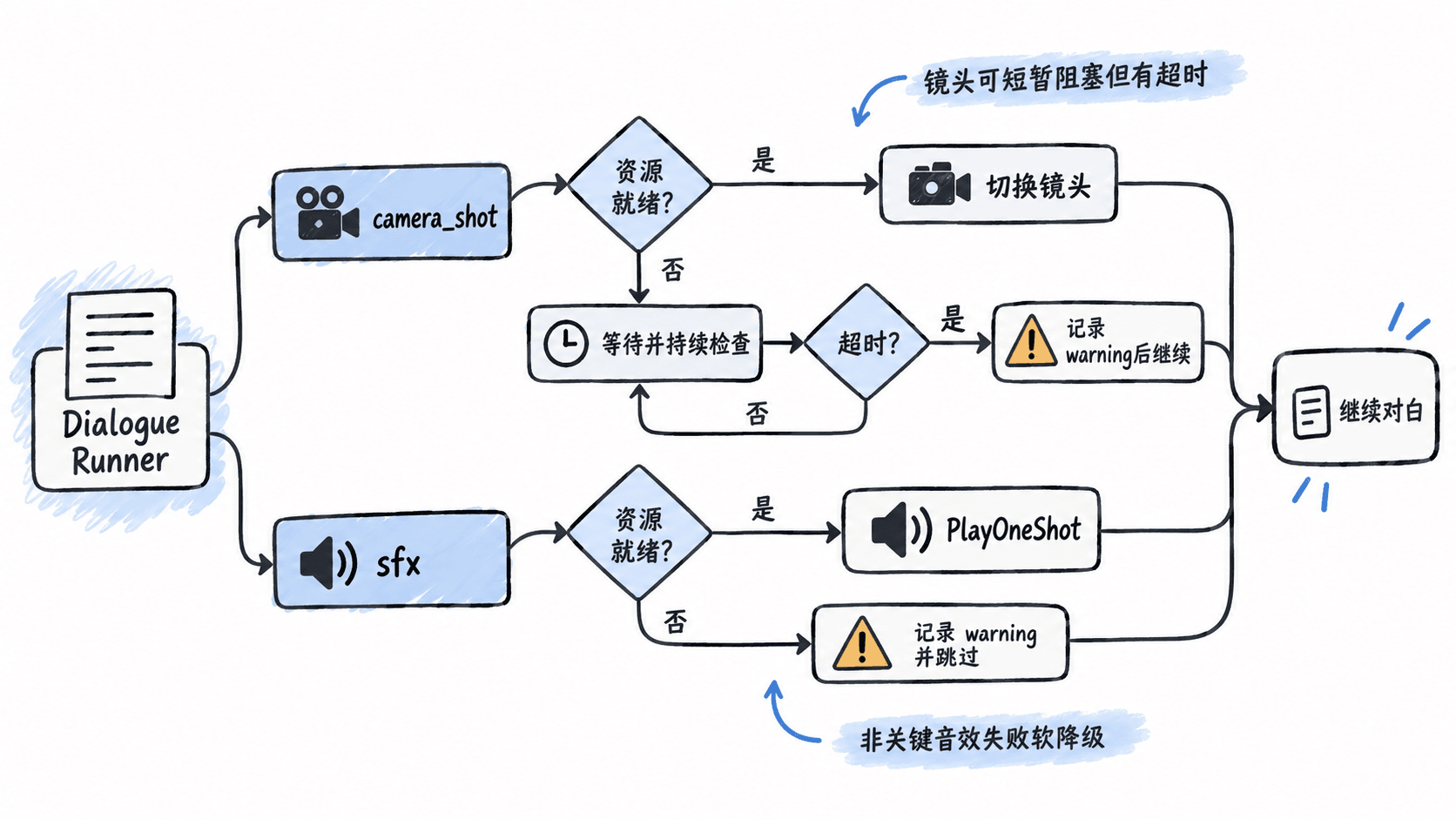
这一节把对白从“文字驱动角色”扩展到“文字驱动整段演出”。你会把镜头切换和音效封装成 Yarn 命令,并处理资源尚未就绪的情况:需要保证时序的镜头可以等待,但必须有超时;非关键音效可以跳过,不能让整段对白永久卡住。
学习目标
- 把镜头和音效封装为可从 Yarn 调用的表现命令
- 区分需要阻塞对白的表现与可以立即返回的表现
- 为异步加载、资源缺失和超时设计可恢复的降级行为
让 Dialogue Runner 只负责发出意图
对白脚本最好只描述 alice_close、two_shot、door_open 这类表现意图,而不是直接写摄像机坐标、AudioClip 路径或资源加载细节。Unity 侧建立一个表现桥接组件,负责把这些稳定 ID 映射到场景对象。
镜头切换通常会影响下一句台词的构图,因此可以让命令在准备完成前阻塞对白;短音效大多不需要等待播放结束,只要触发成功即可继续。两者采用不同的等待策略,比“所有命令都阻塞”或“所有命令都立即返回”更可控。
建立统一的表现桥接组件
下面是片段示例,依赖 Unity、Yarn Spinner、场景中的 DialogueRunner、Camera、AudioSource,以及预先配置的镜头姿态和音效表。若资源由 Addressables 或自研加载器异步准备,可在完成后调用 MarkPresentationReady()。
using System;
using System.Collections;
using System.Collections.Generic;
using UnityEngine;
using Yarn.Unity;

[Serializable]
public sealed class ShotPreset
{
    public string id;
    public Transform pose;
}

[Serializable]
public sealed class SoundCue
{
    public string id;
    public AudioClip clip;
}

public sealed class DialoguePresentationBridge : MonoBehaviour
{
    [SerializeField] private DialogueRunner dialogueRunner;
    [SerializeField] private Camera targetCamera;
    [SerializeField] private AudioSource sfxSource;
    [SerializeField] private ShotPreset[] shotPresets;
    [SerializeField] private SoundCue[] soundCues;
    [SerializeField] private bool presentationReady = true;

    private readonly Dictionary<string, Transform> shots =
        new Dictionary<string, Transform>();
    private readonly Dictionary<string, AudioClip> sounds =
        new Dictionary<string, AudioClip>();

    private void Awake()
    {
        foreach (var item in shotPresets)
        {
            if (!string.IsNullOrWhiteSpace(item.id) && item.pose != null)
                shots[item.id] = item.pose;
        }

        foreach (var item in soundCues)
        {
            if (!string.IsNullOrWhiteSpace(item.id) && item.clip != null)
                sounds[item.id] = item.clip;
        }

        dialogueRunner.AddCommandHandler<string, float>(
            "camera_shot", CameraShotCommand);
        dialogueRunner.AddCommandHandler<string>(
            "sfx", PlaySfx);
    }

    private IEnumerator CameraShotCommand(string shotId, float timeoutSeconds)
    {
        float deadline = Time.realtimeSinceStartup +
                         Mathf.Max(0f, timeoutSeconds);

        while (!presentationReady &&
               Time.realtimeSinceStartup < deadline)
        {
            yield return null;
        }

        if (!presentationReady || !shots.TryGetValue(shotId, out var pose))
        {
            Debug.LogWarning($"camera_shot skipped: {shotId}");
            yield break;
        }

        targetCamera.transform.SetPositionAndRotation(
            pose.position, pose.rotation);
        Debug.Log($"camera_shot: {shotId}");
    }

    private void PlaySfx(string cueId)
    {
        if (!presentationReady ||
            !sounds.TryGetValue(cueId, out var clip))
        {
            Debug.LogWarning($"sfx skipped: {cueId}");
            return;
        }

        sfxSource.PlayOneShot(clip);
        Debug.Log($"sfx: {cueId}");
    }

    public void MarkPresentationReady()
    {
        presentationReady = true;
    }
}
CameraShotCommand 返回协程,因此命令执行期间对白可以等待;但等待被 timeoutSeconds 限制,不会因为加载器异常而无限挂起。PlaySfx 则是即时命令,资源不可用时记录警告并返回,适合不影响剧情推进的非关键声音。
在对白里编排镜头与音效
场景中预先登记 alice_close、two_shot 两个镜头姿态,以及 ui_focus 音效后,可以这样写:
<<camera_shot alice_close 1.5>>
<<sfx ui_focus>>
Alice: 看着我,我们没有多少时间。
<<camera_shot two_shot 1.5>>
Bob: 那就现在走。
预期结果:
camera_shot: alice_close
sfx: ui_focus
显示 Alice 台词
camera_shot: two_shot
显示 Bob 台词
实际的帧时间、音效时长和玩家推进速度会不同,但命令顺序应保持一致。镜头命令只有在镜头已经切好,或等待达到超时后,才会继续执行下一条对白。
资源没准备好时不要让剧情失控
资源未就绪时,先判断它是否影响理解剧情。镜头构图如果承载关键信息,可以短暂等待;环境音、按钮提示音等非关键效果通常直接跳过更合适。无论选择等待还是跳过,都要留下可搜索的日志和稳定的资源 ID。
如果镜头系统使用 Cinemachine、Timeline 或 Addressables,也可以保持 Yarn 层的命令不变,只替换桥接组件内部实现。这样对白脚本持续面向稳定的演出意图,底层资源系统升级时不需要批量改剧情文本。