
React / 系统课时
使用 useContext
使用 useContext
当共享数据需要穿过多层组件时,逐层传递 props 会让中间组件承担与自身无关的转发工作。useContext 让后代组件直接读取最近 Provider 提供的值,适合主题、语言、登录用户等范围明确的共享数据。
学习目标
- 理解 Context、Provider 与
useContext的关系 - 在跨层级组件中读取并更新共享数据
- 判断何时适合使用 Context,避免把它当成全局状态的默认方案
Context 解决的是什么问题
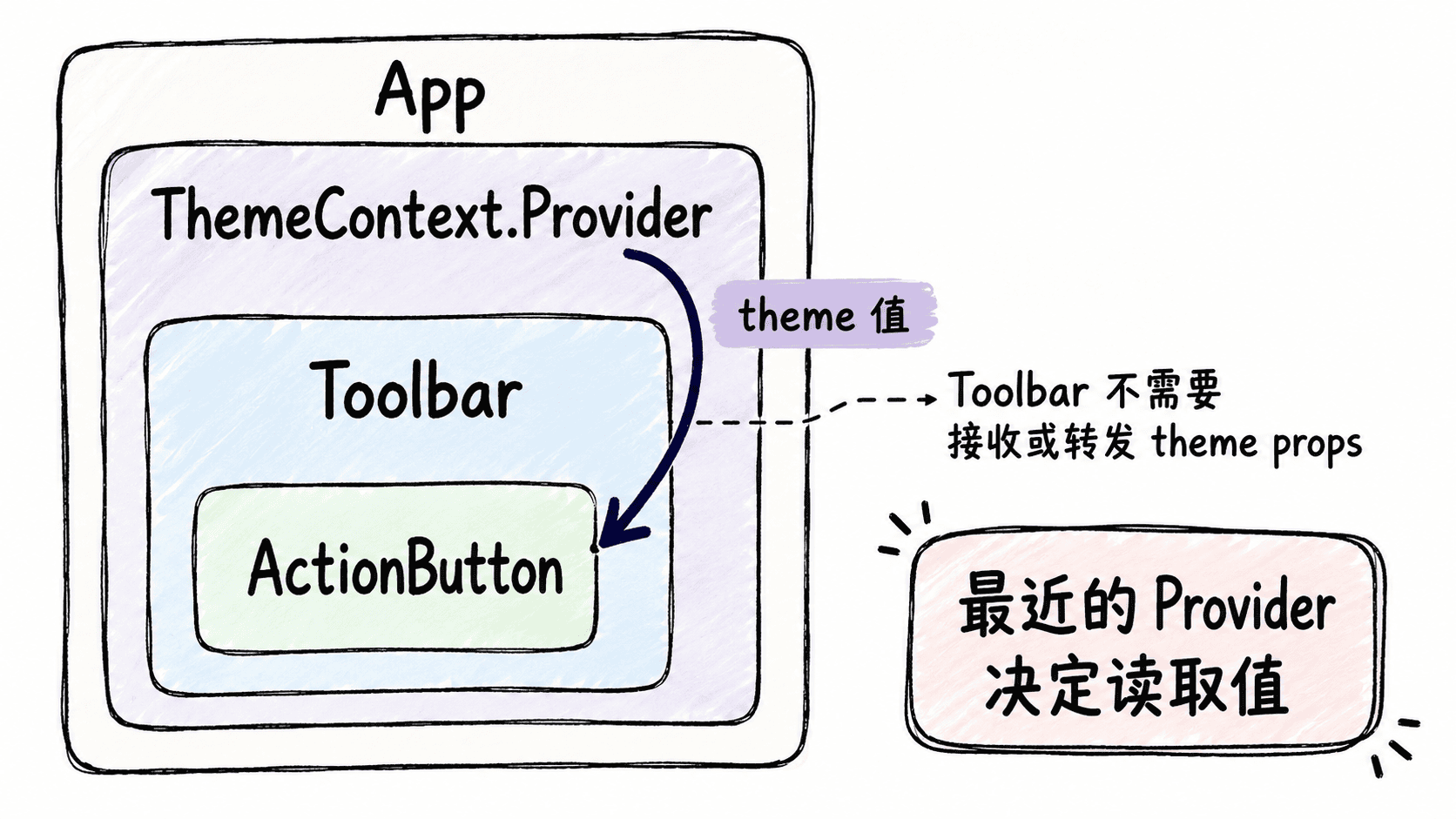
假设 App 保存主题,真正需要主题的是更深层的 ActionButton。如果只用 props,就必须让 Toolbar 接收并继续传递 theme,即使 Toolbar 自己并不使用它。这种只为传下去而接收属性的情况,会增加组件之间不必要的耦合。
Context 把共享值放到一棵组件子树中。Provider 决定值从哪里开始生效,useContext 负责在后代组件中读取离自己最近的那个值。
创建并读取 Context
下面的完整示例把主题状态保存在 App 中,但 ActionButton 没有通过 props 接收主题,而是直接调用 useContext(ThemeContext)。
import { createContext, useContext, useState } from 'react';

const ThemeContext = createContext('light');

function Toolbar() {
  // Toolbar 不需要知道 theme,只负责组合子组件。
  return <ActionButton />;
}

function ActionButton() {
  const theme = useContext(ThemeContext);

  return (
    <button>
      {theme === 'dark' ? '深色模式' : '浅色模式'}
    </button>
  );
}

export default function App() {
  const [theme, setTheme] = useState('light');

  return (
    <ThemeContext.Provider value={theme}>
      <button
        onClick={() =>
          setTheme((current) => (current === 'light' ? 'dark' : 'light'))
        }
      >
        切换主题
      </button>
      <Toolbar />
    </ThemeContext.Provider>
  );
}
预期结果
初始页面显示:
切换主题
浅色模式

点击“切换主题”后显示:
切换主题
深色模式
点击切换按钮后,Provider 的 value 发生变化,读取该 Context 的 ActionButton 会重新渲染。Toolbar 没有读取 Context,因此无需增加只用于转发的 props。
Provider、默认值与最近原则
createContext('light') 中的 'light' 是默认值。只有当组件上方完全没有对应 Provider 时,useContext(ThemeContext) 才会得到这个默认值;如果 Provider 明确传入 undefined,消费者读到的也是 undefined,不会自动回退到默认值。
如果组件外层存在多个同类型 Provider,useContext 会读取组件树中离当前组件最近的那个 Provider。这个规则允许你在局部子树覆盖主题、语言或其他共享配置,而不会影响其他分支。
什么时候不该急着用 Context
Context 适合多个后代都需要、层级较深且值有明确作用范围的数据。只有一两层传递时,普通 props 往往更直观;如果状态更新频繁、业务关系复杂,还需要进一步考虑状态拆分或专门的状态管理方案。
Context 的价值不是消灭 props,而是减少无意义的跨层级转发。当共享范围清晰且消费者分散在较深层级时,useContext 能让数据依赖更直接。