
游戏叙事与剧情 / 系统课时
把选项显示给 Unity UI
把选项显示给 Unity UI
当 Ink 剧情执行到选择点时,Unity 不需要解析 Ink 文本,而是直接读取 Story.currentChoices。本节把 Ink 的 Choice 转成界面层可消费的数据,再据此创建按钮,让剧情运行时数据与 UI 展示职责保持分离。
学习目标
- 读取
Story.currentChoices中当前可选的剧情分支 - 将 Ink
Choice转换成适合 Unity UI 使用的数据结构 - 正确保存选项索引,为后续点击选择做好准备
currentChoices 是 UI 的数据源
Ink 只有在剧情推进到选择点后,currentChoices 才会包含内容。每个 Choice 最重要的两个值是 text 和 index:前者用于按钮文案,后者用于之后调用 ChooseChoiceIndex。
不要让按钮自己保存 Ink 的完整 Choice 对象。更稳妥的做法是先转换成轻量 UI 数据,只暴露界面真正需要的字段。这样以后更换 UGUI、UI Toolkit 或自定义界面时,不必把 Ink 类型扩散到整个 UI 层。
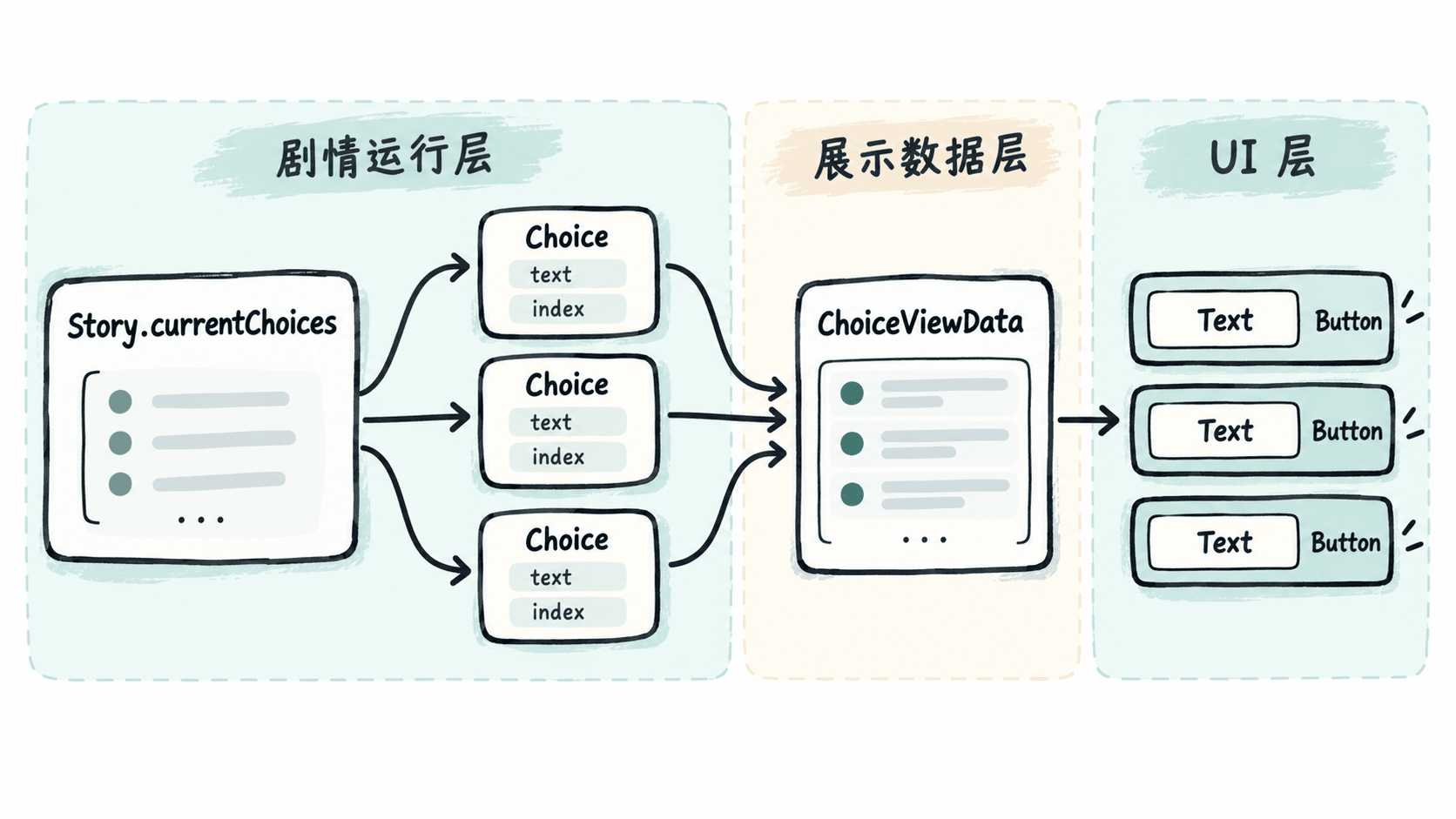
建立界面数据结构
下面的 ChoiceViewData 只保存按钮显示文字和 Ink 选项索引。BuildChoiceViewData 是片段示例,依赖已经创建并推进到选择点的 Story 实例。
using System;
using System.Collections.Generic;
using Ink.Runtime;

[Serializable]
public sealed class ChoiceViewData
{
    public int Index { get; }
    public string Text { get; }

    public ChoiceViewData(int index, string text)
    {
        Index = index;
        Text = text;
    }
}

public static class InkChoiceMapper
{
    public static List<ChoiceViewData> BuildChoiceViewData(Story story)
    {
        if (story == null)
        {
            throw new ArgumentNullException(nameof(story));
        }

        var result = new List<ChoiceViewData>(story.currentChoices.Count);

        foreach (Choice choice in story.currentChoices)
        {
            // 保存 Ink 提供的 index,不能用按钮当前的层级位置替代。
            result.Add(new ChoiceViewData(choice.index, choice.text.Trim()));
        }

        return result;
    }
}
预期结果:如果当前剧情暴露两个选项,例如“询问守卫”和“直接离开”,转换后的列表包含两条数据,并分别保留 Ink 给出的索引和显示文本。实际文本由当前 Ink 剧情决定。
Index=0, Text=询问守卫
Index=1, Text=直接离开
根据数据创建按钮
界面层拿到 ChoiceViewData 后,只负责生成和更新按钮。下面示例使用传统 UGUI,并要求场景中准备一个选项容器以及一个带 Button 和子级 Text 的按钮预制体。
using System.Collections.Generic;
using UnityEngine;
using UnityEngine.UI;

public sealed class ChoiceListView : MonoBehaviour
{
    [SerializeField] private Transform choiceRoot;
    [SerializeField] private Button choiceButtonPrefab;

    public void Render(IReadOnlyList<ChoiceViewData> choices)
    {
        Clear();

        foreach (ChoiceViewData choice in choices)
        {
            Button button = Instantiate(choiceButtonPrefab, choiceRoot);
            Text label = button.GetComponentInChildren<Text>();
            label.text = choice.Text;

            // 本节只展示数据;点击行为在后续流程中绑定。
            button.interactable = true;
        }
    }

    private void Clear()
    {
        for (int i = choiceRoot.childCount - 1; i >= 0; i--)
        {
            Destroy(choiceRoot.GetChild(i).gameObject);
        }
    }
}
预期结果:调用 Render 后,选项容器中按钮数量与当前选择项数量一致,每个按钮显示对应的 ChoiceViewData.Text。
当前选择数:2
Unity UI:显示 2 个可点击按钮
按钮 1:询问守卫
按钮 2:直接离开
刷新时不要保留旧选项
剧情继续后,currentChoices 会代表新的剧情位置,因此刷新前必须移除上一轮按钮,否则旧选择和新选择会同时留在界面上。对于常规对话界面,可以每次清空后重建;当按钮数量很多或刷新非常频繁时,再考虑对象池优化。
另一个容易埋下问题的做法,是只保存按钮序号 0、1、2,之后再假设它永远等于某个业务分支。真正应该传递的是当前 Choice.index。UI 的排序可以变化,但提交给 Ink 的值必须来自这次 currentChoices。
把 Ink 选择项先映射成自己的 UI 数据模型,界面层就只负责“显示什么”,而不会承担“剧情如何推进”的职责;下一步点击按钮时,只需要把这里保存的 Index 交回 Story 即可。