
游戏叙事与剧情 / 系统课时
加载后恢复当前对话位置
加载后恢复当前对话位置
只把 Ink 的状态 JSON 读回 Story 还不够。玩家看到的是“剧情状态 + 当前文本/选项 + 场景上下文”的组合。本节给出一个可落地的恢复顺序:先创建当前版本的 Story,再加载状态,随后恢复游戏上下文并重建 UI,而且恢复阶段不额外调用 Continue(),避免把剧情推进一格。
学习目标
- 使用
Story.state.LoadJson()恢复 Ink 运行状态 - 区分“恢复当前画面”和“继续推进剧情”,避免加载后跳句
- 同步重建选项 UI 与场景、说话人等游戏侧上下文
恢复时真正要还原什么
Story.state.ToJson() 保存的是 Ink Runtime 的执行状态,例如调用栈、全局变量、当前选择等;它不会替你保存 Unity 场景中已经切换到哪张背景、哪个角色立绘正在显示,也不会自动重新创建被销毁的按钮。
因此,一个实用存档至少分成两层:inkStateJson 负责剧情执行位置,业务字段负责 Unity 世界状态。加载时先把二者恢复到一致的检查点,再刷新界面。
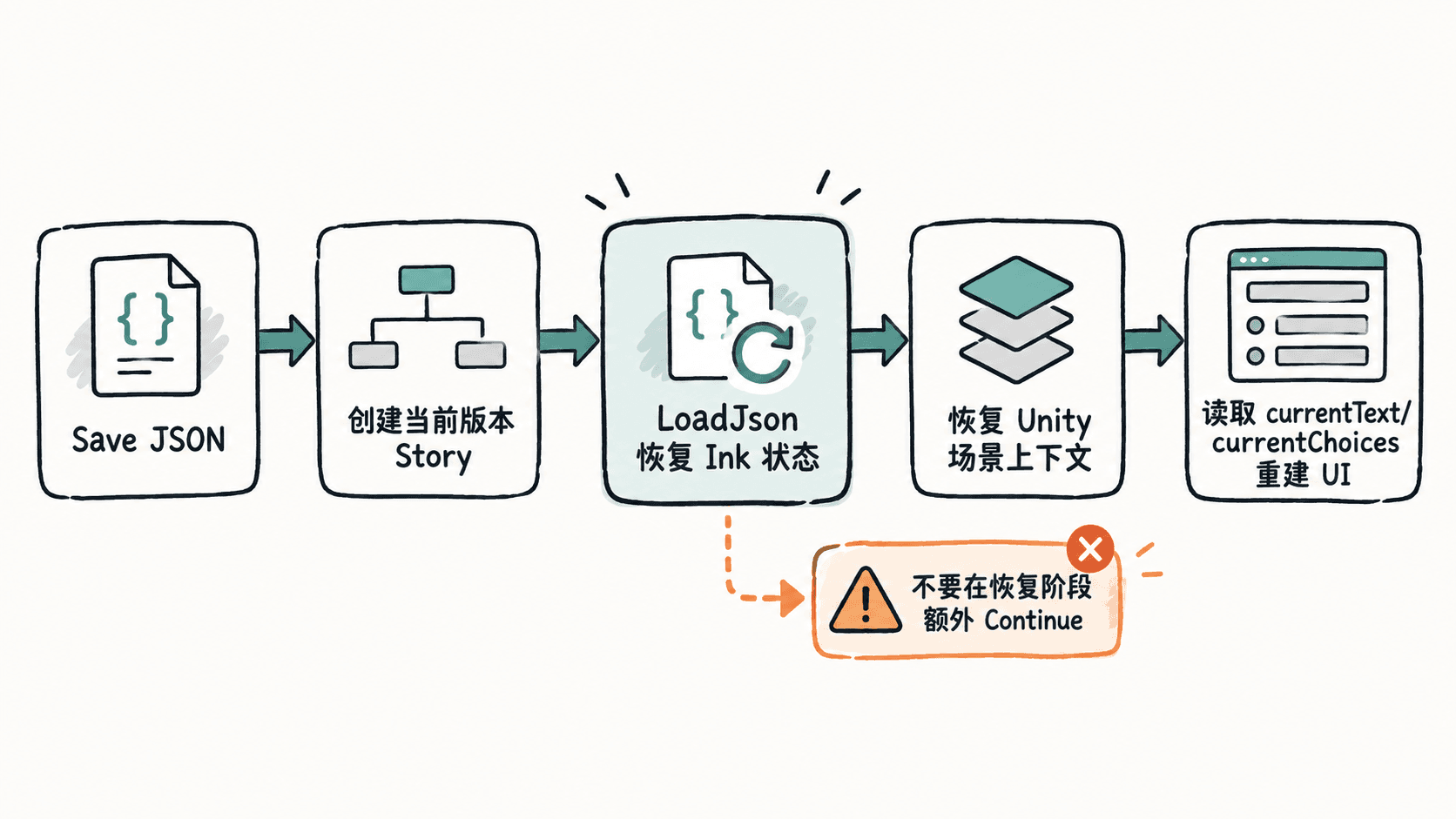
用一个恢复器重建状态与 UI
下面的组件假设 Ink 已经编译成 JSON 文本资源,选项使用一个带 TMP_Text 的 Button 预制体。存档同时保存 sceneId 与 speakerId,用来示范游戏侧上下文。
using System;
using System.Collections.Generic;
using Ink.Runtime;
using TMPro;
using UnityEngine;
using UnityEngine.UI;

public sealed class InkDialogueRestorer : MonoBehaviour
{
    [Serializable]
    private sealed class SaveData
    {
        public string inkStateJson;
        public string sceneId;
        public string speakerId;
    }

    [SerializeField] private TextAsset inkJsonAsset;
    [SerializeField] private TMP_Text dialogueText;
    [SerializeField] private Transform choicesRoot;
    [SerializeField] private Button choiceButtonPrefab;

    private Story story;

    public void LoadFromJson(string saveJson)
    {
        SaveData save = JsonUtility.FromJson<SaveData>(saveJson);
        if (save == null || string.IsNullOrEmpty(save.inkStateJson))
            throw new InvalidOperationException("存档缺少 inkStateJson");

        // 必须先用当前编译产物创建 Story,再把保存的运行状态装载进去。
        story = new Story(inkJsonAsset.text);
        story.state.LoadJson(save.inkStateJson);

        RestoreGameContext(save.sceneId, save.speakerId);
        RebuildUiWithoutContinuing();

        Debug.Log($"Loaded scene={save.sceneId}, speaker={save.speakerId}, choices={story.currentChoices.Count}");
    }

    private void RestoreGameContext(string sceneId, string speakerId)
    {
        // 项目中应替换为真正的场景、背景、立绘或镜头恢复逻辑。
        Debug.Log($"RestoreGameContext scene={sceneId}, speaker={speakerId}");
    }

    private void RebuildUiWithoutContinuing()
    {
        dialogueText.text = story.currentText.Trim();

        for (int i = choicesRoot.childCount - 1; i >= 0; i--)
            Destroy(choicesRoot.GetChild(i).gameObject);

        foreach (Choice choice in story.currentChoices)
        {
            Button button = Instantiate(choiceButtonPrefab, choicesRoot);
            TMP_Text label = button.GetComponentInChildren<TMP_Text>();
            label.text = choice.text.Trim();

            int choiceIndex = choice.index;
            button.onClick.AddListener(() => SelectChoice(choiceIndex));
        }
    }

    private void SelectChoice(int choiceIndex)
    {
        story.ChooseChoiceIndex(choiceIndex);
        ContinueUntilChoiceOrEnd();
    }

    private void ContinueUntilChoiceOrEnd()
    {
        var lines = new List<string>();

        while (story.canContinue)
        {
            string line = story.Continue().Trim();
            if (!string.IsNullOrEmpty(line))
                lines.Add(line);
        }

        dialogueText.text = string.Join("\n", lines);
        RebuildChoicesOnly();
    }

    private void RebuildChoicesOnly()
    {
        for (int i = choicesRoot.childCount - 1; i >= 0; i--)
            Destroy(choicesRoot.GetChild(i).gameObject);

        foreach (Choice choice in story.currentChoices)
        {
            Button button = Instantiate(choiceButtonPrefab, choicesRoot);
            button.GetComponentInChildren<TMP_Text>().text = choice.text.Trim();

            int choiceIndex = choice.index;
            button.onClick.AddListener(() => SelectChoice(choiceIndex));
        }
    }
}
预期输出:假设存档记录的场景为 market、说话人为 merchant,并停在两个选项处,控制台会出现类似结果,实际选项数量取决于存档位置。
RestoreGameContext scene=market, speaker=merchant
Loaded scene=market, speaker=merchant, choices=2
关键点是 LoadFromJson() 只调用 LoadJson() 和 UI 重建,没有调用 Continue()。如果加载后立即 Continue(),程序会从已恢复的位置继续执行,玩家可能看到下一句而不是保存时那一句。
不要把 UI 历史误当成 Ink 状态
currentText 适合恢复“当前显示块”,但聊天式 UI 往往已经累积了多条历史气泡。那些历史气泡属于表现层,不应指望 Ink 状态替你完整重建。
如果产品要求加载后保留整段对话记录,应在存档中额外保存已展示消息列表,或者设计可重复构建的对话日志。恢复时先加载 Ink 状态,再用保存的日志重建滚动列表;不要从头重新执行 Ink 来“重放”历史,因为重放可能再次触发外部函数、副作用或统计事件。
验证加载没有偷偷推进
最简单的验收方法是在保存前记录当前文本、选项文本和一个关键剧情变量,加载后逐项比对。只有玩家真正点击选项时,才允许调用 ChooseChoiceIndex() 与后续 Continue()。
测试时至少覆盖“停在普通文本后”“停在选择题处”“剧情已经结束”三种存档点。若加载后文本或选项与保存时不同,先检查保存时机是否一致,再检查恢复流程中是否有自动 Continue()、场景初始化脚本或外部函数改变了状态。