
游戏叙事与剧情 / 系统课时
把 Story 内容映射到对话框
把 Story 内容映射到对话框
这一节把 Ink Story 的运行时输出整理成稳定的 UI 数据流:每次推进剧情时,先读取正文和标签,再读取当前选项,最后统一刷新说话者、文本和按钮。这样 UI 不需要理解 Ink 的内部状态,后续更换布局或增加头像时也不会把剧情逻辑搅进界面代码。
学习目标
- 理解
Continue()、currentText、currentTags与currentChoices的读取顺序 - 把 Ink 输出转换为 UI 可消费的数据,再统一刷新界面
- 正确区分“继续剧情”和“等待玩家选择”两种状态
从 Story 到 UI 的数据流
Ink 的 Story 是状态机,不是一个普通字符串容器。一次对话刷新通常要经历“推进 Story → 取当前行 → 解析标签 → 读取选项 → 更新 UI”这几步。特别要注意:只有调用 Continue() 之后,currentText 和 currentTags 才代表刚刚推进到的那一行。
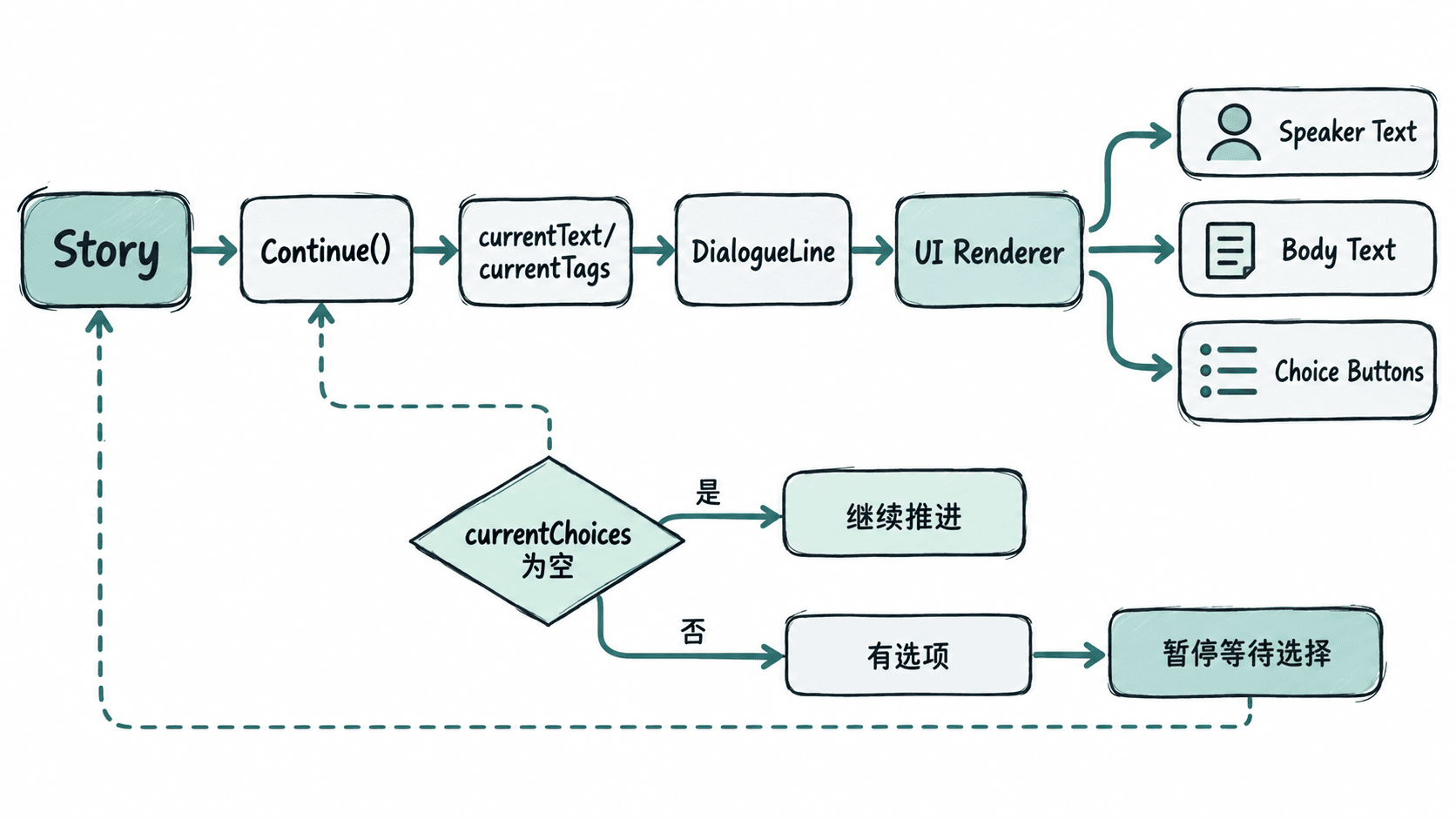
如果直接让每个 TMP_Text 和 Button 自己去读 Story,界面层会和剧情状态强耦合。更稳妥的做法是先把这一帧需要展示的内容整理成一个简单数据对象,再交给 UI 渲染。
定义一层可复用的对话数据
下面的 DialogueLine 只描述“这一行要显示什么”,不保存 Ink 运行时对象。说话者通过行标签读取,例如 Ink 中写 # speaker: Alice。
using System;
using System.Collections.Generic;

[Serializable]
public sealed class DialogueLine
{
    public string Speaker;
    public string Text;
    public IReadOnlyList<string> Choices;

    public DialogueLine(string speaker, string text, IReadOnlyList<string> choices)
    {
        Speaker = speaker;
        Text = text;
        Choices = choices;
    }
}
这是数据结构定义,不会单独产生控制台输出。它的生效方式是:剧情控制器每次推进后创建一个 DialogueLine,UI 只消费这个对象,不直接依赖 Story.currentText 等运行时字段。
读取文本、说话者和选项
下面的控制器假设项目已经安装 Ink Unity Integration,并把编译后的 TextAsset、说话者文本、正文文本、选项容器和按钮预制体拖到 Inspector。示例使用 TextMeshPro,并在每次刷新时销毁旧选项按钮,先把“数据流正确”做稳,再在下一节优化成复用。
using System.Collections.Generic;
using Ink.Runtime;
using TMPro;
using UnityEngine;
using UnityEngine.UI;

public sealed class DialogueController : MonoBehaviour
{
    [SerializeField] private TextAsset inkJsonAsset;
    [SerializeField] private TMP_Text speakerText;
    [SerializeField] private TMP_Text bodyText;
    [SerializeField] private Transform choiceRoot;
    [SerializeField] private Button choiceButtonPrefab;

    private Story story;

    private void Start()
    {
        story = new Story(inkJsonAsset.text);
        RefreshDialogue();
    }

    public void ContinueDialogue()
    {
        if (story.currentChoices.Count == 0)
        {
            RefreshDialogue();
        }
    }

    private void RefreshDialogue()
    {
        ClearChoices();

        if (!story.canContinue)
        {
            bodyText.text = "剧情已结束";
            speakerText.text = string.Empty;
            return;
        }

        string text = story.Continue().Trim();
        string speaker = ReadSpeaker(story.currentTags);
        var choices = new List<string>();

        foreach (Choice choice in story.currentChoices)
        {
            choices.Add(choice.text.Trim());
        }

        var line = new DialogueLine(speaker, text, choices);
        Render(line);
    }

    private void Render(DialogueLine line)
    {
        speakerText.text = line.Speaker;
        bodyText.text = line.Text;

        for (int i = 0; i < line.Choices.Count; i++)
        {
            int choiceIndex = i;
            Button button = Instantiate(choiceButtonPrefab, choiceRoot);
            button.GetComponentInChildren<TMP_Text>().text = line.Choices[i];
            button.onClick.AddListener(() => SelectChoice(choiceIndex));
        }
    }

    private void SelectChoice(int choiceIndex)
    {
        story.ChooseChoiceIndex(choiceIndex);
        RefreshDialogue();
    }

    private static string ReadSpeaker(IReadOnlyList<string> tags)
    {
        const string prefix = "speaker:";

        foreach (string tag in tags)
        {
            string trimmed = tag.Trim();
            if (trimmed.StartsWith(prefix))
            {
                return trimmed.Substring(prefix.Length).Trim();
            }
        }

        return string.Empty;
    }

    private void ClearChoices()
    {
        foreach (Transform child in choiceRoot)
        {
            Destroy(child.gameObject);
        }
    }
}
预期结果
进入场景后,正文区域显示 Story 的当前文本。
当当前行包含 # speaker: Alice 时,说话者区域显示 Alice。
若 Story 当前有 2 个选项,则界面生成 2 个按钮;点击其中一个后调用 ChooseChoiceIndex,并刷新到该分支后续内容。
当没有可继续内容时,正文显示“剧情已结束”。
动态文本、选项数量以及具体名字取决于你的 Ink 内容,因此它们属于运行时值。
为什么读取顺序不能颠倒
story.currentChoices 代表的是“当前剧情位置可选的分支”。如果你还没有先执行 Continue() 把 Story 推进到包含选项的位置,就可能读到上一状态的选项或空列表。常用规则是:先在 canContinue 为真时推进并读取当前行,再查看 currentChoices。
让 UI 只负责显示
这一层映射的价值在于职责边界:Ink 决定剧情状态,控制器负责把 Story 转成当前帧的数据,UI 只负责渲染。以后即使把说话者名字改成头像、把按钮改成手柄可选列表,也只需要调整渲染层,不必改 Ink 的推进规则。