
游戏美术与资产 / 系统课时
怎样批量执行贴图烘焙
怎样批量执行贴图烘焙
批量烘焙不是简单地重复点击 Bake,而是把“发现对象、建立配对、准备目标图、切换选择上下文、执行烘焙、保存文件和记录失败”变成确定流程。这样处理十几个零件时,错误会在对应对象上暴露,而不是到引擎里才发现缺图。
学习目标
- 把批量烘焙拆成可检查、可失败中止的固定阶段
- 使用 Blender Python 按
_high与_low规则逐对烘焙切线空间法线 - 通过输出文件和控制台日志验证每一对对象是否完成
先把批处理拆成固定链路
稳定的批处理应按同一顺序处理每个零件:扫描低模并查找同名高模、检查 UV 与材质、创建或复用目标 Image、只选择当前高低模并把低模设为 Active、执行 Selected to Active 烘焙、保存 PNG、记录结果,然后再进入下一对。
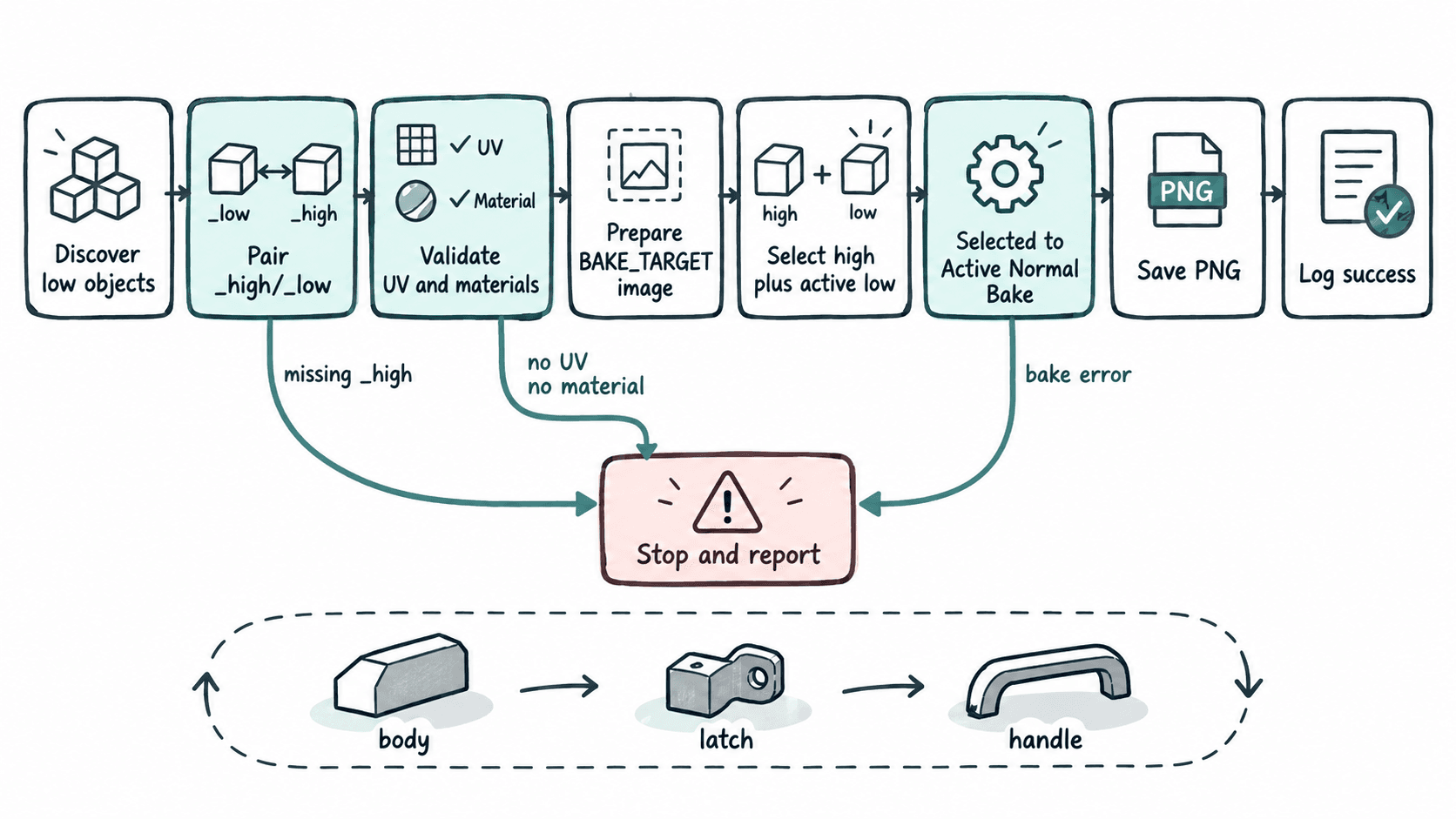
这种流程的关键是“一次只处理一对”。把整个高模集合和整个低模集合同时选中虽然省点击,但一旦零件空间接近,就更容易让射线命中错误对象,也不利于把失败定位到具体零件。
约定脚本能够判断的输入
下面的示例使用三条明确约定:高模以 _high 结尾,低模以 _low 结尾;每个低模至少有一个材质并具备活动 UV;当前 .blend 所在资产目录下允许创建 textures/baked。示例烘焙切线空间 Normal,并使用 Cycles。
MAX_RAY_DISTANCE 使用 Blender 场景单位,示例值 0.03 只是可运行起点,不是所有资产的通用答案。大型资产、毫米级模型或凸起很深的高模都应根据实际间距重新标定;需要手工 Cage 的零件也应从通用批次中单独配置。
用 Blender Python 逐对烘焙
在 Blender 的 Scripting 工作区新建文本并运行下面脚本。运行前应保存 .blend 文件,并确保相关对象所在 Collection 在当前 View Layer 中可选择。
import bpy
from pathlib import Path

HIGH_SUFFIX = "_high"
LOW_SUFFIX = "_low"
IMAGE_SIZE = 2048
MARGIN = 16
MAX_RAY_DISTANCE = 0.03

def find_pairs():
    pairs = []
    objects = list(bpy.context.view_layer.objects)

    for low in objects:
        if low.type != "MESH" or not low.name.endswith(LOW_SUFFIX):
            continue

        base = low.name[:-len(LOW_SUFFIX)]
        high = bpy.context.scene.objects.get(base + HIGH_SUFFIX)
        if high is None or high.type != "MESH":
            raise RuntimeError(f"Missing high poly for {low.name}")

        pairs.append((high, low))

    if not pairs:
        raise RuntimeError("No *_low mesh objects found")

    return sorted(pairs, key=lambda pair: pair[1].name)

def prepare_target_image(low):
    if not low.data.uv_layers:
        raise RuntimeError(f"{low.name} has no UV map")
    if not low.data.materials:
        raise RuntimeError(f"{low.name} has no material")

    base = low.name[:-len(LOW_SUFFIX)]
    image_name = f"{base}_normal"
    image = bpy.data.images.get(image_name)

    if image is None:
        image = bpy.data.images.new(
            image_name,
            width=IMAGE_SIZE,
            height=IMAGE_SIZE,
            alpha=False,
        )
    elif tuple(image.size) != (IMAGE_SIZE, IMAGE_SIZE):
        image.scale(IMAGE_SIZE, IMAGE_SIZE)

    image.colorspace_settings.name = "Non-Color"

    for material in low.data.materials:
        if material is None:
            raise RuntimeError(f"{low.name} has an empty material slot")

        material.use_nodes = True
        nodes = material.node_tree.nodes
        node = nodes.get("BAKE_TARGET")

        if node is None:
            node = nodes.new("ShaderNodeTexImage")
            node.name = "BAKE_TARGET"
            node.label = "BAKE_TARGET"

        for other in nodes:
            other.select = False

        node.image = image
        node.select = True
        nodes.active = node

    return image

def bake_pair(high, low, output_dir):
    image = prepare_target_image(low)

    bpy.ops.object.select_all(action="DESELECT")
    high.select_set(True)
    low.select_set(True)
    bpy.context.view_layer.objects.active = low

    bpy.ops.object.bake(
        type="NORMAL",
        use_selected_to_active=True,
        max_ray_distance=MAX_RAY_DISTANCE,
        normal_space="TANGENT",
        margin=MARGIN,
        target="IMAGE_TEXTURES",
        use_clear=True,
    )

    base = low.name[:-len(LOW_SUFFIX)]
    output_path = output_dir / f"{base}_normal.png"
    image.filepath_raw = str(output_path)
    image.file_format = "PNG"
    image.save()

    print(f"BAKED {low.name} <- {high.name} -> {output_path}")

def main():
    if bpy.context.mode != "OBJECT":
        bpy.ops.object.mode_set(mode="OBJECT")

    bpy.context.scene.render.engine = "CYCLES"
    output_dir = Path(bpy.path.abspath("//textures/baked"))
    output_dir.mkdir(parents=True, exist_ok=True)

    for high, low in find_pairs():
        bake_pair(high, low, output_dir)

if __name__ == "__main__":
    main()
预期输出
BAKED body_low <- body_high -> <PATH>/textures/baked/body_normal.png
BAKED handle_low <- handle_high -> <PATH>/textures/baked/handle_normal.png
实际 <PATH> 由当前 .blend 文件所在目录决定;对象数量也会随场景变化。如果缺少对应高模、UV、材质或材质槽为空,脚本会直接抛出错误并停止,而不是静默生成不完整结果。
验证不能只看“脚本跑完”
批处理结束后先核对 textures/baked 中的文件数量是否与实际配对数一致,再在 Blender 中打开每张 Normal 检查是否存在整片空白、明显黑块、接缝异常或错误零件投射。随后把其中一个低模连同贴图导入目标引擎,用最终切线空间和纹理导入设置做一次抽样验证。
让失败具有可追踪性
当资产数量继续增加时,下一步不是把脚本变成“一键无提示”,而是增加每个零件自己的配置与日志,例如分辨率、Margin、Ray Distance、Cage 名称和目标贴图类型。批处理的目标是让同一输入得到可重复输出,同时让异常尽早停止并指出具体对象。
只要命名、UV、材质目标和输出路径已经形成稳定契约,脚本就能替代重复点击;而射线距离、Cage 与特殊几何仍应保留为资产级参数,避免为了批量速度牺牲烘焙正确性。