
Go / 系统课时
用 httptest 测处理器
用 httptest 测处理器
本节把 HTTP 处理器拆成两层测试:用 httptest.NewRequest 和 ResponseRecorder 直接驱动路由,再用 httptest.NewServer 模拟真实下游服务。最终能验证状态码、响应头、JSON 正文以及处理器发出的下游请求。
学习目标
- 用
httptest.NewRequest、httptest.NewRecorder在不监听端口的情况下测试http.Handler - 用
httptest.NewServer模拟下游 HTTP 服务并检查请求路径 - 根据状态码、响应体和测试失败信息定位路由或协议问题
先选对测试边界
Go 标准库的 net/http/httptest 主要有两种常用边界。当前示例使用 Go 1.22+,因为路由模式 GET /hello/{name} 与 Request.PathValue 从 Go 1.22 起可直接使用。
| 工具 | 适合测试 | 关键检查 |
|---|---|---|
httptest.NewRequest + httptest.NewRecorder |
单个 http.Handler 或 ServeMux |
路由、状态码、响应头、响应体 |
httptest.NewServer |
代码会通过 http.Client 调用下游 |
URL、方法、路径、请求头、下游响应处理 |
直接测试处理器时不需要真正占用 TCP 端口,因此速度快、失败点集中;只有当被测代码本身需要发出 HTTP 请求时,再引入测试服务器。
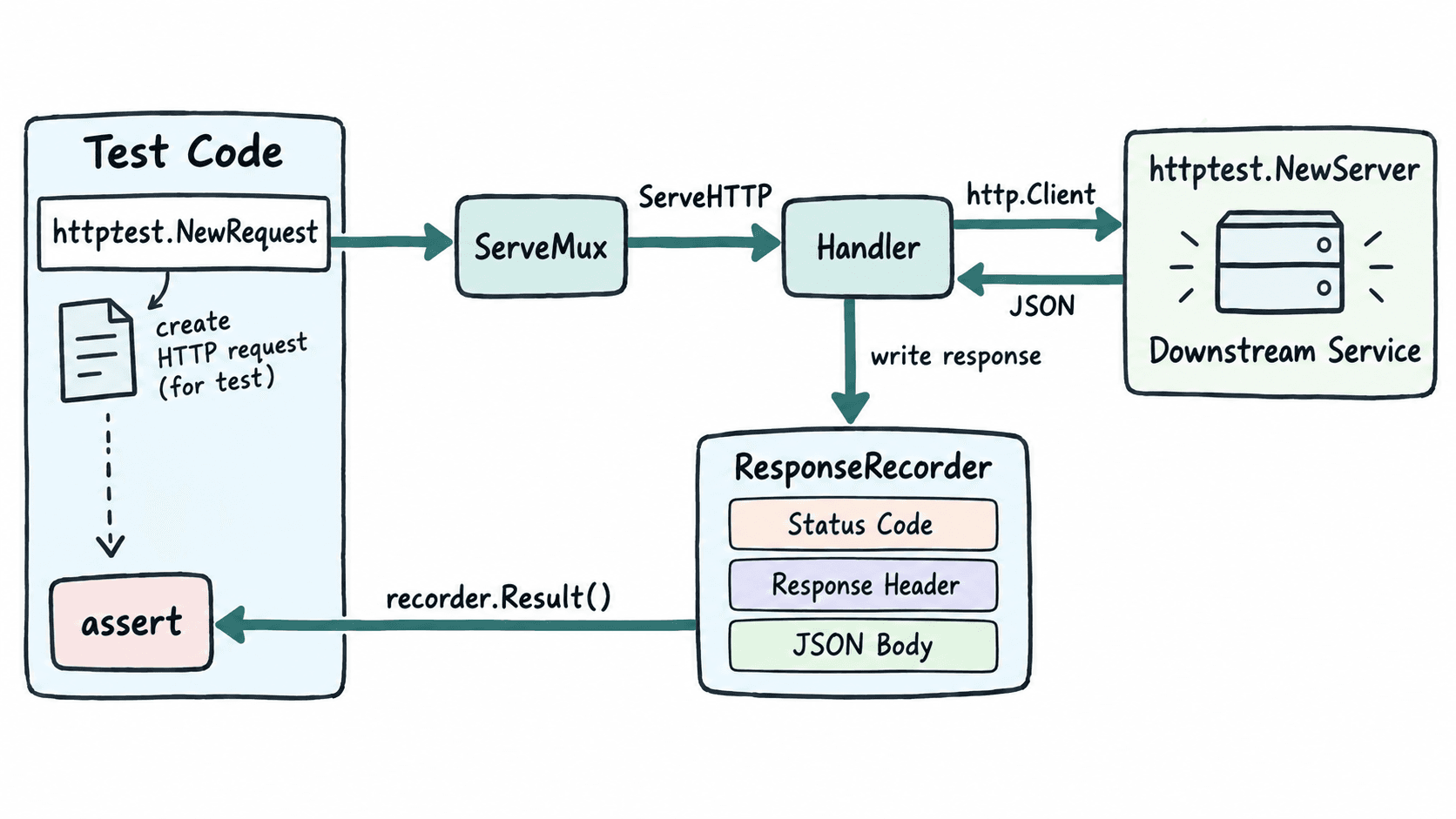
直接测试路由与下游交互
先在空目录初始化模块。模块名只用于本地示例,可以替换成自己的仓库路径。
go mod init example.com/httptestdemo预期输出
go: creating new go.mod: module example.com/httptestdemo新建 handler_test.go。测试服务器记录处理器实际访问的路径,并返回固定 JSON;被测路由再把姓名与下游角色合并后写入响应。
package httptestdemo

import (
	"encoding/json"
	"fmt"
	"net/http"
	"net/http/httptest"
	"net/url"
	"testing"
)

type profileResponse struct {
	Role string `json:"role"`
}

func newMux(profileBaseURL string, client *http.Client) http.Handler {
	mux := http.NewServeMux()

	mux.HandleFunc("GET /hello/{name}", func(w http.ResponseWriter, r *http.Request) {
		name := r.PathValue("name")

		resp, err := client.Get(profileBaseURL + "/profiles/" + url.PathEscape(name))
		if err != nil {
			http.Error(w, "downstream unavailable", http.StatusBadGateway)
			return
		}
		defer resp.Body.Close()

		if resp.StatusCode != http.StatusOK {
			http.Error(w, "downstream failed", http.StatusBadGateway)
			return
		}

		var profile profileResponse
		if err := json.NewDecoder(resp.Body).Decode(&profile); err != nil {
			http.Error(w, "invalid downstream json", http.StatusBadGateway)
			return
		}

		w.Header().Set("Content-Type", "application/json")
		w.WriteHeader(http.StatusOK)
		_ = json.NewEncoder(w).Encode(map[string]string{
			"message": "hello " + name,
			"role":    profile.Role,
		})
	})

	return mux
}

func TestHelloHandler(t *testing.T) {
	var gotPath string

	downstream := httptest.NewServer(http.HandlerFunc(func(w http.ResponseWriter, r *http.Request) {
		gotPath = r.URL.Path
		w.Header().Set("Content-Type", "application/json")
		fmt.Fprint(w, `{"role":"tester"}`)
	}))
	t.Cleanup(downstream.Close)

	req := httptest.NewRequest(http.MethodGet, "http://example.test/hello/Ada", nil)
	rec := httptest.NewRecorder()

	newMux(downstream.URL, downstream.Client()).ServeHTTP(rec, req)

	res := rec.Result()
	defer res.Body.Close()

	if res.StatusCode != http.StatusOK {
		t.Fatalf("status = %d, want %d", res.StatusCode, http.StatusOK)
	}
	if gotPath != "/profiles/Ada" {
		t.Fatalf("downstream path = %q, want %q", gotPath, "/profiles/Ada")
	}
	if got := res.Header.Get("Content-Type"); got != "application/json" {
		t.Fatalf("Content-Type = %q, want application/json", got)
	}

	var body map[string]string
	if err := json.NewDecoder(res.Body).Decode(&body); err != nil {
		t.Fatal(err)
	}
	if body["message"] != "hello Ada" || body["role"] != "tester" {
		t.Fatalf("body = %#v", body)
	}
}
预期结果:保存后该测试文件可由 go test 编译执行;测试会同时验证路由参数、下游请求路径、HTTP 200、Content-Type 与 JSON 字段。
运行并核对测试输出
执行测试时使用 -v,便于看到具体测试名。示例没有外部网络依赖,httptest.NewServer 会在本机临时监听并在 t.Cleanup 中关闭。
go test -v预期输出
=== RUN   TestHelloHandler
--- PASS: TestHelloHandler (<TIME>)
PASS
ok  	example.com/httptestdemo	<TIME>
<TIME> 会因机器而变化。若想只跑这一条,可使用 go test -run '^TestHelloHandler$' -v;测试名正则匹配失败时,Go 可能显示“no tests to run”,不要把它误判成处理器测试通过。
覆盖状态码与失败边界
对 Go 1.22+ 的方法路由,POST /hello/Ada 与已注册的 GET /hello/{name} 方法不匹配,应重点检查 405;完全不存在的路径则检查 404。下游测试服务器若返回 500,本例处理器会转换成 502,这能验证错误是否在服务边界被正确映射。
实际项目至少保留三类断言:成功路径验证业务 JSON,路由失败验证 404/405,下游失败验证本服务返回的 5xx。不要只比较完整响应字符串;JSON 字段顺序并非协议语义,解析后按字段断言更稳妥。