
Go / 系统课时
用中间件注入日志与上下文
用中间件注入日志与上下文
多个 Handler 都需要 request ID、耗时日志和请求级数据时,不应在每个函数里重复复制代码。本篇实现一个标准 http.Handler 中间件:为每个请求生成 ID,写入 context.Context,记录状态码与耗时,再让下游 Handler 直接读取。
学习目标
- 编写接收并返回
http.Handler的中间件 - 用自定义 context key 安全传递 request ID
- 记录方法、路径、状态码、响应字节数与耗时
把请求级逻辑包在 Handler 外层
Go 中间件最常见的形态是 func(next http.Handler) http.Handler。外层先准备请求级数据,再调用 next.ServeHTTP;下游返回后,外层还能记录最终状态和耗时。这里同时涉及 Middleware、Request、Context、Handler 与 ResponseWriter,按调用链看会更清楚。
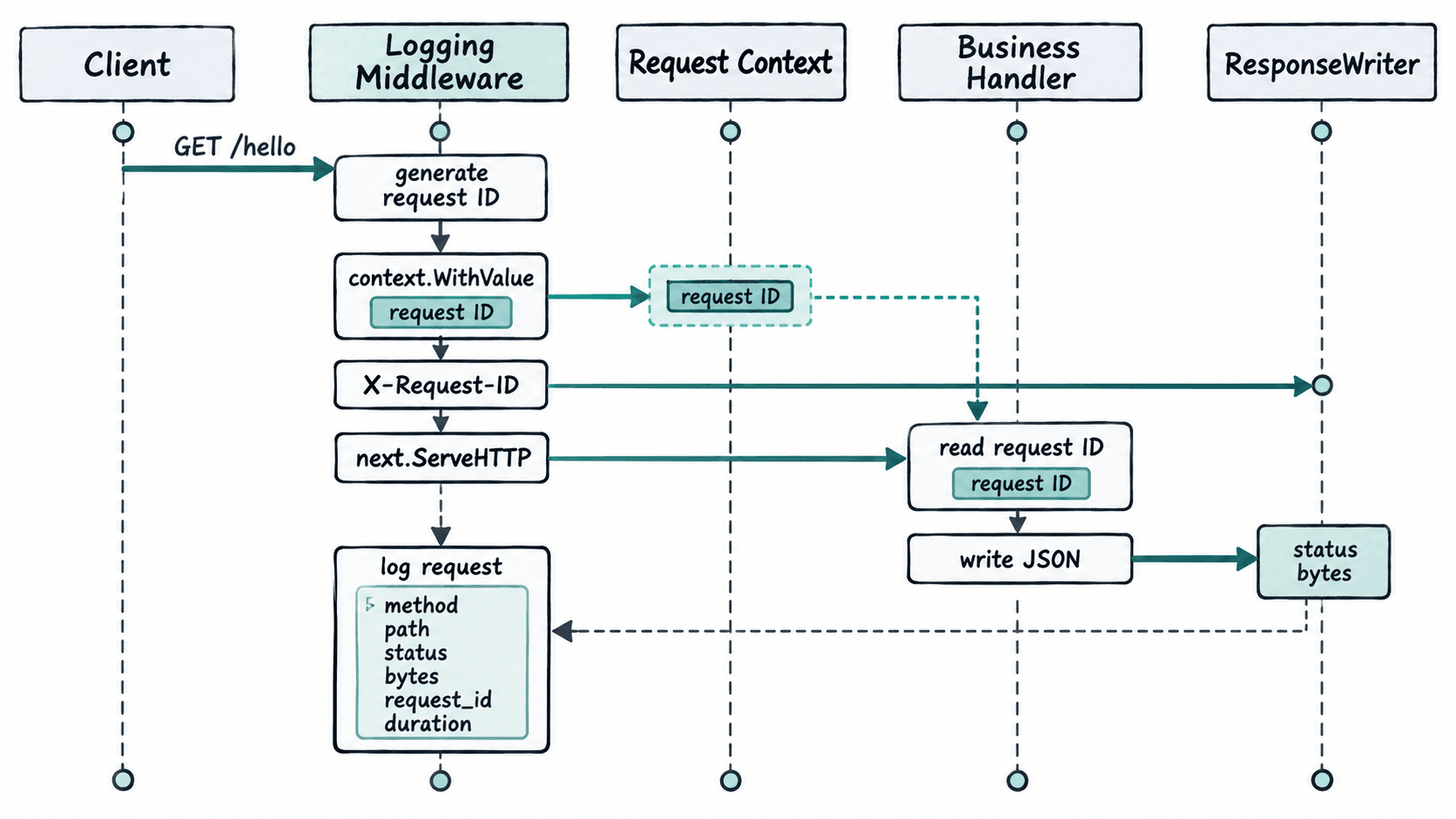
使用自定义未导出类型作为 key,可避免与其他包放入 context 的字符串 key 冲突。request ID 是请求级元数据,适合随 *http.Request 传播;数据库连接池、全局配置等长期对象则不应塞进 context。
实现 request ID 与访问日志
下面示例只使用标准库。statusRecorder 包装 http.ResponseWriter,捕获实际状态码和写出的字节数;如果 Handler 直接写正文但没有调用 WriteHeader,记录器会按 HTTP 规则记为 200。
package main

import (
    "context"
    "crypto/rand"
    "encoding/hex"
    "encoding/json"
    "log"
    "net/http"
    "time"
)

type contextKey string

const requestIDKey contextKey = "request-id"

type statusRecorder struct {
    http.ResponseWriter
    status int
    bytes  int
}

func (rw *statusRecorder) WriteHeader(status int) {
    if rw.status != 0 {
        return
    }
    rw.status = status
    rw.ResponseWriter.WriteHeader(status)
}

func (rw *statusRecorder) Write(p []byte) (int, error) {
    if rw.status == 0 {
        rw.WriteHeader(http.StatusOK)
    }

    n, err := rw.ResponseWriter.Write(p)
    rw.bytes += n
    return n, err
}

func newRequestID() (string, error) {
    raw := make([]byte, 16)
    if _, err := rand.Read(raw); err != nil {
        return "", err
    }
    return hex.EncodeToString(raw), nil
}

func requestIDFromContext(ctx context.Context) string {
    id, _ := ctx.Value(requestIDKey).(string)
    return id
}

func loggingMiddleware(next http.Handler) http.Handler {
    return http.HandlerFunc(func(w http.ResponseWriter, r *http.Request) {
        started := time.Now()

        requestID, err := newRequestID()
        if err != nil {
            http.Error(w, "failed to create request id", http.StatusInternalServerError)
            return
        }

        ctx := context.WithValue(r.Context(), requestIDKey, requestID)
        r = r.WithContext(ctx)
        w.Header().Set("X-Request-ID", requestID)

        recorder := &statusRecorder{ResponseWriter: w}
        next.ServeHTTP(recorder, r)
        if recorder.status == 0 {
            recorder.status = http.StatusOK
        }

        log.Printf(
            "request_id=%s method=%s path=%s status=%d bytes=%d duration=%s",
            requestID,
            r.Method,
            r.URL.Path,
            recorder.status,
            recorder.bytes,
            time.Since(started),
        )
    })
}

func helloHandler(w http.ResponseWriter, r *http.Request) {
    response := struct {
        Message   string `json:"message"`
        RequestID string `json:"requestId"`
    }{
        Message:   "hello",
        RequestID: requestIDFromContext(r.Context()),
    }

    w.Header().Set("Content-Type", "application/json; charset=utf-8")
    if err := json.NewEncoder(w).Encode(response); err != nil {
        log.Printf("encode response: %v", err)
    }
}

func main() {
    mux := http.NewServeMux()
    mux.HandleFunc("/hello", helloHandler)

    handler := loggingMiddleware(mux)
    log.Println("listening on :8080")
    log.Fatal(http.ListenAndServe(":8080", handler))
}
预期结果:每个请求都会得到一个 32 位十六进制 request ID;同一个值同时出现在响应头、Handler 读取到的 context 和访问日志中。
运行并核对同一个 request ID
启动服务:
go run main.go预期输出:
<TIME> listening on :8080实际日志时间会不同。另开终端请求接口:
curl -i http://localhost:8080/hello预期输出:
HTTP/1.1 200 OK
Content-Type: application/json; charset=utf-8
X-Request-Id: <ID>
Date: <TIME>
Content-Length: 67

{"message":"hello","requestId":"<ID>"}
请求完成后,服务端还会出现一条访问日志:
<TIME> request_id=<ID> method=GET path=/hello status=200 bytes=67 duration=<TIME>三处 <ID> 应对应同一个 request ID;Date 和耗时取决于实际运行结果;本示例的 JSON 正文长度固定为 67 字节。
处理 context 与 ResponseWriter 的边界
context.WithValue 只适合请求范围、需要跨调用链传递的少量元数据,例如 request ID、认证主体或 trace 信息。业务函数需要读取时,应通过小函数封装 key 和类型断言,不要在各处直接写字符串 key。
statusRecorder 适合基础日志,但包装 http.ResponseWriter 时要注意可选接口。若应用依赖 WebSocket、HTTP/2 推送或流式刷出等能力,可能还需要转发 http.Flusher、http.Hijacker 等接口;在只做普通 JSON API 时,上面的实现已经足够。中间件顺序也会影响结果:通常先放 panic recovery,再放 request ID 与日志,之后才进入认证、限流和业务 Handler。