
构建与依赖 / 系统课时
搭建统一构建与测试流程
搭建统一构建与测试流程
统一构建的目标是让所有开发者在根目录执行同一条 mvn clean verify,得到相同的 Java 版本约束、编译参数、单元测试、覆盖率门槛和依赖一致性检查。下面给出一套可直接运行的最小父子工程。
学习目标
- 能在父 POM 中统一 Compiler、Surefire、JaCoCo 和 Enforcer。
- 能让子模块继承测试依赖版本与质量门禁,避免每个模块重复配置。
- 能用
verify一次完成编译、测试、覆盖率检查和环境约束验证。
在父 POM 统一插件和门禁
示例面向 Java 17 与 Maven 3.9.x,固定使用已发布的 Maven Compiler Plugin 3.13.0、Surefire 3.2.5、JaCoCo 0.8.11、Maven Enforcer Plugin 3.4.1 和 JUnit Jupiter 5.10.2。为保持示例最小,父工程只聚合一个业务模块;真实项目继续增加 <module> 即可复用同一规则。
<project xmlns="http://maven.apache.org/POM/4.0.0"
         xmlns:xsi="http://www.w3.org/2001/XMLSchema-instance"
         xsi:schemaLocation="http://maven.apache.org/POM/4.0.0 https://maven.apache.org/xsd/maven-4.0.0.xsd">
  <modelVersion>4.0.0</modelVersion>

  <groupId>com.example</groupId>
  <artifactId>quality-parent</artifactId>
  <version>1.0.0-SNAPSHOT</version>
  <packaging>pom</packaging>

  <!-- 新模块在这里加入 Reactor。 -->
  <modules>
    <module>order-service</module>
  </modules>

  <properties>
    <maven.compiler.release>17</maven.compiler.release>
    <project.build.sourceEncoding>UTF-8</project.build.sourceEncoding>
    <junit.version>5.10.2</junit.version>
  </properties>

  <!-- dependencyManagement 统一测试依赖版本,但不自动引入依赖。 -->
  <dependencyManagement>
    <dependencies>
      <dependency>
        <groupId>org.junit.jupiter</groupId>
        <artifactId>junit-jupiter</artifactId>
        <version>${junit.version}</version>
        <scope>test</scope>
      </dependency>
    </dependencies>
  </dependencyManagement>

  <build>
    <plugins>
      <plugin>
        <groupId>org.apache.maven.plugins</groupId>
        <artifactId>maven-compiler-plugin</artifactId>
        <version>3.13.0</version>
        <configuration>
          <release>${maven.compiler.release}</release>
        </configuration>
      </plugin>

      <plugin>
        <groupId>org.apache.maven.plugins</groupId>
        <artifactId>maven-surefire-plugin</artifactId>
        <version>3.2.5</version>
      </plugin>

      <!-- JaCoCo 先挂载 agent,再在 verify 生成报告并检查阈值。 -->
      <plugin>
        <groupId>org.jacoco</groupId>
        <artifactId>jacoco-maven-plugin</artifactId>
        <version>0.8.11</version>
        <executions>
          <execution>
            <id>prepare-agent</id>
            <goals>
              <goal>prepare-agent</goal>
            </goals>
          </execution>
          <execution>
            <id>coverage-report</id>
            <phase>verify</phase>
            <goals>
              <goal>report</goal>
            </goals>
          </execution>
          <execution>
            <id>coverage-check</id>
            <phase>verify</phase>
            <goals>
              <goal>check</goal>
            </goals>
            <configuration>
              <rules>
                <rule>
                  <element>BUNDLE</element>
                  <limits>
                    <limit>
                      <counter>LINE</counter>
                      <value>COVEREDRATIO</value>
                      <minimum>0.80</minimum>
                    </limit>
                  </limits>
                </rule>
              </rules>
            </configuration>
          </execution>
        </executions>
      </plugin>

      <!-- Enforcer 把环境与依赖收敛问题提前变成构建失败。 -->
      <plugin>
        <groupId>org.apache.maven.plugins</groupId>
        <artifactId>maven-enforcer-plugin</artifactId>
        <version>3.4.1</version>
        <executions>
          <execution>
            <id>enforce-build-env</id>
            <goals>
              <goal>enforce</goal>
            </goals>
            <configuration>
              <rules>
                <requireMavenVersion>
                  <version>[3.9,)</version>
                </requireMavenVersion>
                <requireJavaVersion>
                  <version>[17,18)</version>
                </requireJavaVersion>
                <dependencyConvergence/>
              </rules>
            </configuration>
          </execution>
        </executions>
      </plugin>
    </plugins>
  </build>
</project>
这里把插件放在父 POM 的 build/plugins,因此执行会被子模块继承;如果只放进 pluginManagement,它只是提供默认版本和配置,并不会自动让插件参与构建。
准备一个能通过覆盖率门槛的子模块
order-service/pom.xml 只需要继承父工程并声明测试依赖,JUnit 版本来自父 POM 的 dependencyManagement。
<project xmlns="http://maven.apache.org/POM/4.0.0"
         xmlns:xsi="http://www.w3.org/2001/XMLSchema-instance"
         xsi:schemaLocation="http://maven.apache.org/POM/4.0.0 https://maven.apache.org/xsd/maven-4.0.0.xsd">
  <modelVersion>4.0.0</modelVersion>
  <parent>
    <groupId>com.example</groupId>
    <artifactId>quality-parent</artifactId>
    <version>1.0.0-SNAPSHOT</version>
  </parent>
  <artifactId>order-service</artifactId>

  <!-- 版本由父 POM 管理,scope 明确限定为测试。 -->
  <dependencies>
    <dependency>
      <groupId>org.junit.jupiter</groupId>
      <artifactId>junit-jupiter</artifactId>
      <scope>test</scope>
    </dependency>
  </dependencies>
</project>
片段示例:下面的类是 order-service 模块的业务源文件,依赖前面的 Maven 目录和 POM,由后续 mvn clean verify 编译与测试。在 src/main/java/com/example/order/PriceCalculator.java 放入:
package com.example.order;

public final class PriceCalculator {
    public int total(int unitPrice, int count) {
        // 负数属于调用错误,统一拒绝,避免产生无意义金额。
        if (unitPrice < 0 || count < 0) {
            throw new IllegalArgumentException("unitPrice and count must be non-negative");
        }
        return unitPrice * count;
    }
}
片段示例:测试文件依赖上面的业务类和 JUnit Jupiter。在 src/test/java/com/example/order/PriceCalculatorTest.java 中同时覆盖正常返回和参数校验两条路径:
package com.example.order;

import org.junit.jupiter.api.Test;

import static org.junit.jupiter.api.Assertions.assertEquals;
import static org.junit.jupiter.api.Assertions.assertThrows;

class PriceCalculatorTest {
    private final PriceCalculator calculator = new PriceCalculator();

    // 两个测试分别覆盖返回值路径与异常路径。
    @Test
    void calculatesTotal() {
        assertEquals(600, calculator.total(200, 3));
    }

    @Test
    void rejectsNegativeInput() {
        assertThrows(IllegalArgumentException.class, () -> calculator.total(-1, 3));
    }
}
这两个项目文件本身不作为独立程序运行;验证方式是执行下一节的根目录命令。测试通过后 Surefire 应统计 2 个测试,JaCoCo 再以模块为单位检查行覆盖率是否至少为 0.80。
用 verify 一次跑完整条构建链
从父工程根目录执行命令。Enforcer 在前段生命周期检查 Maven、Java 和依赖收敛,Compiler 负责编译,Surefire 在 test 阶段运行 JUnit,JaCoCo 在 verify 阶段检查 80% 行覆盖率。
mvn clean verify预期输出的关键部分如下,下载日志、耗时和本地路径可能不同。
[INFO] Tests run: 2, Failures: 0, Errors: 0, Skipped: 0
[INFO] All coverage checks have been met.
[INFO] BUILD SUCCESS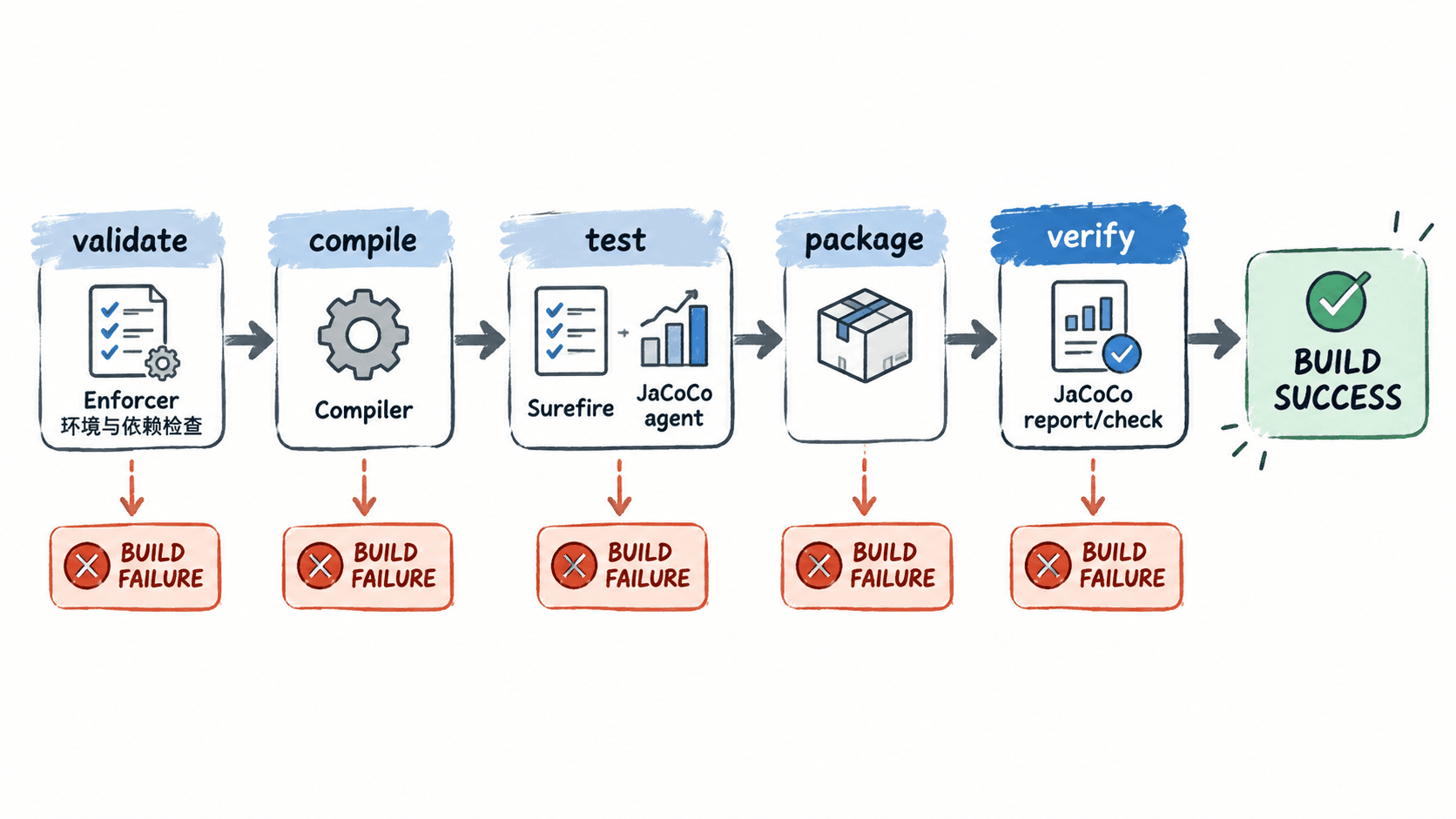
如果团队在 CI 中只执行 mvn test,JaCoCo 的 check 不会运行,因为它绑定在 verify;因此本地和 CI 都应把 mvn clean verify 作为合并前的统一验收命令。
按失败信息定位门禁
| 失败信息或现象 | 直接原因 | 修复方式 |
|---|---|---|
| Enforcer 提示 Maven 版本不满足 | 使用了 3.8.x 或更旧版本 | 切换到 Maven 3.9.x 后重新构建 |
| Enforcer 提示 Java 版本不满足 | JAVA_HOME 不是 JDK 17 |
将 JAVA_HOME 指向 JDK 17,并确认 Maven 使用同一 JDK |
Tests run 中出现 Failure 或 Error |
单元测试断言失败或测试代码异常 | 先修测试或实现,不要跳过测试绕过门禁 |
| JaCoCo 报覆盖率规则未满足 | 当前模块行覆盖率低于 0.80 | 补齐未覆盖的业务分支;确需调整阈值时在父 POM 统一修改 |
dependencyConvergence 失败 |
同一依赖经不同路径出现多个版本 | 在父 POM 的 dependencyManagement 固定单一版本并消除冲突 |
这套配置把“能编译”提升为“环境一致、测试通过、覆盖率达标、依赖收敛”四项同时满足。多模块项目只要都继承同一父 POM,并统一执行根目录的 mvn clean verify,就能把本地构建和 CI 验收对齐到同一套规则。