
跨平台开发 / 系统课时
转换 DateTime 时间字段
转换 DateTime 时间字段
接口中的时间并不总是同一种形态:有的返回 ISO 8601 字符串,有的返回秒级时间戳,有的返回毫秒级时间戳,还可能允许 null。如果把这些差异散落在页面或 Repository 中,时区问题会越来越难追踪。本节用 JsonConverter 把协议格式集中转换成统一的 UTC DateTime。
学习目标
- 区分 ISO 8601、秒级时间戳与毫秒级时间戳的解析方式
- 使用
JsonConverter为 Freezed 字段集中定义双向转换 - 明确 UTC、可空字段和无时区字符串的处理边界
先把接口约定说清楚
DateTime 只是应用内类型,真正决定解析方式的是接口协议。秒级时间戳与毫秒级时间戳不能靠“看起来像数字”来猜;同一个字段应由后端明确规定单位。ISO 8601 字符串也应携带 Z 或明确的偏移量,例如 2024-01-01T08:00:00+08:00。
json_serializable 官方支持通过 JsonConverter 把自定义转换逻辑绑定到字段或类型上,这比在每个调用点重复手写转换更适合长期维护。([Dart packages][2])
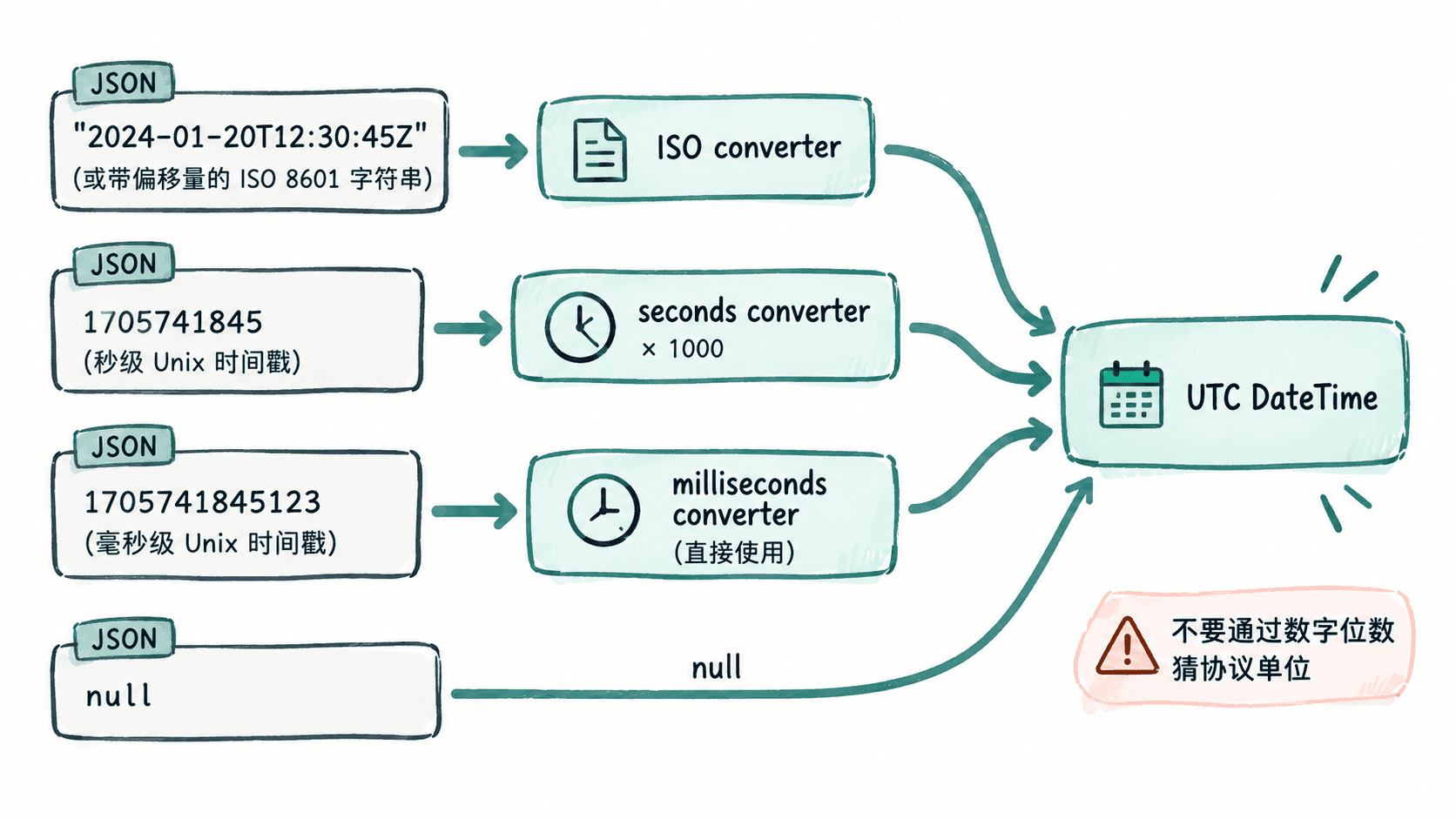
为每种协议格式定义转换器
下面是可直接放入 lib/event.dart 的完整示例。ISO 字段与毫秒字段要求非空,秒级字段允许 null;先按项目既有代码生成流程生成 Freezed 与 JSON 序列化文件,再运行该 Dart 文件验证结果。
import 'dart:convert';

import 'package:freezed_annotation/freezed_annotation.dart';

part 'event.freezed.dart';
part 'event.g.dart';

class IsoUtcDateTimeConverter
    implements JsonConverter<DateTime, String> {
  const IsoUtcDateTimeConverter();

  @override
  DateTime fromJson(String json) => DateTime.parse(json).toUtc();

  @override
  String toJson(DateTime object) =>
      object.toUtc().toIso8601String();
}

class NullableUnixSecondsUtcConverter
    implements JsonConverter<DateTime?, int?> {
  const NullableUnixSecondsUtcConverter();

  @override
  DateTime? fromJson(int? json) {
    if (json == null) return null;

    return DateTime.fromMillisecondsSinceEpoch(
      json * Duration.millisecondsPerSecond,
      isUtc: true,
    );
  }

  @override
  int? toJson(DateTime? object) {
    if (object == null) return null;

    return object.toUtc().millisecondsSinceEpoch ~/
        Duration.millisecondsPerSecond;
  }
}

class UnixMillisecondsUtcConverter
    implements JsonConverter<DateTime, int> {
  const UnixMillisecondsUtcConverter();

  @override
  DateTime fromJson(int json) =>
      DateTime.fromMillisecondsSinceEpoch(json, isUtc: true);

  @override
  int toJson(DateTime object) =>
      object.toUtc().millisecondsSinceEpoch;
}

@freezed
abstract class Event with _$Event {
  const factory Event({
    required String id,
    @IsoUtcDateTimeConverter() required DateTime createdAt,
    @NullableUnixSecondsUtcConverter() DateTime? expiresAt,
    @UnixMillisecondsUtcConverter() required DateTime updatedAt,
  }) = _Event;

  factory Event.fromJson(Map<String, dynamic> json) =>
      _$EventFromJson(json);
}

void main() {
  const raw = '''
{
  "id": "evt-1",
  "createdAt": "2024-01-01T00:00:00Z",
  "expiresAt": 1704067200,
  "updatedAt": 1704067200000
}
''';

  final json = jsonDecode(raw) as Map<String, dynamic>;
  final event = Event.fromJson(json);

  print('createdAt=${event.createdAt.toIso8601String()}');
  print('expiresAt=${event.expiresAt?.toIso8601String()}');
  print('updatedAt=${event.updatedAt.toIso8601String()}');
}
预期输出
createdAt=2024-01-01T00:00:00.000Z
expiresAt=2024-01-01T00:00:00.000Z
updatedAt=2024-01-01T00:00:00.000Z
三个转换器同时定义了反序列化和序列化方向,因此 toJson 时也会继续遵循同一协议:ISO 字段输出 UTC 字符串,秒级字段输出秒数,毫秒级字段输出毫秒数。如果把输入中的 expiresAt 改为 null,模型中的 expiresAt 也会得到 null,不会制造默认时间来掩盖“接口没有值”这一事实。
时区应该在哪一层处理
网络模型层应负责把接口格式转换成语义明确的时间,通常推荐统一成 UTC。界面展示时再根据用户所在时区调用 toLocal() 或使用应用既定的时区方案进行格式化。这样同一个时间值在缓存、排序、比较和日志中都有一致基准。
秒级和毫秒级时间戳同样不应通过位数启发式自动判断。一个字段一旦约定为秒,就固定使用秒转换器;约定为毫秒,就固定使用毫秒转换器。把单位、可空性和 UTC 归一化集中在模型边界,业务层拿到的才是真正稳定、可比较的 DateTime。