
游戏客户端架构 / 系统课时
同一界面重复请求怎么避免
同一界面重复请求怎么避免
同一个 HUD 面板可能被连续打开、重复刷新,或因筛选条件快速变化触发多次加载。如果每次事件都直接发请求,不仅浪费带宽,还可能出现旧请求比新请求更晚返回并覆盖新结果。本节用请求去重、取消和短期缓存把这三类问题收敛到一个请求协调器中。
学习目标
- 用请求键识别“同一份数据”的重复加载
- 在新请求取代旧请求时取消旧任务,阻止过期结果回写
- 用带失效时间的缓存减少短时间内的重复请求
先区分三种重复加载问题
“重复请求”并不只有一种原因。解决前要先判断当前需要的是复用、取消还是缓存。
| 场景 | 风险 | 处理方式 |
|---|---|---|
| 同一时刻多处请求相同数据 | 同一资源被并发加载多次 | 复用进行中的 Promise |
| 新条件已经产生,旧请求仍在执行 | 旧结果晚到后覆盖新结果 | 取消旧请求或丢弃旧响应 |
| 刚加载完成又马上打开同一界面 | 无意义地再次访问服务端 | 在 TTL 内直接读取缓存 |
请求键必须能代表结果身份。例如背包可以用 inventory:<playerId>,排行榜还应包含榜单类型、赛季和分页参数。两个参数不同的请求不能因为 URL 相似就错误去重。
让请求协调器统一管理进行中与缓存
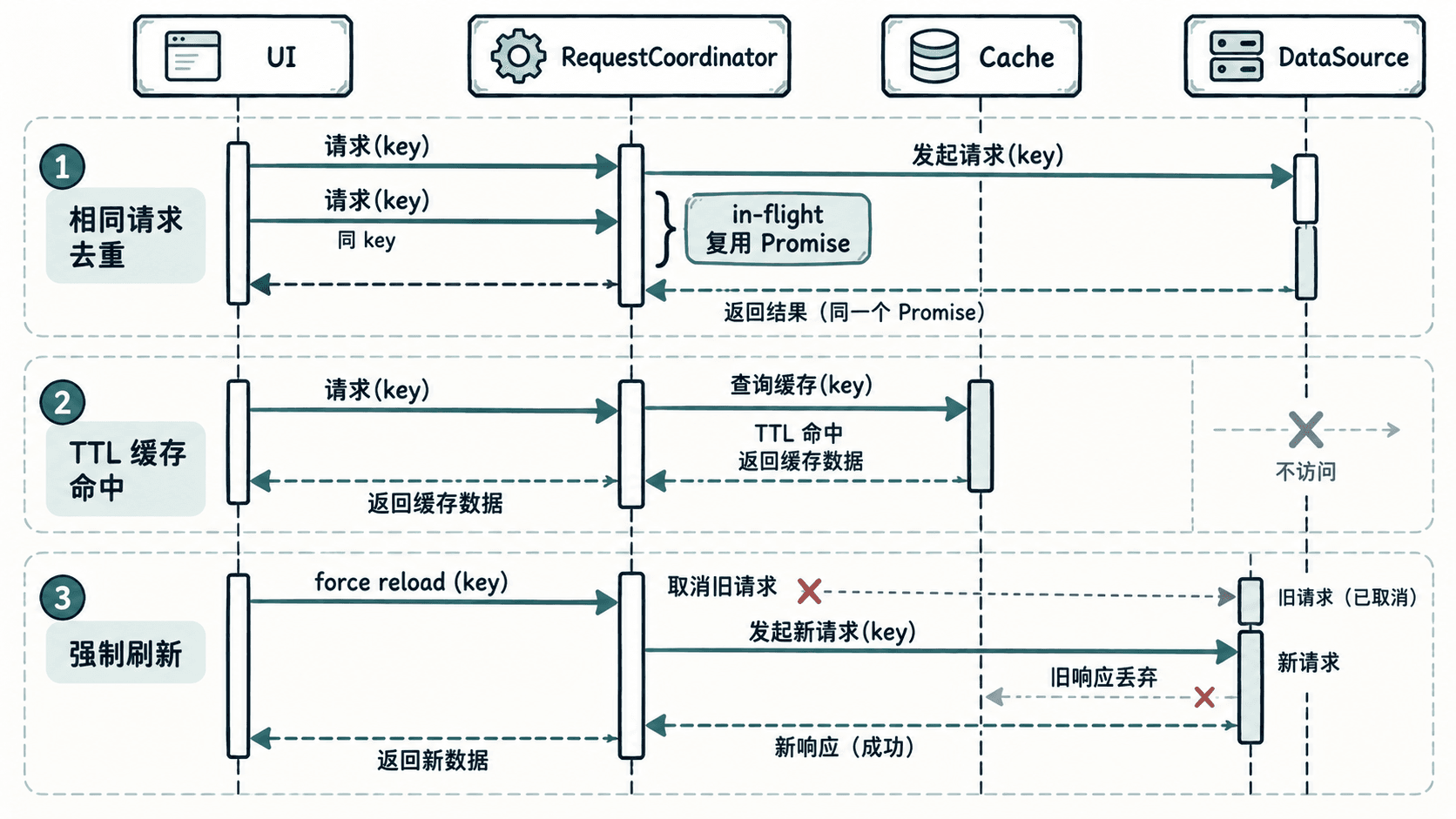
下面的 JavaScript 示例可以直接在支持 AbortController 的 Node.js 18+ 环境运行。协调器先查缓存,再复用同 key 的进行中请求;强制刷新时则取消旧请求,并只保留新请求。
class RequestCoordinator {
  constructor(ttlMs = 5000) {
    this.ttlMs = ttlMs;
    this.inFlight = new Map();
    this.cache = new Map();
  }

  load(key, loader, { force = false } = {}) {
    const now = Date.now();
    const cached = this.cache.get(key);

    // 非强制请求优先使用未过期缓存。
    if (!force && cached && cached.expireAt > now) {
      return Promise.resolve({ source: "cache", data: cached.data });
    }

    const active = this.inFlight.get(key);
    if (active && !force) {
      return active.promise;
    }

    // 新结果明确取代旧结果时,先取消旧任务。
    if (active && force) {
      active.controller.abort();
    }

    const controller = new AbortController();
    const promise = Promise.resolve()
      .then(() => loader(controller.signal))
      .then((data) => {
        if (controller.signal.aborted) {
          throw new Error("request aborted");
        }
        this.cache.set(key, {
          data,
          expireAt: Date.now() + this.ttlMs,
        });
        return { source: "network", data };
      })
      .finally(() => {
        if (this.inFlight.get(key)?.promise === promise) {
          this.inFlight.delete(key);
        }
      });

    this.inFlight.set(key, { controller, promise });
    return promise;
  }

  invalidate(key) {
    this.cache.delete(key);
  }
}

function mockLoad(label, delayMs, value) {
  return (signal) =>
    new Promise((resolve, reject) => {
      if (signal.aborted) {
        reject(new Error(`${label}: aborted`));
        return;
      }

      const timer = setTimeout(() => resolve(value), delayMs);

      signal.addEventListener("abort", () => {
        clearTimeout(timer);
        reject(new Error(`${label}: aborted`));
      });
    });
}

async function main() {
  const coordinator = new RequestCoordinator(10000);

  const first = coordinator.load(
    "inventory:42",
    mockLoad("A", 80, ["sword"])
  );
  const second = coordinator.load(
    "inventory:42",
    mockLoad("B", 10, ["shield"])
  );

  console.log("same promise:", first === second);
  console.log(JSON.stringify(await first));
  console.log(JSON.stringify(await coordinator.load(
    "inventory:42",
    mockLoad("C", 10, ["potion"])
  )));

  const slow = coordinator.load(
    "profile:42",
    mockLoad("slow", 80, { name: "old" })
  );
  const fast = coordinator.load(
    "profile:42",
    mockLoad("fast", 10, { name: "new" }),
    { force: true }
  );

  try {
    await slow;
  } catch (error) {
    console.log(error.message);
  }

  console.log(JSON.stringify(await fast));
}

main().catch(console.error);
预期输出:
same promise: true
{"source":"network","data":["sword"]}
{"source":"cache","data":["sword"]}
slow: aborted
{"source":"network","data":{"name":"new"}}
第二个 inventory:42 请求没有执行自己的 loader,而是复用了第一次请求;紧接着再次读取时命中缓存。profile:42 的强制刷新则取消了慢请求,因此旧结果没有机会覆盖新结果。
缓存必须有失效边界
缓存不是“永远不再请求”。HUD 数据通常需要明确失效条件,例如 TTL 到期、玩家主动刷新、角色切换,或本地操作已经改变服务器数据。完成购买、领取奖励、装备切换这类写操作后,应主动调用失效逻辑,让下一次读取重新获取真实结果。
旧请求不能拥有最终写入权
即使底层网络库不支持真正取消,也要保证旧结果无法回写。常见做法是为每次加载记录递增版本号,响应回来时只接受当前最新版本;取消负责节省资源,版本校验负责守住正确性,两者不是完全替代关系。
当界面关闭时,还应取消没有继续价值的请求或解除结果订阅。这样,请求协调器负责“是否需要加载”,UI 只负责“当前状态应该显示什么”,重复加载和竞态条件就不会散落在各个按钮事件里。