
游戏引擎 / 系统课时
接入异步资源和失败处理
接入异步资源和失败处理
角色状态已经能切换,外观资源却仍可能加载失败或被重复点击触发。本节实现一个拥有请求状态的外观准备对象,验证成功、失败、重复与停用四类路径,再把它接到真实 SpriteFrame 加载,保证只有当前有效结果能够更新表现。
学习目标
- 为异步表现准备定义忙碌与失效策略。
- 保留失败前的可用外观并允许重试。
- 用同一业务规则接入 Cocos 资源与组件生命周期。
规定准备期间允许什么动作
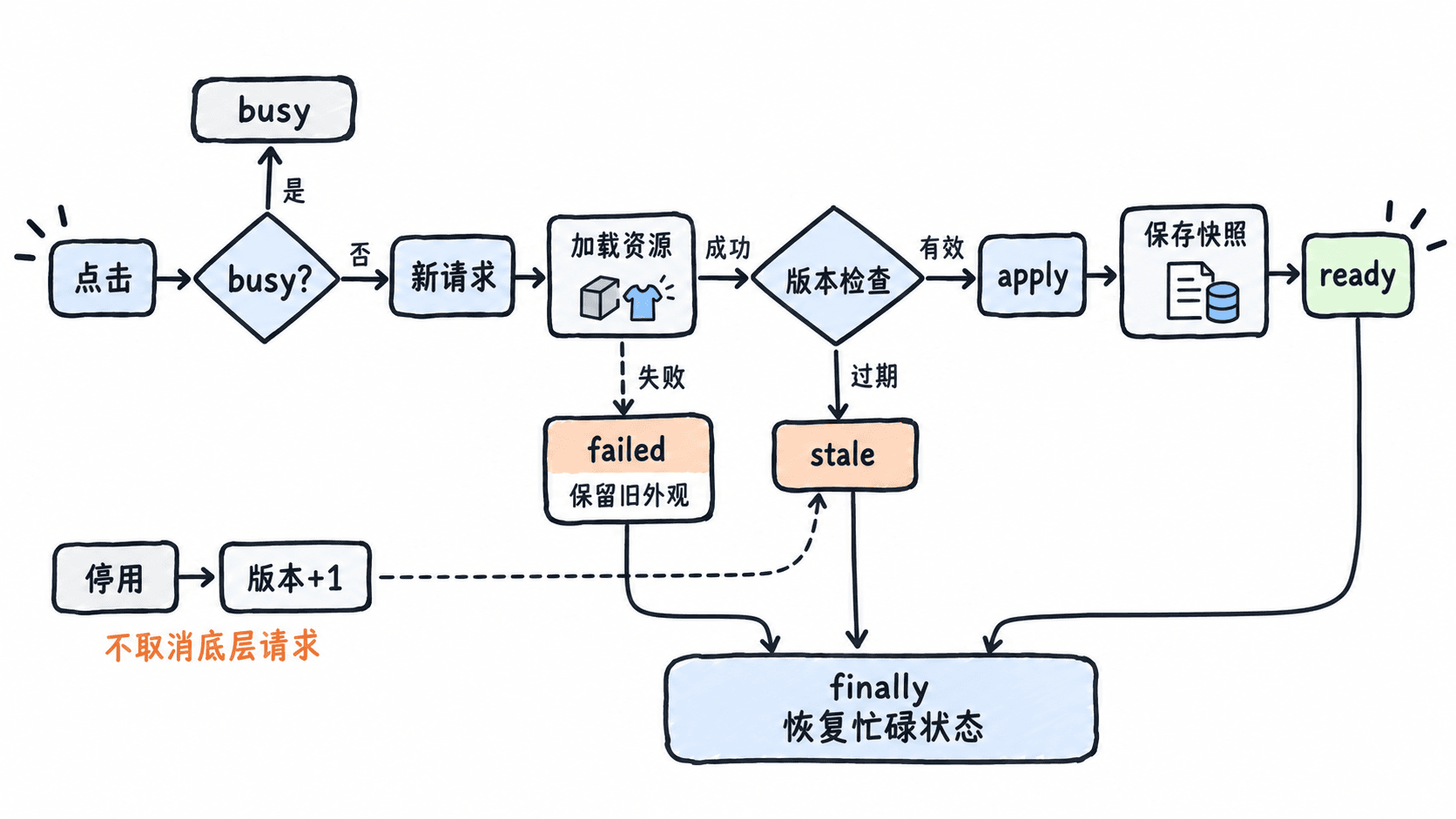
本例选择忙碌期间拒绝重复触发,返回 busy;失败后保留之前外观;成功时提交新外观;停用时使等待结果失效。新请求只能在旧流程结束后再次开始,所以不会有两个已接受请求同时提交,版本号仍负责处理组件离开后的完成结果。
外观对象不依赖 cc,只接受返回 Promise 的加载函数与同步应用函数。加载成功与应用成功都属于 ready 的必要条件:例如 Sprite 缺失时,即使资源已下载,也不能宣称表现准备完成。应用函数应先完成,再记录当前资源,避免失败时保存错误快照。
完整运行四类路径
文件:appearance.ts,完整纯 TypeScript 模块。
export class Appearance<T> {
    private busy = false;
    private version = 0;
    private asset: T | null = null;
    constructor(private apply: (asset: T) => void) {}
    invalidate(): void { this.version++; }
    current(): T | null { return this.asset; }
    async prepare(load: () => Promise<T>): Promise<string> {
        if (this.busy) return 'busy';
        this.busy = true;
        const request = ++this.version;
        try {
            const asset = await load();
            if (request !== this.version) return 'stale';
            // 应用失败也算失败,不能先记录为就绪。
            this.apply(asset); this.asset = asset;
            return 'ready';
        } catch (error: unknown) {
            if (request !== this.version) return 'stale';
            return error instanceof Error ? `failed:${error.message}` : 'failed:unknown';
        } finally { this.busy = false; }
    }
}文件:main.ts,与 appearance.ts 一起 strict 编译后运行 dist/main.js。夹具控制完成顺序,不使用真实引擎资源。
import { Appearance } from './appearance';
function deferred(): { promise: Promise<string>; resolve: (value: string) => void } {
    let resolve!: (value: string) => void;
    const promise = new Promise<string>(ok => { resolve = ok; });
    return { promise, resolve };
}
async function main(): Promise<void> {
    let applied = 0, calls = 0;
    const model = new Appearance<string>(() => { applied++; });
    const gate = deferred();
    const first = model.prepare(() => { calls++; return gate.promise; });
    console.log(await model.prepare(async () => { calls++; return 'duplicate'; }));
    gate.resolve('hero'); console.log(await first);
    console.log(`calls:${calls}|shown:${model.current()}`);
    console.log(await model.prepare(async () => { throw new Error('missing'); }));
    console.log(await model.prepare(async () => 'hero2'));
    const late = deferred();
    const pending = model.prepare(() => late.promise);
    // 离开后旧完成不能再次应用。
    model.invalidate(); late.resolve('old'); console.log(await pending);
    console.log(`shown:${model.current()}|applied:${applied}`);
}
void main().catch((error: unknown) => { throw error; });
预期输出:
busy
ready
calls:1|shown:hero
failed:missing
ready
stale
shown:hero2|applied:2
接入真实 Sprite 表现
文件:SpriteAppearance.ts,片段示例,依赖 Creator 3.8、同目录 appearance.ts、Sprite 与资源图片。
import { _decorator, Component, Node, Sprite, SpriteFrame, resources, isValid } from 'cc';
import { Appearance } from './appearance';
const { ccclass, property } = _decorator;
@ccclass('SpriteAppearance')
export class SpriteAppearance extends Component {
    @property(Node) inputNode: Node | null = null;
    @property path = 'skins/hero/spriteFrame';
    private model: Appearance<SpriteFrame> | null = null;
    onLoad(): void {
        this.model = new Appearance<SpriteFrame>(frame => {
            if (!isValid(this) || !this.enabledInHierarchy) throw new Error('view unavailable');
            const sprite = this.getComponent(Sprite);
            if (!sprite) throw new Error('Sprite missing');
            sprite.spriteFrame = frame;
        });
    }
    onEnable(): void {
        if (!this.inputNode) { console.error('inputNode missing'); return; }
        this.inputNode.on(Node.EventType.TOUCH_END, this.prepare, this);
    }
    onDisable(): void {
        this.inputNode?.off(Node.EventType.TOUCH_END, this.prepare, this);
        this.model?.invalidate();
    }
    private prepare(): void {
        if (!this.model) return;
        const path = this.path;
        void this.model.prepare(() => new Promise<SpriteFrame>((resolve, reject) => {
            // 路径捕获属于本次请求,失败先退出。
            resources.load(path, SpriteFrame, (error, frame) => {
                if (error) { reject(error); return; }
                if (!frame) { reject(new Error('frame missing')); return; }
                resolve(frame);
            });
        })).then(result => console.log(result));
    }
}
预期结果:导入图片到 assets/resources/skins/hero,确认 SpriteFrame 子资源;在角色 Sprite 挂 SpriteAppearance,在 Canvas 下创建可点击 UI 区域并拖入 inputNode。保存并预览,点击后成功显示图片并输出 ready;错误路径输出 failed 开头的结果,具体引擎错误文字可能不同。
核对重试与清理结果
连续点击正在等待的同一实例,后续输入只返回 busy,不再调用加载函数;资源缓存可能使真实预览很快完成,因此重复路径的确定验证由上面的可控夹具提供。停用组件后完成的结果返回 stale,不应用旧外观,重新启用并再次点击可以发起新准备。
失败保留当前外观可以避免画面突然空白,也便于提示用户重试。若产品要求显示错误占位,应把它设计成明确失败表现,而不是让失败回调访问 null 资源。忙碌、就绪和外观数据也应分别记录,不用一个 boolean 代表所有状态。
资源引用释放需要按所有权处理,忽略结果不等于释放缓存,不应随意释放其他组件也在使用的资源。本例只管理提交规则,真实引用计数、场景资源释放与图形效果需要在 Creator 上确认。
输入节点缺失应在启用时报告配置错误;资源类型与路径则在准备时检查,两条错误链不要混在一起。先确认触摸确实调用了 prepare,再确认加载函数启动,最后确认应用函数更新 Sprite。这条顺序能缩小“点击没变化”的排查范围。
纯模型的初始资源为 null,真实 Sprite 可能已经有场景配置的默认图。失败时没有调用应用函数,因此默认图也能保留;current 只表示模型成功提交过的资源,不应被当成整个场景当前所有表现的完整快照。
若请求永久等待,busy 仍为 true,停用只使结果失效,不会立刻解除底层等待。需要重试截止时间时,应另行设计超时与请求归属,不把当前模型解释成通用取消器。实际项目还应决定禁用期间是否允许后台准备,当前规则选择禁止旧结果提交。API 路径依据 Cocos 3.8 动态资源加载。