
React / 知识点
React Hooks 速查手册
手册条目
使用 useImperativeHandle 限制父组件通过 ref 可调用的命令。
使用 useImperativeHandle 暴露命令接口
当父组件确实需要执行聚焦、滚动、播放动画或清空输入等命令式操作时,用 useImperativeHandle 只暴露允许调用的方法,避免父组件直接获得完整 DOM 节点或修改子组件内部状态。其基本签名是 useImperativeHandle(ref, createHandle, dependencies?)。:contentReference[oaicite:0]{index=0}
基本语法
useImperativeHandle(ref, () => ({
  focus() {
    // 执行子组件内部操作
  },
}), []);
createHandle 返回父组件最终从 ref.current 读取的对象。依赖数组中应列出该对象使用的响应式变量;遗漏依赖可能让命令读取旧的 props 或 state。
主示例
下面的输入框只向父组件开放 focus 和 clear,不暴露底层 <input>:
import {
  forwardRef,
  useImperativeHandle,
  useRef,
  useState,
} from 'react';

type InputCommands = {
  focus: () => void;
  clear: () => void;
};

type CommandInputProps = {
  initialValue?: string;
};

const CommandInput = forwardRef<InputCommands, CommandInputProps>(
  function CommandInput({ initialValue = 'demo' }, ref) {
    const inputRef = useRef<HTMLInputElement>(null);
    const [value, setValue] = useState(initialValue);

    useImperativeHandle(
      ref,
      () => ({
        focus() {
          inputRef.current?.focus();
        },
        clear() {
          setValue('');
          inputRef.current?.focus();
        },
      }),
      [],
    );

    return (
      <input
        ref={inputRef}
        value={value}
        onChange={(event) => setValue(event.target.value)}
      />
    );
  },
);

export default function App() {
  const inputCommands = useRef<InputCommands>(null);

  return (
    <main>
      <CommandInput ref={inputCommands} />
      <button onClick={() => inputCommands.current?.focus()}>
        聚焦
      </button>
      <button onClick={() => inputCommands.current?.clear()}>
        清空并聚焦
      </button>
    </main>
  );
}
预期结果:
页面初始显示值 demo。
点击“聚焦”后,光标进入输入框。
点击“清空并聚焦”后,内容被清空且输入框保持焦点。
父组件只能调用 focus() 和 clear()。
高频用法
- 表单组件暴露
focus()、reset()或validate()。 - 播放器组件暴露
play()、pause()和seek()。 - 虚拟列表暴露
scrollToItem(index)。 - 动画组件暴露
start()或cancel()。
优先暴露业务含义明确的命令,例如 scrollToError(),不要把内部 DOM 节点直接返回给父组件。
风险与边界
当界面状态能由 props 表达时,应优先使用声明式数据流。例如弹窗开关通常使用 open 属性,而不是暴露 open() 和 close()。滥用命令接口会增加父子组件耦合,使状态来源难以追踪。React 官方也建议仅将 ref 用于无法通过 props 清晰表达的命令式行为。:contentReference[oaicite:1]{index=1}
若命令引用会变化的 props、state 或函数,却把依赖数组写成 [],父组件可能调用到旧逻辑。安全做法是补齐依赖,或使用函数式状态更新和稳定回调减少闭包依赖。
排障清单
ref.current为null:确认组件已经挂载,并且ref确实传给目标组件。- 提示方法不存在:检查
useImperativeHandle返回对象的方法名是否与父组件类型一致。 - 命令读取旧数据:检查依赖数组是否遗漏 props、state 或组件内函数。
- TypeScript 推断为
never或null:给useRef<InputCommands>(null)和forwardRef补充泛型。 - 父组件能任意修改样式:检查是否错误地暴露了
inputRef.current等完整 DOM 节点。
兼容性
React 19 可将 ref 作为组件属性直接接收;React 18 及更早版本需要通过 forwardRef 接收。上面的写法可兼容 React 18,并能继续用于 React 19 项目。:contentReference[oaicite:2]{index=2}
使用 useContext 获取主题、身份、配置等跨层级共享数据。
使用 useContext 读取共享数据
当主题、登录身份、语言或运行配置需要跨越多层组件共享时,用 useContext 读取距离当前组件最近的 Provider 值。组件会订阅该上下文,并在 Provider 的值变化时重新渲染。:contentReference[oaicite:3]{index=3}
基本语法
const value = useContext(SomeContext);SomeContext 必须是 createContext 创建的同一个对象。React 从当前组件向上查找最近的 Provider;未找到时返回 createContext 设置的默认值。
主示例
下面使用自定义 Hook 集中处理空值检查,并用 useMemo 稳定 Provider 传入的对象:
import {
  createContext,
  useContext,
  useMemo,
  useState,
} from 'react';

type Theme = 'light' | 'dark';

type ThemeContextValue = {
  theme: Theme;
  toggleTheme: () => void;
};

const ThemeContext = createContext<ThemeContextValue | null>(null);

function useTheme(): ThemeContextValue {
  const context = useContext(ThemeContext);

  // 缺少 Provider 时立即暴露配置错误,避免后续空值异常。
  if (context === null) {
    throw new Error('useTheme 必须在 ThemeProvider 内调用');
  }

  return context;
}

function ThemeButton() {
  const { theme, toggleTheme } = useTheme();

  return (
    <button onClick={toggleTheme}>
      当前主题:{theme}
    </button>
  );
}

export default function App() {
  const [theme, setTheme] = useState<Theme>('light');

  const contextValue = useMemo<ThemeContextValue>(
    () => ({
      theme,
      toggleTheme: () => {
        setTheme((current) =>
          current === 'light' ? 'dark' : 'light',
        );
      },
    }),
    [theme],
  );

  return (
    <ThemeContext.Provider value={contextValue}>
      <ThemeButton />
    </ThemeContext.Provider>
  );
}
预期结果:
页面初始显示:当前主题:light
第一次点击后显示:当前主题:dark
再次点击后恢复:当前主题:light
若 ThemeButton 移到 Provider 外部,页面抛出自定义配置错误。
高频用法
- 主题:共享颜色模式、字号或组件样式配置。
- 身份:共享当前用户、权限和登录操作。
- 国际化:共享语言、时区和翻译函数。
- 应用配置:共享只读环境能力或功能开关。
频繁变化且更新范围很大的业务状态不应全部塞进单个 Context。可按职责拆分多个 Context,避免无关消费者一起重新渲染。
风险与边界
Provider 的 value 使用新对象或新函数时,即使内容看起来相同,也可能因为引用变化触发消费者重新渲染。安全做法是稳定对象身份、拆分更新频率不同的 Context,并只向下传递消费者真正需要的数据。React 使用 Object.is 比较前后值,memo 不能阻止组件接收新的 Context 值。:contentReference[oaicite:4]{index=4}
Context 会隐藏组件的数据依赖。对只经过一两层的普通数据,优先直接传 props;对需要独立复用的组件,也可以使用组合模式传入子组件,避免组件强依赖特定 Provider。
排障清单
- 总是得到默认值:确认 Provider 位于消费组件上方,而不是在调用
useContext的同一组件返回值中才创建。 - 得到
undefined:检查 Provider 是否显式传入了value={undefined};此时不会回退到默认值。 - 修改值后组件不更新:确认没有直接修改原对象,并通过 state 创建了新的值。
- 出现大量无关重渲染:检查 Provider 是否每次渲染都创建新的对象或函数,并考虑拆分 Context。
- Provider 存在却读取失败:检查提供端和消费端是否导入了同一个 Context 对象。符号链接或重复打包模块可能产生两个不同实例。:contentReference[oaicite:5]{index=5}
兼容性
useContext 可在支持 Hooks 的 React 版本中使用。为了同时兼容 React 18 和 React 19,Provider 可继续写成 <ThemeContext.Provider value={...}>;React 19 还支持直接使用 <ThemeContext value={...}> 的简化形式。:contentReference[oaicite:6]{index=6}
拆分上下文并稳定 Provider 值,减少无关消费者重新渲染。
优化 Context 更新
当某个 Provider 的 value 身份变化时,订阅该 Context 的消费者会重新渲染。优化重点是:按更新频率拆分 Context,并让对象型 value 在依赖未变时保持同一引用。
什么时候用
当一个 Context 同时放入用户、主题、权限、弹窗等数据,修改其中任意一项都会波及大量无关组件;或者 Provider 每次渲染都创建新的对象和函数,导致消费者频繁刷新时使用。
主方案
将更新频率和职责不同的数据拆成多个 Context。Provider 暴露对象时,用 useCallback 稳定操作函数,再用 useMemo 稳定整个 value。消费者只订阅实际需要的 Context;需要隔离父组件普通重渲染时,再配合 React.memo。
下面示例可直接替换 Vite React 项目的 src/App.jsx:
import { createContext, memo, useCallback, useContext, useMemo, useState } from "react";

const UserContext = createContext(null);
const ThemeContext = createContext(null);

function UserProvider({ children }) {
  const [user, setUser] = useState({ name: "Ada" });

  const rename = useCallback((name) => {
    setUser((current) => ({ ...current, name }));
  }, []);

  // 只有 user 或 rename 真正变化时才创建新的 Provider 值
  const value = useMemo(() => ({ user, rename }), [user, rename]);

  return <UserContext.Provider value={value}>{children}</UserContext.Provider>;
}

function ThemeProvider({ children }) {
  const [theme, setTheme] = useState("light");
  const toggle = useCallback(() => {
    setTheme((current) => (current === "light" ? "dark" : "light"));
  }, []);
  const value = useMemo(() => ({ theme, toggle }), [theme, toggle]);

  return <ThemeContext.Provider value={value}>{children}</ThemeContext.Provider>;
}

const UserPanel = memo(function UserPanel() {
  console.count("UserPanel render");
  const { user, rename } = useContext(UserContext);

  return (
    <section>
      <p>用户:{user.name}</p>
      <button onClick={() => rename("Grace")}>修改用户名</button>
    </section>
  );
});

const ThemeToggle = memo(function ThemeToggle() {
  console.count("ThemeToggle render");
  const { theme, toggle } = useContext(ThemeContext);

  return <button onClick={toggle}>当前主题:{theme}</button>;
});

export default function App() {
  return (
    <UserProvider>
      <ThemeProvider>
        <UserPanel />
        <ThemeToggle />
      </ThemeProvider>
    </UserProvider>
  );
}
预期结果
初次加载:
UserPanel render: 1
ThemeToggle render: 1

点击“当前主题”按钮:
ThemeToggle render: 2
控制台不会新增 UserPanel render

点击“修改用户名”按钮:
UserPanel render: 2
开发环境启用 Strict Mode 时,首次渲染日志可能出现两次;判断重点是切换主题时 UserPanel 不再新增渲染记录。
风险与边界
仅给组件套 React.memo 不能阻止其订阅的 Context 更新;Context 值变化时消费者仍会渲染。若 value 内含每次新建的对象、数组或匿名函数,useMemo 也会因依赖变化而失效,应先稳定这些依赖。
不要为了零散字段拆出大量 Context,否则 Provider 层级和维护成本会快速上升。对于鼠标坐标、实时行情等高频更新,优先考虑状态库的 selector、useSyncExternalStore 或把高频状态下沉到更小的组件范围。
排障清单
- 在消费者中使用
console.count或 React DevTools Profiler,确认是哪次更新触发渲染。 - 检查 Provider 的
value是否直接写成value={{ state, action }}。 - 检查
useMemo依赖中是否存在每次渲染都新建的对象或函数。 - 确认消费者是否订阅了一个过于宽泛、包含无关状态的 Context。
- 生产构建前移除仅用于诊断的日志。
兼容性
Hooks 需要 React 16.8 及以上版本。React 18 及以上开发环境的 Strict Mode 会额外执行渲染以发现副作用,不代表生产环境一定发生同样次数的渲染。
使用 useMemo 缓存确有成本且依赖稳定的派生计算结果。
缓存计算结果
useMemo 用于缓存有明显计算成本的派生结果,或在依赖未变时保持对象、数组引用稳定。它不应替代普通变量,也不能用于执行请求、写日志或修改状态等副作用。
基本语法
const result = useMemo(() => compute(source), [source]);React 在首次渲染时执行计算函数;后续只有依赖发生变化时才重新计算。依赖必须包含计算过程中读取的所有响应式值。
高频用法
适合缓存大数组的筛选、排序、聚合,复杂格式转换,以及传给 React.memo 子组件的对象或数组。下面示例可直接替换 Vite React 项目的 src/App.jsx:
import { useMemo, useState } from "react";

const PRODUCTS = Array.from({ length: 20000 }, (_, index) => ({
  id: index + 1,
  name: `商品 ${index + 1}`,
  score: (index * 37) % 1000,
}));

export default function App() {
  const [query, setQuery] = useState("");
  const [dark, setDark] = useState(false);

  const visibleProducts = useMemo(() => {
    console.count("filter calculation");
    const keyword = query.trim().toLowerCase();

    // 过滤、排序和截取只在 query 改变时执行
    return PRODUCTS.filter((product) =>
      product.name.toLowerCase().includes(keyword)
    )
      .sort((a, b) => b.score - a.score)
      .slice(0, 5);
  }, [query]);

  return (
    <main style={{ background: dark ? "#222" : "#fff", color: dark ? "#fff" : "#111" }}>
      <button onClick={() => setDark((value) => !value)}>切换主题</button>
      <input
        value={query}
        onChange={(event) => setQuery(event.target.value)}
        placeholder="输入商品编号"
      />
      <ul>
        {visibleProducts.map((product) => (
          <li key={product.id}>
            {product.name},评分 {product.score}
          </li>
        ))}
      </ul>
    </main>
  );
}
预期结果
初次加载:
filter calculation: 1

反复点击“切换主题”:
页面主题变化,但控制台不会新增 filter calculation

在输入框中输入 99:
filter calculation: 2
列表更新为名称包含 99 的前 5 条高分商品
开发环境启用 Strict Mode 时,计算日志可能额外出现;应比较“只切换主题”是否触发新的计算,而不是依赖绝对次数。
依赖与边界
依赖数组缺项会读到旧值,依赖过宽则会频繁失效。不要把每次渲染新建的对象直接放入依赖,例如 const options = { limit: 5 } 后再依赖 options;应把对象创建移入计算函数,或先单独缓存该对象。
useMemo 是性能优化,不是语义保证。React 可能在开发检查、组件挂起或未来优化中丢弃缓存,因此计算函数必须是纯函数,重复执行也不能改变外部状态。
风险与安全替代
对字符串拼接、简单布尔判断、小数组映射等廉价计算滥用 useMemo,会增加依赖维护和缓存开销,代码反而更慢。安全替代方案是先直接计算,再用 React DevTools Profiler 或浏览器 Performance 面板确认存在可测量瓶颈后再缓存。
若目的是防止子组件因引用变化而渲染,应同时确认子组件已使用 React.memo;仅缓存传入值而子组件仍随父组件正常渲染,通常收益有限。
排障清单
- 用
console.count临时确认计算函数何时执行。 - 检查计算函数是否包含请求、状态更新、DOM 操作或随机副作用。
- 检查依赖是否完整,并移除每次渲染都新建的依赖对象。
- 检查输入数据是否在原地修改;应返回新数组或新对象。
- 用 Profiler 比较优化前后的提交时间,无法测出收益时删除缓存。
兼容性
useMemo 需要 React 16.8 及以上版本。服务端渲染时也会执行计算函数,因此不要在其中直接访问 window、document 等仅浏览器存在的对象。
使用 useCallback 稳定传给优化子组件或其他 Hook 的函数引用。
缓存回调函数
useCallback 用于在依赖未变化时保持函数引用稳定。最常见的触发条件是:回调传给 React.memo 包装的子组件,或作为其他 Hook 的依赖;普通本地点击处理函数通常不需要缓存。
基本语法
基本形式是 const cachedFn = useCallback(fn, dependencies);。dependencies 必须包含回调中读取的所有响应式值,包括 props、state 和组件内声明的变量。
高频用法
下面示例让父组件切换主题时,不重复渲染只依赖 onSave 的子组件。
import { memo, useCallback, useState } from 'react';

const SaveButton = memo(function SaveButton({ onSave }) {
  console.log('SaveButton render');
  return <button onClick={onSave}>保存</button>;
});

export default function App() {
  const [text, setText] = useState('hello');
  const [dark, setDark] = useState(false);

  // text 不变时,handleSave 的引用保持不变
  const handleSave = useCallback(() => {
    console.log('保存内容:', text);
  }, [text]);

  return (
    <main className={dark ? 'dark' : 'light'}>
      <input
        value={text}
        onChange={(event) => setText(event.target.value)}
      />
      <SaveButton onSave={handleSave} />
      <button onClick={() => setDark((value) => !value)}>
        切换主题
      </button>
    </main>
  );
}
预期输出
初次渲染:SaveButton render
点击“切换主题”:控制台没有新的 SaveButton render
修改输入框:SaveButton render
点击“保存”:保存内容: <当前输入值>
在开发环境启用 Strict Mode 时,初次渲染日志可能出现两次;判断是否有效应看后续无关状态更新是否触发子组件重渲染。
风险与边界
依赖数组漏项会让回调读取旧值,后果通常是保存旧数据或按旧状态执行。安全做法是保留 eslint-plugin-react-hooks 的依赖检查,并优先使用状态更新函数减少依赖,例如 setCount((value) => value + 1)。
如果子组件没有使用 memo,或函数没有作为其他 Hook 的依赖,稳定引用通常没有收益。useCallback 主要解决引用变化,不应当作减少函数创建成本的通用工具。
排障清单
- 子组件仍然重渲染:检查其他 props 是否每次都创建新对象、数组或函数。
- 回调读取旧数据:补全依赖,或改用函数式状态更新。
- 依赖每次都变化:把临时对象移到回调内部,或先稳定其来源。
- 页面仍然卡顿:用 React DevTools Profiler 确认耗时点,不要继续盲目增加缓存。
速查原则:只有“引用稳定”能阻止实际的重复工作时,useCallback 才值得保留。
根据实际渲染成本和引用稳定需求决定是否使用记忆化 Hook。
判断是否需要缓存
是否使用 useMemo、useCallback 或 memo,应由重复计算成本、组件重渲染成本和引用稳定需求决定。没有可观察的重复工作时,直接代码通常更快、更容易维护。
判断顺序
先确认是否存在真实问题,再选择对应工具:
| 现象 | 建议 |
|---|---|
| 计算量小、组件渲染便宜 | 不缓存 |
| 昂贵计算因无关更新重复执行 | 使用 useMemo |
| 回调传给已优化子组件 | 使用 useCallback |
| 子组件因相同 props 重渲染 | 使用 memo |
| 只是“感觉可能更快” | 先用 Profiler 测量 |
判断关键不是代码看起来复杂,而是更新时是否重复执行了可避免的工作。
验证方法
下面示例用 Profiler 观察父组件更新时,昂贵子组件是否被跳过。
import { memo, Profiler, useCallback, useState } from 'react';

const HeavyList = memo(function HeavyList({ onSelect }) {
  let checksum = 0;

  // 模拟一次明显可测的渲染计算
  for (let i = 0; i < 3000000; i += 1) {
    checksum += i % 10;
  }

  console.log('HeavyList render:', checksum);
  return <button onClick={() => onSelect(checksum)}>选择结果</button>;
});

export default function App() {
  const [count, setCount] = useState(0);
  const [selected, setSelected] = useState(null);

  const handleSelect = useCallback((value) => {
    setSelected(value);
  }, []);

  const handleRender = (id, phase, actualDuration) => {
    console.log(id, phase, actualDuration.toFixed(2) + 'ms');
  };

  return (
    <Profiler id='App' onRender={handleRender}>
      <p>父组件计数:{count}</p>
      <p>已选结果:{selected ?? '无'}</p>
      <HeavyList onSelect={handleSelect} />
      <button onClick={() => setCount((value) => value + 1)}>
        父组件 +1
      </button>
    </Profiler>
  );
}
预期输出
HeavyList render: 13500000
App mount <TIME>ms
点击“父组件 +1”后:
App update <TIME>ms
控制台没有新的 HeavyList render
<TIME> 会随设备、浏览器和构建模式变化。把 handleSelect 改成内联函数后再次点击“父组件 +1”;如果出现新的 HeavyList render,说明稳定引用在这个场景确实避免了重复工作。
风险与边界
记忆化本身会增加依赖比较、缓存维护和代码复杂度。触发条件是大量无收益的 useMemo、useCallback 或 memo;后果是代码更难排查,性能还可能不升反降。安全替代方案是先保持实现直接,只对 Profiler 已确认的热点增加缓存。
依赖中若包含每次渲染都新建的对象或函数,缓存会持续失效。先稳定依赖来源,或把对象创建移入计算函数,再判断是否仍需要记忆化。
排障清单
- Profiler 显示耗时很低:删除缓存,保留简单实现。
- 缓存后仍重复渲染:检查所有 props,而不只检查一个回调。
useMemo每次都重算:定位不断变化的依赖引用。- 优化后行为异常:优先检查遗漏依赖和陈旧闭包。
- 生产环境仍慢:使用生产构建复测,开发模式的额外检查会放大耗时。
速查原则:先证明存在重复成本,再缓存;缓存后的收益应能在 Profiler 或渲染日志中被验证。
使用 useTransition 将耗时但非紧急的界面更新标记为过渡任务。
延迟非紧急更新
useTransition 用于把列表筛选、页签切换、图表重绘等非紧急状态更新标记为 Transition,让输入、点击等紧急交互优先响应。它不会让计算本身变快,而是允许 React 中断并稍后继续这部分渲染。
基本语法
const [isPending, startTransition] = useTransition();

startTransition(() => {
  setState(nextValue);
});
isPending 表示当前是否仍有 Transition 未提交;startTransition 的回调会立即执行,其中同步触发的状态更新会被标记为非阻塞更新。
高频用法
下面示例让输入框立即更新,同时把大列表筛选放入 Transition。可直接替换 Vite React 项目的 src/App.jsx。
import { useMemo, useState, useTransition } from 'react';

const PRODUCTS = Array.from(
  { length: 20000 },
  (_, index) => `商品 ${index + 1}`
);

export default function App() {
  const [inputValue, setInputValue] = useState('');
  const [filterText, setFilterText] = useState('');
  const [isPending, startTransition] = useTransition();

  const visibleProducts = useMemo(() => {
    const keyword = filterText.trim().toLowerCase();
    return PRODUCTS.filter((name) =>
      name.toLowerCase().includes(keyword)
    ).slice(0, 100);
  }, [filterText]);

  function handleChange(event) {
    const nextValue = event.target.value;

    // 受控输入必须立即更新,不能放进 Transition。
    setInputValue(nextValue);

    // 列表允许稍后更新,快速连续输入时旧渲染可被中断。
    startTransition(() => {
      setFilterText(nextValue);
    });
  }

  return (
    <main>
      <input
        value={inputValue}
        onChange={handleChange}
        placeholder="输入商品编号"
      />
      <p>{isPending ? '正在更新列表…' : `显示 ${visibleProducts.length} 条`}</p>
      <ul>
        {visibleProducts.map((name) => (
          <li key={name}>{name}</li>
        ))}
      </ul>
    </main>
  );
}
预期结果
输入框内容立即跟随键盘变化。
列表计算较慢时显示“正在更新列表…”。
停止输入后,列表更新为最新筛选结果。实际设备足够快时,isPending 可能几乎不可见,这是正常现象。
风险与边界
不要把受控输入的 setInputValue 放进 startTransition,否则输入值无法按预期同步。正确做法是分别维护紧急输入状态和允许延迟的展示状态。
startTransition 不是 Web Worker。若在回调中直接执行长时间同步循环,回调本身仍会阻塞主线程;应只在其中安排状态更新,把重计算留给后续渲染,或将真正的 CPU 密集任务移到 Worker。
它也不是防抖。若每次输入都会请求接口,Transition 不会减少请求次数;应另外使用防抖、缓存和 AbortController 取消过期请求。
异步回调中,await 之后的状态更新当前仍需再次包一层 startTransition,才能继续按 Transition 处理。
排障清单
isPending一直不出现:确认耗时来自 Transition 触发的渲染,而不是回调外的同步阻塞。- 输入仍然卡顿:检查父组件是否在紧急状态更新时同步执行大计算,必要时拆分组件并配合
memo。 - 结果顺序错乱:并发请求可能后返回旧结果,应使用请求序号、取消信号或框架提供的 Action/数据层处理竞态。
速查:紧急状态直接更新,非紧急界面状态放进 startTransition。
使用 useDeferredValue 推迟处理搜索词等频繁变化的数据。
延迟高频变化值
useDeferredValue 用于让搜索词、滑块值等高频变化数据先更新输入区域,再让依赖该值的慢列表或图表在后台追赶。适合无法控制状态更新位置,或只想延迟某个下游组件的场景。
基本语法
const deferredValue = useDeferredValue(value);
const deferredValueWithInitial = useDeferredValue(value, initialValue);
首次渲染通常返回当前 value;传入 initialValue 时首次可先使用该值。后续值变化时,React 会先保留旧的延迟值,再尝试在后台提交最新值。
高频用法
下面示例让搜索框保持即时响应,并让结果列表使用延迟后的查询词。可直接替换 Vite React 项目的 src/App.jsx。
import { memo, useDeferredValue, useState } from 'react';

const ITEMS = Array.from(
  { length: 15000 },
  (_, index) => `文档 ${index + 1}`
);

const ResultList = memo(function ResultList({ query }) {
  const keyword = query.trim().toLowerCase();
  const results = ITEMS.filter((item) =>
    item.toLowerCase().includes(keyword)
  ).slice(0, 100);

  return (
    <ul>
      {results.map((item) => (
        <li key={item}>{item}</li>
      ))}
    </ul>
  );
});

export default function App() {
  const [query, setQuery] = useState('');
  const deferredQuery = useDeferredValue(query);
  const isStale = query !== deferredQuery;

  return (
    <main>
      <input
        value={query}
        onChange={(event) => setQuery(event.target.value)}
        placeholder="搜索文档编号"
      />
      <p>{isStale ? '正在更新结果…' : '结果已同步'}</p>
      <div style={{ opacity: isStale ? 0.6 : 1 }}>
        <ResultList query={deferredQuery} />
      </div>
    </main>
  );
}
预期结果
输入框立即显示最新字符。
快速输入时可能出现“正在更新结果…”,旧列表暂时保留并降低透明度。
后台渲染完成后,列表切换到最新查询结果并显示“结果已同步”。
ResultList 使用 memo,这样父组件因 query 变化重新渲染时,只要 deferredQuery 仍是旧值,慢列表就能跳过本轮渲染。
与 useTransition 的选择
能直接控制某个 setState,并且希望显示统一的 isPending 状态时,优先使用 useTransition。只能拿到一个来自 props、Context 或自定义 Hook 的值,或只想延迟某个下游子树时,使用 useDeferredValue 更直接。
两者都按设备和渲染压力自适应,没有固定延迟时间,因此不能替代需要精确等待时间的防抖或节流。
风险与边界
useDeferredValue 只延迟渲染,不减少网络请求。若 useEffect 监听原始 query 发请求,每次按键仍会触发请求;需要另加防抖、缓存或取消机制。
不要在每次渲染时创建新对象后立即传入,例如 useDeferredValue({ query })。对象引用每次都不同,会产生不必要的后台渲染;应传原始值,或先用 useMemo 稳定对象引用。
延迟值会短暂落后于真实值。涉及金额提交、权限判断、表单校验结果等必须实时一致的逻辑,应读取原始值,只把延迟值用于可滞后的展示区域。
排障清单
- 输入仍然卡顿:确认慢子组件已拆分,并使用
memo避免在延迟值未变化时重复渲染。 - 列表始终不延迟:设备可能足够快,或上游更新本身已经处于 Transition。
- 请求数量没有下降:这是预期行为,应在请求层实现防抖或取消。
- 页面显示旧结果但无提示:用
value !== deferredValue标记陈旧状态,并提供弱化样式或加载提示。
兼容性:两个参数形式中的 initialValue 需要 React 19+;仅传一个参数可用于 React 18+。
使用 useId 创建适用于无障碍属性关联且支持服务端渲染的标识符。
useId:生成稳定元素 ID
useId 用于给表单控件、提示文本和无障碍属性生成不会互相冲突的标识符。组件重复渲染多份或参与服务端渲染时,用它替代硬编码 ID 或全局自增计数器。
基本语法
在组件顶层调用 const id = useId()。它不接收参数,返回 React 管理的字符串;不要依赖字符串的具体格式。
高频用法
下面用一个基础 ID 派生输入框和说明文本的 ID,使 label、htmlFor、aria-describedby 与 id 正确关联。代码可直接替换 React 项目的 App.jsx。
import { useId } from 'react';

function EmailField({ label }) {
  const baseId = useId();
  const inputId = `${baseId}-input`;
  const hintId = `${baseId}-hint`;

  return (
    <div>
      <label htmlFor={inputId}>{label}</label>
      <input
        id={inputId}
        type="email"
        aria-describedby={hintId}
      />
      <p id={hintId}>请输入可接收通知的邮箱地址。</p>
    </div>
  );
}

export default function App() {
  return (
    <main>
      <EmailField label="工作邮箱" />
      <EmailField label="备用邮箱" />
    </main>
  );
}
预期结果
页面显示两个邮箱输入框及各自的说明文字。
第一个 input.id:<ID-1>-input
第一个 aria-describedby:<ID-1>-hint
第二个 input.id:<ID-2>-input
<ID-1> 与 <ID-2> 不同;实际 ID 字符串由 React 生成。
读取方法:在浏览器开发者工具中检查两个 input。每个 aria-describedby 都应指向同一组中的说明段落,且两组 ID 不重复。
一个组件需要多个相关 ID 时,优先调用一次 useId 再追加 -input、-hint 等后缀。页面存在多个独立 React 根节点时,可在 createRoot 或 hydrateRoot 中配置不同的 identifierPrefix,避免跨根节点冲突。
风险与边界
不要把 useId 用作列表 key。列表 key 必须来自业务数据中的稳定标识,否则插入、删除或重排项目时可能导致状态错误复用;安全替代方案是使用数据库 ID、不可变业务编码或创建数据时生成的持久 ID。
不要在条件、循环或提前返回之后调用 useId。这会破坏 Hook 调用顺序;安全替代方案是把需要独立 ID 的部分提取成子组件,并在子组件顶层调用。
服务端渲染时,服务端与客户端必须产生相同的组件树。条件渲染不一致会使生成的 ID 无法对应并触发 hydration 问题;安全替代方案是让首屏结构一致,再在挂载后更新仅客户端内容。
排障清单
- 多个组件出现重复 ID:确认没有硬编码固定值,并检查是否存在多个独立 React 根节点。
label点击后输入框未聚焦:检查htmlFor是否与目标input.id完全一致。- 辅助说明未被关联:检查
aria-describedby指向的元素是否真实存在。 - hydration 警告:检查服务端与客户端的条件分支、数据初值和
identifierPrefix是否一致。
兼容性
useId 从 React 18 起可用。它适合无障碍关联和 SSR hydration,不适合业务主键、缓存键或列表 key。
使用 useSyncExternalStore 安全读取外部状态容器并响应其变化。
useSyncExternalStore:订阅外部状态
useSyncExternalStore 用于读取 React 之外、会随时间变化的状态,例如现有状态库、事件总线或浏览器 API。它负责订阅、取消订阅并在快照变化时安全触发重新渲染。
基本语法
调用形式为 useSyncExternalStore(subscribe, getSnapshot, getServerSnapshot?)。
subscribe(callback)注册变更回调,并返回取消订阅函数。getSnapshot()返回当前快照;状态未变化时必须返回与上次相同的值。getServerSnapshot()仅用于服务端渲染和 hydration;使用 SSR 时通常需要提供。
高频用法
下面实现一个最小外部计数器。状态和监听器位于 React 组件之外,点击按钮后 store 通知所有订阅者。
import { useSyncExternalStore } from 'react';

let currentCount = 0;
const listeners = new Set();

const counterStore = {
  getSnapshot() {
    return currentCount;
  },

  getServerSnapshot() {
    return 0;
  },

  subscribe(callback) {
    listeners.add(callback);
    return () => listeners.delete(callback);
  },

  increment() {
    currentCount += 1;
    listeners.forEach((callback) => callback());
  },
};

export default function App() {
  const count = useSyncExternalStore(
    counterStore.subscribe,
    counterStore.getSnapshot,
    counterStore.getServerSnapshot
  );

  return (
    <main>
      <p>外部计数:{count}</p>
      <button onClick={counterStore.increment}>增加</button>
    </main>
  );
}
预期结果
初始页面:外部计数:0
点击一次“增加”:外部计数:1
再次点击:外部计数:2
读取方法:每次 increment 修改外部值并调用监听器后,React 会再次读取 getSnapshot;返回值与旧值经 Object.is 比较不同,组件才重新渲染。
常见场景还包括订阅 navigator.onLine、媒体查询或已有非 React store。仅管理组件内部状态时,优先使用 useState 或 useReducer,不要额外创建外部 store。
风险与边界
getSnapshot 不得每次都创建新对象。即使数据没变,新对象也会被判定为不同,可能形成持续重渲染并出现“快照应缓存”的错误;安全替代方案是使用不可变状态,或缓存上一次计算出的对象快照。
subscribe 必须返回清理函数。遗漏清理会在组件卸载或重新订阅后残留监听器,导致内存泄漏和重复更新;安全替代方案是在返回函数中移除同一个 callback。
不要在组件内无条件创建新的 subscribe 函数。函数引用每次渲染都变化时,React 会反复取消并重新订阅;安全替代方案是把函数移到组件外,或在依赖参数变化时用 useCallback 保持引用稳定。
SSR 下省略 getServerSnapshot 会使服务端渲染无法读取初始快照。其返回值还必须与客户端 hydration 时的初始数据一致,否则可能产生 hydration 不匹配;安全替代方案是把服务端快照序列化到页面并在客户端复用。
排障清单
- 页面不更新:确认 store 变化后确实调用了传给
subscribe的 callback。 - 无限重渲染或缓存警告:检查
getSnapshot是否每次返回新的数组或对象。 - 每次渲染都重新订阅:检查
subscribe的函数引用是否稳定。 - 卸载后仍收到更新:确认取消订阅函数删除的是同一个 callback。
- SSR 报错或 hydration 不一致:检查第三个参数及服务端、客户端的初始快照。
兼容性
useSyncExternalStore 从 React 18 起可用,主要用于接入 React 外部数据源。外部 store 的快照应不可变或可缓存,订阅接口必须支持可靠清理。
使用 useLayoutEffect 在浏览器绘制前完成布局测量和同步调整。
同步读取布局:useLayoutEffect
当页面必须先测量 DOM,再在浏览器绘制前同步修正位置或尺寸时使用 useLayoutEffect。典型场景是 Tooltip、浮层、虚拟列表首屏定位;普通数据请求、订阅和日志应优先使用 useEffect,避免阻塞绘制。
基本语法
useLayoutEffect(setup, dependencies)setup 在 DOM 更新后、浏览器绘制前执行,可返回清理函数。依赖项必须写成固定长度数组;省略依赖项会在每次提交后执行,空数组只在挂载阶段执行一次,但开发环境 Strict Mode 会额外执行一次“安装→清理→安装”检查。
高频用法
下面示例先把提示框隐藏到屏幕外,读取其实际高度,再决定显示在按钮上方还是下方。复制到 React 18+ 项目的 main.jsx 可运行。
import { useLayoutEffect, useRef, useState } from 'react';
import { createRoot } from 'react-dom/client';

function TooltipButton() {
  const buttonRef = useRef(null);
  const tooltipRef = useRef(null);
  const [top, setTop] = useState(-9999);

  useLayoutEffect(() => {
    const button = buttonRef.current;
    const tooltip = tooltipRef.current;
    if (!button || !tooltip) return;

    const buttonRect = button.getBoundingClientRect();
    const tooltipHeight = tooltip.getBoundingClientRect().height;
    const gap = 8;

    // 上方空间不足时改放到按钮下方,避免首次绘制后再跳动。
    const nextTop =
      buttonRect.top >= tooltipHeight + gap
        ? buttonRect.top - tooltipHeight - gap
        : buttonRect.bottom + gap;

    setTop(nextTop);
  }, []);

  return (
    <div style={{ padding: 80 }}>
      <button ref={buttonRef}>查看提示</button>
      <div
        ref={tooltipRef}
        style={{
          position: 'fixed',
          left: 80,
          top,
          padding: 8,
          background: '#222',
          color: '#fff',
        }}
      >
        已在绘制前完成测量
      </div>
    </div>
  );
}

createRoot(document.getElementById('root')).render(<TooltipButton />);
预期结果
页面首次可见时,提示框已位于按钮上方;上方空间不足时位于按钮下方,不会先出现在错误位置再跳动。读取方法:打开浏览器 DevTools 的 Elements 面板,检查提示框内联 top 值;调整窗口高度后重新加载,可验证上下方分支。
风险与边界
当副作用中包含大量计算、同步状态更新或频繁布局读取时,useLayoutEffect 会阻塞浏览器绘制,造成首屏变慢或交互卡顿。安全替代是把非布局逻辑移到 useEffect,把昂贵计算移出 Effect,并尽量一次读取布局、一次写入样式,避免反复“读 DOM→写 DOM”触发布局抖动。
服务端渲染阶段没有可测量的 DOM,useLayoutEffect 不会执行。若组件必须 SSR,优先让初始 HTML 在未测量时也可用,再在客户端修正;纯客户端浮层可延迟到挂载后渲染。
排障清单
- 首屏仍闪动:确认测量和同步修正都在同一个
useLayoutEffect中,而不是拆到useEffect。 - Effect 重复执行:开发环境 Strict Mode 属于预期检查;清理函数必须能撤销监听、观察器或临时样式。
- 位置错误:检查是否混用了
getBoundingClientRect()的视口坐标与文档坐标,position: fixed可直接使用前者。 - 无限重渲染:不要在每次执行时无条件写入变化中的状态;比较新旧值,或稳定依赖项。
使用 useInsertionEffect 在布局副作用前注入 CSS-in-JS 生成的样式。
插入动态样式:useInsertionEffect
当你在编写 CSS-in-JS 运行库,需要在任何布局读取发生前把生成的样式规则插入文档时使用 useInsertionEffect。业务组件通常不应直接使用它;静态样式优先使用 CSS 文件,普通动态样式优先使用 className、CSS 变量或内联样式。
基本语法
useInsertionEffect(setup, dependencies)该 Hook 在客户端提交阶段执行,并保证早于 useLayoutEffect,但不能依赖此时 DOM 已完成更新。ref 可能尚未附加,也不能在其中更新状态,因此它只适合注册样式规则,不适合测量元素、请求数据或订阅事件。
高频用法
下面示例实现一个带引用计数的最小样式注册器:首次使用时插入规则,最后一个使用者卸载后删除。复制到 React 18+ 项目的 main.jsx 可运行。
import {
  useInsertionEffect,
  useLayoutEffect,
  useRef,
} from 'react';
import { createRoot } from 'react-dom/client';

const styleRegistry = new Map();

function useDynamicStyle(ruleId, cssText) {
  useInsertionEffect(() => {
    let record = styleRegistry.get(ruleId);

    if (!record) {
      const style = document.createElement('style');
      style.dataset.ruleId = ruleId;
      style.textContent = cssText;
      document.head.appendChild(style);
      record = { count: 0, style, cssText };
      styleRegistry.set(ruleId, record);
    }

    // 同一 ID 必须对应同一规则,避免静默覆盖其他组件的样式。
    if (record.cssText !== cssText) {
      throw new Error(`Conflicting CSS for rule: ${ruleId}`);
    }

    record.count += 1;

    return () => {
      record.count -= 1;
      if (record.count === 0) {
        record.style.remove();
        styleRegistry.delete(ruleId);
      }
    };
  }, [ruleId, cssText]);
}

function DynamicCard() {
  const cardRef = useRef(null);

  useDynamicStyle(
    'dynamic-card',
    '.dynamic-card { padding: 16px; border-radius: 8px; background: rgb(240, 248, 255); }',
  );

  useLayoutEffect(() => {
    const card = cardRef.current;
    if (!card) return;
    console.log(getComputedStyle(card).backgroundColor);
  }, []);

  return (
    <div ref={cardRef} className="dynamic-card">
      样式已在布局读取前插入
    </div>
  );
}

createRoot(document.getElementById('root')).render(<DynamicCard />);
预期输出
rgb(240, 248, 255)页面同时显示浅蓝色卡片。读取方法:在 Elements 面板检查 <head>,可看到带 data-rule-id="dynamic-card" 的 <style>;控制台输出证明布局副作用读取样式时规则已经生效。
风险与边界
useInsertionEffect 会占用提交阶段时间。若每次渲染都生成新的规则 ID 或 cssText,会反复插入和删除 <style>,增加阻塞并造成样式膨胀。安全替代是缓存序列化结果、使用稳定规则 ID,并把可变数值放入 CSS 变量。
直接拼接不可信字符串可能造成 CSS 注入或破坏样式表。应限制可插值属性、转义用户输入,并避免将用户文本直接拼成选择器或完整规则。
服务端渲染时该 Hook 不执行,不能解决首屏无样式。SSR 应由 CSS-in-JS 框架在服务端提取关键 CSS,并保证客户端规则 ID 与服务端一致。
排障清单
- 布局副作用读到旧样式:确认规则同步插入,未放入 Promise、定时器或动态
import()回调。 - 样式重复:检查规则 ID 是否稳定,以及缓存是否在模块级共享。
- 卸载后残留样式:清理函数必须递减引用计数,并在计数为零时删除节点。
- 出现规则冲突异常:同一
ruleId生成了不同 CSS;修正哈希键或把影响样式的输入纳入 ID。
将可复用的状态与副作用逻辑提取为以 use 开头的自定义 Hook。
封装自定义 Hook
当多个组件重复处理同一组状态、订阅与清理逻辑时,把它提取成以 use 开头的函数。组件只保留“使用结果”,Hook 负责状态同步和资源生命周期;自定义 Hook 复用的是逻辑,每次调用仍拥有独立状态。
何时提取
适合提取的信号包括:两个以上组件出现相同的 useState 与 useEffect 组合、订阅必须成对清理、调用方只关心状态或操作方法。只有纯计算时应提取普通函数,不要为了使用 Hook 而包装一层。
名称必须以 use 开头并紧跟大写单词,例如 useOnlineStatus。Hook 和组件一样,只能在顶层调用其他 Hook,不能放进条件、循环、事件处理函数或普通工具函数。
主示例
下面把浏览器网络状态监听封装为 useOnlineStatus。代码可直接放入 React 项目的 App.jsx。
import { useEffect, useState } from 'react';

function useOnlineStatus() {
  const [isOnline, setIsOnline] = useState(true);

  useEffect(() => {
    // 挂载后读取真实状态,避免服务端渲染阶段访问 navigator。
    const updateStatus = () => setIsOnline(navigator.onLine);

    updateStatus();
    window.addEventListener('online', updateStatus);
    window.addEventListener('offline', updateStatus);

    // 清理函数必须移除同一批监听器,防止重复订阅和内存泄漏。
    return () => {
      window.removeEventListener('online', updateStatus);
      window.removeEventListener('offline', updateStatus);
    };
  }, []);

  return isOnline;
}

export default function App() {
  const isOnline = useOnlineStatus();

  return (
    <main>
      <p>网络状态:{isOnline ? '在线' : '离线'}</p>
      <button disabled={!isOnline}>提交订单</button>
    </main>
  );
}
预期结果
联网时:页面显示“网络状态:在线”,按钮可点击。
切换浏览器离线模式后:页面显示“网络状态:离线”,按钮被禁用。
实际状态切换时间由浏览器触发 online、offline 事件的时机决定。
返回值设计
返回调用方真正需要的最小接口。只有一个结果时直接返回值;同时提供状态和操作时返回具名对象,例如 { data, error, refresh },比依赖数组下标更容易扩展。不要把内部的定时器 ID、订阅对象或 setState 无条件暴露出去。
多个组件分别调用同一 Hook 时,不会自动共享状态。需要跨组件共享同一份数据时,应把状态提升到共同父组件、使用 Context,或接入专用外部状态容器。
风险与边界
在条件分支中调用 Hook 会改变调用顺序,可能导致状态错位或出现 “Rendered fewer/more hooks than expected”。安全做法是始终调用 Hook,把启停条件作为参数传入,并在 Hook 内控制副作用。
缺少清理函数时,组件卸载或依赖变化后旧订阅仍可能运行,造成重复回调、状态更新告警或资源泄漏。安全做法是让 Effect 的建立与清理严格成对,并确保清理使用与注册时相同的函数引用。
Hook 的参数和返回值应视为不可变快照。直接修改对象可能破坏依赖比较与缓存结果;需要调整时创建新对象,或通过 Hook 暴露的操作函数更新。
排障清单
- Hook 没有响应最新参数:检查 Effect 依赖是否完整,避免用空依赖数组隐藏动态输入。
- 副作用执行两次:开发环境的 Strict Mode 会额外执行一次建立与清理,用于暴露不完整清理;先修复幂等性,不要用全局开关绕过。
- 多个组件状态不同:确认需求是复用逻辑还是共享状态;自定义 Hook 默认只完成前者。
- 监听越来越多:核对清理函数是否执行,以及注册和移除是否引用同一个回调。
速查:先写出可正确清理的组件逻辑,再提取 Hook;不要让“复用”掩盖依赖和生命周期问题。
为自定义 Hook 设计清晰、稳定且便于扩展的输入参数。
设计 Hook 参数
自定义 Hook 的参数应让调用处一眼看出必填输入、可选行为和默认值。常用策略是“核心值作为位置参数,可扩展配置放入 options 对象”,既保持短调用,也避免后续新增参数时破坏已有代码。
推荐形式
参数只有一两个且含义稳定时可使用位置参数,例如 useUser(userId)。当可选项达到两个以上、布尔值容易混淆,或预计继续扩展时,改用具名配置:
useDebouncedValue(value, { delay: 300, enabled: true })
必填值放在前面,options 放最后并提供默认空对象。配置名表达业务语义,例如 enabled、retryCount、onSuccess;不要使用 flag、handler、config1 这类无法从调用处判断用途的名称。
主示例
下面的 Hook 接收必填值和可选配置。它在指定延迟后更新结果,并允许调用方关闭防抖。代码可直接放入 React + TypeScript 项目的 App.tsx。
import { useEffect, useState } from 'react';

type DebounceOptions = {
  delay?: number;
  enabled?: boolean;
};

function useDebouncedValue<T>(
  value: T,
  { delay = 300, enabled = true }: DebounceOptions = {},
): T {
  const [debouncedValue, setDebouncedValue] = useState(value);

  useEffect(() => {
    // 禁用或延迟为非正数时立即同步,避免创建无意义定时器。
    if (!enabled || delay <= 0) {
      setDebouncedValue(value);
      return;
    }

    const timerId = window.setTimeout(() => {
      setDebouncedValue(value);
    }, delay);

    // value 或配置变化时取消旧任务,只保留最后一次更新。
    return () => window.clearTimeout(timerId);
  }, [value, delay, enabled]);

  return debouncedValue;
}

export default function App() {
  const [keyword, setKeyword] = useState('');
  const debouncedKeyword = useDebouncedValue(keyword, { delay: 500 });

  return (
    <main>
      <input
        value={keyword}
        onChange={(event) => setKeyword(event.target.value)}
        placeholder="输入搜索词"
      />
      <p>即时值:{keyword}</p>
      <p>防抖值:{debouncedKeyword}</p>
    </main>
  );
}
预期结果
输入“react”时,“即时值”随每次按键更新。
停止输入约 500 毫秒后,“防抖值”更新为“react”。
传入 { enabled: false } 时,两项内容同步更新。
计时可能受浏览器任务调度影响,实际触发时间不保证精确等于 500 毫秒。
参数设计规则
| 场景 | 推荐设计 | 避免 |
|---|---|---|
| 单个核心标识 | useUser(userId) |
{ userId } 造成不必要包装 |
| 多个可选行为 | useQuery(key, options) |
三个以上位置参数 |
| 布尔参数 | { enabled: false } |
useQuery(key, false) |
| 回调参数 | { onSuccess, onError } |
含义模糊的 { callback } |
有效值包含 0、空串 |
使用 ?? 或参数默认值 |
用 ` |
options 对象进入 Hook 后先解构出实际使用的字段,Effect 依赖写这些字段,而不是无条件依赖整个 options 对象。这样调用方每次渲染创建新对象时,不会仅因容器引用变化而重复启动副作用。
稳定性与扩展
新增可选能力时向 options 添加字段,并保持旧默认行为不变。不要通过参数类型猜测行为,例如同时接受数字、对象和函数;这会增加分支、类型定义和排障成本。
回调应说明触发时机、参数和是否允许异步。Hook 内需要在 Effect 中调用回调时,要正确处理其依赖;不要为了压制 exhaustive-deps 警告而删除依赖。若回调必须保持最新但不应重建订阅,可使用 ref 保存最新回调,并把这种语义写入 API 说明。
风险与边界
直接修改传入的 options 会污染调用方对象,并可能使依赖比较、记忆化和调试结果失真。安全做法是只读取参数;需要归一化时创建局部变量或新对象。
改变位置参数顺序属于破坏性变更,旧调用可能仍能运行却产生错误行为。安全做法是保留旧签名、增加 options 字段,或提供明确的迁移版本。
默认值会参与 API 语义。随意修改 delay、重试次数或启用状态,可能让升级后的页面出现请求频率或交互变化;发布前应把默认值视为兼容性契约。
排障清单
- Effect 每次渲染都重启:检查是否依赖整个临时 options 对象,改为解构后的原始字段。
- 传入
0却使用默认值:检查是否写了value || defaultValue,应改用value ?? defaultValue或参数默认值。 - 调用处看不懂布尔值:把位置布尔参数迁移为
{ enabled: false }。 - 新增参数后旧调用异常:确认默认行为是否保持不变,并为边界值补充测试。
速查:稳定的 Hook API 优先保证调用语义清晰,其次才是少写几个字符。
根据调用方式选择对象或元组返回值,并保持字段语义稳定。
设计 Hook 返回值
根据调用端的解构方式选择返回单值、元组或对象,并把返回结构当作公开 API。重点不是“写起来短”,而是升级 Hook 后不让调用端产生位置错乱、字段歧义或无意义的重复执行。
选择返回形式
| 形式 | 适用场景 | 主要约束 |
|---|---|---|
| 单值 | 只暴露一个状态或计算结果 | 后续若要增加操作函数,通常需要升级为对象或元组 |
| 元组 | 固定的 2~3 个值,位置关系明确,调用端常需自行命名 | 顺序一旦发布就不要调整 |
| 对象 | 字段较多、调用端只取部分字段、预计继续扩展 | 字段名和语义必须稳定 |
元组适合 [value, action] 这类强位置语义;对象适合 { data, error, reload } 这类可选择解构的接口。不要仅因 useState 返回元组,就让所有自定义 Hook 都返回元组。
主示例
下面同时展示固定二元组和可扩展对象。返回给调用端的操作函数使用 useCallback,避免它们在依赖数组或记忆化子组件中无故变化。
import { useCallback, useState } from 'react';

function useToggle(initial = false): readonly [boolean, () => void] {
  const [enabled, setEnabled] = useState(initial);

  const toggle = useCallback(() => {
    setEnabled(value => !value);
  }, []);

  return [enabled, toggle] as const;
}

type CounterResult = {
  count: number;
  increment: () => void;
  reset: () => void;
};

function useCounter(initial = 0): CounterResult {
  const [count, setCount] = useState(initial);

  const increment = useCallback(() => {
    setCount(value => value + 1);
  }, []);

  const reset = useCallback(() => {
    setCount(initial);
  }, [initial]);

  return { count, increment, reset };
}

export default function App() {
  const [enabled, toggle] = useToggle();
  const { count, increment, reset } = useCounter(10);

  return (
    <main>
      <p>enabled: {String(enabled)}</p>
      <button onClick={toggle}>toggle</button>
      <p>count: {count}</p>
      <button onClick={increment}>+1</button>
      <button onClick={reset}>reset</button>
    </main>
  );
}
预期结果
初始页面显示:
enabled: false
count: 10

点击 toggle 后 enabled 变为 true。
点击 +1 后 count 变为 11。
点击 reset 后 count 恢复为 10。
稳定性约定
元组中的每个位置只表达一种长期不变的含义。可以在末尾增加低风险的可选项,但不要交换已有位置,也不要让第二项有时是函数、有时是状态。
对象字段应使用名词表示状态,如 data、isLoading、error;使用动词表示操作,如 reload、reset。不要把 status 设计成时而布尔值、时而字符串的混合字段。
Hook 内部的状态对象不要直接暴露给调用端修改。返回只读数据和明确的更新函数,避免调用端绕过状态更新流程。
风险与边界
对象字面量每次渲染都会产生新引用。若调用端把整个返回对象放进 Effect 依赖,可能导致 Effect 每次渲染都执行。安全做法是解构并依赖具体字段;只有“对象引用稳定”属于公开契约时,才用 useMemo 包装返回对象。
修改元组顺序会让旧调用端静默读取错误值,后果通常比对象字段改名更隐蔽。发布公共 Hook 前,应固定返回类型并用 TypeScript 类型或测试锁定。
排障清单
- 出现“不可迭代”错误:Hook 返回了对象,调用端却使用数组解构。
- 字段为
undefined:检查对象字段是否改名,或调用端是否拼写错误。 - Effect 反复执行:不要依赖整个返回对象,改为依赖解构后的标量或稳定函数。
- TypeScript 将元组推断成联合数组:返回值加
as const或声明显式只读元组类型。
速查原则:固定、短小、位置明确用元组;字段较多或需要扩展用对象;无论哪种形式,都把名称、顺序和语义视为不可随意变更的 API。
通过自定义 Hook 统一注册、更新和清理浏览器事件监听器。
复用事件监听逻辑
把浏览器事件的注册、最新回调更新和清理封装进自定义 Hook,可避免组件重复编写 addEventListener 与 removeEventListener,并防止闭包读取旧状态或卸载后仍保留监听器。
基本接口
推荐让事件类型、回调、监听选项和启用状态成为参数。回调通过 ref 保存最新版本,注册 Effect 只在事件类型或选项变化时重建监听器。
import { useEffect, useRef, useState } from 'react';

type UseWindowEventOptions = {
  capture?: boolean;
  passive?: boolean;
  once?: boolean;
  enabled?: boolean;
};

function useWindowEvent<K extends keyof WindowEventMap>(
  type: K,
  listener: (event: WindowEventMap[K]) => void,
  options: UseWindowEventOptions = {}
) {
  const {
    capture = false,
    passive = false,
    once = false,
    enabled = true,
  } = options;

  const listenerRef = useRef(listener);

  // 更新业务回调,但不因此重复解绑和绑定浏览器监听器。
  useEffect(() => {
    listenerRef.current = listener;
  }, [listener]);

  useEffect(() => {
    if (!enabled) return;

    const handler = (event: WindowEventMap[K]) => {
      listenerRef.current(event);
    };

    window.addEventListener(type, handler, {
      capture,
      passive,
      once,
    });

    return () => {
      // 移除时必须复用同一个 handler,并保持 capture 一致。
      window.removeEventListener(type, handler, capture);
    };
  }, [type, capture, passive, once, enabled]);
}

export default function App() {
  const [width, setWidth] = useState<number | null>(null);

  useEffect(() => {
    setWidth(window.innerWidth);
  }, []);

  useWindowEvent(
    'resize',
    () => setWidth(window.innerWidth),
    { passive: true }
  );

  return <p>窗口宽度:{width === null ? '读取中' : `${width}px`}</p>;
}
预期结果
页面挂载后显示:
窗口宽度:<WIDTH>px

拖动浏览器窗口后,<WIDTH>会更新为当前视口宽度。
实际数字因设备和窗口大小而不同。
常用参数
capture:在捕获阶段接收事件。移除监听时必须保持相同值,否则可能无法解绑。passive:声明回调不会调用preventDefault(),适合无需阻止默认行为的滚动或触摸监听。once:事件触发一次后由浏览器自动移除;Hook 的清理函数仍可安全执行。enabled:为false时不注册监听,适合弹窗开启、页面激活等条件式监听。
高频用法
窗口级事件可直接复用此 Hook,例如 resize、keydown、online 和 visibilitychange。元素级监听不要硬编码 window,应把 HTMLElement | null 作为目标参数,并在 ref 指向的节点变化时重新注册。
处理键盘快捷键时,回调内先判断输入焦点,避免用户正在编辑 input 或 textarea 时误触全局动作。高频滚动事件不要在每次触发时执行昂贵计算,可配合节流、requestAnimationFrame 或浏览器观察器 API。
风险与边界
若注册和移除使用了不同函数引用,监听器不会被清理,可能造成重复响应和内存占用。本实现把真实注册函数 handler 创建在同一个 Effect 中,并在清理时原样复用。
passive: true 时调用 preventDefault() 不会按预期阻止默认行为。触发条件是回调需要取消滚动或触摸行为;后果是页面仍继续滚动。安全替代方案是把 passive 设为 false,并只在确实需要时取消默认行为。
开发环境启用 Strict Mode 时,React 可能执行一次额外的“注册、清理、再注册”检查。只要清理与注册对称,最终仍只保留一个有效监听器;不要通过全局标记跳过第二次注册。
排障清单
- 事件触发多次:检查是否缺少清理函数,或目标组件被重复挂载。
- 回调读取旧状态:不要把初始回调永久闭包在监听器中,应使用 ref 或可用版本中的 Effect Event。
- 监听无法移除:核对目标、事件名、函数引用和
capture是否与注册时一致。 - 每次渲染都重新注册:不要把未拆解的选项对象直接作为 Effect 依赖,本实现只依赖布尔字段。
- 服务端渲染报
window is not defined:只在 Effect 中访问window,首屏状态使用可在服务端创建的默认值。
速查原则:注册与清理必须成对,业务回调保持最新,监听器只在目标、事件类型或有效选项变化时重建。
通过自定义 Hook 封装请求状态、错误、取消和重新加载能力。
复用异步请求逻辑
当多个组件都要处理加载、失败、取消和重新加载时,用自定义 Hook 统一请求生命周期。下面的实现保证“最后一次请求生效”,并在组件卸载、参数变化或手动取消时终止旧任务。
基本用法
将以下代码放入 React + TypeScript 项目。调用方必须用 useCallback 稳定任务函数,否则每次渲染都会生成新函数并触发重复请求。
import { useCallback, useEffect, useRef, useState } from 'react';

type AsyncState<T> = {
  data: T | null;
  error: Error | null;
  loading: boolean;
};

function useAsync<T>(task: (signal: AbortSignal) => Promise<T>) {
  const [state, setState] = useState<AsyncState<T>>({
    data: null,
    error: null,
    loading: false,
  });
  const controllerRef = useRef<AbortController | null>(null);
  const requestIdRef = useRef(0);

  const cancel = useCallback(() => {
    requestIdRef.current += 1; // 让忽略 AbortSignal 的旧任务也无法回写状态
    controllerRef.current?.abort();
    controllerRef.current = null;
    setState((current) => ({ ...current, loading: false }));
  }, []);

  const reload = useCallback(async () => {
    const requestId = ++requestIdRef.current;
    controllerRef.current?.abort();

    const controller = new AbortController();
    controllerRef.current = controller;
    setState((current) => ({ ...current, loading: true, error: null }));

    try {
      const data = await task(controller.signal);
      if (requestId !== requestIdRef.current) return;

      controllerRef.current = null;
      setState({ data, error: null, loading: false });
    } catch (reason) {
      if (controller.signal.aborted || requestId !== requestIdRef.current) return;

      controllerRef.current = null;
      const error = reason instanceof Error ? reason : new Error(String(reason));
      setState((current) => ({ ...current, error, loading: false }));
    }
  }, [task]);

  useEffect(() => {
    void reload();

    return () => {
      requestIdRef.current += 1;
      controllerRef.current?.abort();
    };
  }, [reload]);

  return { ...state, reload, cancel };
}

function waitForMessage(signal: AbortSignal): Promise<string> {
  return new Promise((resolve, reject) => {
    if (signal.aborted) {
      reject(new DOMException('请求已取消', 'AbortError'));
      return;
    }

    const onAbort = () => {
      clearTimeout(timer);
      reject(new DOMException('请求已取消', 'AbortError'));
    };
    const timer = window.setTimeout(() => {
      signal.removeEventListener('abort', onAbort);
      resolve('请求完成');
    }, 600);

    signal.addEventListener('abort', onAbort, { once: true });
  });
}

export default function App() {
  const task = useCallback((signal: AbortSignal) => waitForMessage(signal), []);
  const { data, error, loading, reload, cancel } = useAsync(task);

  return (
    <main>
      <p>{loading ? '加载中…' : data ?? '暂无数据'}</p>
      {error && <p role="alert">{error.message}</p>}
      <button onClick={() => void reload()} disabled={loading}>
        重新加载
      </button>
      <button onClick={cancel} disabled={!loading}>
        取消
      </button>
    </main>
  );
}
预期结果
首次渲染:加载中…
约 600 毫秒后:请求完成
加载期间点击“取消”:停止等待,不显示错误;若尚无旧数据则显示“暂无数据”
点击“重新加载”:重新进入加载状态,并只接收本次结果
时间为动态值,实际完成时间取决于任务实现和运行环境。
返回值速查
| 字段 | 含义 | 使用方式 |
|---|---|---|
data |
最近一次成功结果 | 渲染数据;重新加载时默认保留旧值 |
error |
最近一次非取消错误 | 显示错误提示或上报日志 |
loading |
当前是否有有效请求 | 控制骨架屏、按钮禁用状态 |
reload() |
取消旧请求并重新执行 | 用户重试、参数不变时刷新 |
cancel() |
取消当前请求并阻止旧结果回写 | 页面切换、用户主动停止 |
风险与边界
任务函数身份不稳定时,useEffect 会持续重新执行,造成请求循环。安全做法是在调用方用 useCallback 包装任务,并把任务真正使用的参数放入依赖数组。
AbortController 只有在底层任务监听 signal 时才能停止实际工作;若第三方 API 不支持取消,本实现仍会用请求编号阻止旧结果覆盖新状态,但无法节省后台计算或网络资源。
该 Hook 不处理缓存、请求去重、分页、服务端渲染和跨组件共享。出现这些需求时,优先使用项目已有的数据请求层,而不是继续向单个 Hook 堆叠职责。
排障清单
- 请求不断重复:检查传入的
task是否每次渲染都变更。 - 取消后仍产生网络流量:确认
fetch或第三方客户端接收并使用了AbortSignal。 - 旧参数结果覆盖新参数:确认没有绕过请求编号判断直接调用
setState。 - 开发模式看到首次请求被取消后重发:检查是否启用了 Strict Mode;重点确认清理逻辑正确,不要通过删除清理函数规避。
识别回调、定时器和副作用中捕获旧状态导致的逻辑错误。
处理闭包旧值
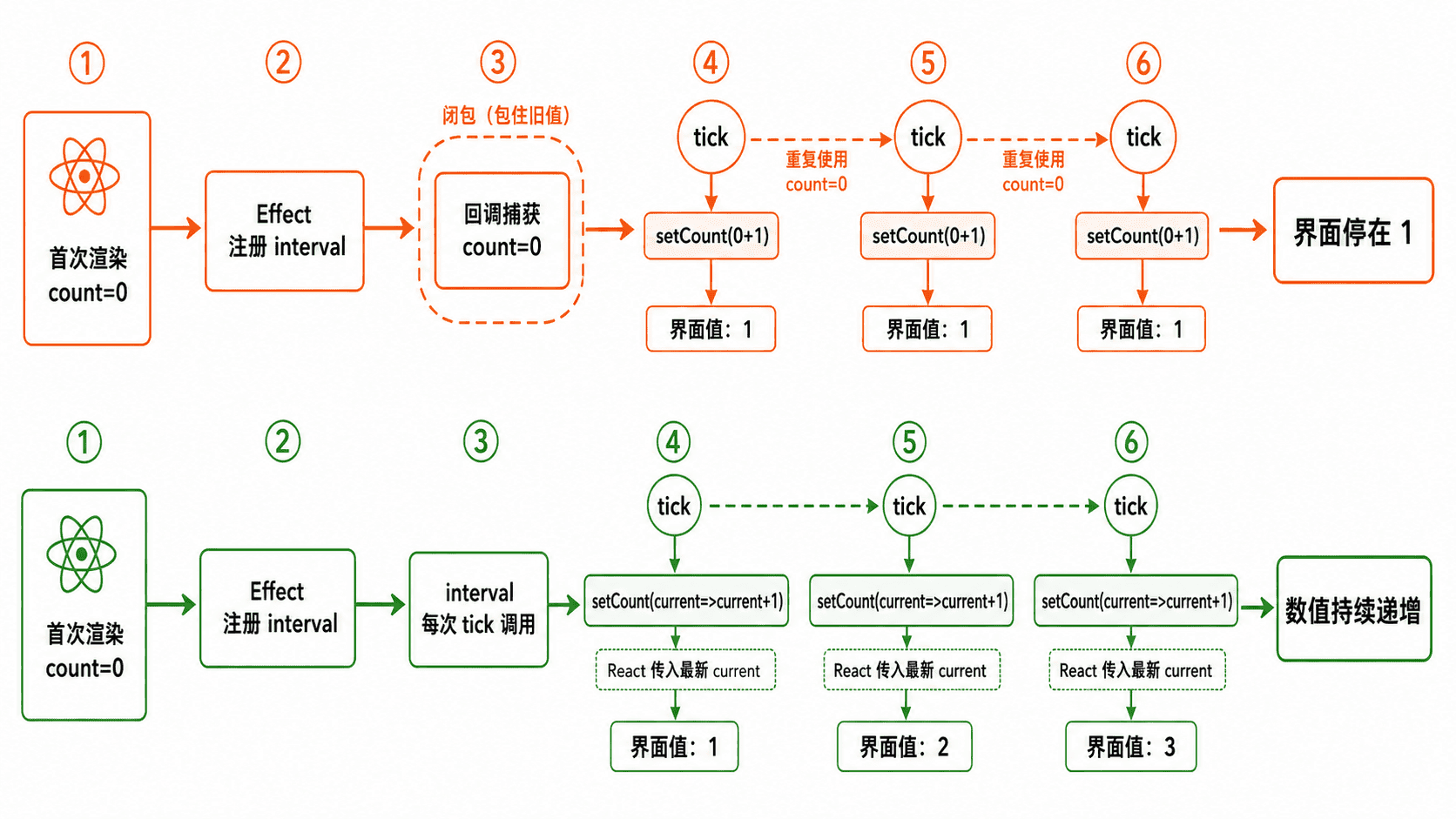
回调函数会读取“创建它的那次渲染”中的状态和属性。定时器、事件监听器、异步任务或缺失依赖的 Effect 长期保存旧回调时,就可能持续使用过期值。
快速识别
典型现象包括:计数器第一次变为 1 后不再增长、异步回调仍使用旧 ID、监听器始终读取旧开关状态。先检查回调创建位置,再核对它引用的响应式值是否出现在依赖数组中。
主示例
下面同时保留错误写法和修复写法。修复点不是“让闭包自动更新”,而是使用函数式更新,由 React 把最新状态传给更新函数。
import { useEffect, useState } from 'react';

function BuggyCounter() {
  const [count, setCount] = useState(0);

  useEffect(() => {
    const timer = window.setInterval(() => {
      setCount(count + 1); // 此闭包一直读取首次渲染的 count=0
    }, 1000);

    return () => window.clearInterval(timer);
  }, []);

  return <p>错误计数:{count}</p>;
}

function FixedCounter() {
  const [count, setCount] = useState(0);

  useEffect(() => {
    const timer = window.setInterval(() => {
      setCount((current) => current + 1);
    }, 1000);

    return () => window.clearInterval(timer);
  }, []);

  return <p>正确计数:{count}</p>;
}

export default function App() {
  return (
    <main>
      <BuggyCounter />
      <FixedCounter />
    </main>
  );
}
预期结果
约 1 秒后:
错误计数:1
正确计数:1

继续等待:
错误计数始终为 1
正确计数每秒递增为 2、3、4……
时间为动态值,浏览器调度或后台标签页节流会使间隔略有偏差。
修复选择
| 场景 | 首选处理 |
|---|---|
| 新状态只依赖旧状态 | 使用 setState(current => next),无需读取闭包中的旧状态 |
| Effect 应随某个值变化而重新同步 | 把该值加入依赖数组,并在清理函数中移除旧定时器、监听或订阅 |
| 长期回调不能重建,但必须读取最新值 | 用 useRef 保存最新值;只用于读取,不要把应触发界面更新的数据藏进 ref |
| 回调身份需要稳定 | 使用 useCallback,同时完整填写依赖;它不会自动修复缺失依赖 |
风险与边界
为消除警告而删除依赖或关闭 react-hooks/exhaustive-deps,会让 Effect 永远保留旧值,后果通常是错误请求、重复订阅或业务判断失效。安全做法是重构数据流、使用函数式更新,或让 Effect 按真实依赖重新同步。
把所有最新值都塞进 useRef 虽能绕过闭包,却会隐藏状态变化,导致界面不更新且逻辑难追踪。只有当值用于定时器、原生监听器等长期回调的即时读取,并且不负责渲染时才适合使用 ref。
异步请求即使依赖完整,也可能因返回顺序不同覆盖新结果。此时还要配合取消、清理标记或请求编号,不能只处理闭包问题。
排障清单
- 复现是否只在第二次及以后更新出现,确认是否持续读取首次值。
- 检查
useEffect、useCallback、useMemo的依赖是否包含全部外部响应式值。 - 检查定时器、订阅和监听器是否在 Effect 清理函数中解除。
- 检查
useCallback是否只是稳定了错误闭包,而没有补齐依赖。 - 运行 Hooks ESLint 规则;不要用禁用注释掩盖警告。
区分开发环境严格模式检查与真实的重复订阅或重复请求问题。
排查重复执行
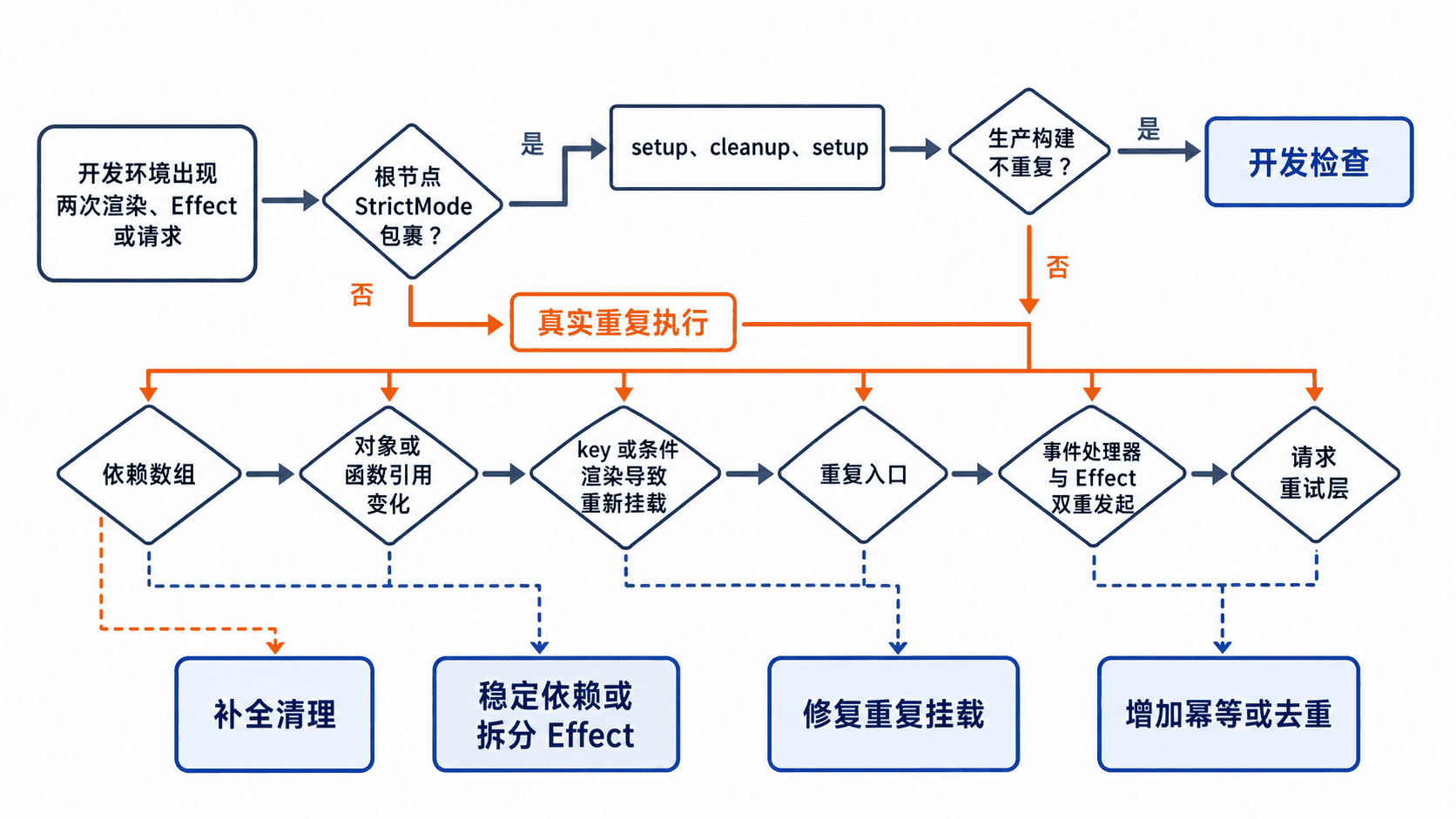
当组件在开发环境里出现两次渲染、两次 Effect 初始化或两次请求时,先判断它是严格模式的开发检查,还是代码真的重复注册了副作用。当应用根节点启用 React 严格模式时,开发阶段会额外执行一次渲染检查,并让 Effect 经历一次 setup → cleanup → setup;生产环境不会执行这组额外检查。:contentReference[oaicite:0]{index=0}
快速定位
先记录“渲染、初始化、清理、事件触发”四个节点,不要只看请求数量。下面代码可直接放入 Vite React 项目的 src/main.tsx,点击按钮可验证清理是否完整。
import { StrictMode, useEffect } from "react";
import { createRoot } from "react-dom/client";

const bus = new EventTarget();

function Probe() {
  console.count("render");

  useEffect(() => {
    const onPing = () => console.count("ping received");

    console.log("effect setup");
    bus.addEventListener("ping", onPing);

    // 清理必须撤销本次 setup 创建的全部订阅。
    return () => {
      console.log("effect cleanup");
      bus.removeEventListener("ping", onPing);
    };
  }, []);

  return (
    <button onClick={() => bus.dispatchEvent(new Event("ping"))}>
      Send ping
    </button>
  );
}

createRoot(document.getElementById("root")!).render(
  <StrictMode>
    <Probe />
  </StrictMode>
);
预期输出(开发环境首次挂载,计数显示形式可能因控制台而异):
render: 1
render: 2
effect setup
effect cleanup
effect setup
点击一次按钮后应只新增一次:
ping received: 1读取方法:出现两次 setup 但中间有对应 cleanup,且一次点击只触发一次处理,通常是严格模式检查;若一次点击产生两次 ping received,说明清理缺失、处理器引用不一致或订阅在其他位置又注册了一次。
真实重复的常见来源
- Effect 没有依赖数组,导致每次提交后都重新执行。
- 依赖中包含每次渲染都新建的对象或函数,使 Effect 持续重新同步。
- 组件的
key改变、条件渲染切换或路由变化,造成真实卸载再挂载。 - 请求同时在事件处理器、Effect、状态库或请求重试层中发起。
- 多个 React 根、重复脚本入口或热更新残留同时挂载了同一组件。
风险与边界
直接移除 <StrictMode> 只会隐藏开发检查。触发条件是副作用缺少幂等性或清理;后果可能是连接泄漏、重复监听、重复计时器和重复写请求。安全替代方案是补全 cleanup、取消过期请求,并让写操作使用业务幂等键或服务端去重,而不是依赖“只执行一次”。
对支付、下单、发消息等不可重复写操作,不要在挂载 Effect 中无保护地提交。优先放到明确的用户事件中;确需自动提交时,增加请求唯一键、状态机或服务端幂等约束。
排障清单
- 确认问题是否只发生在开发环境和
<StrictMode>范围内。 - 使用生产构建复测;生产仍重复就按真实缺陷处理。
- 检查每个 setup 是否有对称 cleanup,且移除时使用同一个处理器引用。
- 在浏览器 Network 中比较请求发起栈、时间和状态;被 cleanup 取消的请求通常显示为 canceled。
- 检查依赖是否每次渲染都改变,以及组件是否因
key或条件分支重新挂载。
速查判断:开发环境 setup → cleanup → setup 是检查信号;生产环境仍重复、一次事件触发多次处理,才是实际重复副作用。
根据依赖检查提示重构代码,而不是随意关闭规则或遗漏依赖。
排查依赖警告
react-hooks/exhaustive-deps 提示缺少依赖时,应让依赖数组准确描述 Hook 回调读取的响应式值,再通过重构减少不必要依赖。随意关闭规则会让闭包继续读取旧的 props 或 state,形成难复现的数据不同步问题。:contentReference[oaicite:1]{index=1}
判断警告是否合理
组件内部声明的 props、state、局部变量和函数,只要在 useEffect、useMemo 或 useCallback 回调中读取,通常都应出现在依赖数组中。依赖不是执行次数开关,而是“哪些值变化后需要重新同步”的声明。
下面是典型错误,属于片段示例:userId 会变化,但 Effect 永远使用首次渲染捕获的值。
useEffect(() => {
  loadUser(userId).then(setUser);
}, []); // 缺少 userId
推荐重构
下面示例可直接作为 React 组件运行。它把实际读取的 userId 放入依赖,并在切换用户时忽略旧请求结果,避免后返回的数据覆盖新状态。
import { useEffect, useState } from "react";

type User = { id: number; name: string };

function loadUser(userId: number): Promise<User> {
  return new Promise((resolve) => {
    setTimeout(() => resolve({ id: userId, name: `user-${userId}` }), 100);
  });
}

function UserCard({ userId }: { userId: number }) {
  const [user, setUser] = useState<User | null>(null);

  useEffect(() => {
    let cancelled = false;

    async function syncUser() {
      const result = await loadUser(userId);
      // 组件卸载或 userId 改变后,不再提交旧结果。
      if (!cancelled) setUser(result);
    }

    void syncUser();
    return () => {
      cancelled = true;
    };
  }, [userId]);

  return <p>{user ? `${user.id}: ${user.name}` : "Loading..."}</p>;
}

export default function App() {
  return <UserCard userId={42} />;
}
预期结果:
页面先显示:Loading...
约 100 ms 后显示:42: user-42
ESLint 不再报告 userId 缺失
实际等待时间可能不同。读取方法:当 userId 改变时,Effect 应重新同步一次;旧调用即使更晚返回,也不能覆盖当前用户。
高频修复方式
- 值确实决定同步目标:直接加入依赖,例如
[userId]。 - 常量不会随渲染变化:移到组件外部,使其不再是响应式值。
- 对象或函数只供 Effect 使用:在 Effect 内创建,再依赖其中真正变化的原始值。
- 更新依赖于旧 state:使用函数式更新,如
setCount(c => c + 1),避免仅为读取旧值而增加依赖。 - 一个 Effect 同时处理多个独立同步任务:拆成多个 Effect,让每组依赖对应一个目的。:contentReference[oaicite:2]{index=2}
风险与边界
关闭规则的触发条件通常是“想让 Effect 只跑一次”;后果是 props 或 state 更新后仍读取旧值,产生漏请求、错误订阅和状态漂移。安全替代方案是移动常量、拆分 Effect、改用函数式更新,或把由点击、提交等交互触发的逻辑放回事件处理器。
盲目把每个对象和函数都加入依赖也可能造成循环。触发条件是这些值在每次渲染时重新创建;后果是重复请求、反复重连或 Maximum update depth exceeded。安全替代方案是把创建逻辑移入 Effect、依赖原始字段,只有确实需要稳定引用时才使用 useMemo 或 useCallback。
排障清单
- 标出 Hook 回调读取的全部 props、state、局部变量和函数。
- 确认每个响应式值都在依赖数组中。
- 依赖加入后若频繁执行,检查对象或函数是否每次渲染都新建。
- 若 Effect 只是在派生渲染数据,改为渲染期间直接计算,不要用 Effect。
- 若逻辑由用户操作触发,移到对应事件处理器。
- 不使用
eslint-disable作为默认修复;确需例外时必须记录不变性依据和回归用例。
速查原则:先让依赖匹配代码,再修改代码减少依赖;不要先改依赖数组来强行控制执行次数。